Scikit-Learn

Streamlit ML Multiclass Classification Model Prediction Sample (feat. Pipeline)

개요

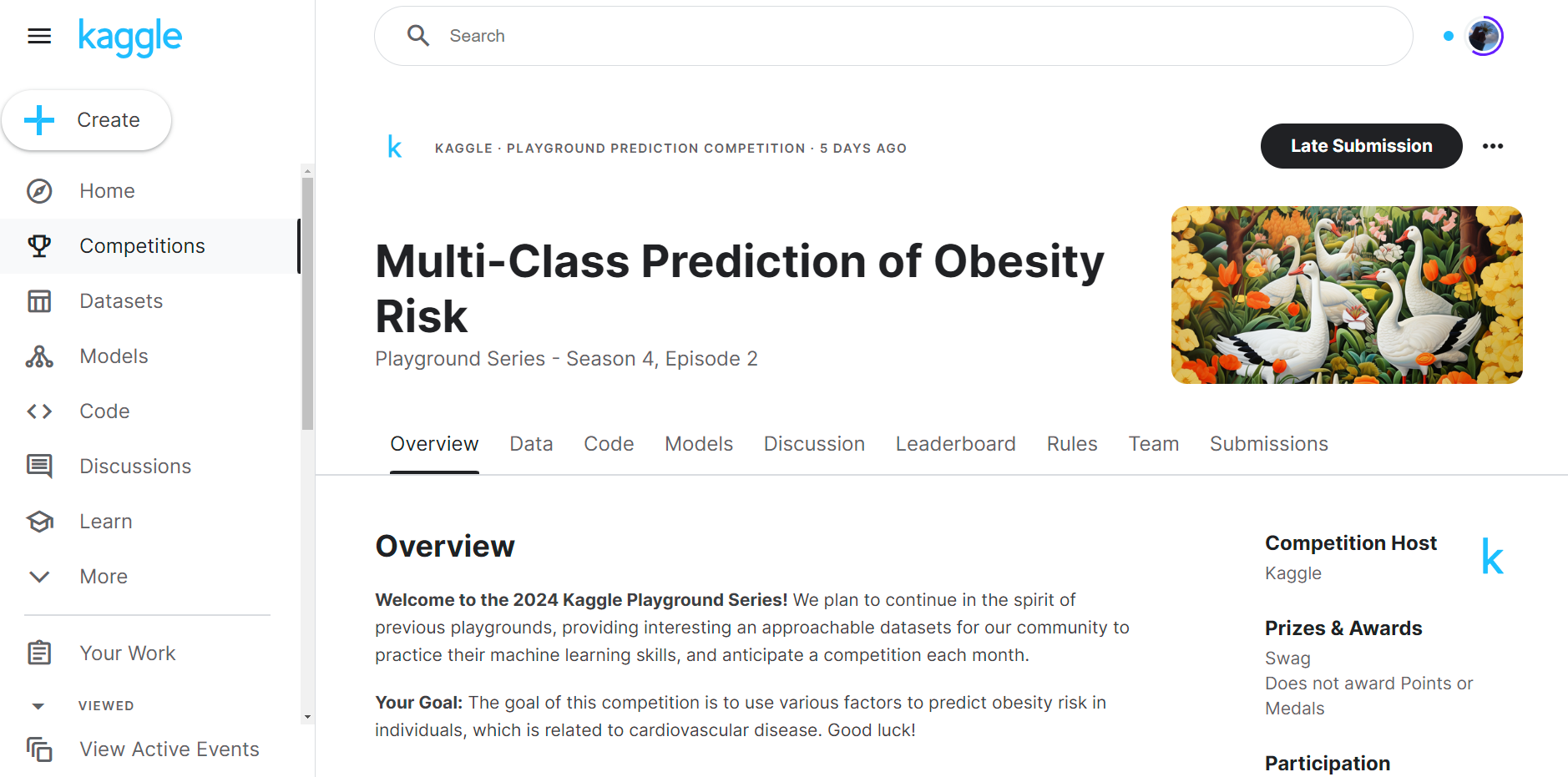
  • Kaggle 데이터셋을 활용하여 Streamlit ML Multiclass Classification Model을 배포한다.
  • 각 코드에 대한 자세한 설명은 여기에서는 생략한다.

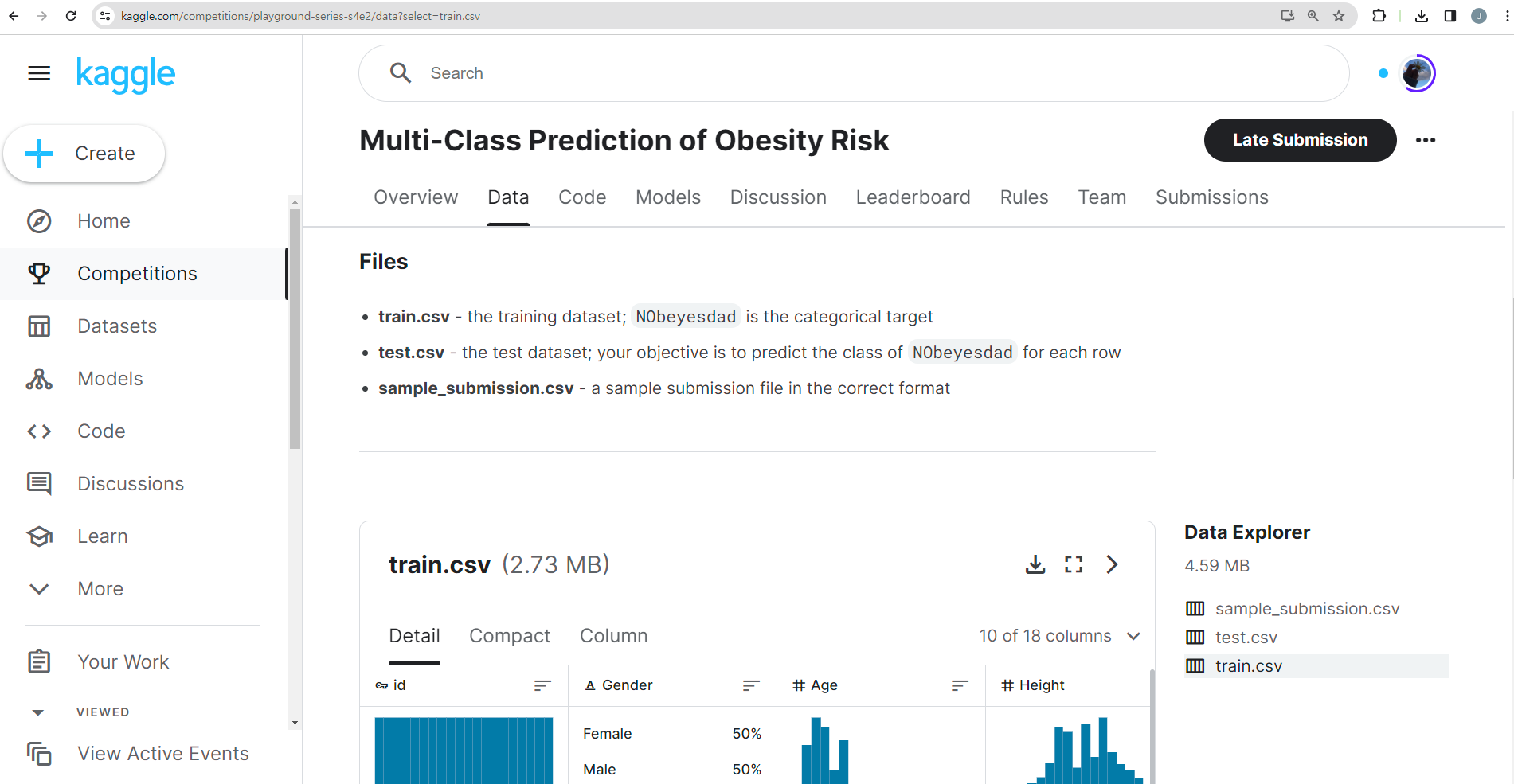
데이터 수집

Untitled

Untitled

모델 개발

  • 다음 코드는 모델을 개발하는 코드이다.
  • 주어진 데이터셋에서 종속변수 NObeyesdad을 예측하는 모델을 구성했다.
    • 파일명 : model.py
import pandas as pd
from sklearn.model_selection import train_test_split
from sklearn.compose import ColumnTransformer
from sklearn.preprocessing import StandardScaler, OneHotEncoder
from sklearn.ensemble import RandomForestClassifier
from sklearn.pipeline import Pipeline
from sklearn.metrics import classification_report
from joblib import dump, load
import os

DATA_PATH = './data/train.csv'
data = pd.read_csv(DATA_PATH)

# Separate features and target variable
X = data.drop(['id', 'NObeyesdad'], axis=1)
y = data['NObeyesdad']

# Split the dataset into training and testing sets
X_train, X_test, y_train, y_test = train_test_split(X, y, test_size=0.2, random_state=42)

# Identify numerical and categorical columns
num_columns = X.select_dtypes(include=['float64']).columns
cat_columns = X.select_dtypes(include=['object']).columns

# Create the preprocessing pipeline
preprocessor = ColumnTransformer(
    transformers=[
        ('num', StandardScaler(), num_columns),
        ('cat', OneHotEncoder(handle_unknown='ignore'), cat_columns)
    ]
)

# Create the full pipeline
pipeline = Pipeline(steps=[
    ('preprocessor', preprocessor),
    ('classifier', RandomForestClassifier())
])

# Train the model
pipeline.fit(X_train, y_train)

# 모델 저장
model_directory = 'model'

if not os.path.exists(model_directory):
    os.makedirs(model_directory)

model_path = os.path.join(model_directory, 'NObeyesdad_prediction_pipeline.joblib')
dump(pipeline, model_path)
  • 위 코드에서 핵심은 모델을 저장하는 것이며, 또한 OneHotEncoder(handle_unknown='ignore') 을 지정하는 것이다.
  • 해당하는 폴더에 model 폴더가 없으면 model 폴더를 생성하고 NObeyesdad_prediction_pipeline.joblib 이름으로 모델을 저장한다.

파일 실행

  • model.py 를 실행하여 모델을 생성한다.
python model.py

Streamlit App 개발

  • 다음 코드는 Streamlit App 개발을 하는 코드이다.
    • 파일명 : app.py
import streamlit as st
import pandas as pd
from joblib import load
import os

# Assuming your model is saved in the 'model' directory with the name 'obesity_prediction_pipeline.joblib'
model_directory = 'model'
model_path = os.path.join(model_directory, 'NObeyesdad_prediction_pipeline.joblib')

def predict_NObeyesdad_level(model_path, Gender, Age, Height, Weight, family_history_with_overweight, FAVC, FCVC, NCP, CAEC, SMOKE, CH2O, SCC, FAF, TUE, CALC, MTRANS):
    
    # 모델 불러오기
    pipeline = load(model_path)
    
    # 데이터프레임 생성
    df = pd.DataFrame([{
        'Gender': Gender, 'Age': Age, 'Height': Height, 'Weight': Weight,
        'family_history_with_overweight': family_history_with_overweight, 'FAVC': FAVC,
        'FCVC': FCVC, 'NCP': NCP, 'CAEC': CAEC, 'SMOKE': SMOKE, 'CH2O': CH2O,
        'SCC': SCC, 'FAF': FAF, 'TUE': TUE, 'CALC': CALC, 'MTRANS': MTRANS
    }])
    
    # 예측 값 생성
    prediction = pipeline.predict(df)
    return prediction[0]

def main():
    st.title('Obesity Level Prediction Model')
    st.write('Predict obesity levels based on personal and health-related attributes.')

    # Create input fields for each feature
    Gender = st.selectbox('Gender', ['Male', 'Female'])
    Age = st.number_input('Age', min_value=0.0, format='%f')
    Height = st.number_input('Height (in meters)', min_value=0.0, format='%f')
    Weight = st.number_input('Weight (in kg)', min_value=0.0, format='%f')
    family_history_with_overweight = st.selectbox('Family history with overweight', ['yes', 'no'])
    FAVC = st.selectbox('Frequent consumption of high caloric food', ['yes', 'no'])
    FCVC = st.number_input('Frequency of consumption of vegetables', min_value=0.0, max_value=3.0, step=0.1)
    NCP = st.number_input('Number of main meals', min_value=1.0, max_value=4.0, step=0.1)
    CAEC = st.selectbox('Consumption of food between meals', ['No', 'Sometimes', 'Frequently', 'Always'])
    SMOKE = st.selectbox('Do you smoke?', ['yes', 'no'])
    CH2O = st.number_input('Consumption of water daily (liters)', min_value=0.0, format='%f')
    SCC = st.selectbox('Calories consumption monitoring', ['yes', 'no'])
    FAF = st.number_input('Physical activity frequency (per week)', min_value=0.0, format='%f')
    TUE = st.number_input('Time using technology devices (hours)', min_value=0.0, format='%f')
    CALC = st.selectbox('Consumption of alcohol', ['Never', 'Sometimes', 'Frequently', 'Always'])
    MTRANS = st.selectbox('Mode of transportation', ['Automobile', 'Bike', 'Motorbike', 'Public_Transportation', 'Walking'])

    if st.button('Predict Obesity Level'):
        result = predict_NObeyesdad_level(model_path, Gender, Age, Height, Weight, family_history_with_overweight, FAVC, FCVC, NCP, CAEC, SMOKE, CH2O, SCC, FAF, TUE, CALC, MTRANS)
        st.success(f'Predicted Obesity Level: {result}')

if __name__ == "__main__":
    main()
  • 위 코드에서 핵심은 predict_tip 함수이다. pipeline으로 모델을 설계하면 곧바로 predict() 저장된 모델을 불러온 후, 함수 사용이 가능하다.

테스트

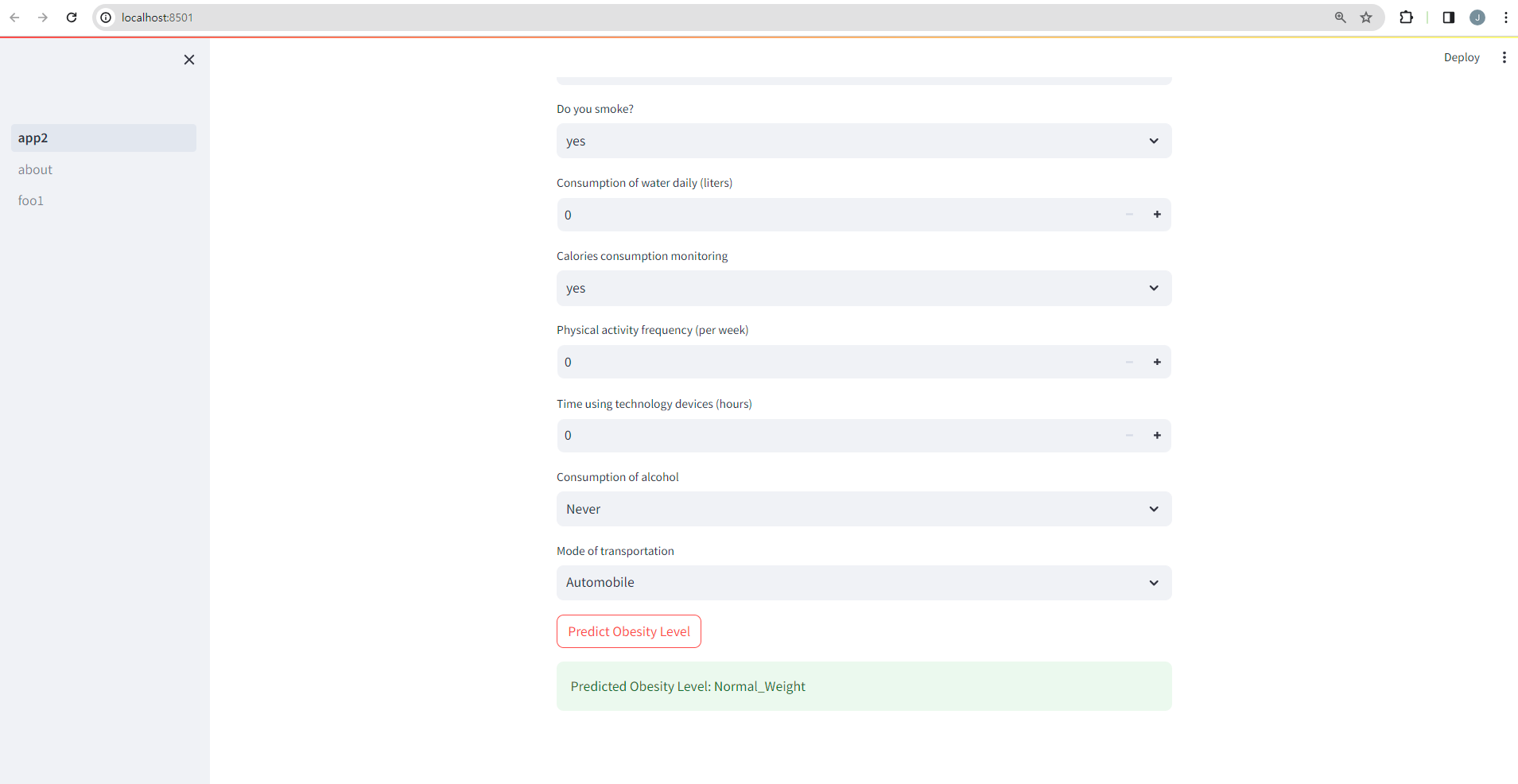
  • 테스트 결과는 아래와 같이 나온다.
streamlit run app.py 

Untitled

Streamlit ML Model Prediction Sample (feat. Pipeline)

강의소개

  • 인프런에서 Streamlit 관련 강의를 진행하고 있습니다.
  • 인프런 : https://inf.run/YPniH

개요

  • tips 데이터셋을 활용하여 Streamlit ML Model을 배포한다.
  • 각 코드에 대한 자세한 설명은 여기에서는 생략한다.

모델 개발

  • 다음 코드는 모델을 개발하는 코드이다.
  • 주어진 데이터셋에서 tip을 예측하는 모델을 구성했다.
    • 파일명 : model.py
import streamlit as st
import pandas as pd
import seaborn as sns
from sklearn.model_selection import train_test_split
from sklearn.linear_model import LinearRegression
from sklearn.compose import ColumnTransformer
from sklearn.pipeline import Pipeline
from sklearn.preprocessing import OneHotEncoder
from joblib import dump, load
import os

# 데이터셋 불러오기
tips = sns.load_dataset('tips')

# 데이터셋 컬럼 추출
categorical_features = ['sex', 'smoker', 'day', 'time']
numerical_features = ['total_bill', 'size']

# pipeline 모델 만들기
preprocessor = ColumnTransformer(
    transformers=[
        ('num', 'passthrough', numerical_features),
        ('cat', OneHotEncoder(), categorical_features)
    ])

pipeline = Pipeline(steps=[('preprocessor', preprocessor),
                           ('model', LinearRegression())])

# 데이터셋 분류 / 종속 변수 tip을 예측하는 모델
X = tips.drop('tip', axis=1)
y = tips['tip']

# 데이터셋 분류
X_train, X_test, y_train, y_test = train_test_split(X, y, test_size=0.2, random_state=42)

# 모델 학습
pipeline.fit(X_train, y_train)

# 모델 저장
model_directory = 'model'

if not os.path.exists(model_directory):
    os.makedirs(model_directory)

model_path = os.path.join(model_directory, 'tip_prediction_pipeline.joblib')
dump(pipeline, model_path)
  • 위 코드에서 핵심은 모델을 저장하는 것이다. 마지막 코드이다.
  • 해당하는 폴더에 model 폴더가 없으면 model 폴더를 생성하고 tip_prediction_pipeline.joblib 이름으로 모델을 저장한다.
  • model.py를 실행한다.
python model.py
  • 정상적으로 모델이 만들어졌으면, model 폴더가 생겼을 것이고, 그 다음에 해당 모델이 저장되어 있을 것이다.

Streamlit App 개발

  • 다음 코드는 Streamlit App 개발을 하는 코드이다.
    • 파일명 : app.py
import streamlit as st
import pandas as pd
from joblib import load
import os

model_directory = 'model'
model_path = os.path.join(model_directory, 'tip_prediction_pipeline.joblib')

def predict_tip(model_path, total_bill, size, sex, smoker, day, time):
    
    # 모델 불러오기
    pipeline = load(model_path)
    
    # 예측 데이터 생성
    df = pd.DataFrame([{'total_bill': total_bill, 'size': size, 'sex': sex, 'smoker': smoker, 'day': day, 'time': time}])
    
    # 예측값 생성
    prediction = pipeline.predict(df)
    return prediction[0]

def main():

    st.title('팁 예측 모델')
    st.write('total_bill과 다른 요인을 고려하여 tip 예측 모델 생성')

    total_bill = st.number_input('Total Bill ($)', min_value=0.0, format='%f')
    size = st.number_input('Size of the Party', min_value=1, step=1)
    sex = st.selectbox('Sex', ['Male', 'Female'])
    smoker = st.selectbox('Smoker', ['Yes', 'No'])
    day = st.selectbox('Day', ['Thur', 'Fri', 'Sat', 'Sun'])
    time = st.selectbox('Time', ['Lunch', 'Dinner'])

    if st.button('예상 Tip 예측'):
        result = predict_tip(model_path, total_bill, size, sex, smoker, day, time)
        st.success(f'예측 Tip: ${result:.2f}')

if __name__ == "__main__":
    main()
  • 위 코드에서 핵심은 predict_tip 함수이다. pipeline으로 모델을 설계하면 곧바로 predict() 저장된 모델을 불러온 후, 함수 사용이 가능하다.

테스트

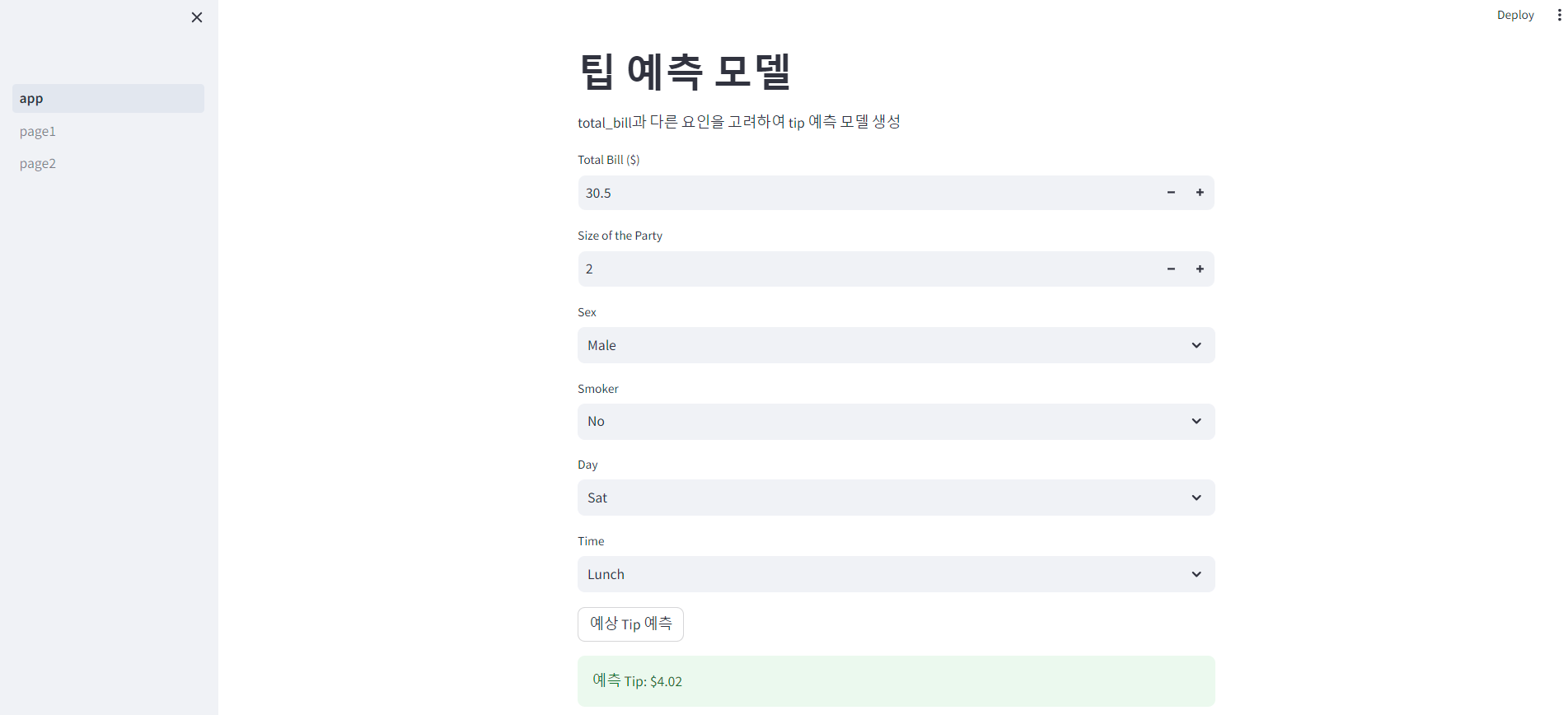
  • 테스트 결과는 아래와 같이 나온다.
streamlit run app.py 

Untitled

Scikit-Learn ML Model with Java

강의 홍보

개요

  • scikit-learn 모델을 JAVA에서 구동 시켜야 한다.
  • 크게 3가지 방법론이 존재한다.(원문 참조 : Moving from Python to Java to deploy your machine learning model to production
    • embed : Java 코드 내에서 직접 Python 코드 구현 방법. Jython을 이용하지만, 문제는 Scikit-Learn은 지원하지 않는다. 따라서 일반적으로 Flask API를 통해서 지원하기도 한다.
    • transpile : Scikit-Learn 모델을 전달하는 방법. sklearn-porterm2cgen를 고려할 수 있다.
    • redevelop : Scikit-Learn 모델을 H20나 Spark의 MLib을 구현한 후 배포하는 방법이다.

새로운 제안

  • 그러나 다각도로 여러 시도 및 라이브러리가 존재함.
  • 오늘 소개할 라이브러니느 sklearn2pmml임.
  • JAVA가 설치가 되어 있어야 함.
    • 로컬 환경은 각자 환경변수를 추가해야 함. 이 부분은 생략함.
  • 구글 코랩에서는 아래와 같이 설치가 가능함.
  • Java 코드 참조 : Using scikit-learn model into Java app
!apt update -q
!apt-get install -q openjdk-11-jdk-headless

%env JAVA_HOME "/usr/lib/jvm/java-11-openjdk-amd64"
Hit:1 https://developer.download.nvidia.com/compute/cuda/repos/ubuntu1804/x86_64  InRelease
Get:2 https://cloud.r-project.org/bin/linux/ubuntu bionic-cran40/ InRelease [3,626 B]
Get:3 http://security.ubuntu.com/ubuntu bionic-security InRelease [88.7 kB]
Hit:4 http://ppa.launchpad.net/c2d4u.team/c2d4u4.0+/ubuntu bionic InRelease
Hit:5 http://archive.ubuntu.com/ubuntu bionic InRelease
Get:6 http://archive.ubuntu.com/ubuntu bionic-updates InRelease [88.7 kB]
Ign:7 https://developer.download.nvidia.com/compute/machine-learning/repos/ubuntu1804/x86_64  InRelease
Hit:8 http://ppa.launchpad.net/cran/libgit2/ubuntu bionic InRelease
Hit:9 https://developer.download.nvidia.com/compute/machine-learning/repos/ubuntu1804/x86_64  Release
Hit:10 http://ppa.launchpad.net/deadsnakes/ppa/ubuntu bionic InRelease
Get:11 http://archive.ubuntu.com/ubuntu bionic-backports InRelease [74.6 kB]
Hit:12 http://ppa.launchpad.net/graphics-drivers/ppa/ubuntu bionic InRelease
Get:14 http://security.ubuntu.com/ubuntu bionic-security/main amd64 Packages [2,867 kB]
Get:15 http://archive.ubuntu.com/ubuntu bionic-updates/restricted amd64 Packages [1,075 kB]
Get:16 http://archive.ubuntu.com/ubuntu bionic-updates/universe amd64 Packages [2,297 kB]
Get:17 http://archive.ubuntu.com/ubuntu bionic-updates/main amd64 Packages [3,302 kB]
Fetched 9,797 kB in 6s (1,534 kB/s)
Reading package lists...
Building dependency tree...
Reading state information...
49 packages can be upgraded. Run 'apt list --upgradable' to see them.
Reading package lists...
Building dependency tree...
Reading state information...
openjdk-11-jdk-headless is already the newest version (11.0.15+10-0ubuntu0.18.04.1).
The following package was automatically installed and is no longer required:
  libnvidia-common-460
Use 'apt autoremove' to remove it.
0 upgraded, 0 newly installed, 0 to remove and 49 not upgraded.
env: JAVA_HOME="/usr/lib/jvm/java-11-openjdk-amd64"
  • 설치가 끝난 후에는 sklearn2pmml을 설치한다.
!pip install sklearn2pmml
Looking in indexes: https://pypi.org/simple, https://us-python.pkg.dev/colab-wheels/public/simple/
Collecting sklearn2pmml
  Downloading sklearn2pmml-0.84.2.tar.gz (6.3 MB)
     |████████████████████████████████| 6.3 MB 5.1 MB/s 
[?25hRequirement already satisfied: joblib>=0.13.0 in /usr/local/lib/python3.7/dist-packages (from sklearn2pmml) (1.1.0)
Requirement already satisfied: scikit-learn>=0.18.0 in /usr/local/lib/python3.7/dist-packages (from sklearn2pmml) (1.0.2)
Requirement already satisfied: sklearn-pandas>=0.0.10 in /usr/local/lib/python3.7/dist-packages (from sklearn2pmml) (1.8.0)
Requirement already satisfied: numpy>=1.14.6 in /usr/local/lib/python3.7/dist-packages (from scikit-learn>=0.18.0->sklearn2pmml) (1.21.6)
Requirement already satisfied: scipy>=1.1.0 in /usr/local/lib/python3.7/dist-packages (from scikit-learn>=0.18.0->sklearn2pmml) (1.4.1)
Requirement already satisfied: threadpoolctl>=2.0.0 in /usr/local/lib/python3.7/dist-packages (from scikit-learn>=0.18.0->sklearn2pmml) (3.1.0)
Requirement already satisfied: pandas>=0.11.0 in /usr/local/lib/python3.7/dist-packages (from sklearn-pandas>=0.0.10->sklearn2pmml) (1.3.5)
Requirement already satisfied: pytz>=2017.3 in /usr/local/lib/python3.7/dist-packages (from pandas>=0.11.0->sklearn-pandas>=0.0.10->sklearn2pmml) (2022.1)
Requirement already satisfied: python-dateutil>=2.7.3 in /usr/local/lib/python3.7/dist-packages (from pandas>=0.11.0->sklearn-pandas>=0.0.10->sklearn2pmml) (2.8.2)
Requirement already satisfied: six>=1.5 in /usr/local/lib/python3.7/dist-packages (from python-dateutil>=2.7.3->pandas>=0.11.0->sklearn-pandas>=0.0.10->sklearn2pmml) (1.15.0)
Building wheels for collected packages: sklearn2pmml
  Building wheel for sklearn2pmml (setup.py) ... [?25l[?25hdone
  Created wheel for sklearn2pmml: filename=sklearn2pmml-0.84.2-py3-none-any.whl size=6298569 sha256=f6a564303dd11e9ce38b6c7b4ec4e8a4632499c61d3ee69f40070a1f1983ef80
  Stored in directory: /root/.cache/pip/wheels/bb/e4/71/d3c8f75fae8d7f387f82099ec8cdd6b83cf1dccaeb3561c7b6
Successfully built sklearn2pmml
Installing collected packages: sklearn2pmml
Successfully installed sklearn2pmml-0.84.2

샘플 코드 작성

  • 간단한 모형을 구축한다.
from sklearn.datasets import load_diabetes
from sklearn.tree import DecisionTreeRegressor
from sklearn.model_selection import train_test_split
from sklearn2pmml import PMMLPipeline, sklearn2pmml
import pandas as pd

# 데이터 불러오기
df = load_diabetes()
X = pd.DataFrame(columns = df.feature_names, data = df.get('data'))
y = pd.DataFrame(columns = ['target'], data = df.get('target'))

# 데이터셋 분리하기
X_train, X_test, y_train, y_test = train_test_split(X, y, test_size = 0.1, random_state=42)

# Pipeline 구축하기
pipeline = PMMLPipeline([ ('regressor', DecisionTreeRegressor()) ])

# 모형 학습 시키기
pipeline.fit(X_train, y_train)
PMMLPipeline(steps=[('regressor', DecisionTreeRegressor())])
  • 이번에는 모형을 테스트 한다.
from sklearn.metrics import mean_absolute_error
y_pred = pipeline.predict(X_test)
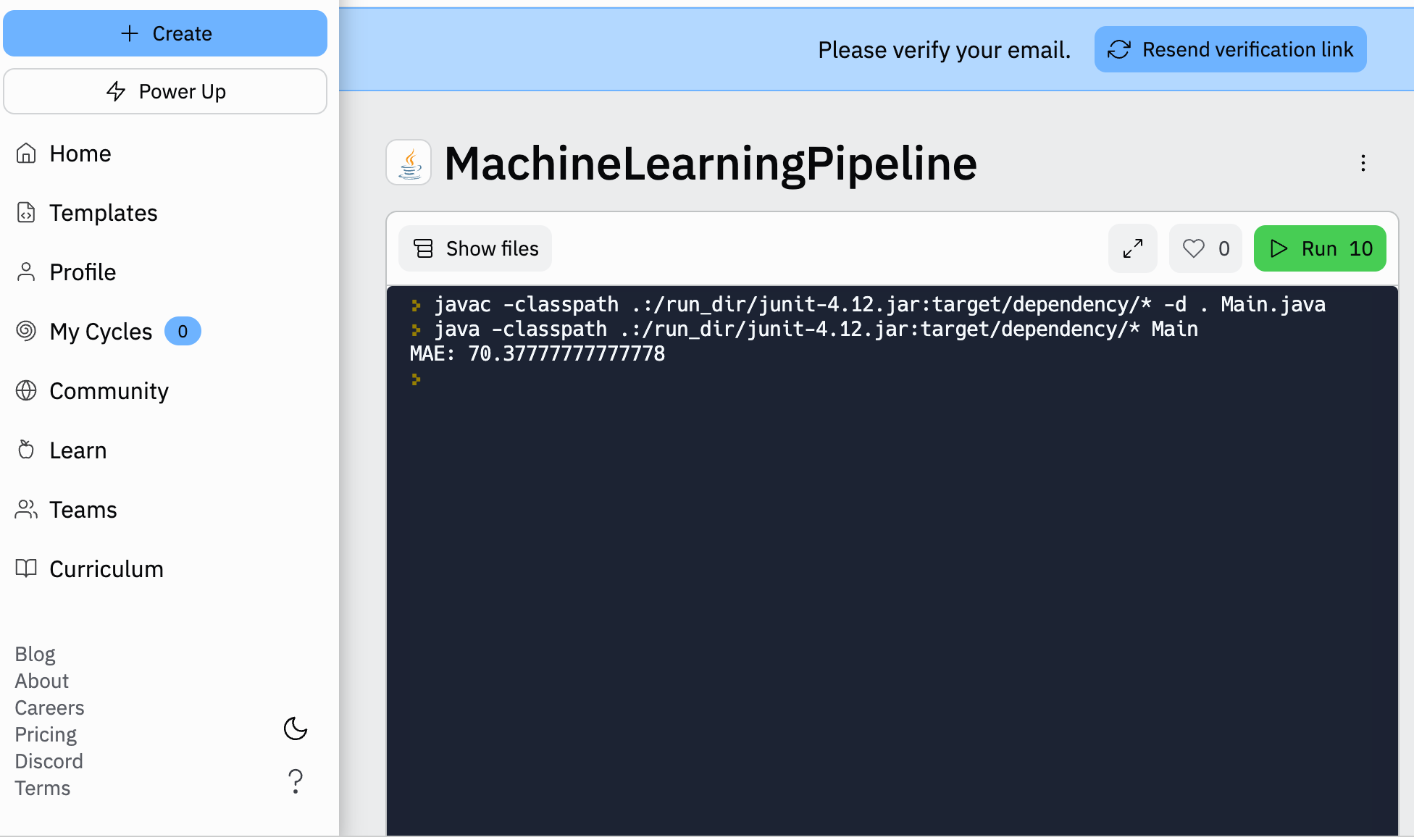
print('MAE: ', mean_absolute_error(y_pred, y_test))
MAE:  65.42222222222222
  • 이제 모형을 pmml 파일 형태로 저장한다.
# 모델 내보내기
sklearn2pmml(pipeline, 'model.pmml', with_repr = True)

Scikit-Learn Model into JAVA

  • 해당 모형을 이제 이제 Java에서 가져오도록 한다.
  • Java 코드에서는 pmml4s library를 이용한다.
import org.pmml4s.model.Model;

import java.util.*;

public class Main {

    private final Model model = Model.fromFile(Main.class.getClassLoader().getResource("model.pmml").getFile());

    public Double getRegressionValue(Map<String, Double> values) {
        Object[] valuesMap = Arrays.stream(model.inputNames())
                .map(values::get)
                .toArray();

        Object[] result = model.predict(valuesMap);
        return (Double) result[0];
    }

    public static void main(String[] args) {
        Main main = new Main();
        Map<String, Double> values = Map.of(
                "age", 20d,
                "sex", 1d,
                "bmi", -100d,
                "bp", -200d,
                "s1", 1d,
                "s2", 2d,
                "s3", 3d,
                "s4", 4d,
                "s5", 5d,
                "s6", 6d
        );

        double predicted = main.getRegressionValue(values);
        System.out.println(predicted);
    }
}

MLFlow with Scikit-Learn

개요

  • Scikit-Learn 모델을 만든 후, MLFlow로 모델을 배포한다.
  • 머신러닝 코드에 대한 설명은 생략한다.
  • 가상환경 설정에 관한 내용도 생략한다.

라이브러리 불러오기

  • 기존 코드에서 mlflow 라이브러리만 추가한다.
%matplotlib inline

import numpy as np 
import pandas as pd 
import matplotlib as mpl
import matplotlib.pyplot as plt 
import sklearn
import seaborn as sns
import mlflow 
import mlflow.sklearn
from sklearn.linear_model import LogisticRegression
from sklearn.model_selection import train_test_split, KFold
from sklearn.preprocessing import StandardScaler
from sklearn.metrics import roc_auc_score, plot_roc_curve, confusion_matrix 

print(f"numpy version {np.__version__}")
print(f"pandas version {pd.__version__}")
print(f"matplotlib version {mpl.__version__}")
print(f"seaborn version {sns.__version__}")
print(f"sklearn version {sklearn.__version__}")
print(f"MLFlow version {mlflow.__version__}")
numpy version 1.23.1
pandas version 1.4.3
matplotlib version 3.5.2
seaborn version 0.11.2
sklearn version 1.1.1
MLFlow version 1.27.0

데이터 불러오기

  • 데이터를 불러오도록 한다.
DATA_PATH = "C:\\Users\\your_id\\Desktop\\mlops_tutorial\\data\\creditcard.csv"

df = pd.read_csv(DATA_PATH)
print(df.head())
   Time        V1        V2        V3        V4        V5        V6        V7  \
0   0.0 -1.359807 -0.072781  2.536347  1.378155 -0.338321  0.462388  0.239599   
1   0.0  1.191857  0.266151  0.166480  0.448154  0.060018 -0.082361 -0.078803   
2   1.0 -1.358354 -1.340163  1.773209  0.379780 -0.503198  1.800499  0.791461   
3   1.0 -0.966272 -0.185226  1.792993 -0.863291 -0.010309  1.247203  0.237609   
4   2.0 -1.158233  0.877737  1.548718  0.403034 -0.407193  0.095921  0.592941   

         V8        V9  ...       V21       V22       V23       V24       V25  \
0  0.098698  0.363787  ... -0.018307  0.277838 -0.110474  0.066928  0.128539   
1  0.085102 -0.255425  ... -0.225775 -0.638672  0.101288 -0.339846  0.167170   
2  0.247676 -1.514654  ...  0.247998  0.771679  0.909412 -0.689281 -0.327642   
3  0.377436 -1.387024  ... -0.108300  0.005274 -0.190321 -1.175575  0.647376   
4 -0.270533  0.817739  ... -0.009431  0.798278 -0.137458  0.141267 -0.206010   

        V26       V27       V28  Amount  Class  
0 -0.189115  0.133558 -0.021053  149.62      0  
1  0.125895 -0.008983  0.014724    2.69      0  
2 -0.139097 -0.055353 -0.059752  378.66      0  
3 -0.221929  0.062723  0.061458  123.50      0  
4  0.502292  0.219422  0.215153   69.99      0  

[5 rows x 31 columns]

로지스틱 모형 만들기

  • 기존 코드를 참조하여 모델을 만든다.
  • 데이터셋 분리를 한다.

normal = df[df['Class'] == 0].sample(frac=0.5, random_state=42).reset_index(drop=True)
anomaly = df[df['Class']==1]

normal_train, normal_test = train_test_split(normal, test_size = 0.2, random_state=42)
anomary_train, anomary_test = train_test_split(anomaly, test_size = 0.2, random_state=42)

normal_train, normal_validate = train_test_split(normal_train, test_size = 0.25, random_state=42)
anomary_train, anomary_validate = train_test_split(anomary_train, test_size = 0.25, random_state=42)

normal_train.shape, normal_validate.shape, anomary_train.shape, anomary_validate.shape
((85294, 31), (28432, 31), (294, 31), (99, 31))
  • 최종 학습, 테스트 및 검증 세트를 생성하기 위해 각각의 정상 및 이상 데이터 분할을 연결해야 한다.
X_train = pd.concat((normal_train, anomary_train))
X_test = pd.concat((normal_test, anomary_test))
X_validate = pd.concat((normal_validate, anomary_validate))

y_train = np.array(X_train["Class"])
y_test = np.array(X_test["Class"])
y_validate = np.array(X_validate["Class"])

X_train = X_train.drop("Class", axis = 1)
X_test = X_test.drop("Class", axis = 1)
X_validate = X_validate.drop("Class", axis = 1)

X_train.shape, X_validate.shape, X_test.shape, y_train.shape, y_validate.shape, y_test.shape
((85588, 30), (28531, 30), (28531, 30), (85588,), (28531,), (28531,))
  • 표준화를 진행한다.
scaler = StandardScaler()
scaler.fit(X_train)

X_train = scaler.transform(X_train)
X_test = scaler.transform(X_test)
X_validate = scaler.transform(X_validate)

MLFlow를 통한 학습 및 평가

  • MLFlow 기능으로 검증에 사용하는 사용자 정의 함수를 만들어 본다.
  • 여기서 핵심은
    • mlflow.log_metric() 함수를 통해 지표를 로깅할 수 있음
    • mlflow.log_artifact() 함수를 통해 그래프를 저장할 수 잇음.
def train(sk_model, X_train, y_train):
    sk_model = sk_model.fit(X_train, y_train)
    train_acc = sk_model.score(X_train, y_train)
    mlflow.log_metric("train_acc", train_acc)
    
    print(f"Train Accuracy: (train_acc:.3%)")
    

def evaluate(sk_model, X_test, y_test):
    eval_acc = sk_model.score(X_test, y_test)
    preds = sk_model.predict(X_test)
    auc_score = roc_auc_score(y_test, preds)
    mlflow.log_metric("eval_acc", eval_acc)
    mlflow.log_metric("auc_score", auc_score)
    
    print(f"Auc Score : {auc_score:.3%}")
    print(f"Eval Score : {eval_acc:.3%}")
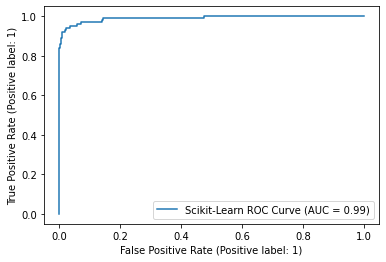
    roc_plot = plot_roc_curve(sk_model, X_test, y_test, name="Scikit-Learn ROC Curve")
    plt.savefig("sklearn_roc_plot.png")
    plt.show()
    plt.clf()
    conf_matrix = confusion_matrix(y_test, preds)
    ax = sns.heatmap(conf_matrix, annot=True, fmt='g')
    ax.invert_xaxis()
    ax.invert_yaxis()
    plt.ylabel("Actual")
    plt.xlabel("Predicted")
    plt.title("Confusion Matrix")
    plt.savefig("sklearn_conf_matrix.png")
    mlflow.log_artifact("sklearn_roc_plot.png")
    mlflow.log_artifact("sklearn_conf_matrix.png")

MLFlow 실행 로깅 및 확인

  • 실제 실험 이름을 설정하고, MLFlow 실행 시작. 해당 코드를 모두 실행한다.
# 모델 설정
sk_model = LogisticRegression(random_state=None, max_iter=400, solver='newton-cg')

# 실험 이름 설정
mlflow.set_experiment("sklearn_experiment")

# 해당 이름으로 실행 배치
with mlflow.start_run():
    train(sk_model, X_train, y_train)
    evaluate(sk_model, X_test, y_test)
    
    # 하나의 MLFlow 실행 컨텍스트에서 모든 코드를 묶을 수 있음. 
    # 참조 : https://mlflow.org/docs/latest/models.html#model-customization
    mlflow.sklearn.log_model(sk_model, 'log_reg_model')
    
    # 본질적으로 모델과 지표가 로깅되는 현재 실행을 가져오고 출력함. 
    print("Model run: ", mlflow.active_run().info.run_uuid)
mlflow.end_run()
Train Accuracy: (train_acc:.3%)
Auc Score : 86.355%
Eval Score : 99.888%


C:\Users\your_id\Desktop\mlops_tutorial\venv\lib\site-packages\sklearn\utils\deprecation.py:87: FutureWarning: Function plot_roc_curve is deprecated; Function :func:`plot_roc_curve` is deprecated in 1.0 and will be removed in 1.2. Use one of the class methods: :meth:`sklearn.metric.RocCurveDisplay.from_predictions` or :meth:`sklearn.metric.RocCurveDisplay.from_estimator`.
  warnings.warn(msg, category=FutureWarning)

png

Scikit-Learn OneHot Encoding 다양한 적용 방법

강의 홍보

개요

  • One-Hot Encoding 개념에 대해 이해한다.
  • One-Hot Encoder 사용법을 익힌다.

One-Hot Encoding

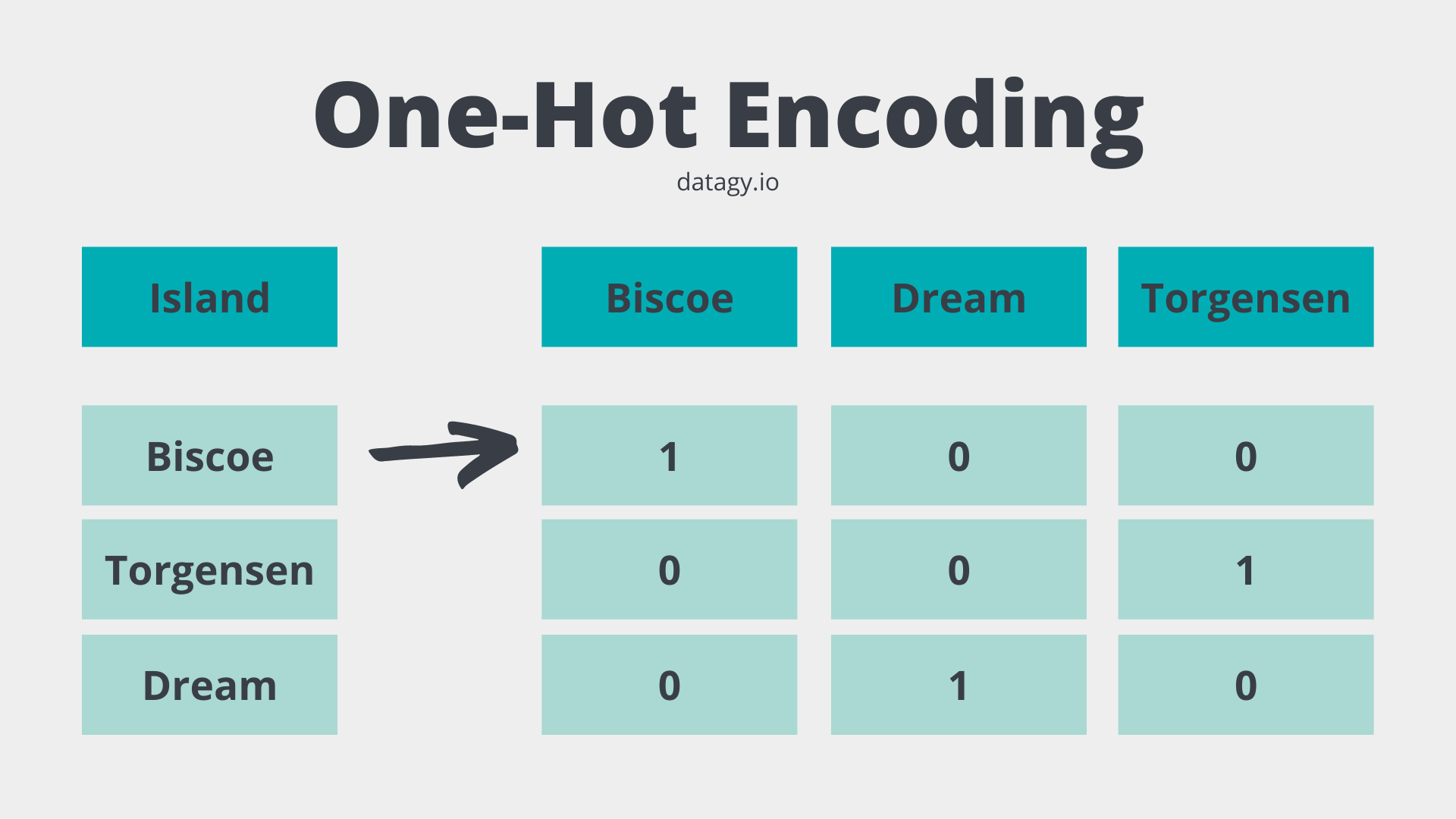
  • One-Hot Encoding은 문자를 숫자로 변환하는 것이다.
  • 먼저 그림을 보면서 이해하도록 한다.

  • 머신러닝 알고리즘은 데이터가 모두 숫자인 것으로 이해하기 때문에 모두 변환해주어야 한다.

OnetHotEncoder

  • OneHotEncoder는 Scikit-Learn 라이브러리에 있는 클래스이다.
    • 자세한 내용은 링크를 참조한다.
  • 먼저 예시를 참조한다.
import sklearn
print("sklearn ver.", sklearn.__version__)
sklearn ver. 1.0.2
from sklearn.preprocessing import OneHotEncoder
enc = OneHotEncoder(handle_unknown='ignore')
X = [['Male', 1], ['Female', 3], ['Female', 2]]
enc.fit_transform(X).toarray()
array([[0., 1., 1., 0., 0.],
       [1., 0., 0., 0., 1.],
       [1., 0., 0., 1., 0.]])
  • 예시 코드를 보면 위 그림과 결괏값이 다르게 나오는 걸 확인할 수 있다.
  • 보통 우리가 다루는 데이터는 pandas 데이터프레임이기 때문에, 입문자분들에게는 거리감이 느껴질 수 있다.
  • 그래서 pandas 데이터프레임 데이터를 가져와서 테스트를 해보았다.
from sklearn.preprocessing import OneHotEncoder
from seaborn import load_dataset

penguins = load_dataset('penguins')
ohe = OneHotEncoder()
transformed = ohe.fit_transform(penguins[['island']])
print(transformed.toarray())
print(ohe.categories_)
print(penguins['island'].unique())
[[0. 0. 1.]
 [0. 0. 1.]
 [0. 0. 1.]
 ...
 [1. 0. 0.]
 [1. 0. 0.]
 [1. 0. 0.]]
[array(['Biscoe', 'Dream', 'Torgersen'], dtype=object)]
['Torgersen' 'Biscoe' 'Dream']
  • 이제 해당 코드를 기존 데이터프레임에 추가하도록 한다.
print(penguins.head())
  species     island  bill_length_mm  bill_depth_mm  flipper_length_mm  \
0  Adelie  Torgersen            39.1           18.7              181.0   
1  Adelie  Torgersen            39.5           17.4              186.0   
2  Adelie  Torgersen            40.3           18.0              195.0   
3  Adelie  Torgersen             NaN            NaN                NaN   
4  Adelie  Torgersen            36.7           19.3              193.0   

   body_mass_g     sex  
0       3750.0    Male  
1       3800.0  Female  
2       3250.0  Female  
3          NaN     NaN  
4       3450.0  Female  
penguins[ohe.categories_[0]] = transformed.toarray()
print(penguins.head())
  species     island  bill_length_mm  bill_depth_mm  flipper_length_mm  \
0  Adelie  Torgersen            39.1           18.7              181.0   
1  Adelie  Torgersen            39.5           17.4              186.0   
2  Adelie  Torgersen            40.3           18.0              195.0   
3  Adelie  Torgersen             NaN            NaN                NaN   
4  Adelie  Torgersen            36.7           19.3              193.0   

   body_mass_g     sex  Biscoe  Dream  Torgersen  
0       3750.0    Male     0.0    0.0        1.0  
1       3800.0  Female     0.0    0.0        1.0  
2       3250.0  Female     0.0    0.0        1.0  
3          NaN     NaN     0.0    0.0        1.0  
4       3450.0  Female     0.0    0.0        1.0  

만약 다중 문자열 컬럼을 한다면?

  • 위 예시는 변경하려는 컬럼이 1개일 때는 시의적절하게 사용할 수 있다.
  • 그러나, 보통 캐글이나 데이콘 같은 대회에서는 여러개의 문자열 컬럼을 변환시켜야 한다.
  • 물론, 프로그래밍 능력을 갖춘 분이라면, 반복문을 사용해서 처리할 수도 있다.
  • 그러나, sklearn.compose.make_column_transformer 클래스를 활용하면 보다 쉽게 처리할 수 있다.
from sklearn.preprocessing import OneHotEncoder
from sklearn.preprocessing import LabelEncoder
from sklearn.compose import make_column_transformer
from seaborn import load_dataset
import pandas as pd

penguins = load_dataset('penguins')
sample_cols = ['island', 'sex', 'bill_length_mm', 'species']
penguins = penguins[sample_cols]

# 결측치 제거 
penguins = penguins.dropna()
print(penguins.head())
print(penguins.info())
      island     sex  bill_length_mm species
0  Torgersen    Male            39.1  Adelie
1  Torgersen  Female            39.5  Adelie
2  Torgersen  Female            40.3  Adelie
4  Torgersen  Female            36.7  Adelie
5  Torgersen    Male            39.3  Adelie
<class 'pandas.core.frame.DataFrame'>
Int64Index: 333 entries, 0 to 343
Data columns (total 4 columns):
 #   Column          Non-Null Count  Dtype  
---  ------          --------------  -----  
 0   island          333 non-null    object 
 1   sex             333 non-null    object 
 2   bill_length_mm  333 non-null    float64
 3   species         333 non-null    object 
dtypes: float64(1), object(3)
memory usage: 13.0+ KB
None
categorical_cols = ['island', 'sex']
label_cols = ['species']

transformer = make_column_transformer(
    (OneHotEncoder(), categorical_cols),
    remainder='passthrough', 
    verbose_feature_names_out = False)

transformed = transformer.fit_transform(penguins)
transformed_df = pd.DataFrame(transformed, columns=transformer.get_feature_names_out())
print(transformed_df.head())
  island_Biscoe island_Dream island_Torgersen sex_Female sex_Male  \
0           0.0          0.0              1.0        0.0      1.0   
1           0.0          0.0              1.0        1.0      0.0   
2           0.0          0.0              1.0        1.0      0.0   
3           0.0          0.0              1.0        1.0      0.0   
4           0.0          0.0              1.0        0.0      1.0   

  bill_length_mm species  
0           39.1  Adelie  
1           39.5  Adelie  
2           40.3  Adelie  
3           36.7  Adelie  
4           39.3  Adelie  

OrdinalEncoder 클래스와 같이 사용이 가능한가?

  • 이번에는 OrdinalEncoder 클래스와 같이 사용을 하도록 한다.
import pandas as pd
from seaborn import load_dataset

tips = load_dataset('tips')

# 결측치 제거 
tips = tips.dropna()
print(tips.info())
<class 'pandas.core.frame.DataFrame'>
Int64Index: 244 entries, 0 to 243
Data columns (total 7 columns):
 #   Column      Non-Null Count  Dtype   
---  ------      --------------  -----   
 0   total_bill  244 non-null    float64 
 1   tip         244 non-null    float64 
 2   sex         244 non-null    category
 3   smoker      244 non-null    category
 4   day         244 non-null    category
 5   time        244 non-null    category
 6   size        244 non-null    int64   
dtypes: category(4), float64(2), int64(1)
memory usage: 9.1 KB
None
  • 위 데이터에서 sex, day는 onehot encoding을 진행하고, smoker와 time은 ordinal encoding을 동시 진행해본다.
  • 또한, numeric features를 위해 스케일러도 진행했다.
  • 그 후, 새로운 데이터 프레임으로 변환하는 코드를 작성한다.
  • ColumnTransformer 메서드 적용 후, get_feature_names()를 얻기 위해서는 helper 함수가 필요하다.
    • 함수는 해당 링크에서 가져왔다.
import warnings
import sklearn
import pandas as pd
import numpy as np

def get_feature_names(column_transformer):
    """Get feature names from all transformers.
    Returns
    -------
    feature_names : list of strings
        Names of the features produced by transform.
    """
    # Remove the internal helper function
    #check_is_fitted(column_transformer)
    
    # Turn loopkup into function for better handling with pipeline later
    def get_names(trans):
        # >> Original get_feature_names() method
        if trans == 'drop' or (
                hasattr(column, '__len__') and not len(column)):
            return []
        if trans == 'passthrough':
            if hasattr(column_transformer, '_df_columns'):
                if ((not isinstance(column, slice))
                        and all(isinstance(col, str) for col in column)):
                    return column
                else:
                    return column_transformer._df_columns[column]
            else:
                indices = np.arange(column_transformer._n_features)
                return ['x%d' % i for i in indices[column]]
        if not hasattr(trans, 'get_feature_names'):
        # >>> Change: Return input column names if no method avaiable
            # Turn error into a warning
            warnings.warn("Transformer %s (type %s) does not "
                                 "provide get_feature_names. "
                                 "Will return input column names if available"
                                 % (str(name), type(trans).__name__))
            # For transformers without a get_features_names method, use the input
            # names to the column transformer
            if column is None:
                return []
            else:
                return [name + "__" + f for f in column]

        return [name + "__" + f for f in trans.get_feature_names()]
    
    ### Start of processing
    feature_names = []
    
    # Allow transformers to be pipelines. Pipeline steps are named differently, so preprocessing is needed
    if type(column_transformer) == sklearn.pipeline.Pipeline:
        l_transformers = [(name, trans, None, None) for step, name, trans in column_transformer._iter()]
    else:
        # For column transformers, follow the original method
        l_transformers = list(column_transformer._iter(fitted=True))
    
    
    for name, trans, column, _ in l_transformers: 
        if type(trans) == sklearn.pipeline.Pipeline:
            # Recursive call on pipeline
            _names = get_feature_names(trans)
            # if pipeline has no transformer that returns names
            if len(_names)==0:
                _names = [name + "__" + f for f in column]
            feature_names.extend(_names)
        else:
            feature_names.extend(get_names(trans))
    
    return feature_names
  • 이제 위 함수들을 적용해서 각 인코딩과 사용하지 않는 컬럼들을 하나로 합치는 코드를 작성해본다.
from sklearn.preprocessing import OneHotEncoder
from sklearn.preprocessing import OrdinalEncoder
from sklearn.preprocessing import StandardScaler
from sklearn.compose import ColumnTransformer
from sklearn.pipeline import Pipeline

categorical_cols = ['sex', 'day']
ordinal_cols = ['smoker', 'time']
numeric_cols = ['total_bill']
keep_features = [x for x in tips.columns if x not in categorical_cols + ordinal_cols + numeric_cols]

tips2 = tips[categorical_cols + ordinal_cols + numeric_cols]

transformer = ColumnTransformer(
    [('StandardScaler', StandardScaler(), numeric_cols),
     ('OneHotEncoder', OneHotEncoder(), categorical_cols),
     ('OrdinalEncoder', OrdinalEncoder(), ordinal_cols)],
    remainder='passthrough', 
    verbose_feature_names_out = False)

transformed = transformer.fit_transform(tips2)
transformed_df = pd.DataFrame(transformed, columns=get_feature_names(transformer))
tip3 = pd.concat([tips[keep_features], transformed_df], axis = 1)
tip3.info()
<class 'pandas.core.frame.DataFrame'>
Int64Index: 244 entries, 0 to 243
Data columns (total 11 columns):
 #   Column                      Non-Null Count  Dtype  
---  ------                      --------------  -----  
 0   tip                         244 non-null    float64
 1   size                        244 non-null    int64  
 2   StandardScaler__total_bill  244 non-null    float64
 3   OneHotEncoder__x0_Female    244 non-null    float64
 4   OneHotEncoder__x0_Male      244 non-null    float64
 5   OneHotEncoder__x1_Fri       244 non-null    float64
 6   OneHotEncoder__x1_Sat       244 non-null    float64
 7   OneHotEncoder__x1_Sun       244 non-null    float64
 8   OneHotEncoder__x1_Thur      244 non-null    float64
 9   OrdinalEncoder__smoker      244 non-null    float64
 10  OrdinalEncoder__time        244 non-null    float64
dtypes: float64(10), int64(1)
memory usage: 22.9 KB


/usr/local/lib/python3.7/dist-packages/ipykernel_launcher.py:38: UserWarning: Transformer StandardScaler (type StandardScaler) does not provide get_feature_names. Will return input column names if available
/usr/local/lib/python3.7/dist-packages/sklearn/utils/deprecation.py:87: FutureWarning: Function get_feature_names is deprecated; get_feature_names is deprecated in 1.0 and will be removed in 1.2. Please use get_feature_names_out instead.
  warnings.warn(msg, category=FutureWarning)
/usr/local/lib/python3.7/dist-packages/ipykernel_launcher.py:38: UserWarning: Transformer OrdinalEncoder (type OrdinalEncoder) does not provide get_feature_names. Will return input column names if available
  • 일단 임시로 작업을 하기는 했으나, 뭔가 깔끔해보이지는 않는다.
  • 만약 작업을 한다면, 한꺼번에 하지 말고, 각 단계별로 pipeline을 구성 후, 순차적으로 하는 것이 현재로써는 좀 더 “정신건강상 좋아보인다!”