Data Transformation

Kaggle Survey Data Transformation Tip

Intro

  • Data Transformation is always important to visualise.
  • Here, I just introduced to get value counts in different dataset.
  • If you are newbie, please be aware of this code before you dive into visualization.
# This Python 3 environment comes with many helpful analytics libraries installed
# It is defined by the kaggle/python Docker image: https://github.com/kaggle/docker-python
# For example, here's several helpful packages to load

import numpy as np # linear algebra
import pandas as pd # data processing, CSV file I/O (e.g. pd.read_csv)

# Input data files are available in the read-only "../input/" directory
# For example, running this (by clicking run or pressing Shift+Enter) will list all files under the input directory

import os
for dirname, _, filenames in os.walk('/kaggle/input'):
    for filename in filenames:
        print(os.path.join(dirname, filename))

# You can write up to 20GB to the current directory (/kaggle/working/) that gets preserved as output when you create a version using "Save & Run All" 
# You can also write temporary files to /kaggle/temp/, but they won't be saved outside of the current session
/kaggle/input/kaggle-survey-2021/kaggle_survey_2021_responses.csv
/kaggle/input/kaggle-survey-2021/supplementary_data/kaggle_survey_2021_methodology.pdf
/kaggle/input/kaggle-survey-2021/supplementary_data/kaggle_survey_2021_answer_choices.pdf

Data Import

  • Import raw data and split into questions dataset and survey dataset.
df = pd.read_csv("../input/kaggle-survey-2021/kaggle_survey_2021_responses.csv")
questions = df.iloc[0, :].T
questions
/opt/conda/lib/python3.7/site-packages/IPython/core/interactiveshell.py:3441: DtypeWarning: Columns (0,195,201,285,286,287,288,289,290,291,292) have mixed types.Specify dtype option on import or set low_memory=False.
  exec(code_obj, self.user_global_ns, self.user_ns)


Time from Start to Finish (seconds)                                Duration (in seconds)
Q1                                                           What is your age (# years)?
Q2                                                What is your gender? - Selected Choice
Q3                                             In which country do you currently reside?
Q4                                     What is the highest level of formal education ...
                                                             ...                        
Q38_B_Part_8                           In the next 2 years, do you hope to become mor...
Q38_B_Part_9                           In the next 2 years, do you hope to become mor...
Q38_B_Part_10                          In the next 2 years, do you hope to become mor...
Q38_B_Part_11                          In the next 2 years, do you hope to become mor...
Q38_B_OTHER                            In the next 2 years, do you hope to become mor...
Name: 0, Length: 369, dtype: object
df = df.iloc[1:, :]

Quick Data Review

  • All survey responses are count-based dataset.
  • It’s easy to check using value counts()
df['Q1'].value_counts()
25-29    4931
18-21    4901
22-24    4694
30-34    3441
35-39    2504
40-44    1890
45-49    1375
50-54     964
55-59     592
60-69     553
70+       128
Name: Q1, dtype: int64

Problem

  • Some questions are not easy to counts because of Supplementary Questions.
questions.index.tolist()[7:20]
['Q7_Part_1',
 'Q7_Part_2',
 'Q7_Part_3',
 'Q7_Part_4',
 'Q7_Part_5',
 'Q7_Part_6',
 'Q7_Part_7',
 'Q7_Part_8',
 'Q7_Part_9',
 'Q7_Part_10',
 'Q7_Part_11',
 'Q7_Part_12',
 'Q7_OTHER']
def sub_questions_count(question_num, part_num, text = False):
  part_questions = []

  if text in ["A", "B"]:
    part_questions = ['Q' + str(question_num) + "_" + text + '_Part_' + str(j) for j in range(1, part_num)]
    part_questions.append('Q' + str(question_num) + "_" + text + '_OTHER')
  else:
    part_questions = ['Q' + str(question_num) + '_Part_' + str(j) for j in range(1, part_num)]
    part_questions.append('Q' + str(question_num) + '_OTHER')

  # category count
  categories = []
  counts = []
  for i in part_questions:
    category = df[i].value_counts().index[0]
    val = df[i].value_counts()[0]
    categories.append(category)
    counts.append(val)

  combined_df = pd.DataFrame()
  combined_df['Category'] = categories
  combined_df['Count'] = counts

  combined_df = combined_df.sort_values(['Count'], ascending = False)
  return combined_df

Test

  • Case 1
# Test 
# 'Q38_B_Part_11',
print(sub_questions_count(38, 11, "B").reset_index(drop=True))
                  Category  Count
0             TensorBoard    4239
1                  MLflow    2747
2        Weights & Biases    1583
3              Neptune.ai    1276
4                 ClearML    1020
5                Polyaxon     737
6                Guild.ai     729
7    Domino Model Monitor     666
8                Comet.ml     633
9      Sacred + Omniboard     591
10                   Other    377

Case 2.

Home Credit Default - Data Visualization

공지

  • 본 포스트는 재직자 교육을 위해 만든 강의안의 일부입니다.

Introduction

대회 개요

Many people struggle to get loans due to insufficient or non-existent credit histories. And, unfortunately, this population is often taken advantage of by untrustworthy lenders. Home Credit strives to broaden financial inclusion for the unbanked population by providing a positive and safe borrowing experience. In order to make sure this underserved population has a positive loan experience, Home Credit makes use of a variety of alternative data–including telco and transactional information–to predict their clients’ repayment abilities. While Home Credit is currently using various statistical and machine learning methods to make these predictions, they’re challenging Kagglers to help them unlock the full potential of their data. Doing so will ensure that clients capable of repayment are not rejected and that loans are given with a principal, maturity, and repayment calendar that will empower their clients to be successful.

엑셀 데이터 가공하기 변환

강의 홍보

개요

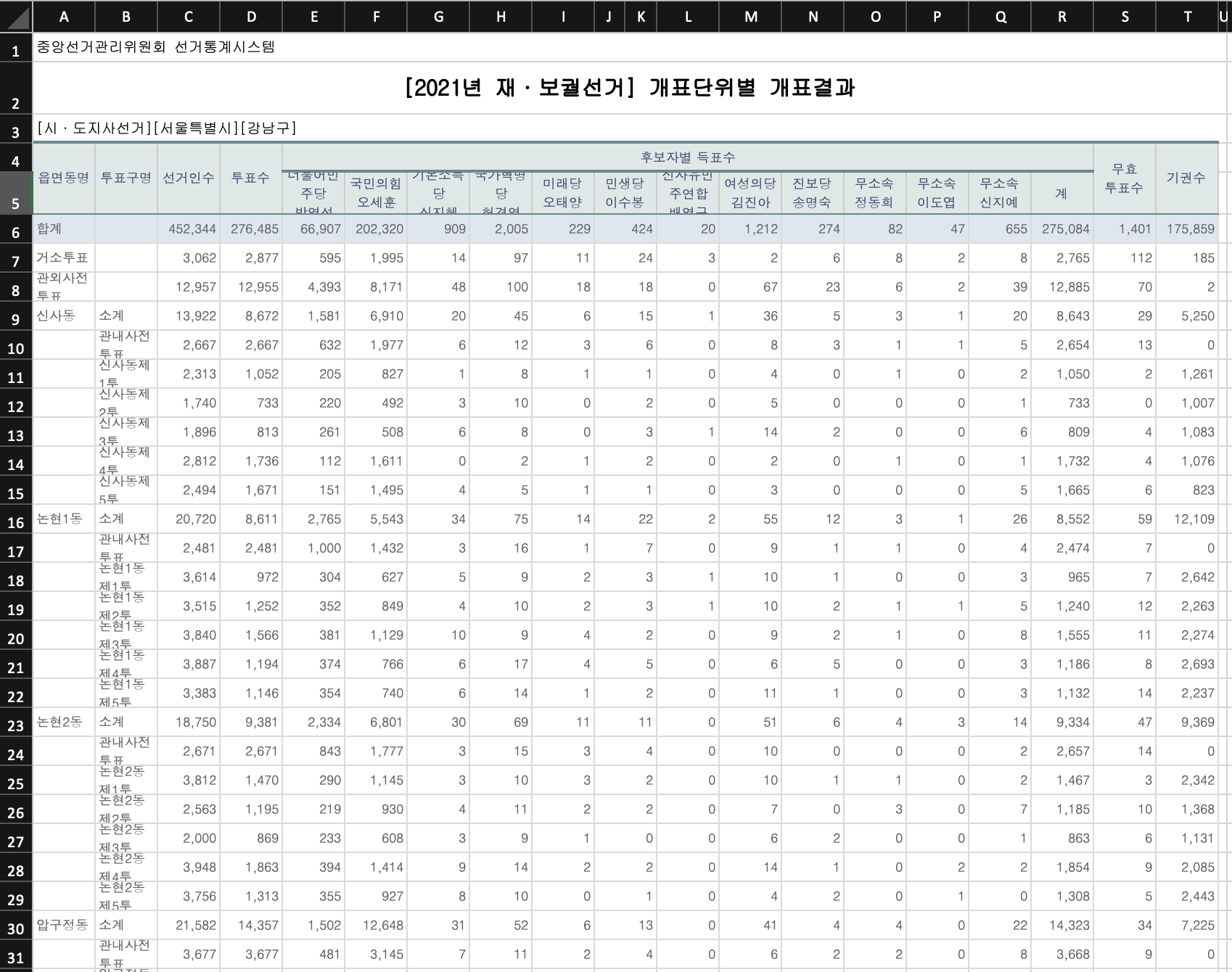
  • 정리되지 못한 엑셀 파일을 불러와서 하나의 테이블을 만드는 과정을 진행해본다.

  • 위 데이터를 원본 그대로 받아서 pandas 데이터 프레임에 추가한다.
  • A3 셀에 있는 [시·도지사선거][서울특별시][강남구] 분리하여 각 column에 추가한다.

라이브러리 불러오기

  • 3개의 라이브러리를 불러온다.
import pandas as pd
import openpyxl
import os

파일 확인

  • data 폴더 내 데이터를 확인한다.
  • 추후, 엑셀 데이터만 추려서 반복문을 활용하여 동일하게 처리할 수 있도록 상상을 한다.
print(os.listdir('data'))
['1 강남구-[2021년_재·보궐선거]_개표단위별_개표결과.xlsx', '.DS_Store', '~$1 강남구-[2021년_재·보궐선거]_개표단위별_개표결과.xlsx']

openpyxl 라이브러리 할용

  • openpyxl 라이브러리는 A Python library to read/write Excel 2010 xlsx/xlsm files을 가지고 있다.
  • 먼저 A3 셀에 있는 [시·도지사선거][서울특별시][강남구] 데이터를 가져오도록 한다.
  • 이 때, openpyxl 라이브리를 활용하면 각 셀에 접근해서 개별적으로 데이터를 가져올 수 있다.
DATA_PATH = "data"
FILE_PATH = os.listdir(DATA_PATH)[0]
wb_obt= openpyxl.load_workbook("data/" + FILE_PATH) 
sheet = wb_obt.active
values = sheet["A3"].value
values
'[시·도지사선거][서울특별시][강남구]'

문자열 전처리

  • 먼저 하나의 셀로 연결되어 있는 것을 각각 분리하도록 하는 코드를 작성한다.
  • strip(‘pattern’)는 특정 문자를 제거하는 것이고, split(‘pattern’)는 문자열을 특수문자로 분리하는 것이다.
city_list = values.strip("[]").split("][")
city_list
['시·도지사선거', '서울특별시', '강남구']

데이터 수집 및 전처리

  • 이 때 중요한 parameters는 skiprows, header이다.
  • 먼저 skiprows는 특정 행은 건너 뛴다는 의미를 가지고 있다. 즉, 데이터프레임에 접근하기 전까지의 행은 건너 뛴다는 의미다.
  • header는 엑셀의 열에 해당하는데, 본 데이터에서는 multiple headers가 있다. 따라서, 이를 리스트 처리하면 해당 열은 모두 가져올 수 있다.
df = pd.read_excel("data/1 강남구-[2021년_재·보궐선거]_개표단위별_개표결과.xlsx", skiprows=3,  header=[0, 1], )
df.drop(columns=df.columns[-1], axis=1, inplace=True) # 마지막 column은 NAN라 삭제.  
print(df.head())
                읍면동명               투표구명               선거인수                투표수  \
  Unnamed: 0_level_1 Unnamed: 1_level_1 Unnamed: 2_level_1 Unnamed: 3_level_1   
0                 합계                              452344.0           276485.0   
1               거소투표                                3062.0             2877.0   
2             관외사전투표                               12957.0            12955.0   
3                신사동                 소계            13922.0             8672.0   
4                                관내사전투표             2667.0             2667.0   

     후보자별 득표수                                                               \
  더불어민주당\n박영선 국민의힘\n오세훈 기본소득당\n신지혜 국가혁명당\n허경영 미래당\n오태양 민생당\n이수봉 민생당\n이수봉.1   
0     66907.0  202320.0      909.0     2005.0    229.0    424.0        NaN   
1       595.0    1995.0       14.0       97.0     11.0     24.0        NaN   
2      4393.0    8171.0       48.0      100.0     18.0     18.0        NaN   
3      1581.0    6910.0       20.0       45.0      6.0     15.0        NaN   
4       632.0    1977.0        6.0       12.0      3.0      6.0        NaN   

                                                                        \
  신자유민주연합\n배영규 여성의당\n김진아 진보당\n송명숙 무소속\n정동희 무소속\n이도엽 무소속\n신지예         계   
0         20.0    1212.0    274.0     82.0     47.0    655.0  275084.0   
1          3.0       2.0      6.0      8.0      2.0      8.0    2765.0   
2          0.0      67.0     23.0      6.0      2.0     39.0   12885.0   
3          1.0      36.0      5.0      3.0      1.0     20.0    8643.0   
4          0.0       8.0      3.0      1.0      1.0      5.0    2654.0   

              무효\n투표수                 기권수  
  Unnamed: 18_level_1 Unnamed: 19_level_1  
0              1401.0            175859.0  
1               112.0               185.0  
2                70.0                 2.0  
3                29.0              5250.0  
4                13.0                 0.0  
  • header[0]값은 읍면동명, 투표구명, 선거인수, 투표수 등으로 정리가 되어 있다.
  • header[1]값은 각 후보들의 값이 나타난 것을 확인할 수 있다.
  • 여기에서 후보자별 득표수만 지우기만 하면 된다. 다만, 각각 가져와야 하는 값이 서로 다르다.
    • 이 때, MultiIndex에 대응하기 위해 get_level_values() 함수를 사용한다.
df.columns
MultiIndex([(    '읍면동명',  'Unnamed: 0_level_1'),
            (    '투표구명',  'Unnamed: 1_level_1'),
            (    '선거인수',  'Unnamed: 2_level_1'),
            (     '투표수',  'Unnamed: 3_level_1'),
            ('후보자별 득표수',         '더불어민주당\n박영선'),
            ('후보자별 득표수',           '국민의힘\n오세훈'),
            ('후보자별 득표수',          '기본소득당\n신지혜'),
            ('후보자별 득표수',          '국가혁명당\n허경영'),
            ('후보자별 득표수',            '미래당\n오태양'),
            ('후보자별 득표수',            '민생당\n이수봉'),
            ('후보자별 득표수',          '민생당\n이수봉.1'),
            ('후보자별 득표수',        '신자유민주연합\n배영규'),
            ('후보자별 득표수',           '여성의당\n김진아'),
            ('후보자별 득표수',            '진보당\n송명숙'),
            ('후보자별 득표수',            '무소속\n정동희'),
            ('후보자별 득표수',            '무소속\n이도엽'),
            ('후보자별 득표수',            '무소속\n신지예'),
            ('후보자별 득표수',                   '계'),
            ( '무효\n투표수', 'Unnamed: 18_level_1'),
            (     '기권수', 'Unnamed: 19_level_1')],
           )
df.columns.get_level_values(0)
Index(['읍면동명', '투표구명', '선거인수', '투표수', '후보자별 득표수', '후보자별 득표수', '후보자별 득표수',
       '후보자별 득표수', '후보자별 득표수', '후보자별 득표수', '후보자별 득표수', '후보자별 득표수', '후보자별 득표수',
       '후보자별 득표수', '후보자별 득표수', '후보자별 득표수', '후보자별 득표수', '후보자별 득표수', '무효\n투표수',
       '기권수'],
      dtype='object')
df.columns.get_level_values(1)
Index(['Unnamed: 0_level_1', 'Unnamed: 1_level_1', 'Unnamed: 2_level_1',
       'Unnamed: 3_level_1', '더불어민주당\n박영선', '국민의힘\n오세훈', '기본소득당\n신지혜',
       '국가혁명당\n허경영', '미래당\n오태양', '민생당\n이수봉', '민생당\n이수봉.1', '신자유민주연합\n배영규',
       '여성의당\n김진아', '진보당\n송명숙', '무소속\n정동희', '무소속\n이도엽', '무소속\n신지예', '계',
       'Unnamed: 18_level_1', 'Unnamed: 19_level_1'],
      dtype='object')
  • 이제, 각각의 index를 list로 변환후 하나의 column으로 합치는 과정을 진행한다.
  • 총 20개의 column이 정렬된 것을 확인할 수 있다.
col_1 = df.columns.get_level_values(0)[0:4].tolist()
col_2 = df.columns.get_level_values(1)[4:-2].tolist()
col_3 = df.columns.get_level_values(0)[-3:-1].tolist()
cols = col_1 + col_2 + col_3
cols
['읍면동명',
 '투표구명',
 '선거인수',
 '투표수',
 '더불어민주당\n박영선',
 '국민의힘\n오세훈',
 '기본소득당\n신지혜',
 '국가혁명당\n허경영',
 '미래당\n오태양',
 '민생당\n이수봉',
 '민생당\n이수봉.1',
 '신자유민주연합\n배영규',
 '여성의당\n김진아',
 '진보당\n송명숙',
 '무소속\n정동희',
 '무소속\n이도엽',
 '무소속\n신지예',
 '계',
 '후보자별 득표수',
 '무효\n투표수']
df.columns = cols
df.columns
Index(['읍면동명', '투표구명', '선거인수', '투표수', '더불어민주당\n박영선', '국민의힘\n오세훈', '기본소득당\n신지혜',
       '국가혁명당\n허경영', '미래당\n오태양', '민생당\n이수봉', '민생당\n이수봉.1', '신자유민주연합\n배영규',
       '여성의당\n김진아', '진보당\n송명숙', '무소속\n정동희', '무소속\n이도엽', '무소속\n신지예', '계',
       '후보자별 득표수', '무효\n투표수'],
      dtype='object')
  • 이제 시도와 시군구를 각각 추가한다.
df['시도'] = city_list[1]
df['시군구'] = city_list[2]
print(df.head(10))
     읍면동명    투표구명      선거인수       투표수  더불어민주당\n박영선  국민의힘\n오세훈  기본소득당\n신지혜  \
0      합계          452344.0  276485.0      66907.0   202320.0       909.0   
1    거소투표            3062.0    2877.0        595.0     1995.0        14.0   
2  관외사전투표           12957.0   12955.0       4393.0     8171.0        48.0   
3     신사동      소계   13922.0    8672.0       1581.0     6910.0        20.0   
4          관내사전투표    2667.0    2667.0        632.0     1977.0         6.0   
5          신사동제1투    2313.0    1052.0        205.0      827.0         1.0   
6          신사동제2투    1740.0     733.0        220.0      492.0         3.0   
7          신사동제3투    1896.0     813.0        261.0      508.0         6.0   
8          신사동제4투    2812.0    1736.0        112.0     1611.0         0.0   
9          신사동제5투    2494.0    1671.0        151.0     1495.0         4.0   

   국가혁명당\n허경영  미래당\n오태양  민생당\n이수봉  ...  여성의당\n김진아  진보당\n송명숙  무소속\n정동희  \
0      2005.0     229.0     424.0  ...     1212.0     274.0      82.0   
1        97.0      11.0      24.0  ...        2.0       6.0       8.0   
2       100.0      18.0      18.0  ...       67.0      23.0       6.0   
3        45.0       6.0      15.0  ...       36.0       5.0       3.0   
4        12.0       3.0       6.0  ...        8.0       3.0       1.0   
5         8.0       1.0       1.0  ...        4.0       0.0       1.0   
6        10.0       0.0       2.0  ...        5.0       0.0       0.0   
7         8.0       0.0       3.0  ...       14.0       2.0       0.0   
8         2.0       1.0       2.0  ...        2.0       0.0       1.0   
9         5.0       1.0       1.0  ...        3.0       0.0       0.0   

   무소속\n이도엽  무소속\n신지예         계  후보자별 득표수   무효\n투표수     시도  시군구  
0      47.0     655.0  275084.0    1401.0  175859.0  서울특별시  강남구  
1       2.0       8.0    2765.0     112.0     185.0  서울특별시  강남구  
2       2.0      39.0   12885.0      70.0       2.0  서울특별시  강남구  
3       1.0      20.0    8643.0      29.0    5250.0  서울특별시  강남구  
4       1.0       5.0    2654.0      13.0       0.0  서울특별시  강남구  
5       0.0       2.0    1050.0       2.0    1261.0  서울특별시  강남구  
6       0.0       1.0     733.0       0.0    1007.0  서울특별시  강남구  
7       0.0       6.0     809.0       4.0    1083.0  서울특별시  강남구  
8       0.0       1.0    1732.0       4.0    1076.0  서울특별시  강남구  
9       0.0       5.0    1665.0       6.0     823.0  서울특별시  강남구  

[10 rows x 22 columns]
  • 어느정도 정리가 된 것으로 보인다.

(Python) Pandas Data Convert

강의 홍보

1줄 요약

  • Pandas에서 데이터 형변환은 astype로 끝낸다.

참고자료

예제

  • 가상의 temp 데이터를 만든다.
  • 모두 0, 1, 2 데이터이지만 각 데이터 타입은 모두 다르다.
import pandas as pd

temp = pd.DataFrame({"A": [0,1,2], 
                     "B": ["0", "1", "2"], 
                     "C": [0.0, 1.0, 2.0]})

temp.info()
<class 'pandas.core.frame.DataFrame'>
RangeIndex: 3 entries, 0 to 2
Data columns (total 3 columns):
 #   Column  Non-Null Count  Dtype  
---  ------  --------------  -----  
 0   A       3 non-null      int64  
 1   B       3 non-null      object 
 2   C       3 non-null      float64
dtypes: float64(1), int64(1), object(1)
memory usage: 200.0+ bytes
print(temp)
   A  B  C
0  0  0  0
1  1  1  1
2  2  2  2

확인

  • 변환을 진행할 때는, 아래와 같이 확인하는 용도로 우선 확인한다. 이 때 확인해야 하는 것은 dtype: ~ 이다.
  • 보시다시피 정상적으로 잘 변환되는 것을 알 수 있다.
temp["A"].astype(str)
0    0
1    1
2    2
Name: A, dtype: object
temp["B"].astype(int)
0    0
1    1
2    2
Name: B, dtype: int64
temp["C"].astype(int)
0    0
1    1
2    2
Name: C, dtype: int64

적용

  • 이제 본 데이터에 적용을 해본다.
temp["A"] = temp["A"].astype(str)
temp["B"] = temp["B"].astype(int)
temp["C"] = temp["C"].astype(int)

temp.info()
<class 'pandas.core.frame.DataFrame'>
RangeIndex: 3 entries, 0 to 2
Data columns (total 3 columns):
 #   Column  Non-Null Count  Dtype 
---  ------  --------------  ----- 
 0   A       3 non-null      object
 1   B       3 non-null      int64 
 2   C       3 non-null      int64 
dtypes: int64(2), object(1)
memory usage: 200.0+ bytes
  • 처음과 달라진 Dtype를 확인할 수 있을 것이다.
  • 간단한 문법이지만, 막상 실무에서 적용하려면 생각이 잘 나지 않을수도 있다. 작은 도움이 되기를 바란다.

Happy To Code

Pandas read_csv skiprows 활용

강의 홍보

문제 개요

  • Kaggle 데이터 New York City Taxi Fare Prediction 데이터를 구글 코랩에서 Loading 하는 중 메모리 문제가 발생함
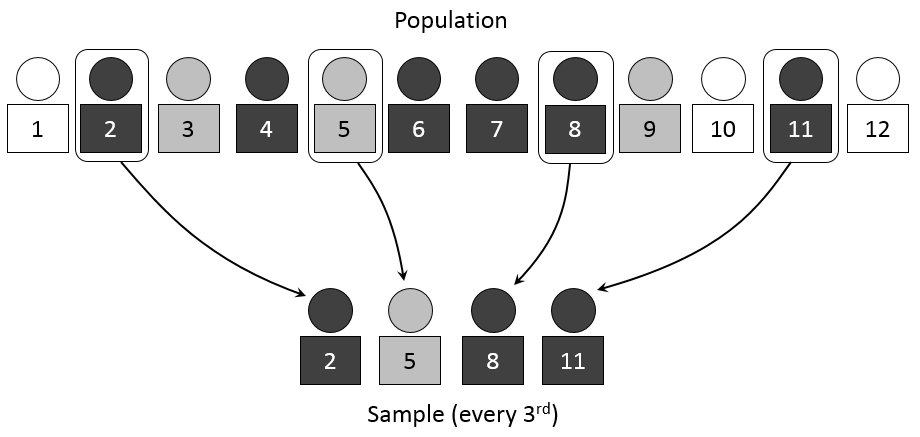
  • 계통추출(Systematic Sampling)을 통해 데이터를 불러오기로 함

예제 실습

  • 아래 예제를 통해서 실제로 데이터가 줄어드는지 확인을 해본다.
  • 핵심 코드는 skip_logic 함수이며, skiprows = skiprows=lambda x: skip_logic(x, 3) 형태로 작성할 수 있다.
  • IRIS 데이터는 https://www.kaggle.com/saurabh00007/iriscsv 에서 다운로드 받았다.
    • iris 데이터외에도 각자 데이터를 가지고 실습을 해도 좋다.
import pandas as pd 

def skip_logic(index, skip_num):
    if index % skip_num == 0:
        return False
    return True

def main():
    print('**** skiprows 기본 옵션 ****')
    iris = pd.read_csv('iris.csv')
    print(iris.shape)

    print('**** skiprows 인덱스 0, 2, 5만 제외 ****')
    iris = pd.read_csv('iris.csv', skiprows=[0, 2, 5])
    print(iris.shape)
    
    print('**** skiprows 인덱스 range(3, 20)만 제외 ****')
    iris = pd.read_csv('iris.csv', skiprows=[i for i in range(3, 20)])
    print(iris.shape)
    
    print('**** skiprows 입력값의 배수에 해당하는 값만 Load ****')
    iris = pd.read_csv('iris.csv', skiprows=lambda x: skip_logic(x, 3))
    print(iris.shape)
    
if __name__ == '__main__':
    main()
**** skiprows 기본 옵션 ****
(150, 6)
**** skiprows 인덱스 0, 2, 5만 제외 ****
(147, 6)
**** skiprows 인덱스 range(3, 20)만 제외 ****
(133, 6)
**** skiprows 입력값의 배수에 해당하는 값만 Load ****
(50, 6)

실전 적용

  • 이제 배운 것을 적용해보자.

데이터 크기

  • train.csv 데이터의 크기를 확인해보자.
import os

def convert_bytes(file_path, unit=None):
  size = os.path.getsize(file_path)
  if unit == "KB":
    return print('File size: ' + str(round(size / 1024, 3)) + ' Kilobytes')
  elif unit == "MB":
    return print('File size: ' + str(round(size / (1024 * 1024), 3)) + ' Megabytes')
  elif unit == "GB":
    return print('File size: ' + str(round(size / (1024 * 1024 * 1024), 3)) + ' Gigabytes')
  else:
    return print('File size: ' + str(size) + ' bytes')

file_list = ['train.csv', 'test.csv', 'sample_submission.csv']
for file in file_list:
  print("The {file} size: ".format(file=file))
  convert_bytes(file)
  convert_bytes(file, 'KB')
  convert_bytes(file, 'MB')
  convert_bytes(file, 'GB')
  print("--" * 5)
The train.csv size: 
File size: 5697178298 bytes
File size: 5563650.682 Kilobytes
File size: 5433.253 Megabytes
File size: 5.306 Gigabytes
----------
The test.csv size: 
File size: 983020 bytes
File size: 959.98 Kilobytes
File size: 0.937 Megabytes
File size: 0.001 Gigabytes
----------
The sample_submission.csv size: 
File size: 343271 bytes
File size: 335.226 Kilobytes
File size: 0.327 Megabytes
File size: 0.0 Gigabytes
----------

실전 적용

  • 이제 실전 적용을 해본다.
import numpy as np
import pandas as pd
import seaborn as sns 
import matplotlib.pyplot as plt

def skip_logic(index, skip_num):
    if index % skip_num == 0:
        return False
    return True

train = pd.read_csv('./train.csv', skiprows=lambda x: skip_logic(x, 4))
print(train.shape)
test = pd.read_csv('./test.csv')
submission = pd.read_csv('./sample_submission.csv')
(13855964, 8)

결론

  • 대용량 데이터를 다루는 것은 쉽지 않지만, skiprows 파라미터를 적절히 활용하여 메모리 이슈를 피하자.

NLP - From Word2Vec TO GPT-3

개요

  • 본 포스트는 자연어처리의 주요 흐름에 관해 간단하게 정리한 내용이다.
  • 일종의 모음집이라고 하면 좋을 것 같다.
    • 구체적인 자연어 이론에 대한 설명은 대해서는 유투브 영상 및 그 와 다양한 자료들을 참고하도록 하자. .

사전 학습의 개념

  • 사전 학습 모델이란 기존에 자비어(Xavier) 등 임의의 값으로 초기화된 모델의 가중치들을 다른 문제(task)에 학습시킨 가중치들로 초기화하는 방법이다.
  • 이미지 분류에서는 보통 전이학습이라는 용어를 사용하기도 했다.
  • 자연어에서의 가장 대표적인 사전학습 모델이 버트와 GPT이다.
  • 현재는 이러한 대부분의 자연어 처리 모델이 언어 모델을 사전 학습한 모델을 활용하도록 한다.
    • 예를 들면, 오늘 저녁 반찬 간이 조금 싱겁다라는 문장이 있을 때, 오늘 아침 반찬 간이라는 단어들을 통해 싱거워라는 단어를 모델이 예측하며 학습하게 된다.
  • 이러한 학습을 통해 모델은 언어에 대한 전반적인 이해(Natural Language Understanding, NLU)를 하게 되고, 이렇게 사전 학습된 지식을 기반으로 하위 문제에 대한 성능을 향상 시킨다.

사전 학습의 방법

  • 첫번째는 특징 기반(feature-based) 방법이다.
  • 특징 기반 방법이란 사전 학습된 특징을 하위 문제의 모델에 부가적인 특징을 활용하는 방법이다.
    • 특징 기반의 사전 학습 활용 방법의 대표적인 예는 word2vec으로, 학습한 임베딩 특징을 우리가 학습하고자 하는 모델의 임베딩 특징으로 활용하는 방법이다.
    • 사전 학습한 가중치를 활용하는 또 다른 방법은 미세 조정(fine-tuning)이다. 미세 조정이란 사전 학습한 모든 가중치와 더불어 하위 문제를 위한 최소한의 가중치를 추가해서 모델을 추가로 학습(미세 조정) 하는 방법을 말한다.

기존연구 소개

  • 버트와 GPT를 배우기에 앞서 자연어 처리 연구의 흐름에 대해 살펴보도록 한다.

Word2Vec & Skip Gram

  • 문장에서 특정한 단어가 어떻게 올 것인지 예측하는 방법의 가장 기본적인 원리라고 할 수 있다.
  • word2vec은 CBOW(Continuous Bag of Words)와 Skip-Gram이라는 두가지 모델로 나뉜다.
  • 두 모델은 서로 반대되는 개념이라고 할 수 있다.
from IPython.display import HTML

HTML('<iframe width="560" height="315" src="https://www.youtube.com/embed/sY4YyacSsLc?start=596" frameborder="0" allow="accelerometer; autoplay; clipboard-write; encrypted-media; gyroscope; picture-in-picture" allowfullscreen></iframe>')
HTML('<iframe width="560" height="315" src="https://www.youtube.com/embed/UqRCEmrv1gQ?start=596" frameborder="0" allow="accelerometer; autoplay; clipboard-write; encrypted-media; gyroscope; picture-in-picture" allowfullscreen></iframe>')
  • 다음 문장을 확인해보자. 예시를 들면 다음과 같다.

정형데이터와 함께하는 텍스트 마이닝

공지

  • 해당 포스트는 취업 준비반 대상 강의 교재로 파이썬 머신러닝 완벽가이드를 축약한 내용입니다.
    • 매우 좋은 책이니 가급적 구매하시기를 바랍니다.

개요

  • Mercari Price Suggestion Challenge는 캐글에서 진행된 과제이며, 제공되는 데이터 세트는 제품에 대한 여러 속성 및 제품 설명 등의 텍스트 데이터로 구성된다.
  • 데이터 세트는 다음 링크에서 확인한다. https://www.kaggle.com/c/mercari-price-suggestion-challenge/data

데이터 다운로드

  • 데이터를 다운로드 받도록 한다.
!pip install kaggle
!sudo apt install p7zip p7zip-full # 7z 파일을 풀기 위한 것이다. 
Requirement already satisfied: kaggle in /usr/local/lib/python3.6/dist-packages (1.5.10)
Requirement already satisfied: python-dateutil in /usr/local/lib/python3.6/dist-packages (from kaggle) (2.8.1)
Requirement already satisfied: python-slugify in /usr/local/lib/python3.6/dist-packages (from kaggle) (4.0.1)
Requirement already satisfied: certifi in /usr/local/lib/python3.6/dist-packages (from kaggle) (2020.12.5)
Requirement already satisfied: requests in /usr/local/lib/python3.6/dist-packages (from kaggle) (2.23.0)
Requirement already satisfied: urllib3 in /usr/local/lib/python3.6/dist-packages (from kaggle) (1.24.3)
Requirement already satisfied: tqdm in /usr/local/lib/python3.6/dist-packages (from kaggle) (4.41.1)
Requirement already satisfied: six>=1.10 in /usr/local/lib/python3.6/dist-packages (from kaggle) (1.15.0)
Requirement already satisfied: text-unidecode>=1.3 in /usr/local/lib/python3.6/dist-packages (from python-slugify->kaggle) (1.3)
Requirement already satisfied: chardet<4,>=3.0.2 in /usr/local/lib/python3.6/dist-packages (from requests->kaggle) (3.0.4)
Requirement already satisfied: idna<3,>=2.5 in /usr/local/lib/python3.6/dist-packages (from requests->kaggle) (2.10)
Reading package lists... Done
Building dependency tree       
Reading state information... Done
p7zip is already the newest version (16.02+dfsg-6).
p7zip set to manually installed.
p7zip-full is already the newest version (16.02+dfsg-6).
0 upgraded, 0 newly installed, 0 to remove and 14 not upgraded.
from google.colab import files
uploaded = files.upload()
for fn in uploaded.keys():
  print('uploaded file "{name}" with length {length} bytes'.format(
      name=fn, length=len(uploaded[fn])))
  
# kaggle.json을 아래 폴더로 옮긴 뒤, file을 사용할 수 있도록 권한을 부여한다. 
!mkdir -p ~/.kaggle/ && mv kaggle.json ~/.kaggle/ && chmod 600 ~/.kaggle/kaggle.json

Upload widget is only available when the cell has been executed in the current browser session. Please rerun this cell to enable.

텍스트 마이닝 - 감성 분석

공지

  • 해당 포스트는 취업 준비반 대상 강의 교재로 파이썬 머신러닝 완벽가이드를 축약한 내용입니다.
    • 매우 좋은 책이니 가급적 구매하시기를 바랍니다.

감성 분석 개요

  • 문서의 주관적인 감성/의견/감정/기분 등을 파악하기 위한 방법으로 소셜 미디어, 여론조사, 온라인 리뷰, 피드백 등 다양한 분야에서 활용되고 있다.
  • 감성 분석은 크게 지도학습 & 비지도학습 방식으로 수행된다.
  • 데이터는 캐글 대회 데이터를 활용하였다.
  • 따라서, 본 포스트에서는 지도학습 기반과 비지도학습 기반의 감성 분석을 실습한다.

데이터 불러오기

  • 각각 필요한 데이터를 불러오도록 한다.
from google.colab import drive # 패키지 불러오기 
from os.path import join  

ROOT = "/content/drive"     # 드라이브 기본 경로
print(ROOT)                 # print content of ROOT (Optional)
drive.mount(ROOT)           # 드라이브 기본 경로 Mount
/content/drive
Mounted at /content/drive
MY_GOOGLE_DRIVE_PATH = 'My Drive/Colab Notebooks/NLP/' # 프로젝트 경로
PROJECT_PATH = join(ROOT, MY_GOOGLE_DRIVE_PATH) # 프로젝트 경로
print(PROJECT_PATH)
/content/drive/My Drive/Colab Notebooks/NLP/
%cd "{PROJECT_PATH}"
/content/drive/My Drive/Colab Notebooks/NLP
import pandas as pd
review_df = pd.read_csv("data/labeledTrainData.tsv", header = 0, sep="\t", quoting = 3)
review_df.head(3)

텍스트 마이닝 - 뉴스 분류

공지

  • 해당 포스트는 취업 준비반 대상 강의 교재로 파이썬 머신러닝 완벽가이드를 축약한 내용입니다.
    • 매우 좋은 책이니 가급적 구매하시기를 바랍니다.

텍스트 분류 실습 - 뉴스그룹 분류 개요

  • 사이킷런은 fetch_20newsgroups API를 이용해 뉴스그룹의 분류를 수행해 볼 수 있는 예제 데이터 활용 가능함.
  • 희소 행렬에 분류를 효과적으로 처리할 수 있는 알고리즘은 로지스틱 회귀, 선형 서포트 벡터 머신, 나이브 베이즈 등임.

텍스트 정규화

  • fetch_20newsgroups()는 인터넷에서 데이터를 받은 후, 올리는 것이기 때문에 인터넷 연결 유무를 확인한다.
from sklearn.datasets import fetch_20newsgroups
news_data = fetch_20newsgroups(subset='all', random_state=156)
print(news_data.keys())
dict_keys(['data', 'filenames', 'target_names', 'target', 'DESCR'])
  • Target 클래스가 어떻게 구성돼 있는지 확인해 본다.
import pandas as pd
print('target 클래스의 값과 분포도 \n', pd.Series(news_data.target).value_counts().sort_index())
print('target 클래스의 이름들 \n', news_data.target_names)
target 클래스의 값과 분포도 
 0     799
1     973
2     985
3     982
4     963
5     988
6     975
7     990
8     996
9     994
10    999
11    991
12    984
13    990
14    987
15    997
16    910
17    940
18    775
19    628
dtype: int64
target 클래스의 이름들 
 ['alt.atheism', 'comp.graphics', 'comp.os.ms-windows.misc', 'comp.sys.ibm.pc.hardware', 'comp.sys.mac.hardware', 'comp.windows.x', 'misc.forsale', 'rec.autos', 'rec.motorcycles', 'rec.sport.baseball', 'rec.sport.hockey', 'sci.crypt', 'sci.electronics', 'sci.med', 'sci.space', 'soc.religion.christian', 'talk.politics.guns', 'talk.politics.mideast', 'talk.politics.misc', 'talk.religion.misc']
  • Target 클래스의 값은 0부터 19까지 20개로 구성이 되어 있다.
  • 각각의 개별 데이터가 텍스트로 어떻게 구성되어 있는지 확인해 본다.
print(news_data.data[1])
From: jlevine@rd.hydro.on.ca (Jody Levine)
Subject: Re: insect impacts
Organization: Ontario Hydro - Research Division
Lines: 64

I feel childish.

In article <1ppvds$92a@seven-up.East.Sun.COM> egreen@East.Sun.COM writes:
>In article 7290@rd.hydro.on.ca, jlevine@rd.hydro.on.ca (Jody Levine) writes:
>>>>
>>>>how _do_ the helmetless do it?
>>>
>>>Um, the same way people do it on 
>>>horseback
>>
>>not as fast, and they would probably enjoy eating bugs, anyway
>
>Every bit as fast as a dirtbike, in the right terrain.  And we eat
>flies, thank you.

Who mentioned dirtbikes? We're talking highway speeds here. If you go 70mph
on your dirtbike then feel free to contribute.

>>>jeeps
>>
>>you're *supposed* to keep the windscreen up
>
>then why does it go down?

Because it wouldn't be a Jeep if it didn't. A friend of mine just bought one
and it has more warning stickers than those little 4-wheelers (I guess that's
becuase it's a big 4 wheeler). Anyway, it's written in about ten places that
the windshield should remain up at all times, and it looks like they've made
it a pain to put it down anyway, from what he says. To be fair, I do admit
that it would be a similar matter to drive a windscreenless Jeep on the 
highway as for bikers. They may participate in this discussion, but they're
probably few and far between, so I maintain that this topic is of interest
primarily to bikers.

>>>snow skis
>>
>>NO BUGS, and most poeple who go fast wear goggles
>
>So do most helmetless motorcyclists.

Notice how Ed picked on the more insignificant (the lower case part) of the 
two parts of the statement. Besides, around here it is quite rare to see 
bikers wear goggles on the street. It's either full face with shield, or 
open face with either nothing or aviator sunglasses. My experience of 
bicycling with contact lenses and sunglasses says that non-wraparound 
sunglasses do almost nothing to keep the crap out of ones eyes.

>>The question still stands. How do cruiser riders with no or negligible helmets
>>stand being on the highway at 75 mph on buggy, summer evenings?
>
>helmetless != goggleless

Ok, ok, fine, whatever you say, but lets make some attmept to stick to the
point. I've been out on the road where I had to stop every half hour to clean
my shield there were so many bugs (and my jacket would be a blood-splattered
mess) and I'd see guys with shorty helmets, NO GOGGLES, long beards and tight
t-shirts merrily cruising along on bikes with no windscreens. Lets be really
specific this time, so that even Ed understands. Does anbody think that 
splattering bugs with one's face is fun, or are there other reasons to do it?
Image? Laziness? To make a point about freedom of bug splattering?

I've        bike                      like       | Jody Levine  DoD #275 kV
     got a       you can        if you      -PF  | Jody.P.Levine@hydro.on.ca
                         ride it                 | Toronto, Ontario, Canada
  • 뉴스그룹 기사의 내용뿐만 아니라 뉴스그룹 제목, 작성자, 소속, 이메일 등의 다양한 정보를 가지고 있음.
  • 그러나, 불필요한 부분들은 remove 파라미터를 이용하여 제거할 수 있음.
  • 훈련 데이터와 테스트 데이터로 분류하는 코드를 작성해본다.
from sklearn.datasets import fetch_20newsgroups

# subset='train'으로 학습용 데이터만 추출, remove=('headers', 'footers', 'quotes')로 내용만 추출
train_news = fetch_20newsgroups(subset='train', remove=('headers', 'footers', 'quotes'), random_state=156)

X_train = train_news.data
y_train = train_news.target

# subset='test'으로 테스트 데이터만 추출, remove=('headers', 'footers', 'quotes')로 내용만 추출
test_news = fetch_20newsgroups(subset='test', remove=('headers', 'footers', 'quotes'), random_state=156)

X_test = test_news.data
y_test = test_news.target

print('학습 데이터 크기 {0}, 테스트 데이터 크기 {1}'.format(len(train_news.data), len(test_news.data)))
Downloading 20news dataset. This may take a few minutes.
Downloading dataset from https://ndownloader.figshare.com/files/5975967 (14 MB)


학습 데이터 크기 11314, 테스트 데이터 크기 7532

피처 벡터화 변환

  • 이제 피처 벡터화를 진행해야 하는데, 이 때에는 CountVectorizer를 이용해 학습 데이터의 텍스트를 피처 벡터화를 진행
  • 테스트 데이터 역시 피처 벡터화 진행
    • 이 때에는 테스트 데이터를 변환(transform) 해줘야 하며, 이 때, fit_transform() 사용 하면 안됨
from sklearn.feature_extraction.text import CountVectorizer

# Count Vectorization 피처 벡터화 변환 진행
cnt_vect = CountVectorizer()
cnt_vect.fit(X_train)

X_train_cnt_vect = cnt_vect.transform(X_train)

# 테스트 데이터를 feature 벡터화 변환 수행
X_test_cnn_vect = cnt_vect.transform(X_test)

print("학습 데이터 텍스트의 CountVectorizer Shape:", X_train_cnt_vect.shape)
학습 데이터 텍스트의 CountVectorizer Shape: (11314, 101631)
  • 이렇게 만들어진 학습 데이터를 CountVectorizer로 피처를 추출한 결과 11314개의 문서에서, 단어가 101631개로 만들어진 것을 확인함

머신러닝 모델 학습/예측/평가

  • 이제 로지스틱 회귀를 활용하여 뉴스그룹에 대한 분류를 예측해본다.
from sklearn.linear_model import LogisticRegression
from sklearn.metrics import accuracy_score

# Logistic Regresion을 이용해 학습/예측/평가 수행 
lr_clf = LogisticRegression()
lr_clf.fit(X_train_cnt_vect, y_train)
pred = lr_clf.predict(X_test_cnn_vect)

print('CountVectorized Logistic Regression의 예측 정확도는 {0:.3f}'.format(accuracy_score(y_test, pred)))
CountVectorized Logistic Regression의 예측 정확도는 0.608


/usr/local/lib/python3.6/dist-packages/sklearn/linear_model/_logistic.py:940: ConvergenceWarning: lbfgs failed to converge (status=1):
STOP: TOTAL NO. of ITERATIONS REACHED LIMIT.

Increase the number of iterations (max_iter) or scale the data as shown in:
    https://scikit-learn.org/stable/modules/preprocessing.html
Please also refer to the documentation for alternative solver options:
    https://scikit-learn.org/stable/modules/linear_model.html#logistic-regression
  extra_warning_msg=_LOGISTIC_SOLVER_CONVERGENCE_MSG)
  • Count 기반에서 TF-IDF 기반으로 벡터화 변경하여 예측 모델 수행함.
from sklearn.feature_extraction.text import TfidfVectorizer

# TF-IDF 벡터화를 적용하여 학습 데이터 세트와 테스트 데이터 세트 변환. 
tfidf_vect = TfidfVectorizer()
tfidf_vect.fit(X_train)

X_train_tfidf_vect = tfidf_vect.transform(X_train)
X_test_tfidf_vect = tfidf_vect.transform(X_test)
  • 이번에는 LogisticRegression을 이용해 학습/예측/평가 수행.
lr_clf = LogisticRegression()
lr_clf.fit(X_train_tfidf_vect, y_train)
pred = lr_clf.predict(X_test_tfidf_vect)

print("TF-IDF Logistic Regression의 예측 정확도는 {0:.3f}".format(accuracy_score(y_test, pred)))
TF-IDF Logistic Regression의 예측 정확도는 0.674
  • TF-IDF가 단순 카운트 기반보다 훨씬 높은 예측 정확도 제공.

모형 업그레이드 1단계

  • 모형을 업그레이드 하기 위해서는 최상의 피처 전처리 수행이 필요함
# stop words 필터링 추가 & ngram을 기본 (1, 1)에서 (1, 2)로 변경해 피처 벡터화 적용
tfidf_vect = TfidfVectorizer(stop_words="english", ngram_range=(1, 2), max_df=300)
tfidf_vect.fit(X_train)

X_train_tfidf_vect = tfidf_vect.transform(X_train)
X_test_tfidf_vect = tfidf_vect.transform(X_test)

lr_clf = LogisticRegression()
lr_clf.fit(X_train_tfidf_vect, y_train)
pred = lr_clf.predict(X_test_tfidf_vect)

print("TF-IDF Logistic Regression의 예측 정확도는 {0:.3f}".format(accuracy_score(y_test, pred)))
TF-IDF Logistic Regression의 예측 정확도는 0.692

모형 업그레이드 2단계

  • 이번에는 GridSearchCV를 이용하여 로지스틱 회귀의 하이퍼 파라미터 최적화를 수행한다.
from sklearn.model_selection import GridSearchCV
import time 
import datetime

start = time.time()

# 최적 C값 도출 튜닝 수행 / 과적합 방지용
params = {'C' : [0.01, 0.1]} # [0.01, 0.1, 1, 5, 10]
grid_cv_lr = GridSearchCV(lr_clf, param_grid=params, cv=2, scoring="accuracy", verbose=1)
grid_cv_lr.fit(X_train_tfidf_vect, y_train)
print('Logistic Regression best C parameter :', grid_cv_lr.best_params_)
# print('Logistic Regression Best C Parameter :', grid_cv_lr.best_params_)

sec = time.time()-start
times = str(datetime.timedelta(seconds=sec)).split(".")
times = times[0]
print(times)
Fitting 2 folds for each of 2 candidates, totalling 4 fits


[Parallel(n_jobs=1)]: Using backend SequentialBackend with 1 concurrent workers.
[Parallel(n_jobs=1)]: Done   4 out of   4 | elapsed:  2.4min finished


Logistic Regression best C parameter : {'C': 0.1}
0:03:32
import time
import datetime
def bench_mark(start):
  sec = time.time() - start
  times = str(datetime.timedelta(seconds=sec)).split(".")
  times = times[0]
  print(times)
  • 최적 C 값으로 학습된 grid_cv로 예측 및 정확도 평가
pred = grid_cv_lr.predict(X_test_tfidf_vect)
print('TF-IDF Vectorized Logistic Regression의 예측 정확도는 {0:.3f}'.format(accuracy_score(y_test, pred)))
TF-IDF Vectorized Logistic Regression의 예측 정확도는 0.645

사이킷런 파이프라인 활용한 머신러닝 수행

  • 사이킷런의 Pipeline 클래스를 이용하여 피처 벡터화와 ML 알고리즘 학습/예측을 위한 코드 작성을 한 번에 진행 가능함.
  • Pipeline을 이용하여 데이터의 전처리와 머신러닝 학습 과정을 통일된 API 기반에서 처리할 수 있어서 보다 더 직관적인 ML 모델 코드를 생성할 수 있음.
  • 또한 대용량 데이터의 피처 벡터화 결과를 별도 데이터로 저장하지 않고 스트림 기반에서 바로 머신러닝 알고리즘의 데이터로 입력할 수 있기 때문에 수행 시간 절약도 가능함.
  • 다음은 텍스트 분류 예제 코드를 Pipeline을 이용해 재 작성한 코드이다.
from sklearn.pipeline import Pipeline

# TfidfVectorizer 객체를 tfidf_vect로, LogisticRegression 객체를 lr_clf로 생성하는 Pipeline 생성
pipeline = Pipeline([
                     ('tfidf_vect', TfidfVectorizer(stop_words='english', ngram_range=(1,2), max_df = 300)), 
                     ('lr_clf', LogisticRegression(C=10))
])
  • 위 파이프라인을 활용하면 fit(), transform()과 LogisticRegression의 fit(), predict()가 필요 없음
start = time.time()

pipeline.fit(X_train, y_train)
pred = pipeline.predict(X_test)

print('Pipeline을 통한 Logistic Regression의 예측 정확도는 {0:.3f}'.format(accuracy_score(y_test, pred)))

bench_mark(start)
/usr/local/lib/python3.6/dist-packages/sklearn/linear_model/_logistic.py:940: ConvergenceWarning: lbfgs failed to converge (status=1):
STOP: TOTAL NO. of ITERATIONS REACHED LIMIT.

Increase the number of iterations (max_iter) or scale the data as shown in:
    https://scikit-learn.org/stable/modules/preprocessing.html
Please also refer to the documentation for alternative solver options:
    https://scikit-learn.org/stable/modules/linear_model.html#logistic-regression
  extra_warning_msg=_LOGISTIC_SOLVER_CONVERGENCE_MSG)


Pipeline을 통한 Logistic Regression의 예측 정확도는 0.701
0:05:55
  • 지금까지 진행한 것은 단순하게 파이프라인을 활용해 머신러닝을 수행한 것이며, 이제 Pipeline + GridSearchCV를 적용한다.
  • 파라미터를 최적화하려면 너무 많은 튜닝 시간이 소모되기 때문에 주의 하도록 하며, 총 27개의 파라미터 X CV 2 총 54번의 학습을 진행하기 때문에 오래 걸리니 유의니 시간에 유의하도록 한다.
start = time.time()

pipeline = Pipeline([
    ('tfidf_vect', TfidfVectorizer(stop_words='english')),
    ('lr_clf', LogisticRegression())
])

# Pipeline에 기술된 각각의 객체 변수에 언더바(_)2개를 연달아 붙여 GridSearchCV에 사용될 
# 파라미터/하이퍼 파라미터 이름과 값을 설정. . 
params = { 'tfidf_vect__ngram_range': [(1,1), (1,2), (1,3)],
           'tfidf_vect__max_df': [100, 300, 700],
           'lr_clf__C': [1,5,10]
}

# GridSearchCV의 생성자에 Estimator가 아닌 Pipeline 객체 입력
grid_cv_pipe = GridSearchCV(pipeline, param_grid=params, cv=2 , scoring='accuracy', verbose=1)
grid_cv_pipe.fit(X_train, y_train)
print(grid_cv_pipe.best_params_ , grid_cv_pipe.best_score_)

pred = grid_cv_pipe.predict(X_test)
print('Pipeline을 통한 Logistic Regression 의 예측 정확도는 {0:.3f}'.format(accuracy_score(y_test ,pred)))

bench_mark(start)

Reference

  • 권철민. (2020). 파이썬 머신러닝 완벽가이드. 경기, 파주: 위키북스

텍스트 마이닝 - 희소행렬

공지

  • 해당 포스트는 취업 준비반 대상 강의 교재로 파이썬 머신러닝 완벽가이드를 축약한 내용입니다.
    • 매우 좋은 책이니 가급적 구매하시기를 바랍니다.

개요

  • 피처 벡터화에 있어서의 희소행렬에 대해 배운다.
  • BOW 형태를 가진 언어 모델의 피처 벡터화는 대부분 희소 행렬이다.

희소행렬

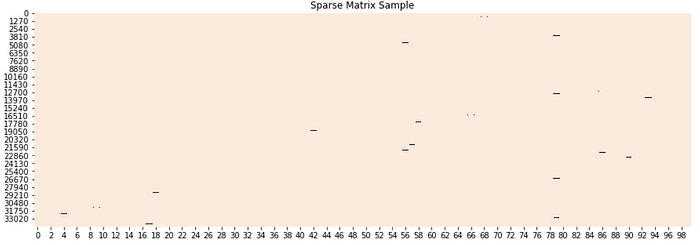
  • 희소 행렬은 너무 많은 불필요한 0 값이 메모리 공간에 할당되어 메모리 공간을 많이 차지하는데 있다.
  • 다음 그림을 살펴보자.
  • 이러한 희소 행렬을 물리적으로 적은 메모리 공간을 차지할 수 있도록 변환해야 하는데, 이 때, COO와 CSR 형식이 존재한다.

(1) 희소 행렬 - COO

  • COO(Coordinate: 좌표) 형식은 0이 아닌 데이터만 별도의 데이터 배열(Array)에 저장하고, 그 데이터가 가리키는 행과 열의 위치를 별도의 배열로 저장
  • 희소행렬 변환 위해 Scipy를 활용한다.
import numpy as np
dense = np.array([[3, 0, 1], [0, 2, 0]])
dense
array([[3, 0, 1],
       [0, 2, 0]])
  • Scipy의 coo_matrix 클래스를 이용해 COO형식의 희소 행렬로 변환한다.
from scipy import sparse

# 0이 아닌 데이터 추출
data = np.array([3, 1, 2])

# 행 위치와 열 위치를 각각 배열로 생성
row_pos = np.array([0, 0, 1])
col_pos = np.array([0, 2, 1])

# sparse 패키지의 coo_matrix를 이용해 COO 형식으로 희소 행렬 생성
sparse_coo = sparse.coo_matrix((data, (row_pos, col_pos)))
sparse_coo.toarray()
array([[3, 0, 1],
       [0, 2, 0]])
  • 다시 원래의 데이터 행렬로 추출됨을 알 수 있음.

(2) 희소 행렬 - CSR 형식

  • CSR(Compressed Sparse Row) 형식은 COO 형식이 행과 열의 위치를 나타내기 위해서 반복적인 위치 데이터를 사용해야 하는 문제점을 해결한 방식
from numpy import array
from scipy.sparse import csr_matrix

# 매트릭스
A = array([[1, 0, 0, 1, 0, 0], [0, 0, 2, 0, 0, 1], [0, 0, 0, 2, 0, 0]])
print(A)

# CSR method
S = csr_matrix(A)
print(S)

# reconstruct dense matrix
B = S.todense()
print(B)
[[1 0 0 1 0 0]
 [0 0 2 0 0 1]
 [0 0 0 2 0 0]]
  (0, 0)	1
  (0, 3)	1
  (1, 2)	2
  (1, 5)	1
  (2, 3)	2
[[1 0 0 1 0 0]
 [0 0 2 0 0 1]
 [0 0 0 2 0 0]]
  • COOCSR이 어떻게 희소 행렬의 메모리를 줄일 수 있는지 예제를 통해서 살펴보았다.
  • 간단하게 정리를 하면 다음과 같다.
from numpy import array
from scipy import sparse
dense = array([[1, 0, 0, 1, 0, 0], [0, 0, 2, 0, 0, 1], [0, 0, 0, 2, 0, 0]])

coo = sparse.coo_matrix(dense)
print(coo)
  (0, 0)	1
  (0, 3)	1
  (1, 2)	2
  (1, 5)	1
  (2, 3)	2
csr = sparse.csr_matrix(dense)
print(csr)
  (0, 0)	1
  (0, 3)	1
  (1, 2)	2
  (1, 5)	1
  (2, 3)	2

옵션

  • 사이킷런의 CountVectorizerTfidfVectorizer 클래스로 변환된 피처 벡터화 행렬은 모두 ScipyCSR형태의 희소 행렬이다.

‘This implementation produces a sparse representation of the counts using scipy.sparse.csr_matrix.’ from https://scikit-learn.org/stable/modules/generated/sklearn.feature_extraction.text.CountVectorizer.html