Programmings

[MLOps] Weight & Biases 소개 및 사용 방법

인프런 강의

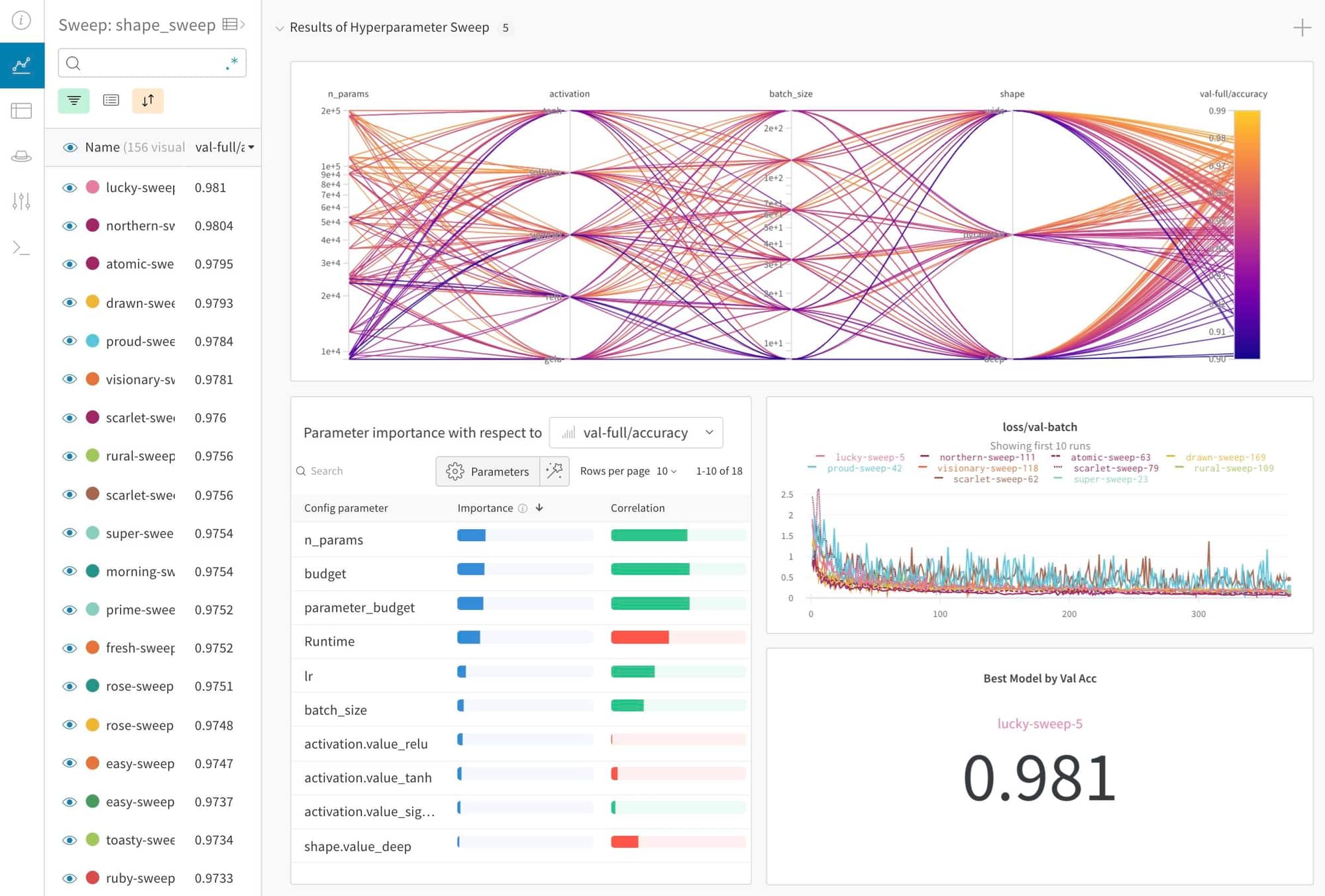
1줄 요약

  • wandb로 MLOps를 배워봅니다.

References

초기 설정

Pandas 속도 비교 - loc vs replace(2)

강의 홍보

1줄 요약

  • 값을 변경할 때에는 .replace 메서드를 사용합니다.

개요

  • Replace 속도를 측정해보자.
  • 이번에는 multiple 값을 변경하는 방법에 대해 알아봅니다.

비교 1 .loc vs .replace

  • 값을 바꾸는 방법은 다음과 같다.
    • data['column'].loc[data['column'] == 'Old Value'] = 'New Value'
import pandas as pd
import seaborn as sns
diamonds = sns.load_dataset('diamonds')
print(diamonds)
       carat        cut color clarity  depth  table  price     x     y     z
0       0.23      Ideal     E     SI2   61.5   55.0    326  3.95  3.98  2.43
1       0.21    Premium     E     SI1   59.8   61.0    326  3.89  3.84  2.31
2       0.23       Good     E     VS1   56.9   65.0    327  4.05  4.07  2.31
3       0.29    Premium     I     VS2   62.4   58.0    334  4.20  4.23  2.63
4       0.31       Good     J     SI2   63.3   58.0    335  4.34  4.35  2.75
...      ...        ...   ...     ...    ...    ...    ...   ...   ...   ...
53935   0.72      Ideal     D     SI1   60.8   57.0   2757  5.75  5.76  3.50
53936   0.72       Good     D     SI1   63.1   55.0   2757  5.69  5.75  3.61
53937   0.70  Very Good     D     SI1   62.8   60.0   2757  5.66  5.68  3.56
53938   0.86    Premium     H     SI2   61.0   58.0   2757  6.15  6.12  3.74
53939   0.75      Ideal     D     SI2   62.2   55.0   2757  5.83  5.87  3.64

[53940 rows x 10 columns]
diamonds.info()
<class 'pandas.core.frame.DataFrame'>
RangeIndex: 53940 entries, 0 to 53939
Data columns (total 10 columns):
 #   Column   Non-Null Count  Dtype   
---  ------   --------------  -----   
 0   carat    53940 non-null  float64 
 1   cut      53940 non-null  category
 2   color    53940 non-null  category
 3   clarity  53940 non-null  category
 4   depth    53940 non-null  float64 
 5   table    53940 non-null  float64 
 6   price    53940 non-null  int64   
 7   x        53940 non-null  float64 
 8   y        53940 non-null  float64 
 9   z        53940 non-null  float64 
dtypes: category(3), float64(6), int64(1)
memory usage: 3.0 MB

비교 2. .loc vs .replace

  • cut Column에 있는 값 중, PremiumIdeal 모두 Best로 변경합니다.
import time

diamonds = sns.load_dataset('diamonds')
diamonds['cut'] = diamonds['cut'].astype('object')

start_time = time.time()
diamonds['cut'].loc[(diamonds['cut'] == 'Premium') | (diamonds['cut'] == 'Ideal')] = 'Best'
print('Time using .loc[]: {} sec'.format(time.time() - start_time))
print(diamonds)
Time using .loc[]: 0.008001089096069336 sec
       carat        cut color clarity  depth  table  price     x     y     z
0       0.23       Best     E     SI2   61.5   55.0    326  3.95  3.98  2.43
1       0.21       Best     E     SI1   59.8   61.0    326  3.89  3.84  2.31
2       0.23       Good     E     VS1   56.9   65.0    327  4.05  4.07  2.31
3       0.29       Best     I     VS2   62.4   58.0    334  4.20  4.23  2.63
4       0.31       Good     J     SI2   63.3   58.0    335  4.34  4.35  2.75
...      ...        ...   ...     ...    ...    ...    ...   ...   ...   ...
53935   0.72       Best     D     SI1   60.8   57.0   2757  5.75  5.76  3.50
53936   0.72       Good     D     SI1   63.1   55.0   2757  5.69  5.75  3.61
53937   0.70  Very Good     D     SI1   62.8   60.0   2757  5.66  5.68  3.56
53938   0.86       Best     H     SI2   61.0   58.0   2757  6.15  6.12  3.74
53939   0.75       Best     D     SI2   62.2   55.0   2757  5.83  5.87  3.64

[53940 rows x 10 columns]


/Library/Frameworks/Python.framework/Versions/3.8/lib/python3.8/site-packages/pandas/core/indexing.py:1636: SettingWithCopyWarning: 
A value is trying to be set on a copy of a slice from a DataFrame

See the caveats in the documentation: https://pandas.pydata.org/pandas-docs/stable/user_guide/indexing.html#returning-a-view-versus-a-copy
  self._setitem_single_block(indexer, value, name)
  • 이번에는 replace 메서드를 사용해본다.
    • data['column'].replace('old value', 'new value', inplace = True
diamonds = sns.load_dataset('diamonds')

start_time = time.time()
diamonds.replace(['Premium', 'Ideal'], 'Best', inplace=True)
print('Time using replace(): {} sec'.format(time.time() - start_time)) 
Time using replace(): 0.0011608600616455078 sec
  • 기존 코드에서, GoodVery GoodLow로 변경코드를 추가합니다.
diamonds = sns.load_dataset('diamonds')
diamonds['cut'] = diamonds['cut'].astype('object')

start_time = time.time()
diamonds['cut'].loc[(diamonds['cut'] == 'Premium') | \
                    (diamonds['cut'] == 'Ideal')] = 'Best'
diamonds['cut'].loc[(diamonds['cut'] == 'Very Good') | \
                    (diamonds['cut'] == 'Good')] = 'Low'
print('Time using .loc[]: {} sec'.format(time.time() - start_time))
print(diamonds)
Time using .loc[]: 0.013423681259155273 sec
       carat   cut color clarity  depth  table  price     x     y     z
0       0.23  Best     E     SI2   61.5   55.0    326  3.95  3.98  2.43
1       0.21  Best     E     SI1   59.8   61.0    326  3.89  3.84  2.31
2       0.23   Low     E     VS1   56.9   65.0    327  4.05  4.07  2.31
3       0.29  Best     I     VS2   62.4   58.0    334  4.20  4.23  2.63
4       0.31   Low     J     SI2   63.3   58.0    335  4.34  4.35  2.75
...      ...   ...   ...     ...    ...    ...    ...   ...   ...   ...
53935   0.72  Best     D     SI1   60.8   57.0   2757  5.75  5.76  3.50
53936   0.72   Low     D     SI1   63.1   55.0   2757  5.69  5.75  3.61
53937   0.70   Low     D     SI1   62.8   60.0   2757  5.66  5.68  3.56
53938   0.86  Best     H     SI2   61.0   58.0   2757  6.15  6.12  3.74
53939   0.75  Best     D     SI2   62.2   55.0   2757  5.83  5.87  3.64

[53940 rows x 10 columns]
/Library/Frameworks/Python.framework/Versions/3.8/lib/python3.8/site-packages/pandas/core/indexing.py:1636: SettingWithCopyWarning: 
A value is trying to be set on a copy of a slice from a DataFrame

See the caveats in the documentation: https://pandas.pydata.org/pandas-docs/stable/user_guide/indexing.html#returning-a-view-versus-a-copy
  self._setitem_single_block(indexer, value, name)
diamonds = sns.load_dataset('diamonds')

start_time = time.time()
diamonds.replace([['Premium', 'Ideal'], ['Very Good', 'Good']], ['Best', 'Low'], inplace=True)
print('Time using replace(): {} sec'.format(time.time() - start_time)) 
print(diamonds)
Time using replace(): 0.002335071563720703 sec
       carat   cut color clarity  depth  table  price     x     y     z
0       0.23  Best     E     SI2   61.5   55.0    326  3.95  3.98  2.43
1       0.21  Best     E     SI1   59.8   61.0    326  3.89  3.84  2.31
2       0.23   Low     E     VS1   56.9   65.0    327  4.05  4.07  2.31
3       0.29  Best     I     VS2   62.4   58.0    334  4.20  4.23  2.63
4       0.31   Low     J     SI2   63.3   58.0    335  4.34  4.35  2.75
...      ...   ...   ...     ...    ...    ...    ...   ...   ...   ...
53935   0.72  Best     D     SI1   60.8   57.0   2757  5.75  5.76  3.50
53936   0.72   Low     D     SI1   63.1   55.0   2757  5.69  5.75  3.61
53937   0.70   Low     D     SI1   62.8   60.0   2757  5.66  5.68  3.56
53938   0.86  Best     H     SI2   61.0   58.0   2757  6.15  6.12  3.74
53939   0.75  Best     D     SI2   62.2   55.0   2757  5.83  5.87  3.64

[53940 rows x 10 columns]
Pandas 속도 비교 - loc vs replace

강의 홍보

개요

  • loc and Replace 속도를 비교 측정해본다..

방법 1. .loc vs .replace

  • 값을 바꾸는 방법은 다음과 같다.
    • data['column'].loc[data['column'] == 'Old Value'] = 'New Value'
import pandas as pd
import seaborn as sns
diamonds = sns.load_dataset('diamonds')
print(diamonds)
       carat        cut color clarity  depth  table  price     x     y     z
0       0.23      Ideal     E     SI2   61.5   55.0    326  3.95  3.98  2.43
1       0.21    Premium     E     SI1   59.8   61.0    326  3.89  3.84  2.31
2       0.23       Good     E     VS1   56.9   65.0    327  4.05  4.07  2.31
3       0.29    Premium     I     VS2   62.4   58.0    334  4.20  4.23  2.63
4       0.31       Good     J     SI2   63.3   58.0    335  4.34  4.35  2.75
...      ...        ...   ...     ...    ...    ...    ...   ...   ...   ...
53935   0.72      Ideal     D     SI1   60.8   57.0   2757  5.75  5.76  3.50
53936   0.72       Good     D     SI1   63.1   55.0   2757  5.69  5.75  3.61
53937   0.70  Very Good     D     SI1   62.8   60.0   2757  5.66  5.68  3.56
53938   0.86    Premium     H     SI2   61.0   58.0   2757  6.15  6.12  3.74
53939   0.75      Ideal     D     SI2   62.2   55.0   2757  5.83  5.87  3.64

[53940 rows x 10 columns]

  • cut Column에 있는 값 중, Premium을 Best로 바꿔보도록 한다.
import time
start_time = time.time()

diamonds['cut'].loc[diamonds['cut'] == 'Premium'] == 'Best'
print('Time using .loc[]: {} sec'.format(time.time() - start_time))
Time using .loc[]: 0.0020329952239990234 sec
  • 이번에는 replace 메서드를 사용해본다.
    • data['column'].replace('old value', 'new value', inplace = True
diamonds = sns.load_dataset('diamonds')

start_time = time.time()
diamonds.replace('Premium', 'Best', inplace=True)
print('Time using replace(): {} sec'.format(time.time() - start_time))
Time using replace(): 0.00027108192443847656 sec

Pandas 속도 비교 - iloc and loc

강의 홍보

1줄 요약

  • .loc[]와 .iloc[] 인덱스의 속도 차이를 측정해본다.

개요

  • 시간이 허락한다면, Pandas 속도를 비교하는 게시글을 자주 작성하려고 한다.
    • Pandas가 상대적으로 속도가 느리기 때문에, 조금 더 효율적인 코드를 작성하는 쪽에 초점을 맞춰본다.
  • .loc[] : index name locator를 의미한다.
  • iloc[] : index number locator를 의미한다.

행 선택시 속도 비교

  • 먼저 행을 선택할 때의 속도 차이를 확인하도록 합니다.
import pandas as pd
import time
import seaborn as sns

diamonds = sns.load_dataset("diamonds")
diamonds.info()
<class 'pandas.core.frame.DataFrame'>
RangeIndex: 53940 entries, 0 to 53939
Data columns (total 10 columns):
 #   Column   Non-Null Count  Dtype   
---  ------   --------------  -----   
 0   carat    53940 non-null  float64 
 1   cut      53940 non-null  category
 2   color    53940 non-null  category
 3   clarity  53940 non-null  category
 4   depth    53940 non-null  float64 
 5   table    53940 non-null  float64 
 6   price    53940 non-null  int64   
 7   x        53940 non-null  float64 
 8   y        53940 non-null  float64 
 9   z        53940 non-null  float64 
dtypes: category(3), float64(6), int64(1)
memory usage: 3.0 MB
  • 먼저 .loc 속도 측정을 해봅니다.
row_nums = range(0, 10000)

start_time = time.time()
rows = diamonds.loc[row_nums]
end_time = time.time()

print("Time using .loc[]: {} sec".format(end_time - start_time))
Time using .loc[]: 0.0029916763305664062 sec
  • 이번에는 동일하게 .iloc를 적용해봅니다.
start_time = time.time()
rows = diamonds.iloc[row_nums]
end_time = time.time()

print("Time using .iloc[]: {} sec".format(end_time - start_time))
Time using .iloc[]: 0.001990079879760742 sec

열 선택시 속도 비교

  • 이번에는 iloc를 활용하여 열을 선택합니다.
iloc_start_time = time.time()
cols = diamonds.iloc[:, [0, 2, 4, 6, 8]]
iloc_end_time = time.time()

print("Time using .iloc[]: {} sec".format(iloc_end_time - iloc_start_time))
Time using .iloc[]: 0.0009975433349609375 sec
  • 이번에는 Column명을 입력해서 추출하도록 합니다.
name_start_time = time.time()
cols = diamonds[['carat', 'color', 'depth', 'price', 'y']]
name_end_time = time.time()

print("Time using selection by name : {} sec".format(name_end_time - name_start_time))
Time using selection by name : 0.000997304916381836 sec

Reference

[Python] PyCaret Windows 10 아나콘다 설치 방법

강의 홍보

1줄 요약

  • 관리자 실행해서 아나콘다 가상 환경을 만든 후, 새로운 패키지를 설치한다.

PyCaret 설치 방법 (Windows 10)

  • 윈도우 10 환경에서 PyCaret 패키지를 설치해봅니다.
  • 아나콘다 설치에 관한 내용은 생략합니다. 다만, 이 때, 필요한 것은 환경변수에 추가가 되어 있어야 합니다.

가상환경 설정

  • 새로운 가상환경을 만듭니다. (이게 제일 편합니다.)
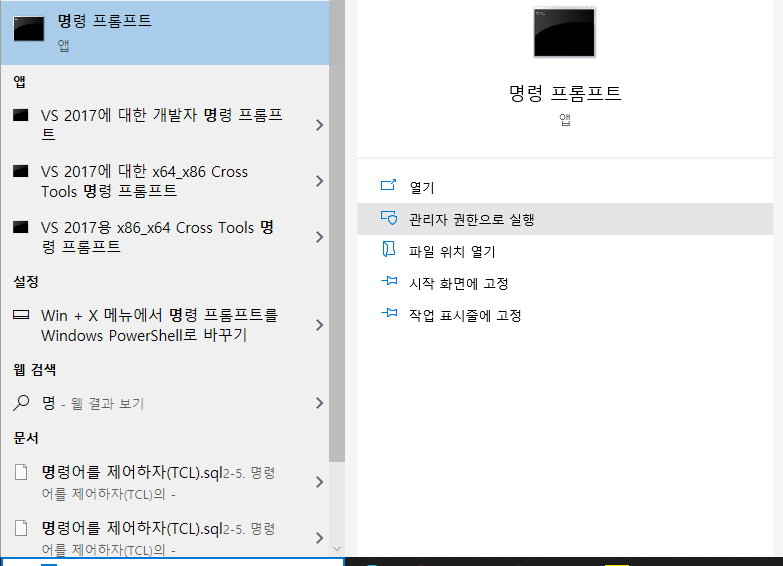
  • 명령프롬프트를 관리자로 실행합니다.

시간 측정의 중요성 및 방법

강의 홍보

1줄 요약

  • 코드를 효과적으로 작성해야 하는 이유를 확인한다.

Calculation 비교

  • 요한 카를 프리드리히 가우스(1777-1855)가 문제를 냈다고 알려짐

  • 1 + 2 + … + 1000000 까지 해당하는 모든 연속 양수의 합계를 구한다.

  • 두가지 방법이 존재한다.

[Python] PyDataset Library를 활용한 Sample 데이터 수집

강의 홍보

1줄 요약

  • R처럼 Sample 데이터를 쉽게 불러오자.

Sample Dataset

!pip install pydataset
Collecting pydataset
[?25l  Downloading https://files.pythonhosted.org/packages/4f/15/548792a1bb9caf6a3affd61c64d306b08c63c8a5a49e2c2d931b67ec2108/pydataset-0.2.0.tar.gz (15.9MB)
     |████████████████████████████████| 15.9MB 285kB/s 
[?25hRequirement already satisfied: pandas in /usr/local/lib/python3.7/dist-packages (from pydataset) (1.1.5)
Requirement already satisfied: python-dateutil>=2.7.3 in /usr/local/lib/python3.7/dist-packages (from pandas->pydataset) (2.8.1)
Requirement already satisfied: numpy>=1.15.4 in /usr/local/lib/python3.7/dist-packages (from pandas->pydataset) (1.19.5)
Requirement already satisfied: pytz>=2017.2 in /usr/local/lib/python3.7/dist-packages (from pandas->pydataset) (2018.9)
Requirement already satisfied: six>=1.5 in /usr/local/lib/python3.7/dist-packages (from python-dateutil>=2.7.3->pandas->pydataset) (1.15.0)
Building wheels for collected packages: pydataset
  Building wheel for pydataset (setup.py) ... [?25l[?25hdone
  Created wheel for pydataset: filename=pydataset-0.2.0-cp37-none-any.whl size=15939431 sha256=ebe470895a3467fe13c7654021e9108227a6dec8ce6da4f9b4e704520bcd6203
  Stored in directory: /root/.cache/pip/wheels/fe/3f/dc/5d02ccc767317191b12d042dd920fcf3432fab74bc7978598b
Successfully built pydataset
Installing collected packages: pydataset
Successfully installed pydataset-0.2.0
from pydataset import data
print(data())
        dataset_id                                             title
0    AirPassengers       Monthly Airline Passenger Numbers 1949-1960
1          BJsales                 Sales Data with Leading Indicator
2              BOD                         Biochemical Oxygen Demand
3     Formaldehyde                     Determination of Formaldehyde
4     HairEyeColor         Hair and Eye Color of Statistics Students
..             ...                                               ...
752        VerbAgg                  Verbal Aggression item responses
753           cake                 Breakage Angle of Chocolate Cakes
754           cbpp                 Contagious bovine pleuropneumonia
755    grouseticks  Data on red grouse ticks from Elston et al. 2001
756     sleepstudy       Reaction times in a sleep deprivation study
  • 데이터를 불러오는 코드를 작성한다.
cake = data("cake")
print(cake)

data("cake", show_doc=True)
     replicate recipe  temperature  angle  temp
1            1      A          175     42   175
2            1      A          185     46   185
3            1      A          195     47   195
4            1      A          205     39   205
5            1      A          215     53   215
..         ...    ...          ...    ...   ...
266         15      C          185     28   185
267         15      C          195     25   195
268         15      C          205     25   205
269         15      C          215     31   215
270         15      C          225     25   225
cake

PyDataset Documentation (adopted from R Documentation. The displayed examples are in R)

## Breakage Angle of Chocolate Cakes

### Description

Data on the breakage angle of chocolate cakes made with three different
recipes and baked at six different temperatures. This is a split-plot design
with the recipes being whole-units and the different temperatures being
applied to sub-units (within replicates). The experimental notes suggest that
the replicate numbering represents temporal ordering.

### Format

A data frame with 270 observations on the following 5 variables.

`replicate`

a factor with levels `1` to `15`

`recipe`

a factor with levels `A`, `B` and `C`

`temperature`

an ordered factor with levels `175` < `185` < `195` < `205` < `215` < `225`

`angle`

a numeric vector giving the angle at which the cake broke.

`temp`

numeric value of the baking temperature (degrees F).

### Details

The `replicate` factor is nested within the `recipe` factor, and `temperature`
is nested within `replicate`.

### Source

Original data were presented in Cook (1938), and reported in Cochran and Cox
(1957, p. 300). Also cited in Lee, Nelder and Pawitan (2006).

### References

Cook, F. E. (1938) _Chocolate cake, I. Optimum baking temperature_. Master's
Thesis, Iowa State College.

Cochran, W. G., and Cox, G. M. (1957) _Experimental designs_, 2nd Ed. New
York, John Wiley \& Sons.

Lee, Y., Nelder, J. A., and Pawitan, Y. (2006) _Generalized linear models with
random effects. Unified analysis via H-likelihood_. Boca Raton, Chapman and
Hall/CRC.

### Examples

    str(cake)
    ## 'temp' is continuous, 'temperature' an ordered factor with 6 levels
    (fm1 <- lmer(angle ~ recipe * temperature + (1|recipe:replicate), cake, REML= FALSE))
    (fm2 <- lmer(angle ~ recipe + temperature + (1|recipe:replicate), cake, REML= FALSE))
    (fm3 <- lmer(angle ~ recipe + temp        + (1|recipe:replicate), cake, REML= FALSE))
    ## and now "choose" :
    anova(fm3, fm2, fm1)

Custom Containers with AI Platform Training

인프런 강의

1줄 요약

  • UCI Machine Learning Repository 데이터를 활용해서 MLOps를 구축해본다.
  • 본 장에서는 MLOps의 간단한 흐름을 파악하는데 주력한다.
  • 실제로는 하나부터 열까지 모든 코드를 따 짜야 한다.
  • 관련 내용은 추후에 여유가 될 때 업데이트를 해보도록 한다.

감사 인사

  • God Google 감사합니다.
  • God Coursera 감사합니다.

Objectives

  • Create a train and a validation split with BigQuery.
  • Wrap a machine learning model into a Docker container and train it on AI Platform.
  • Use the hyperparameter tuning engine on Google Cloud to find the best hyperparameters.
  • Deploy a trained machine learning model on Google Cloud as a REST API and query it.

Task 0: Setup

  • 클라우드 창에서 Cloud Shell을 활성화 합니다. (그림 생략)
  • 현재 프로젝트가 잘 연결이 되어 있는지 확인합니다.
$ student_02_2523be913322@cloudshell:~ (qwiklabs-gcp-02-9960bd90e36a)$ gcloud auth list
           Credentialed Accounts
ACTIVE  ACCOUNT
*       student-02-2523be913322@qwiklabs.net

To set the active account, run:
    $ gcloud config set account `ACCOUNT`
  • 만약 실제 프로젝트에서 연결이 안되어 있다면 gcloud config set에서 참고합니다.

Task 1: Enable Cloud Services

  • 여러 형태의 클라우드 서비스를 실행해야 하는 코드를 작성한다.
  • 먼저, Cloud Shell에서 프로젝트 ID를 Google Cloud Project로 설정하려면 다음 명령을 실행합니다.
$ export PROJECT_ID=$(gcloud config get-value core/project)
$ gcloud config set project $PROJECT_ID
  • 필요한 클라우드 서비스를 활용하기 위해 다음 명령어를 추가합니다.
$ gcloud services enable \
cloudbuild.googleapis.com \
container.googleapis.com \
cloudresourcemanager.googleapis.com \
iam.googleapis.com \
containerregistry.googleapis.com \
containeranalysis.googleapis.com \
ml.googleapis.com \
dataflow.googleapis.com
  • Cloud Build 서비스 계정에 대한 Editor 사용 권한 추가 합니다.
$ PROJECT_NUMBER=$(gcloud projects describe $PROJECT_ID --format="value(projectNumber)")
CLOUD_BUILD_SERVICE_ACCOUNT="${PROJECT_NUMBER}@cloudbuild.gserviceaccount.com"
gcloud projects add-iam-policy-binding $PROJECT_ID \
  --member serviceAccount:$CLOUD_BUILD_SERVICE_ACCOUNT \
  --role roles/editor

Updated IAM policy for project [qwiklabs-gcp-02-9960bd90
e36a].
bindings:
- members:
  - serviceAccount:qwiklabs-gcp-02-9960bd90e36a@qwiklabs
-gcp-02-9960bd90e36a.iam.gserviceaccount.com
  - user:student-02-2523be913322@qwiklabs.net
  role: roles/appengine.appAdmin
- members:
  - serviceAccount:qwiklabs-gcp-02-9960bd90e36a@qwiklabs
-gcp-02-9960bd90e36a.iam.gserviceaccount.com
.
.
.
- members:
  - serviceAccount:qwiklabs-gcp-02-9960bd90e36a@qwiklabs-gcp-02-9960bd90e36a.iam.gserviceaccount.com
  - user:student-02-2523be913322@qwiklabs.net
  role: roles/viewer
etag: BwXBj7nBxIk=
version: 1
  • 각각의 Role의 역할이 바뀐것을 확인했다면, 다음 Task를 진행하도록 한다.

Task 2. Create an instance of AI Platform Pipelines

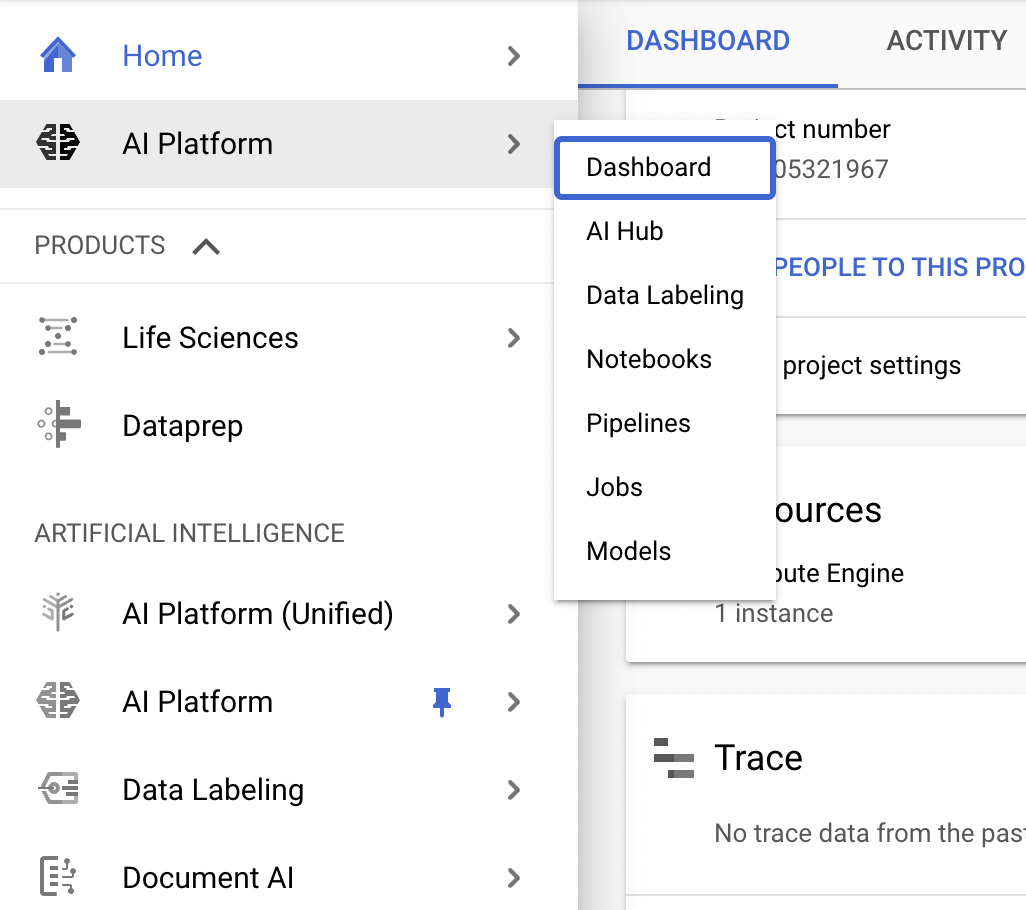
  • Google Cloud Console의 탐색 메뉴에서 AI 플랫폼으로 스크롤하여 Pin 아이콘을 클릭합니다. 이렇게 하면 나중에 실습에서 쉽게 액세스할 수 있도록 메뉴 상단에 바로 가기가 만들어집니다.

Training Data Split in BigQuery

I. 구글 클라우드 설정

본격적인 빅쿼리 실습에 앞서서, Python과 연동하는 예제를 준비하였다. 빅쿼리 시작에 앞서서 선행적으로 클라우드 사용을 해야 한다.

  1. 만약 GCP 프로젝트가 없다면, 계정을 연동한다. Go to Cloud Resource Manager
  2. 그리고, 비용결제를 위한 카드를 등록한다. Enable billing
  3. 마지막으로 BigQuery API를 사용해야 하기 때문에 빅쿼리 API 사용허가를 내준다.Enable BigQuery

위 API를 이용하지 않으면 Python 또는 R과 연동해서 사용할 수는 없다. 자주 쓰는것이 아니라면 비용은 거의 발생하지 않으니 염려하지 않아도 된다. 비용관리에 대한 자세한 내용은 BigQuery 권장사항: 비용 관리에서 확인하기를 바란다.

R Path Setting on MacOS

1줄 요약

  • 터미널에서 R 실행이 안된다면 PATH를 설정한다.

문제 상황

  • MacOS 터미널에서 R을 실행하고 싶은데, 가끔 아래와 같은 에러 메시지가 나올때가 있다.
$ R 
bash: R: command not found

문제 해결

  • 이는 환경설정 문제이다. 즉, 이러한 경우에는 여러 솔루션이 있다.

  • 그 중에서 필자는 Fourth Solution: 선택하였다.

$ export PATH="/Library/Frameworks/R.framework/Resources:$PATH"
  • 그 후에 terminal에서 which R을 실행해본다. 아래와 같이 정상적으로 출력이 된다면, 환경설정은 잘 된 것이다.
$ which R
/Library/Frameworks/R.framework/Resources/R

Happy To Code