개요
- M1 Mac에서 텐서플로를 설치 한다.
- 필자의 현재 M1 환경은 아래와 같다.
R version 4.1.2 (2021-11-01)
Platform: aarch64-apple-darwin20 (64-bit)
Running under: macOS Big Sur 11.6

Matrix products: default
LAPACK: /Library/Frameworks/R.framework/Versions/4.1-arm64/Resources/lib/libRlapack.dylib

locale:
[1] en_US.UTF-8/en_US.UTF-8/en_US.UTF-8/C/en_US.UTF-8/en_US.UTF-8

attached base packages:
[1] stats     graphics  grDevices utils     datasets  methods   base

other attached packages:
[1] ggplot2_3.3.5    dplyr_1.0.7      tfdatasets_2.7.0 keras_2.7.0
[5] reticulate_1.22  tensorflow_2.7.0

loaded via a namespace (and not attached):
 [1] Rcpp_1.0.7        compiler_4.1.2    pillar_1.6.4      prettyunits_1.1.1
 [5] base64enc_0.1-3   tools_4.1.2       progress_1.2.2    digest_0.6.28
 [9] zeallot_0.1.0     nlme_3.1-153      gtable_0.3.0      jsonlite_1.7.2
[13] lifecycle_1.0.1   tibble_3.1.6      lattice_0.20-45   mgcv_1.8-38
[17] pkgconfig_2.0.3   png_0.1-7         rlang_0.4.12      Matrix_1.3-4
[21] cli_3.1.0         rstudioapi_0.13   withr_2.4.2       generics_0.1.1
[25] vctrs_0.3.8       hms_1.1.1         rprojroot_2.0.2   grid_4.1.2
[29] tidyselect_1.1.1  glue_1.5.0        here_1.0.1        R6_2.5.1
[33] fansi_0.5.0       farver_2.1.0      purrr_0.3.4       magrittr_2.0.1
[37] whisker_0.4       splines_4.1.2     scales_1.1.1      tfruns_1.5.0
[41] ellipsis_0.3.2    colorspace_2.0-2  labeling_0.4.2    utf8_1.2.2
[45] munsell_0.5.0     crayon_1.4.2
Miniforge3 설치
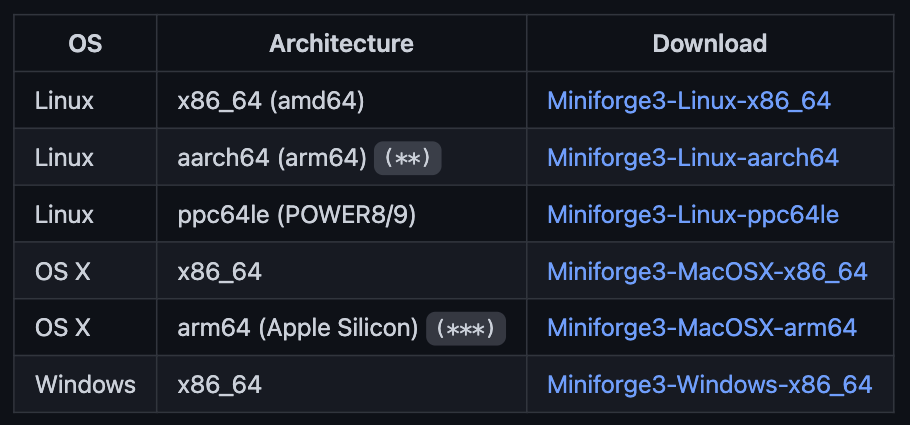
- miniforge3를 설치 해야 한다.
- arm64를 선택해서 다운로드 한다.