Python

Pandas read_csv skiprows 활용

강의 홍보

문제 개요

  • Kaggle 데이터 New York City Taxi Fare Prediction 데이터를 구글 코랩에서 Loading 하는 중 메모리 문제가 발생함
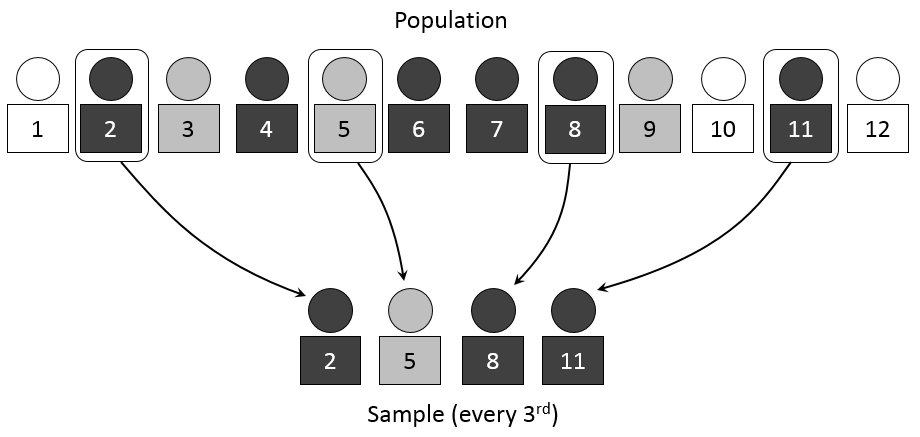
  • 계통추출(Systematic Sampling)을 통해 데이터를 불러오기로 함

예제 실습

  • 아래 예제를 통해서 실제로 데이터가 줄어드는지 확인을 해본다.
  • 핵심 코드는 skip_logic 함수이며, skiprows = skiprows=lambda x: skip_logic(x, 3) 형태로 작성할 수 있다.
  • IRIS 데이터는 https://www.kaggle.com/saurabh00007/iriscsv 에서 다운로드 받았다.
    • iris 데이터외에도 각자 데이터를 가지고 실습을 해도 좋다.
import pandas as pd 

def skip_logic(index, skip_num):
    if index % skip_num == 0:
        return False
    return True

def main():
    print('**** skiprows 기본 옵션 ****')
    iris = pd.read_csv('iris.csv')
    print(iris.shape)

    print('**** skiprows 인덱스 0, 2, 5만 제외 ****')
    iris = pd.read_csv('iris.csv', skiprows=[0, 2, 5])
    print(iris.shape)
    
    print('**** skiprows 인덱스 range(3, 20)만 제외 ****')
    iris = pd.read_csv('iris.csv', skiprows=[i for i in range(3, 20)])
    print(iris.shape)
    
    print('**** skiprows 입력값의 배수에 해당하는 값만 Load ****')
    iris = pd.read_csv('iris.csv', skiprows=lambda x: skip_logic(x, 3))
    print(iris.shape)
    
if __name__ == '__main__':
    main()
**** skiprows 기본 옵션 ****
(150, 6)
**** skiprows 인덱스 0, 2, 5만 제외 ****
(147, 6)
**** skiprows 인덱스 range(3, 20)만 제외 ****
(133, 6)
**** skiprows 입력값의 배수에 해당하는 값만 Load ****
(50, 6)

실전 적용

  • 이제 배운 것을 적용해보자.

데이터 크기

  • train.csv 데이터의 크기를 확인해보자.
import os

def convert_bytes(file_path, unit=None):
  size = os.path.getsize(file_path)
  if unit == "KB":
    return print('File size: ' + str(round(size / 1024, 3)) + ' Kilobytes')
  elif unit == "MB":
    return print('File size: ' + str(round(size / (1024 * 1024), 3)) + ' Megabytes')
  elif unit == "GB":
    return print('File size: ' + str(round(size / (1024 * 1024 * 1024), 3)) + ' Gigabytes')
  else:
    return print('File size: ' + str(size) + ' bytes')

file_list = ['train.csv', 'test.csv', 'sample_submission.csv']
for file in file_list:
  print("The {file} size: ".format(file=file))
  convert_bytes(file)
  convert_bytes(file, 'KB')
  convert_bytes(file, 'MB')
  convert_bytes(file, 'GB')
  print("--" * 5)
The train.csv size: 
File size: 5697178298 bytes
File size: 5563650.682 Kilobytes
File size: 5433.253 Megabytes
File size: 5.306 Gigabytes
----------
The test.csv size: 
File size: 983020 bytes
File size: 959.98 Kilobytes
File size: 0.937 Megabytes
File size: 0.001 Gigabytes
----------
The sample_submission.csv size: 
File size: 343271 bytes
File size: 335.226 Kilobytes
File size: 0.327 Megabytes
File size: 0.0 Gigabytes
----------

실전 적용

  • 이제 실전 적용을 해본다.
import numpy as np
import pandas as pd
import seaborn as sns 
import matplotlib.pyplot as plt

def skip_logic(index, skip_num):
    if index % skip_num == 0:
        return False
    return True

train = pd.read_csv('./train.csv', skiprows=lambda x: skip_logic(x, 4))
print(train.shape)
test = pd.read_csv('./test.csv')
submission = pd.read_csv('./sample_submission.csv')
(13855964, 8)

결론

  • 대용량 데이터를 다루는 것은 쉽지 않지만, skiprows 파라미터를 적절히 활용하여 메모리 이슈를 피하자.

ACEA Water, Intro to Time Series Forecasting

강의 홍보

Overview

Can you build a model to predict the amount of water in each waterbody to help preserve this natural resource? This is an Analytics competition where your task is to create a Notebook that best addresses the Evaluation criteria below. Submissions should be shared directly with host and will be judged by the Acea Group based on how well they addrss:

Tutorial of Ranzcr EDA

강의 홍보

Competition

Intro

import os

import pandas as pd

from matplotlib import pyplot as plt
import seaborn as sns

Check File Size

  • Check Each Size of Dataset Folder in this competition
    • train_records = 4.5GB
    • test_tfrecords = 0.5MB
    • train (image data) = 6.5GB
    • test (image data) = 0.8MB
import os

def get_folder_size(file_directory):
  # file_list = os.listdir(file_directory)
  dir_sizes = {}
  for r, d, f in os.walk(file_directory, False):
      size = sum(os.path.getsize(os.path.join(r,f)) for f in f+d)
      size += sum(dir_sizes[os.path.join(r,d)] for d in d)
      dir_sizes[r] = size
      print("{} is {} MB".format(r, round(size/2**20), 2))      
  
base_dir = '../input/ranzcr-clip-catheter-line-classification'
get_folder_size(base_dir)
../input/ranzcr-clip-catheter-line-classification/test is 805 MB
../input/ranzcr-clip-catheter-line-classification/test_tfrecords is 555 MB
../input/ranzcr-clip-catheter-line-classification/train_tfrecords is 4563 MB
../input/ranzcr-clip-catheter-line-classification/train is 6592 MB
../input/ranzcr-clip-catheter-line-classification is 12524 MB

Check train file

  • Let’s descirbe train
train = pd.read_csv('../input/ranzcr-clip-catheter-line-classification/train.csv', index_col = 0)
test = pd.read_csv('../input/ranzcr-clip-catheter-line-classification/sample_submission.csv', index_col = 0)
display(train.head())
display(test.head())
ETT - AbnormalETT - BorderlineETT - NormalNGT - AbnormalNGT - BorderlineNGT - Incompletely ImagedNGT - NormalCVC - AbnormalCVC - BorderlineCVC - NormalSwan Ganz Catheter PresentPatientID
StudyInstanceUID
1.2.826.0.1.3680043.8.498.2669762895327322818937555779958242056100000010000ec89415d1
1.2.826.0.1.3680043.8.498.4630289159739875875981862867536515772900100100010bf4c6da3c
1.2.826.0.1.3680043.8.498.23819260719748494858948050424870692577000000001003fc1c97e5
1.2.826.0.1.3680043.8.498.6828664320232321280128351836714435874400000001000c31019814
1.2.826.0.1.3680043.8.498.1005020300922593825911900052881476217500000000010207685cd1
ETT - AbnormalETT - BorderlineETT - NormalNGT - AbnormalNGT - BorderlineNGT - Incompletely ImagedNGT - NormalCVC - AbnormalCVC - BorderlineCVC - NormalSwan Ganz Catheter Present
StudyInstanceUID
1.2.826.0.1.3680043.8.498.4692314557909600261710656729713516093200000000000
1.2.826.0.1.3680043.8.498.8400687018261108009182410976756156488700000000000
1.2.826.0.1.3680043.8.498.1221903329441311994751549472068754167200000000000
1.2.826.0.1.3680043.8.498.8499447438023596810990684554070609267100000000000
1.2.826.0.1.3680043.8.498.3579898779380566966257210888174520137200000000000

Definitions of Variables

  • What’s inside data?
    • StudyInstanceUID - unique ID for each image
    • ETT - Abnormal - endotracheal tube placement abnormal
    • ETT - Borderline - endotracheal tube placement borderline abnormal
    • ETT - Normal - endotracheal tube placement normal
    • NGT - Abnormal - nasogastric tube placement abnormal
    • NGT - Borderline - nasogastric tube placement borderline abnormal
    • NGT - Incompletely Imaged - nasogastric tube placement inconclusive due to imaging
    • NGT - Normal - nasogastric tube placement borderline normal
    • CVC - Abnormal - central venous catheter placement abnormal
    • CVC - Borderline - central venous catheter placement borderline abnormal
    • CVC - Normal - central venous catheter placement normal
    • Swan Ganz Catheter Present(??)
    • PatientID - unique ID for each patient in the dataset

Kaggle API on Mac/Linux

강의 홍보

개요

  • 새로운 학생들과 Kaggle 경진대회를 나가게 되었다.
  • 참여 경진대회
  • 기존에는 주로 Google Colab에서 했지만, 대용량 데이터부터 터미널로 다운로드 받아야 한다.

핵심 문장

kaggle.json 파일을 각 OS에 맞게 옮긴다.

Kaggle API 다운로드

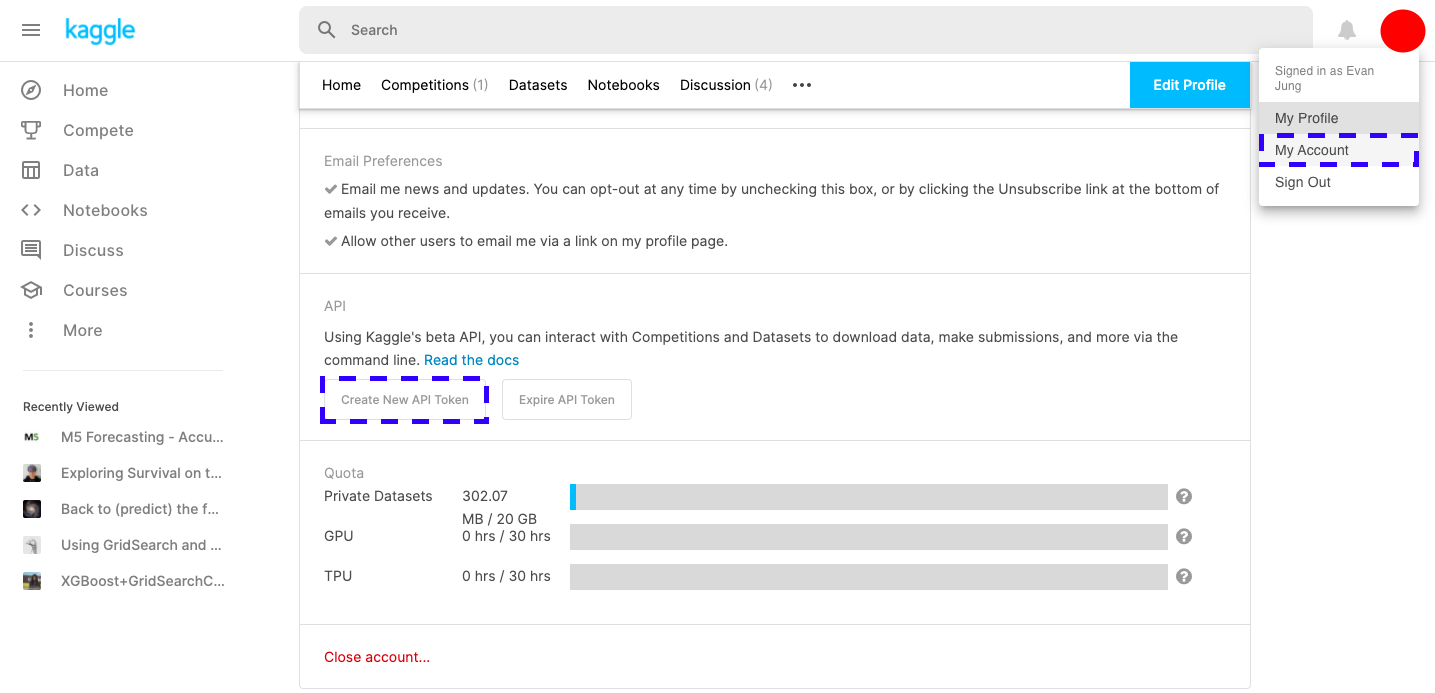
  • 계정 [Profile]-[My Account]를 클릭 후, 아래 화면에서 Kaggle API를 다운로드 받는다.

파일 이동

  • 다운로드 파일을 적절한 위치에 옮긴다.
$ mv kaggle.json ~/.kaggle/
$ chmod 600 ~/.kaggle/kaggle.json

Python 파일 만들기

  • class를 활용하여 파일을 다운로드 받는다.
    • (사실, 터미널에서 해도 되기는 하다.)
from kaggle.api.kaggle_api_extended import KaggleApi

class KAGGLE:
    def __init__(self):
        self.api = KaggleApi()
        self.api.authenticate()

    def search(self, category):
        competitions = self.api.competitions_list(category = category)
        for comp in competitions:
            print(comp.ref, comp.reward, comp.userRank, sep=',')

    def download(self, name):
        files = self.api.competition_download_files(name)
        return files

if __name__ == '__main__':
    kaggle = KAGGLE()
    kaggle.search('all')
    kaggle.download('titanic')
  • 파일을 만든 후, 위 소스코드를 붙여 넣고, 실행한다.
$ python3 yourpython.py
contradictory-my-dear-watson,Prizes,None
gan-getting-started,Prizes,None
tpu-getting-started,Knowledge,None
digit-recognizer,Knowledge,None
titanic,Knowledge,None
house-prices-advanced-regression-techniques,Knowledge,1286
connectx,Knowledge,None
nlp-getting-started,Knowledge,1071
competitive-data-science-predict-future-sales,Kudos,None
hungry-geese,Prizes,None
indoor-location-navigation,$10,000,None
hpa-single-cell-image-classification,$25,000,None
vinbigdata-chest-xray-abnormalities-detection,$50,000,None
hubmap-kidney-segmentation,$60,000,None
ranzcr-clip-catheter-line-classification,$50,000,None
tabular-playground-series-feb-2021,Swag,None
rock-paper-scissors,Prizes,None
jane-street-market-prediction,$100,000,None
santa-2020,Prizes,None
cassava-leaf-disease-classification,$18,000,3059
  • 만약 상태 진행 표시가 필요하다면, 차라리 캐글 명령어를 직접 입력하도록 한다.
$ kaggle competitions download -c vinbigdata-chest-xray-abnormalities-detection

Kaggle House Price ML

강의 홍보

공지

  • 현재 책 출판 준비 중입니다.
  • 구체적인 설명은 책이 출판된 이후에 요약해서 올리도록 합니다.

이전 글

머신러닝 모형 학습 및 평가

데이터셋 분리 및 교차 검증

X = all_df.iloc[:len(y), :]
X_test = all_df.iloc[len(y):, :]
X.shape, y.shape, X_test.shape
((1458, 258), (1458,), (1459, 258))
from sklearn.model_selection import train_test_split
X_train, X_test, y_train, y_test = train_test_split(X, y, test_size = 0.25, random_state = 0)
X_train.shape, X_test.shape, y_train.shape, y_test.shape
((1093, 258), (365, 258), (1093,), (365,))

평가지표

MAE

import numpy as np

def mean_absolute_error(y_true, y_pred):

  error = 0
  for yt, yp in zip(y_true, y_pred):
    error = error + np.abs(yt-yp)
  
  mae = error / len(y_true)
  return mae

MSE

import numpy as np

def mean_squared_error(y_true, y_pred):

  error = 0
  for yt, yp in zip(y_true, y_pred):
    error = error + (yt - yp) ** 2
  
  mse = error / len(y_true)
  return mse

RMSE

import numpy as np

def root_rmse_squared_error(y_true, ypred):
  error = 0
  
  for yt, yp in zip(y_true, y_pred):
    error = error + (yt - yp) ** 2
  
  mse = error / len(y_true)
  rmse = np.round(np.sqrt(mse), 3)
  return rmse

Test1

y_true = [400, 300, 800]
y_pred = [380, 320, 777]

print("MAE:", mean_absolute_error(y_true, y_pred))
print("MSE:", mean_squared_error(y_true, y_pred))
print("RMSE:", root_rmse_squared_error(y_true, y_pred))
MAE: 21.0
MSE: 443.0
RMSE: 21.048

Test2

y_true = [400, 300, 800, 900]
y_pred = [380, 320, 777, 600]

print("MAE:", mean_absolute_error(y_true, y_pred))
print("MSE:", mean_squared_error(y_true, y_pred))
print("RMSE:", root_rmse_squared_error(y_true, y_pred))
MAE: 90.75
MSE: 22832.25
RMSE: 151.103

RMSE with Sklean

from sklearn.metrics import mean_squared_error

def rmsle(y_true, y_pred):
    return np.sqrt(mean_squared_error(y_true, y_pred))

모형 정의 및 검증 평가

from sklearn.metrics import mean_squared_error
from sklearn.model_selection import KFold, cross_val_score
from sklearn.linear_model import LinearRegression

def cv_rmse(model, n_folds=5):
    cv = KFold(n_splits=n_folds, random_state=42, shuffle=True)
    rmse_list = np.sqrt(-cross_val_score(model, X, y, scoring='neg_mean_squared_error', cv=cv))
    print('CV RMSE value list:', np.round(rmse_list, 4))
    print('CV RMSE mean value:', np.round(np.mean(rmse_list), 4))
    return (rmse_list)

n_folds = 5
rmse_scores = {}
lr_model = LinearRegression()
score = cv_rmse(lr_model, n_folds)
print("linear regression - mean: {:.4f} (std: {:.4f})".format(score.mean(), score.std()))
rmse_scores['linear regression'] = (score.mean(), score.std())
CV RMSE value list: [0.139  0.1749 0.1489 0.1102 0.1064]
CV RMSE mean value: 0.1359
linear regression - mean: 0.1359 (std: 0.0254)

첫번째 최종 예측 값 제출

from sklearn.model_selection import cross_val_predict

X = all_df.iloc[:len(y), :]
X_test = all_df.iloc[len(y):, :]
X.shape, y.shape, X_test.shape

lr_model_fit = lr_model.fit(X, y)
final_preds = np.floor(np.expm1(lr_model_fit.predict(X_test)))
print(final_preds)
[117164. 158072. 187662. ... 173438. 115451. 219376.]
submission = pd.read_csv("sample_submission.csv")
submission.iloc[:,1] = final_preds
print(submission.head())
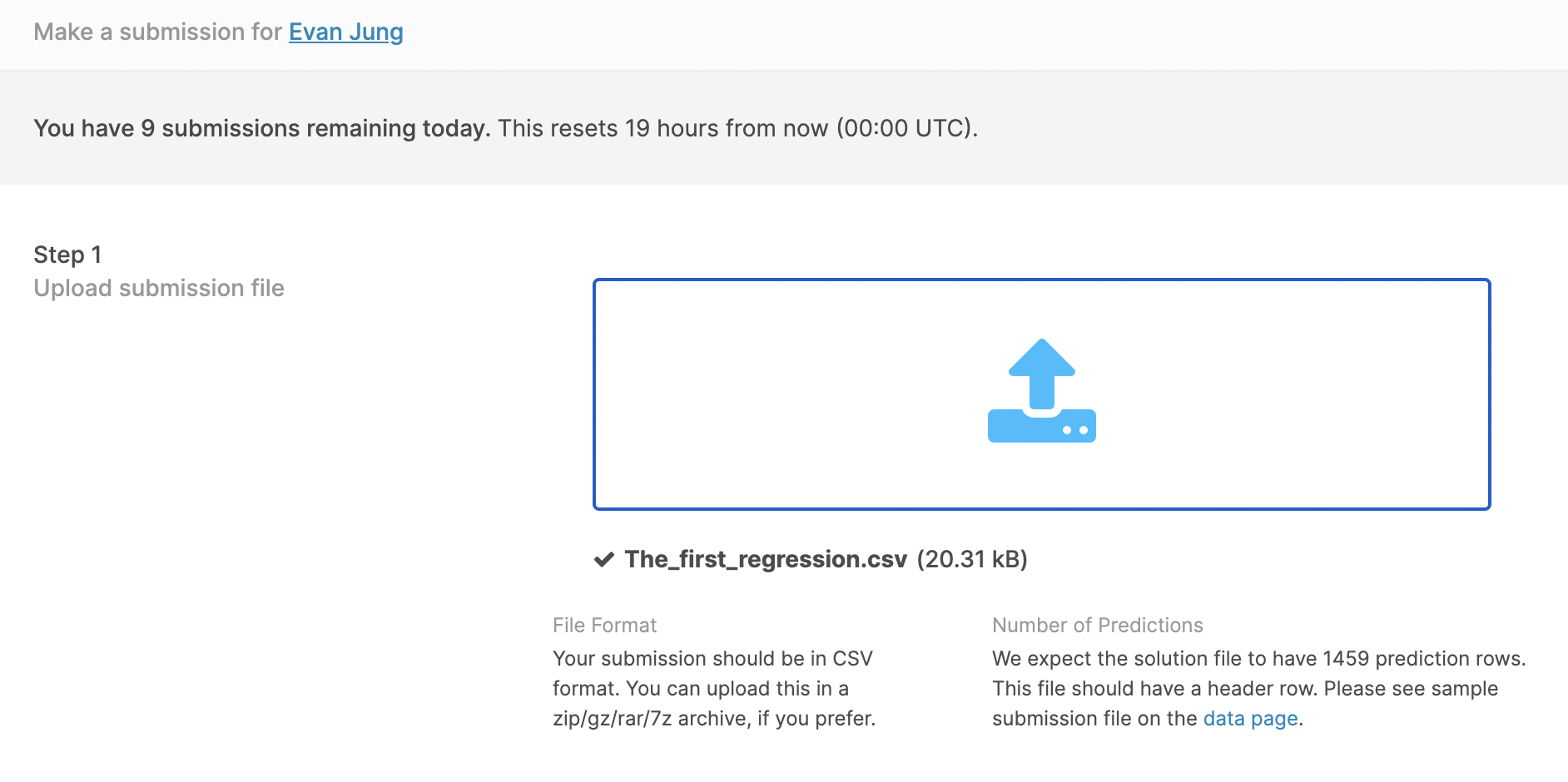
submission.to_csv("The_first_regression.csv", index=False)
     Id  SalePrice
0  1461   117164.0
1  1462   158072.0
2  1463   187662.0
3  1464   197265.0
4  1465   199692.0

Kaggle 업데이트

  • 먼저 경진대회 Submission 파일을 클릭한 후, 파일을 업르도 한다.

Kaggle Feature Engineering - House Price

강의 홍보

공지

  • 현재 책 출판 준비 중입니다.
  • 구체적인 설명은 책이 출판된 이후에 요약해서 올리도록 합니다.

Kaggle API

Kaggle API를 활용한 데이터를 수집하는 예제는 Feature Engineering with Housing Price Prediction - Numerical Features 에서도 확인할 수 있기 때문에 생략 합니다.

Kaggle Countplot with Text using Seaborn

강의 홍보

개요

캐글 데이터 연동

  • 캐글 데이터를 구글 드라이브에 업로드 한 뒤 구글 코랩과 연동한다.
  • Kaggle API를 통해 데이터를 불러올 수도 있지만, 수동으로 다운로드 받은 뒤 드라이브에 업로드 하였다.
# Mount Google Drive
from google.colab import drive # import drive from google colab

ROOT = "/content/drive"     # default location for the drive
print(ROOT)                 # print content of ROOT (Optional)
drive.mount(ROOT)           # we mount the google drive at /content/drive
/content/drive
Mounted at /content/drive
# import join used to join ROOT path and MY_GOOGLE_DRIVE_PATH
from os.path import join  

# path to your project on Google Drive
MY_GOOGLE_DRIVE_PATH = 'My Drive/Colab Notebooks/competition/kaggle/2020 Kaggle Machine Learning'

PROJECT_PATH = join(ROOT, MY_GOOGLE_DRIVE_PATH)
print(PROJECT_PATH)
/content/drive/My Drive/Colab Notebooks/competition/kaggle/2020 Kaggle Machine Learning
%cd "{PROJECT_PATH}"
/content/drive/My Drive/Colab Notebooks/competition/kaggle/2020 Kaggle Machine Learning

라이브러리 & 데이터 불러오기

import numpy as np
import pandas as pd
import matplotlib.pyplot as plt
import seaborn as sns

pd.set_option('mode.chained_assignment', None)
survey = pd.read_csv('./data/kaggle_survey_2020_responses.csv')
question = survey.iloc[0,:].T
full_df = survey.iloc[1:,:]
full_df.shape
/usr/local/lib/python3.6/dist-packages/IPython/core/interactiveshell.py:2718: DtypeWarning: Columns (0) have mixed types.Specify dtype option on import or set low_memory=False.
  interactivity=interactivity, compiler=compiler, result=result)


(20036, 355)

데이터 전처리

  • 우선 IndiaUSA를 제외한 나라는 삭제하도록 한다.
  • 출력된 결과를 확인해보면 알겠지만, 행이 대폭 감소한 것을 확인할 수 있다.
full_df['Q3'].replace({'United States of America':'USA'}, inplace=True)
df1 = full_df[(full_df['Q3']=='India')|(full_df['Q3']=='USA')]
df1.reset_index(drop=True, inplace=True)
print(df1['Q3'].unique())
df1.shape
['USA' 'India']


(8088, 355)

1차 데이터 시각화

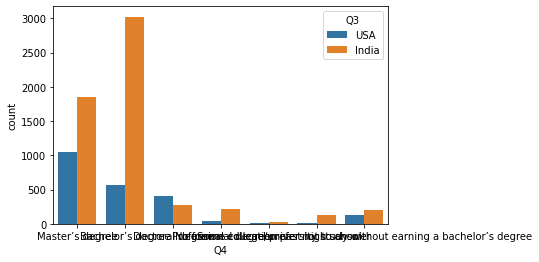
  • 이제 countplot()을 활용하여 시각화를 진행한다.
sns.countplot(x = 'Q4', hue = 'Q3', data = df1)
<matplotlib.axes._subplots.AxesSubplot at 0x7f3bbad50ac8>

png

matplotlib 03_2 Scatter Plot

강의 홍보

산점도 그래프

산점도는 두 수치형 변수의 분포를 비교하고 두 변수 사이에 상관 관계가 있는지 여부를 확인하는 데 사용됩니다. 데이터 내에 구별되는 군집/분할이 있으면 산점도에서도 명확해집니다.

(1) 라이브러리 불러오기

필요한 라이브러리를 불러옵니다.

import matplotlib.pyplot as plt
import numpy as np
import seaborn as sns

(2) 데이터 생성

이번에는 seaborn 패키지 내 tips 데이터를 활용합니다.

(Mac) Python 기본 환경설정 및 주피터 노트북 설치

개요

  • M1 맥북을 구입 후, 환경 설정을 하다보며, 기록을 남기기로 하였다.
  • 환경변수에 대해 살짝 다루도록 한다.
  • Jupyter Notebook 설치를 진행해본다.
    • Note: 아나콘다가 아닌, Python 공식홈페이지에서 다운 받은 것을 전제로 한다.

설정 1. zsh to bash 환경으로 바꾸기

  • 필자는 zsh는 잘 쓰지 않았다.
  • 그런데, Mac은 Default로 bash 환경을 쓴다.
  • 써보지 않았기에, bash로 바꾸도록 한다. (쉽다!)
$ chsh -s /bin/bash
  • 위 설정을 진행한 후, 터미널을 종료한 뒤 다시 시작한다.
  • 만약, 현재 쉘 스크립트를 알고자 하면 아래와 같은 명령어를 입력하도록 한다.
$ echo $SHELL
/bin/bash

설정 2. 파이썬 환경설정

  • 먼저 아래 코드를 실행한다.
$ cd ~
$ ls -a
.			.ipython		.zshrc
..			.local			Applications
.CFUserTextEncoding	.matplotlib		Desktop
.DS_Store		.python_history		Documents
.Rhistory		.r			Downloads
.Trash			.rstudio-desktop	Library
.bash_history		.ssh			Movies
.bash_profile		.viminfo		Music
.bash_profile.swp	.zprofile		Myblog
.bash_sessions		.zprofile.swp		OneDrive
.config			.zsh_history		Pictures
.gitconfig		.zsh_sessions		Public
  • 위 파일 중에서 특히 관심을 가져야하는 파일은 두가지다

NLP - From Word2Vec TO GPT-3

개요

  • 본 포스트는 자연어처리의 주요 흐름에 관해 간단하게 정리한 내용이다.
  • 일종의 모음집이라고 하면 좋을 것 같다.
    • 구체적인 자연어 이론에 대한 설명은 대해서는 유투브 영상 및 그 와 다양한 자료들을 참고하도록 하자. .

사전 학습의 개념

  • 사전 학습 모델이란 기존에 자비어(Xavier) 등 임의의 값으로 초기화된 모델의 가중치들을 다른 문제(task)에 학습시킨 가중치들로 초기화하는 방법이다.
  • 이미지 분류에서는 보통 전이학습이라는 용어를 사용하기도 했다.
  • 자연어에서의 가장 대표적인 사전학습 모델이 버트와 GPT이다.
  • 현재는 이러한 대부분의 자연어 처리 모델이 언어 모델을 사전 학습한 모델을 활용하도록 한다.
    • 예를 들면, 오늘 저녁 반찬 간이 조금 싱겁다라는 문장이 있을 때, 오늘 아침 반찬 간이라는 단어들을 통해 싱거워라는 단어를 모델이 예측하며 학습하게 된다.
  • 이러한 학습을 통해 모델은 언어에 대한 전반적인 이해(Natural Language Understanding, NLU)를 하게 되고, 이렇게 사전 학습된 지식을 기반으로 하위 문제에 대한 성능을 향상 시킨다.

사전 학습의 방법

  • 첫번째는 특징 기반(feature-based) 방법이다.
  • 특징 기반 방법이란 사전 학습된 특징을 하위 문제의 모델에 부가적인 특징을 활용하는 방법이다.
    • 특징 기반의 사전 학습 활용 방법의 대표적인 예는 word2vec으로, 학습한 임베딩 특징을 우리가 학습하고자 하는 모델의 임베딩 특징으로 활용하는 방법이다.
    • 사전 학습한 가중치를 활용하는 또 다른 방법은 미세 조정(fine-tuning)이다. 미세 조정이란 사전 학습한 모든 가중치와 더불어 하위 문제를 위한 최소한의 가중치를 추가해서 모델을 추가로 학습(미세 조정) 하는 방법을 말한다.

기존연구 소개

  • 버트와 GPT를 배우기에 앞서 자연어 처리 연구의 흐름에 대해 살펴보도록 한다.

Word2Vec & Skip Gram

  • 문장에서 특정한 단어가 어떻게 올 것인지 예측하는 방법의 가장 기본적인 원리라고 할 수 있다.
  • word2vec은 CBOW(Continuous Bag of Words)와 Skip-Gram이라는 두가지 모델로 나뉜다.
  • 두 모델은 서로 반대되는 개념이라고 할 수 있다.
from IPython.display import HTML

HTML('<iframe width="560" height="315" src="https://www.youtube.com/embed/sY4YyacSsLc?start=596" frameborder="0" allow="accelerometer; autoplay; clipboard-write; encrypted-media; gyroscope; picture-in-picture" allowfullscreen></iframe>')
HTML('<iframe width="560" height="315" src="https://www.youtube.com/embed/UqRCEmrv1gQ?start=596" frameborder="0" allow="accelerometer; autoplay; clipboard-write; encrypted-media; gyroscope; picture-in-picture" allowfullscreen></iframe>')
  • 다음 문장을 확인해보자. 예시를 들면 다음과 같다.