Python

Elastic Search Engine Installation

강의 홍보

개요

설치

(venv) $ wget https://artifacts.elastic.co/downloads/elasticsearch/elasticsearch-7.14.1-darwin-x86_64.tar.gz
(venv) $ wget https://artifacts.elastic.co/downloads/elasticsearch/elasticsearch-7.14.1-darwin-x86_64.tar.gz.sha512
(venv) $ shasum -a 512 -c elasticsearch-7.14.1-darwin-x86_64.tar.gz.sha512 
(venv) $ tar -xzf elasticsearch-7.14.1-darwin-x86_64.tar.gz
(venv) $ cd elasticsearch-7.14.1/
(venv) $ ls
LICENSE.txt     NOTICE.txt      README.asciidoc bin             config          jdk.app         lib             logs            modules         plugins
  • 현재 경로에서 config/elasticsearch.yml 파일을 열고 노드와 클러스터 이름을 지정해보자.
# Use a descriptive name for your cluster:
#
cluster.name: dataEngineeringWithPython
#
# ------------------------------------ Node ------------------------------------
#
# Use a descriptive name for the node:
#
node.name: OnlyMode
  • 이제 준비가 끝났다면, 다음 명령을 실행하여 일래스틱 서치를 진행해본다.
  • 사전에 Java가 설치가 되어 있어야 한다. 만약 설치가 안 되어 있다면, Apache NiFi Installation에서 설치과정을 확인한다.
(venv) $ ./bin/elasticsearch
warning: usage of JAVA_HOME is deprecated, use ES_JAVA_HOME
OpenJDK 64-Bit Server VM warning: Option UseConcMarkSweepGC was deprecated in version 9.0 and will likely be removed in a future release.
[2021-09-07T11:09:50,528][INFO ][o.e.n.Node               ] [OnlyMode] version[7.14.1], pid[14599], build[default/tar/66b55ebfa59c92c15db3f69a335d500018b3331e/2021-08-26T09:01:05.390870785Z], OS[Mac OS X/11.4/x86_64], JVM[AdoptOpenJDK/OpenJDK 64-Bit Server VM/11.0.11/11.0.11+9]
.
.
.
[2021-09-07T11:10:20,876][INFO ][o.e.i.g.DatabaseRegistry ] [OnlyMode] database file changed [/var/folders/zq/ch7gky6n3rzgjf1pd0w2l35w0000gn/T/elasticsearch-1663630215408415345/geoip-databases/18vlOg1KR7q3JLo9G5S8SA/GeoLite2-City.mmdb], reload database...
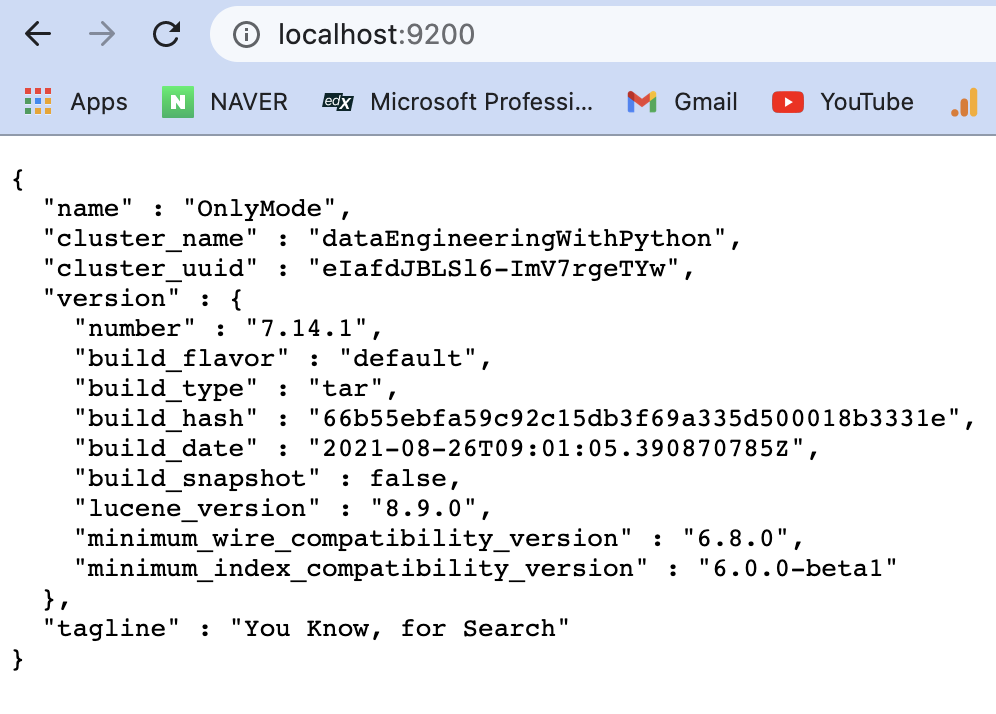
  • 이제 http://localhost:9200을 열어본다.
  • 이 책에서 사용할 NoSQL DB가 준비가 되었다는 뜻을 의미한다.

elastic.png

Apache Airflow Installation

강의 홍보

개요

  • NiFi와 같은 용도의 소프트웨어이며, 현재 가장 인기 있는 오픈소스 데이터 파이프라인 도구라고 할 수 있다.
  • 보통은 시스템에 경로를 설정한다. 그런데, 본 장에서는 가상환경 설정 후 진행하는 것으로 했다.
  • 가상 환경은 virtualenv 를 통해서 진행한다.
  • 그 후에 가상 환경에 접속한다.
$ source venv/bin/activate
(venv) $

Step 01. 환경변수 설정

  • 우선 pip 으로 설치 하기에 앞서서 환경 변수를 임시로 설정한다.
  • 해당 환경 변수가 설정된 곳으로 airflow 설치 관련 폴더 및 파일들이 다운로드 될 것이다.
(venv) $ export AIRFLOW_HOME="$(pwd)"
(venv) $ echo $AIRFLOW_HOME
/Users/evan/Desktop/data_engineering_python/install_files/airflow

Step 02. 라이브러리 설치

  • 이제 airflow 설치를 진행한다.
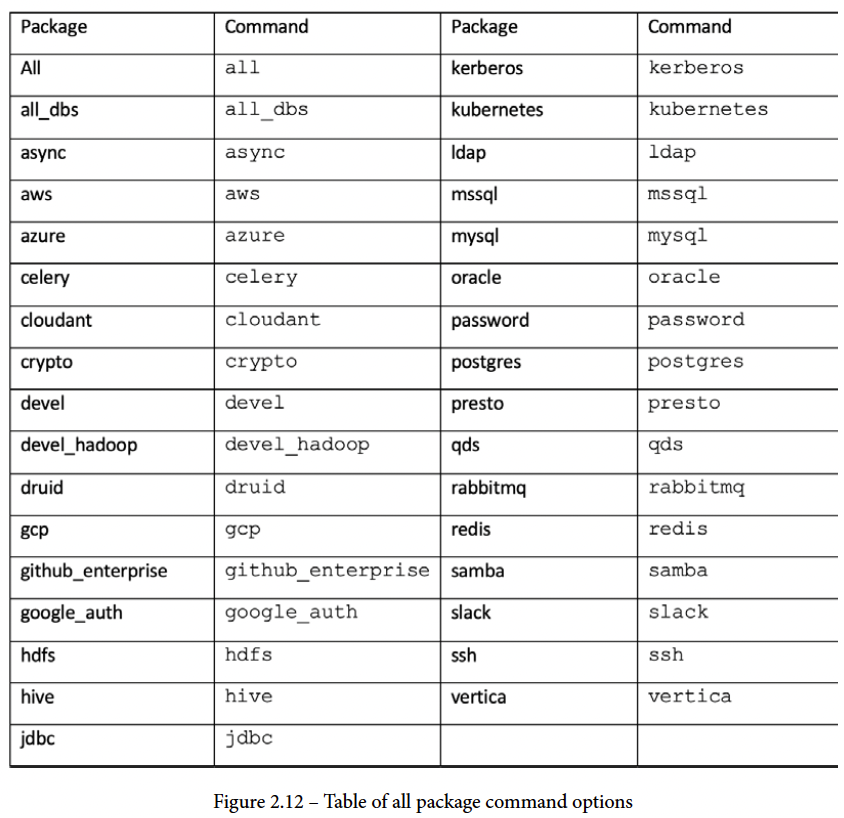
  • 이때, 설치 명령어에 따른 옵션은 아래 그림에서 살펴보기를 바란다.

airflow_01.png

Apache NiFi Installation

강의 홍보

개요

  • 데이터 엔지니어링에 필요한 기본적인 인프라를 설치 진행하는 튜토리얼을 만들었다.
  • 기본적으로 교재에 충실하지만, 약 1년전에 쓰인 책이라, 최신 버전으로 업그레이드 하였다.

Apache NiFi 설치과정

  • 먼저 웹사이트에 방문하여 필요한 파일을 다운로드 받는다.
  1. wget을 이용해서 NiFi를 현재 디렉터리에 내려받는다.
$ wget https://downloads.apache.org/nifi/1.14.0/nifi-1.14.0-bin.tar.gz
--2021-09-06 13:10:55--  https://downloads.apache.org/nifi/1.14.0/nifi-1.14.0-bin.tar.gz
Resolving downloads.apache.org (downloads.apache.org)... 135.181.214.104, 135.181.209.10, 88.99.95.219
Connecting to downloads.apache.org (downloads.apache.org)|135.181.214.104|:443... connected.
HTTP request sent, awaiting response... 200 OK
Length: 1417663663 (1.3G) [application/x-gzip]
Saving to: ‘nifi-1.14.0-bin.tar.gz’

nifi-1.14.0-bin.tar.gz                      100%[==========================================================================================>]   1.32G  5.27MB/s    in 4m 13s
  1. .tar.gz 파일의 압축을 푼다.
$ tar -xvf nifi-1.14.0-bin.tar.gz
$ ls
nifi-1.14.0             nifi-1.14.0-bin.tar.gz
  1. nifi-1.14.0 의 디렉터리가 생겼을 것이며, 해당 디렉터리로 가서 다음 명령어를 실행한다.
$ cd nifi-1.14.0
$ bin/nifi.sh start
nifi.sh: JAVA_HOME not set; results may vary

Java home: 
NiFi home: /Users/evan/Desktop/data_engineering_python/install_files/nifi-1.14.0

Bootstrap Config File: /Users/evan/Desktop/data_engineering_python/install_files/nifi-1.14.0/conf/bootstrap.conf

The operation couldn’t be completed. Unable to locate a Java Runtime.
Please visit http://www.java.com for information on installing Java.
  • 자바가 이미 설치가 되어 있다면 정상적으로 실행이 된다.
  • 그러나, 자바가 설치가 되어 있지 않다면 위 에러와 같이 별도로 자바 환경 설치를 해야 한다.

3.1 자바 설치 및 환경변수 지정

LSTM을 활용한 주식가격 예측

강의 홍보

LSTM과 RNN의 개요

  • RNN은 자연어처리에서 사용되는 대표적인 알고리즘
    • 순환신경망으로 표현됨
    • 활용범위: 음성 인식, 언어 모델링, 번역, 이미지 주석 생성

In ML, Data Leakage - 2

머신러닝 전처리 자주하는 안 좋은 습관들 모음

Sample 데이터

  • 먼저 가상의 데이터를 하나 생성합니다.
from sklearn.datasets import make_regression
from sklearn.model_selection import train_test_split

random_state = 42
X, y = make_regression(random_state = random_state, n_features = 1, noise = 1)
X_train, X_test, y_train, y_test = train_test_split(X, y, test_size = 0.4, random_state = random_state)

Inconsistent preprocessing

  • 모델을 학습시킬 때 이러한 데이터 변환을 사용하는 경우 테스트 데이터든 프로덕션 시스템의 데이터든 후속 데이터셋에도 사용해야 합니다. 그렇지 않으면 피쳐 공간이 변경되고 모델이 효과적으로 수행되지 않습니다.

Wrong

  • 먼저, 잘못된 방식을 소개합니다.
  • train 데이터에는 scaler가 적용되었지만, 테스트 데이터에는 적용되지 않았습니다. 따라서, 이러한 경우 모델 성능이 예상보다 떨어질 수 있습니다.
from sklearn.metrics import mean_squared_error
from sklearn.linear_model import LinearRegression
from sklearn.preprocessing import StandardScaler

scaler = StandardScaler()
X_train_transformed = scaler.fit_transform(X_train)
model = LinearRegression().fit(X_train_transformed, y_train)
mean_squared_error(y_test, model.predict(X_test))
62.80867119249524
  • Non-Transformed X_test 데이터를 예측값으로 넣으려면 X_train과 마찬가지로 동일하게 transform을 적용해야 한다.
scaler = StandardScaler()
X_train_transformed = scaler.fit_transform(X_train)
X_test_transformed = scaler.transform(X_test)
model = LinearRegression().fit(X_train_transformed, y_train)
mean_squared_error(y_test, model.predict(X_test_transformed))
0.9027975466369481
from sklearn.datasets import make_regression
from sklearn.model_selection import train_test_split
from sklearn.metrics import mean_squared_error
from sklearn.linear_model import LinearRegression
from sklearn.preprocessing import StandardScaler
from sklearn.pipeline import make_pipeline

random_state = 42
X, y = make_regression(random_state = random_state, n_features = 1, noise = 1)
X_train, X_test, y_train, y_test = train_test_split(X, y, test_size = 0.4, random_state = random_state)

model = make_pipeline(StandardScaler(), LinearRegression())
model.fit(X_train, y_train)
mean_squared_error(y_test, model.predict(X_test))
0.9027975466369481

Data Leakage

  • 모델을 구축할 때 예측 시점에 사용할 수 없는 정보가 사용될 때 데이터 누출이 발생함.
  • 이로 인해 교차 검증 시, 매우 낙관적인 성능 추정치가 발생하기도 하며, 실제 새로운 데이터와 만날 때는 성능이 매우 크게 저하 되기도 함.
  • 훈련 및 테스트 데이터 하위 집합 모두 이전 섹션에서 설명한 것과 동일한 전처리 변환을 받아야 하지만,
  • 이러한 변환은 훈련 데이터에서만 학습되는 것이 중요하다. 예를 들어 평균값으로 나누는 정규화 단계가 있는 경우 평균은 모든 데이터의 평균이 아니라 훈련 데이터 하위 집합의 평균이어야 합니다. 테스트 하위 집합이 평균 계산에 포함되는 경우 테스트 하위 집합의 정보가 모델에 영향을 줍니다.
  • Data Leakage가 발생하는 몇가지 상황을 살펴본다.

Data Leakage During Pre-Processing

  • 우선 가상의 데이터를 만듭니다.
import numpy as np 
n_samples, n_features, n_classes = 200, 100000, 2
rng = np.random.RandomState(42)
X = rng.standard_normal((n_samples, n_features))
y = rng.choice(n_classes, n_samples)

print(X.shape, y.shape)
(200, 100000) (200,)

Wrong

  • 이제 transformation부터 머신러닝 학습, 그리고 평가까지 진행한다.
from sklearn.model_selection import train_test_split
from sklearn.feature_selection import SelectKBest
from sklearn.ensemble import GradientBoostingClassifier
from sklearn.metrics import accuracy_score

# 여기 부분이 잘못 되었다. 
X_selected = SelectKBest(k=25).fit_transform(X, y)

X_train, X_test, y_train, y_test = train_test_split(X_selected, y, random_state=42)
gbc = GradientBoostingClassifier(random_state=1)
gbc.fit(X_train, y_train)

y_pred = gbc.predict(X_test)
accuracy_score(y_test, y_pred)
0.72

Right

  • Data Leakage를 예방하기 위해 먼저 train 데이터와 test 데이터를 분리한다.
  • fit이나 fit_transform은 train 데이터에만 적용한다.
X_train, X_test, y_train, y_test = train_test_split(X, y, random_state = 42)
select = SelectKBest(k=25)

X_train_selected = select.fit_transform(X_train, y_train)
gbc = GradientBoostingClassifier(random_state = 1)
gbc.fit(X_train_selected, y_train)
GradientBoostingClassifier(ccp_alpha=0.0, criterion='friedman_mse', init=None,
                           learning_rate=0.1, loss='deviance', max_depth=3,
                           max_features=None, max_leaf_nodes=None,
                           min_impurity_decrease=0.0, min_impurity_split=None,
                           min_samples_leaf=1, min_samples_split=2,
                           min_weight_fraction_leaf=0.0, n_estimators=100,
                           n_iter_no_change=None, presort='deprecated',
                           random_state=1, subsample=1.0, tol=0.0001,
                           validation_fraction=0.1, verbose=0,
                           warm_start=False)
X_test_selected = select.transform(X_test)
y_pred = gbc.predict(X_test_selected)
accuracy_score(y_test, y_pred)
0.5
  • 이번에는 Pipeline을 통해 구성하도록 한다.
from sklearn.pipeline import make_pipeline

X_train, X_test, y_train, y_test = train_test_split(
    X, y, random_state=42)

pipeline = make_pipeline(SelectKBest(k=25), 
                         GradientBoostingClassifier(random_state=1))

pipeline.fit(X_train, y_train)
Pipeline(memory=None,
         steps=[('selectkbest',
                 SelectKBest(k=25,
                             score_func=<function f_classif at 0x7f56a7c7f5f0>)),
                ('gradientboostingclassifier',
                 GradientBoostingClassifier(ccp_alpha=0.0,
                                            criterion='friedman_mse', init=None,
                                            learning_rate=0.1, loss='deviance',
                                            max_depth=3, max_features=None,
                                            max_leaf_nodes=None,
                                            min_impurity_decrease=0.0,
                                            min_impurity_split=None,
                                            min_samples_leaf=1,
                                            min_samples_split=2,
                                            min_weight_fraction_leaf=0.0,
                                            n_estimators=100,
                                            n_iter_no_change=None,
                                            presort='deprecated',
                                            random_state=1, subsample=1.0,
                                            tol=0.0001, validation_fraction=0.1,
                                            verbose=0, warm_start=False))],
         verbose=False)
  • 테스트 데이터는 예측을 할 때만 사용하도록 한다.
y_pred = pipeline.predict(X_test)
accuracy_score(y_test, y_pred)
0.5
  • Pipeline은 cross_val_score에 직접 사용할 수도 있다.
from sklearn.model_selection import cross_val_score
scores = cross_val_score(pipeline, X, y)
print(f"Mean accuracy: {scores.mean():.2f}+/-{scores.std():.2f}")
Mean accuracy: 0.52+/-0.04

In ML, Data Leakage - 1

Data Leakage

  • 모형 평가를 하기 전에 전체 데이터셋을 가공 및 변환함.
  • 이를 평가에 반영하면 새로운 데이터를 예측할 때 부정확한 결과를 도출 할 수 있음.
  • 이를 방지 하기 위해서는 training 데이터만 데이터 전처리를 수행하는 것이 바람직함.
  • Data Leakage를 피하기 위해서는 scikit-learn modeling pipeline을 설계해햐 함.

데이터 준비

  • 가상의 데이터를 준비한다.
  • 데이터는 모두 수치형 데이터로 준비했다.
from sklearn.datasets import make_classification
X, y = make_classification(n_samples = 1000, n_features = 20, n_informative = 15, n_redundant = 5, random_state = 7)

# summarize the dataset
print(X.shape, y.shape)
(1000, 20) (1000,)

일반적인 방법의 데이터 전처리

  • 수치형 데이터이기 때문에, MinMaxScaler 클래스를 활용한다.
from sklearn.preprocessing import MinMaxScaler

scaler = MinMaxScaler()
X = scaler.fit_transform(X)
  • 이번에는 데이터셋을 분리하도록 한다.
from sklearn.model_selection import train_test_split
X_train, X_test, y_train, y_test = train_test_split(X, y, test_size=0.33, random_state = 7)
  • 이번에는 로지스틱 회귀분석을 시행한다.
from sklearn.linear_model import LogisticRegression

model = LogisticRegression()
model.fit(X_train, y_train)
LogisticRegression(C=1.0, class_weight=None, dual=False, fit_intercept=True,
                   intercept_scaling=1, l1_ratio=None, max_iter=100,
                   multi_class='auto', n_jobs=None, penalty='l2',
                   random_state=None, solver='lbfgs', tol=0.0001, verbose=0,
                   warm_start=False)
  • 이제 모형을 평가하도록 합니다.
from sklearn.metrics import accuracy_score

yhat = model.predict(X_test)
accuracy = accuracy_score(y_test, yhat)

print('Accuracy: %.3f' % (accuracy * 100))
Accuracy: 84.848
  • 이것이 일반적인 방법론이다. 그러나 엄밀히 말하면 Data Leakage 현상이 나타났다고 볼 수 있다.

Data Leakage 피하는 방법

  • 이번에는 먼저 데이터 셋을 분리하도록 합니다.
  • Train 데이터에만 scaler를 적용하도록 합니다.
from sklearn.utils.validation import check_random_state

X, y = make_classification(n_samples = 2000, n_features = 20, n_informative = 15, n_redundant = 5, random_state = 7)
X_train, X_test, y_train, y_test = train_test_split(X, y, test_size=0.33, random_state = 1)
  • 그 후, X_train과 X_test에만 scaler를 적용한다.
scaler = MinMaxScaler()
scaler.fit(X_train)
X_train = scaler.transform(X_train)
X_test = scaler.transform(X_test)
  • 이제 모형을 만든 후, 결괏값을 적용합니다.
model = LogisticRegression()
model.fit(X_train, y_train)
yhat = model.predict(X_test)
accuracy = accuracy_score(y_test, yhat)

print('Accuracy: %.3f' % (accuracy * 100))
Accuracy: 88.333
  • 결과를 보면 알겠지만, 모형의 성능에도 좋지 않음을 올 수 있다.

Reference

Jason Brownlee. 2020. How to Avoid Data Leakage When Performing Data Preparation. Retrieved from https://machinelearningmastery.com/data-preparation-without-data-leakage/

(Python-Plotly) Plotly 그래프 깃헙 블로그에 올리기

강의 홍보

개요

  • 깃헙 브로그에 동적 시각화를 올리는 방법에 대해 기술한다.
  • 현재까지 찾아낸 것은 이게 최선입니다! 더 나은 것이 있다면 공유 부탁드립니다. (꾸벅)

필수 라이브러리 설치

$ pip install plotly
$ pip install chart_studio
  • plotly의 역할 그래프를 작성하는 기본 도구이며, chart_studio의 역할은 그래프를 plotly 홈페이지 업로드 할 수 있도록 도와주고, 또한 iframe output으로 변환하는 데 도움을 주는 코드이다.

step 01. 그래프 작성

  • 그래프를 작성합니다.
import plotly.express as px
import chart_studio

gapminder = px.data.gapminder()
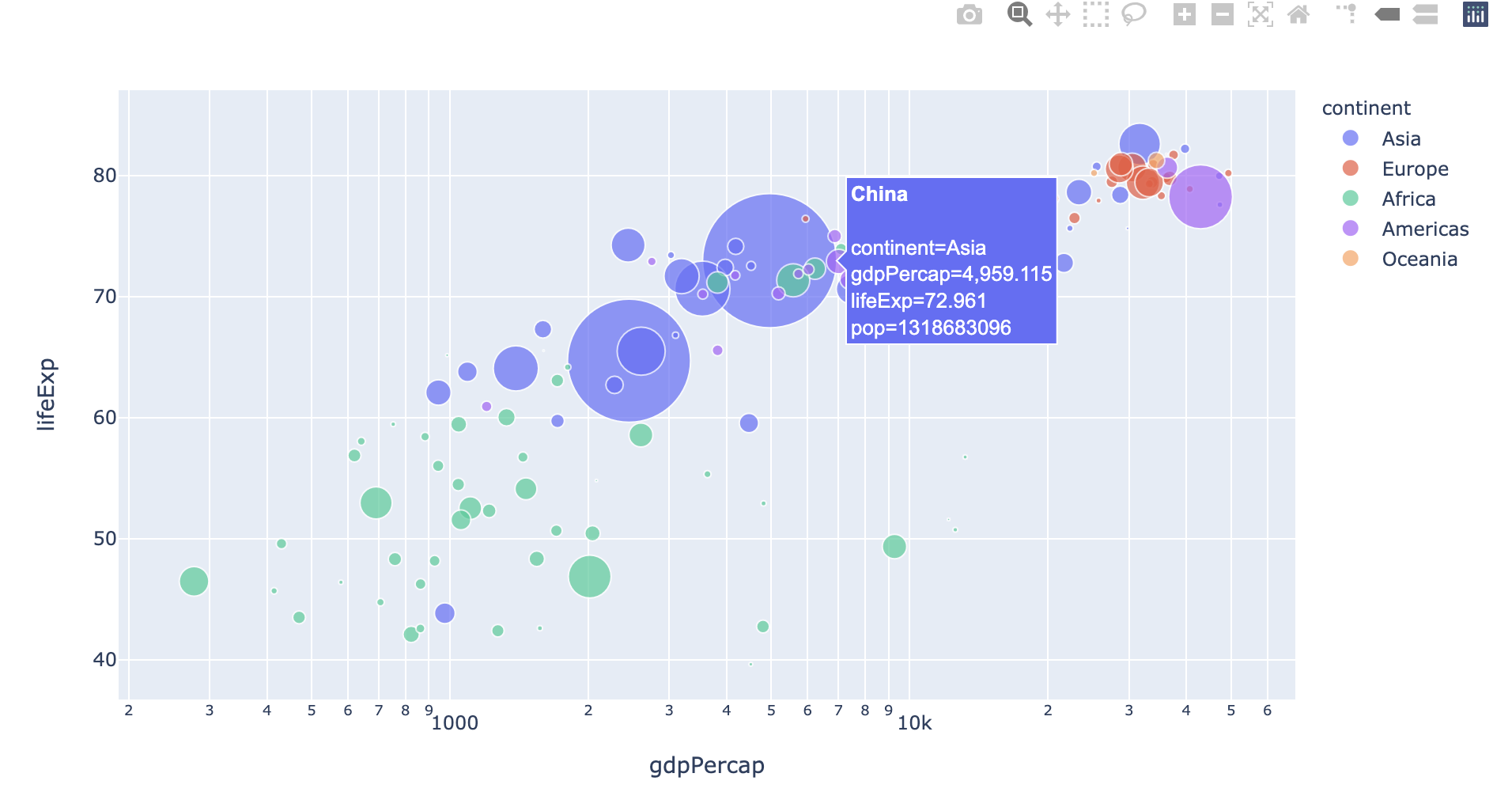
fig = px.scatter(gapminder.query("year==2007"), x="gdpPercap", y="lifeExp", size="pop", color="continent",
           hover_name="country", log_x=True, size_max=60)
fig.show()
  • 위 출력물은 실제로는 동적 시각화로 구현이 됩니다만, 캡쳐하여 올려 놓습니다.

[Python] 이미지 데이터 입출력

1줄 요약

  • OpenCV를 활용한 다양한 이미지 입출력에 대해 배우도록 한다.

Reading/Writing an image file

  • 이미지 관련 I/O
  • BMP, PNG, JPEG, and TIFF also supported.
import numpy as np
img = np.zeros((3, 3), dtype=np.uint8)
img
array([[0, 0, 0],
       [0, 0, 0],
       [0, 0, 0]], dtype=uint8)
  • 각 픽셀은 8비트 int로 구성되어 있음.
  • 각 픽셀의 범위는 0-255, 0은 검은색, 255는 흰색을 의미함.
import cv2 
img = cv2.cvtColor(img, cv2.COLOR_GRAY2BGR)
img
array([[[0, 0, 0],
        [0, 0, 0],
        [0, 0, 0]],

       [[0, 0, 0],
        [0, 0, 0],
        [0, 0, 0]],

       [[0, 0, 0],
        [0, 0, 0],
        [0, 0, 0]]], dtype=uint8)
  • 3차원 배열을 의미. 각 채널은 Blue, Green, Red를 의미한다.

image Load

  • Convert PNG into JPEG
  • 사용할 이미지는 아래와 같다.

Pandas 속도 비교 - with or without Dictionary

강의 홍보

1줄 요약

  • Dictionary를 활용한 값 변경의 속도가 훨씬 빠르다.

데이터 불러오기

  • diamonds 데이터셋을 불러온다.
import pandas as pd
import seaborn as sns

diamonds = sns.load_dataset('diamonds')
print(diamonds)
       carat        cut color clarity  depth  table  price     x     y     z
0       0.23      Ideal     E     SI2   61.5   55.0    326  3.95  3.98  2.43
1       0.21    Premium     E     SI1   59.8   61.0    326  3.89  3.84  2.31
2       0.23       Good     E     VS1   56.9   65.0    327  4.05  4.07  2.31
3       0.29    Premium     I     VS2   62.4   58.0    334  4.20  4.23  2.63
4       0.31       Good     J     SI2   63.3   58.0    335  4.34  4.35  2.75
...      ...        ...   ...     ...    ...    ...    ...   ...   ...   ...
53935   0.72      Ideal     D     SI1   60.8   57.0   2757  5.75  5.76  3.50
53936   0.72       Good     D     SI1   63.1   55.0   2757  5.69  5.75  3.61
53937   0.70  Very Good     D     SI1   62.8   60.0   2757  5.66  5.68  3.56
53938   0.86    Premium     H     SI2   61.0   58.0   2757  6.15  6.12  3.74
53939   0.75      Ideal     D     SI2   62.2   55.0   2757  5.83  5.87  3.64

[53940 rows x 10 columns]
  • Color 데이터를 확인해보자.
diamonds['color'].value_counts()
G    11292
E     9797
F     9542
H     8304
D     6775
I     5422
J     2808
Name: color, dtype: int64

color 데이터 값 변경하기

  • D, E, F는 A로 바꿉니다.
  • G, H는 B로 바꿉니다.
  • I, J는 C로 바꿉니다.

Without Dictionary

  • 먼저 첫번째 방법입니다.
import time 

start_time = time.time()
diamonds['color'].replace('D', 'A', inplace=True)
diamonds['color'].replace('E', 'A', inplace=True)
diamonds['color'].replace('F', 'A', inplace=True)
diamonds['color'].replace('G', 'B', inplace=True)
diamonds['color'].replace('H', 'B', inplace=True)
diamonds['color'].replace('I', 'C', inplace=True)
diamonds['color'].replace('J', 'C', inplace=True)

print("Time using .replace() only: {} sec".format(time.time() - start_time))
print("---")
print(diamonds['color'].value_counts())
Time using .replace() only: 0.025814056396484375 sec
---
A    26114
B    19596
C     8230
Name: color, dtype: int64

With Dictionary

  • 이번에는 Dictionary를 활용합니다.
diamonds = sns.load_dataset('diamonds')

start_time = time.time()
diamonds.replace({'color': {'D':'A', 'E':'A', 'F':'A', 'G':'B', 'H':'B', 'I':'C', 'J':'C'}}, inplace=True)

print("Time using .replace() only: {} sec".format(time.time() - start_time))
print("---")
print(diamonds['color'].value_counts())
Time using .replace() only: 0.005134105682373047 sec
---
A    26114
B    19596
C     8230
Name: color, dtype: int64
  • 동일한 결괏값이 나왔지만, 속도 차이가 0.02초 vs 0.005초 차이로 매우 큼을 확인할 수 있다.
  • 즉, 값을 변경한다면, Dictionary를 사용한다.

Pandas 속도 비교 - loc vs replace(2)

강의 홍보

1줄 요약

  • 값을 변경할 때에는 .replace 메서드를 사용합니다.

개요

  • Replace 속도를 측정해보자.
  • 이번에는 multiple 값을 변경하는 방법에 대해 알아봅니다.

비교 1 .loc vs .replace

  • 값을 바꾸는 방법은 다음과 같다.
    • data['column'].loc[data['column'] == 'Old Value'] = 'New Value'
import pandas as pd
import seaborn as sns
diamonds = sns.load_dataset('diamonds')
print(diamonds)
       carat        cut color clarity  depth  table  price     x     y     z
0       0.23      Ideal     E     SI2   61.5   55.0    326  3.95  3.98  2.43
1       0.21    Premium     E     SI1   59.8   61.0    326  3.89  3.84  2.31
2       0.23       Good     E     VS1   56.9   65.0    327  4.05  4.07  2.31
3       0.29    Premium     I     VS2   62.4   58.0    334  4.20  4.23  2.63
4       0.31       Good     J     SI2   63.3   58.0    335  4.34  4.35  2.75
...      ...        ...   ...     ...    ...    ...    ...   ...   ...   ...
53935   0.72      Ideal     D     SI1   60.8   57.0   2757  5.75  5.76  3.50
53936   0.72       Good     D     SI1   63.1   55.0   2757  5.69  5.75  3.61
53937   0.70  Very Good     D     SI1   62.8   60.0   2757  5.66  5.68  3.56
53938   0.86    Premium     H     SI2   61.0   58.0   2757  6.15  6.12  3.74
53939   0.75      Ideal     D     SI2   62.2   55.0   2757  5.83  5.87  3.64

[53940 rows x 10 columns]
diamonds.info()
<class 'pandas.core.frame.DataFrame'>
RangeIndex: 53940 entries, 0 to 53939
Data columns (total 10 columns):
 #   Column   Non-Null Count  Dtype   
---  ------   --------------  -----   
 0   carat    53940 non-null  float64 
 1   cut      53940 non-null  category
 2   color    53940 non-null  category
 3   clarity  53940 non-null  category
 4   depth    53940 non-null  float64 
 5   table    53940 non-null  float64 
 6   price    53940 non-null  int64   
 7   x        53940 non-null  float64 
 8   y        53940 non-null  float64 
 9   z        53940 non-null  float64 
dtypes: category(3), float64(6), int64(1)
memory usage: 3.0 MB

비교 2. .loc vs .replace

  • cut Column에 있는 값 중, PremiumIdeal 모두 Best로 변경합니다.
import time

diamonds = sns.load_dataset('diamonds')
diamonds['cut'] = diamonds['cut'].astype('object')

start_time = time.time()
diamonds['cut'].loc[(diamonds['cut'] == 'Premium') | (diamonds['cut'] == 'Ideal')] = 'Best'
print('Time using .loc[]: {} sec'.format(time.time() - start_time))
print(diamonds)
Time using .loc[]: 0.008001089096069336 sec
       carat        cut color clarity  depth  table  price     x     y     z
0       0.23       Best     E     SI2   61.5   55.0    326  3.95  3.98  2.43
1       0.21       Best     E     SI1   59.8   61.0    326  3.89  3.84  2.31
2       0.23       Good     E     VS1   56.9   65.0    327  4.05  4.07  2.31
3       0.29       Best     I     VS2   62.4   58.0    334  4.20  4.23  2.63
4       0.31       Good     J     SI2   63.3   58.0    335  4.34  4.35  2.75
...      ...        ...   ...     ...    ...    ...    ...   ...   ...   ...
53935   0.72       Best     D     SI1   60.8   57.0   2757  5.75  5.76  3.50
53936   0.72       Good     D     SI1   63.1   55.0   2757  5.69  5.75  3.61
53937   0.70  Very Good     D     SI1   62.8   60.0   2757  5.66  5.68  3.56
53938   0.86       Best     H     SI2   61.0   58.0   2757  6.15  6.12  3.74
53939   0.75       Best     D     SI2   62.2   55.0   2757  5.83  5.87  3.64

[53940 rows x 10 columns]


/Library/Frameworks/Python.framework/Versions/3.8/lib/python3.8/site-packages/pandas/core/indexing.py:1636: SettingWithCopyWarning: 
A value is trying to be set on a copy of a slice from a DataFrame

See the caveats in the documentation: https://pandas.pydata.org/pandas-docs/stable/user_guide/indexing.html#returning-a-view-versus-a-copy
  self._setitem_single_block(indexer, value, name)
  • 이번에는 replace 메서드를 사용해본다.
    • data['column'].replace('old value', 'new value', inplace = True
diamonds = sns.load_dataset('diamonds')

start_time = time.time()
diamonds.replace(['Premium', 'Ideal'], 'Best', inplace=True)
print('Time using replace(): {} sec'.format(time.time() - start_time)) 
Time using replace(): 0.0011608600616455078 sec
  • 기존 코드에서, GoodVery GoodLow로 변경코드를 추가합니다.
diamonds = sns.load_dataset('diamonds')
diamonds['cut'] = diamonds['cut'].astype('object')

start_time = time.time()
diamonds['cut'].loc[(diamonds['cut'] == 'Premium') | \
                    (diamonds['cut'] == 'Ideal')] = 'Best'
diamonds['cut'].loc[(diamonds['cut'] == 'Very Good') | \
                    (diamonds['cut'] == 'Good')] = 'Low'
print('Time using .loc[]: {} sec'.format(time.time() - start_time))
print(diamonds)
Time using .loc[]: 0.013423681259155273 sec
       carat   cut color clarity  depth  table  price     x     y     z
0       0.23  Best     E     SI2   61.5   55.0    326  3.95  3.98  2.43
1       0.21  Best     E     SI1   59.8   61.0    326  3.89  3.84  2.31
2       0.23   Low     E     VS1   56.9   65.0    327  4.05  4.07  2.31
3       0.29  Best     I     VS2   62.4   58.0    334  4.20  4.23  2.63
4       0.31   Low     J     SI2   63.3   58.0    335  4.34  4.35  2.75
...      ...   ...   ...     ...    ...    ...    ...   ...   ...   ...
53935   0.72  Best     D     SI1   60.8   57.0   2757  5.75  5.76  3.50
53936   0.72   Low     D     SI1   63.1   55.0   2757  5.69  5.75  3.61
53937   0.70   Low     D     SI1   62.8   60.0   2757  5.66  5.68  3.56
53938   0.86  Best     H     SI2   61.0   58.0   2757  6.15  6.12  3.74
53939   0.75  Best     D     SI2   62.2   55.0   2757  5.83  5.87  3.64

[53940 rows x 10 columns]


/Library/Frameworks/Python.framework/Versions/3.8/lib/python3.8/site-packages/pandas/core/indexing.py:1636: SettingWithCopyWarning: 
A value is trying to be set on a copy of a slice from a DataFrame

See the caveats in the documentation: https://pandas.pydata.org/pandas-docs/stable/user_guide/indexing.html#returning-a-view-versus-a-copy
  self._setitem_single_block(indexer, value, name)
diamonds = sns.load_dataset('diamonds')

start_time = time.time()
diamonds.replace([['Premium', 'Ideal'], ['Very Good', 'Good']], ['Best', 'Low'], inplace=True)
print('Time using replace(): {} sec'.format(time.time() - start_time)) 
print(diamonds)
Time using replace(): 0.002335071563720703 sec
       carat   cut color clarity  depth  table  price     x     y     z
0       0.23  Best     E     SI2   61.5   55.0    326  3.95  3.98  2.43
1       0.21  Best     E     SI1   59.8   61.0    326  3.89  3.84  2.31
2       0.23   Low     E     VS1   56.9   65.0    327  4.05  4.07  2.31
3       0.29  Best     I     VS2   62.4   58.0    334  4.20  4.23  2.63
4       0.31   Low     J     SI2   63.3   58.0    335  4.34  4.35  2.75
...      ...   ...   ...     ...    ...    ...    ...   ...   ...   ...
53935   0.72  Best     D     SI1   60.8   57.0   2757  5.75  5.76  3.50
53936   0.72   Low     D     SI1   63.1   55.0   2757  5.69  5.75  3.61
53937   0.70   Low     D     SI1   62.8   60.0   2757  5.66  5.68  3.56
53938   0.86  Best     H     SI2   61.0   58.0   2757  6.15  6.12  3.74
53939   0.75  Best     D     SI2   62.2   55.0   2757  5.83  5.87  3.64

[53940 rows x 10 columns]