Python

GCP Settings 2022 ver

개요

  • GCP 빅쿼리를 연동하는 예제를 구현한다.
  • 먼저 빅쿼리를 통해 데이터를 적재하는 예제를 확인한다.
  • 구글 코랩에서 빅쿼리 데이터를 불러온다.
  • 데이터 스튜디오에서 빅쿼리 데이터를 불러온다.

소개

Google Cloud 회원가입

  • 준비물
    • Google 계정
    • 신용카드나 체크카드 (개인적으로 돈이 없는 체크카드 사용 권장)
  • 구글 클라우드 사이트 접속
  • 무료 서버 받으려면 아래 화면에서 TRY IT FREE 를 클릭한다.

Untitled

Spark Installation on M1 Mac

사전준비

  • M1 Mac에서 스파크를 설치하는 과정을 소개 하려고 한다.
  • 필자의 Python 버전은 아래와 같다.
$ python --version
Python 3.8.7

자바 설치

Screen Shot 2022-01-05 at 12.57.39 AM.png

  • 그 다음 자바 설치를 확정한다.
$ java --showversion
  • 만약 에러가 아래와 같은 에러가 발생한다면, 시스템 환경설정 - Java - 업데이트 항목을 순차적으로 클릭한다.
$ java --showversion
Error: Could not create the Java Virtual Machine.
Error: A fatal exception has occurred. Program will exit.

Screen Shot 2022-01-05 at 12.20.33 AM.png

Spark Installation on Windows 10

사전준비

  • 스파크를 설치하는 과정은 소개 하려고 한다.
  • 사전에 파이썬 3만 설치가 되어 있으면 된다.
  • 만약, 파이썬이 처음이라면 Anaconda를 설치한다.

다운로드 전 필수 확인사항

  • 스파크 설치 전에는 반드시 체크해야 하는 사항이 있다. (System Compatibility)
  • 2022년 1월 기준은 아래와 같다.

Get Spark from the downloads page of the project website. This documentation is for Spark version 3.2.0. Spark uses Hadoop’s client libraries for HDFS and YARN. Downloads are pre-packaged for a handful of popular Hadoop versions. Users can also download a “Hadoop free” binary and run Spark with any Hadoop version by augmenting Spark’s classpath. Scala and Java users can include Spark in their projects using its Maven coordinates and Python users can install Spark from PyPI.

PyCaret Installation on M1 Mac

PyCaret Installation on M1 Mac

개요

  • M1 Mac에서 PyCaret을 설치하고 싶었다.
  • PyCaretAutoML 라이브러리이며, 단 몇줄의 코드로 복잡한 기계학습을 학습 및 비교할 수 있도록 구현한 코드라고 볼 수 있다.
  • M1 Mac에서 해당 라이브러리를 사용하려면 크게 2가지 필수 전제 조건이 있다.
    • LightGBM, XGboost 설치

1. PyCaret 설치 방법

  • 일반 인텔 기반의 Mac의 설치는 매우 쉽다. (Intel Mac)
$ brew install lightgbm
  • 그러나, M1 Mac에서는 생각보다 쉽지 않다.
    • 물론, Rosetta로 터미널을 바꾸면 Intel Mac 처럼 쓸 수 있다. 그러나, M1의 GPU를 활용하려면 기존 설치 방법으로는 적용이 어렵다.

(1) Step 01. Xcode Command Line Tools

(2) Step 02. miniforge 설치

  • 본 블로그에서 가장 중요하다.
  • 2021년 12월 기준 시점에서는 반드시 설치를 해야 한다.
    • GPU를 사용하기 위해서는 LightGBM, XGBoost, PyCaret은 Conda 기반으로만 설치가 가능하다.
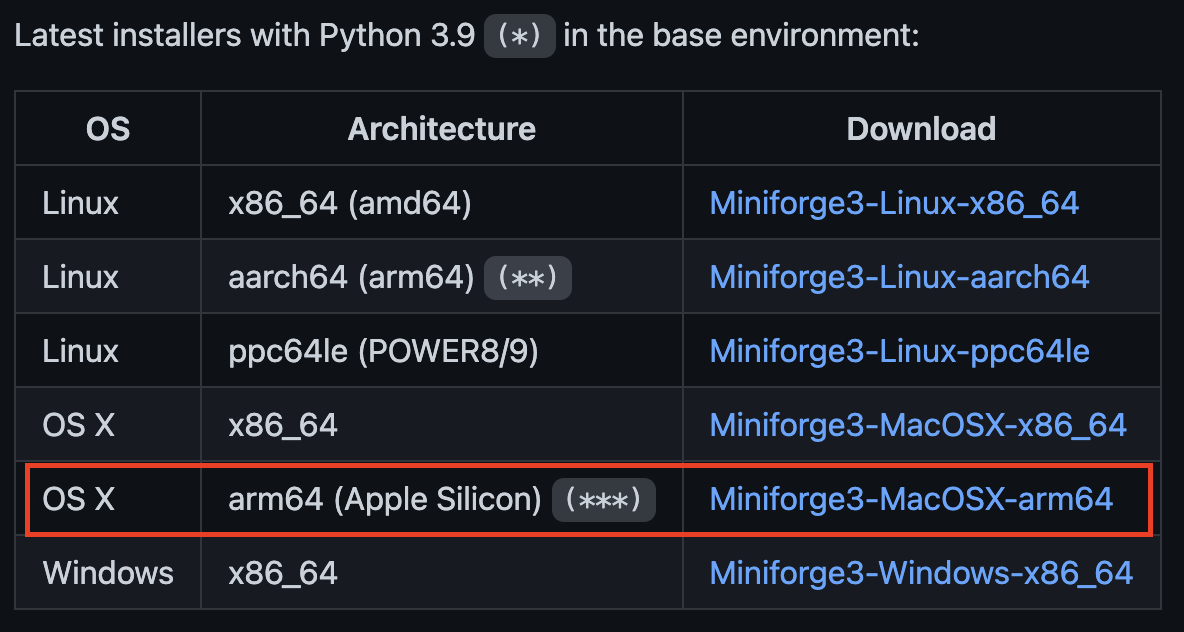
  • 설치 파일 주소: https://github.com/conda-forge/miniforge
    • 설치 시, 아래 그림과 같이 arm64 Apple Silicon을 선택해서 다운로드 받아야 한다.

install_01.png

PyCaret, Skorch Using Pipeline

개요

  • Scikit-Learn의 Pipeline은 강력하다.
  • PyCaret, Skorch에도 사용이 가능하다.
  • Google Colab에서 시도해보자.

필수 라이브러리 설치

  • pycaret을 설치 한 후에는 반드시 런타임 재시작을 클릭한다.
!pip install pycaret
Collecting pycaret
  Downloading pycaret-2.3.5-py3-none-any.whl (288 kB)
.
.
Successfully installed Boruta-0.3 Mako-1.1.6 PyYAML-6.0 alembic-1.4.1 databricks-cli-0.16.2 docker-5.0.3 funcy-1.17 gitdb-4.0.9 gitpython-3.1.24 gunicorn-20.1.0 htmlmin-0.1.12 imagehash-4.2.1 imbalanced-learn-0.7.0 joblib-1.0.1 kmodes-0.11.1 lightgbm-3.3.1 mlflow-1.22.0 mlxtend-0.19.0 multimethod-1.6 pandas-profiling-3.1.0 phik-0.12.0 prometheus-flask-exporter-0.18.7 pyLDAvis-3.2.2 pycaret-2.3.5 pydantic-1.8.2 pynndescent-0.5.5 pyod-0.9.6 python-editor-1.0.4 querystring-parser-1.2.4 requests-2.26.0 scikit-learn-0.23.2 scikit-plot-0.3.7 scipy-1.5.4 smmap-5.0.0 tangled-up-in-unicode-0.1.0 umap-learn-0.5.2 visions-0.7.4 websocket-client-1.2.3
!pip install -U skorch
Requirement already satisfied: skorch in /usr/local/lib/python3.7/dist-packages (0.11.0)
Requirement already satisfied: tabulate>=0.7.7 in /usr/local/lib/python3.7/dist-packages (from skorch) (0.8.9)
Requirement already satisfied: scikit-learn>=0.19.1 in /usr/local/lib/python3.7/dist-packages (from skorch) (0.23.2)
Requirement already satisfied: tqdm>=4.14.0 in /usr/local/lib/python3.7/dist-packages (from skorch) (4.62.3)
Requirement already satisfied: numpy>=1.13.3 in /usr/local/lib/python3.7/dist-packages (from skorch) (1.19.5)
Requirement already satisfied: scipy>=1.1.0 in /usr/local/lib/python3.7/dist-packages (from skorch) (1.5.4)
Requirement already satisfied: joblib>=0.11 in /usr/local/lib/python3.7/dist-packages (from scikit-learn>=0.19.1->skorch) (1.0.1)
Requirement already satisfied: threadpoolctl>=2.0.0 in /usr/local/lib/python3.7/dist-packages (from scikit-learn>=0.19.1->skorch) (3.0.0)
from pycaret.datasets import get_data
data = get_data("electrical_grid")
tau1tau2tau3tau4p1p2p3p4g1g2g3g4stabf
02.9590603.0798858.3810259.7807543.763085-0.782604-1.257395-1.7230860.6504560.8595780.8874450.958034unstable
19.3040974.9025243.0475411.3693575.067812-1.940058-1.872742-1.2550120.4134410.8624140.5621390.781760stable
28.9717078.8484283.0464791.2145183.405158-1.207456-1.277210-0.9204920.1630410.7666890.8394440.109853unstable
30.7164157.6696004.4866412.3405633.963791-1.027473-1.938944-0.9973740.4462090.9767440.9293810.362718unstable
43.1341127.6087724.9437599.8575733.525811-1.125531-1.845975-0.5543050.7971100.4554500.6569470.820923unstable

PyTorchModel

  • sktorch 라이브러리는 PyTorch 모델과 함께 작동한다.
  • MLP 모델을 작성하는 클래스를 설계한다.
import torch.nn as nn

class Net(nn.Module): 
  def __init__(self, num_inputs=12, num_units_d1 = 200, num_units_d2 = 100):
    super(Net, self).__init__() 

    self.dense0 = nn.Linear(num_inputs, num_units_d1)
    self.nonlin = nn.ReLU()
    self.dropout = nn.Dropout(0.5)
    self.dense1 = nn.Linear(num_units_d1, num_units_d2)
    self.output = nn.Linear(num_units_d2, 2)
    self.softmax = nn.Softmax(dim=-1)

  def forward(self, X, **kwargs):
    X = self.nonlin(self.dense0(X))
    X = self.dropout(X)
    X = self.nonlin(self.dense1(X))
    X = self.softmax(self.output(X))
    return X

Skorch Classifier

  • NeuralNetClassifier 클래스를 PyTorch 클래스와 연동한다.
  • Optimizer 기본값인 SGD를 사용한다. 만약 다른 Optimizer로 변경을 원하면 다음 링크에서 확인한다.
  • Sktorch 5 폴드 교차검증을 수행한다.
    • 학습 데이터는 80%, 나머지 20%는 검증 데이터로 활용한다.
from skorch import NeuralNetClassifier 

net = NeuralNetClassifier(
    module = Net, 
    max_epochs = 30, 
    lr = 0.1, 
    batch_size = 32, 
    train_split = None
)

PyCaret과 신경망 학습 방법

  • SKORCH NN model을 초기화 했다면, 이번에는 PyCaret과 함께 모델을 학습할 수 있다.
  • PyCaret은 기본적으로 Pandas DataFrame을 메인 객체로 사용하다.
  • 그런데, sktorch model을 사용하기 위해서는 pipeline을 구성할 때는 DataFrameTransformer() 함수를 사용해야 한다.
from skorch.helper import DataFrameTransformer
import numpy as np
from sklearn.pipeline import Pipeline

nn_pipe = Pipeline(
    [("transform", DataFrameTransformer()), 
     ("net", net), ]
)

PyCaret Setup

  • Skorch API 대신 PyCaret 모델을 사용해본다.
  • log_experimentTrue를 사용하게 되면 MLFlow를 사용할 수 있다.
  • silentTrue인 경우 중간에 발생하는 press enter to continue 입력 단계를 피할 수 있다.
from pycaret.classification import *
target = "stabf"
clf1 = setup(data = data, 
            target = target,
            train_size = 0.8,
            fold = 5,
            session_id = 123,
            log_experiment = True, 
            experiment_name = 'electrical_grid_1', 
            silent = True)
DescriptionValue
0session_id123
1Targetstabf
2Target TypeBinary
3Label Encodedstable: 0, unstable: 1
4Original Data(10000, 13)
5Missing ValuesFalse
6Numeric Features12
7Categorical Features0
8Ordinal FeaturesFalse
9High Cardinality FeaturesFalse
10High Cardinality MethodNone
11Transformed Train Set(8000, 12)
12Transformed Test Set(2000, 12)
13Shuffle Train-TestTrue
14Stratify Train-TestFalse
15Fold GeneratorStratifiedKFold
16Fold Number5
17CPU Jobs-1
18Use GPUFalse
19Log ExperimentTrue
20Experiment Nameelectrical_grid_1
21USI9626
22Imputation Typesimple
23Iterative Imputation IterationNone
24Numeric Imputermean
25Iterative Imputation Numeric ModelNone
26Categorical Imputerconstant
27Iterative Imputation Categorical ModelNone
28Unknown Categoricals Handlingleast_frequent
29NormalizeFalse
30Normalize MethodNone
31TransformationFalse
32Transformation MethodNone
33PCAFalse
34PCA MethodNone
35PCA ComponentsNone
36Ignore Low VarianceFalse
37Combine Rare LevelsFalse
38Rare Level ThresholdNone
39Numeric BinningFalse
40Remove OutliersFalse
41Outliers ThresholdNone
42Remove MulticollinearityFalse
43Multicollinearity ThresholdNone
44Remove Perfect CollinearityTrue
45ClusteringFalse
46Clustering IterationNone
47Polynomial FeaturesFalse
48Polynomial DegreeNone
49Trignometry FeaturesFalse
50Polynomial ThresholdNone
51Group FeaturesFalse
52Feature SelectionFalse
53Feature Selection Methodclassic
54Features Selection ThresholdNone
55Feature InteractionFalse
56Feature RatioFalse
57Interaction ThresholdNone
58Fix ImbalanceFalse
59Fix Imbalance MethodSMOTE

PyCaret Train Model

  • Random Forest 모델을 사용해본다.
model = create_model("rf")
AccuracyAUCRecallPrec.F1KappaMCC
00.92440.97960.96670.91890.94220.83310.8353
10.92750.97930.95490.93300.94380.84170.8422
20.92250.98100.96080.92110.94060.82940.8309
30.90810.97380.94610.91300.92930.79830.7993
40.90440.97380.94710.90710.92670.78940.7909
Mean0.91740.97750.95510.91860.93650.81840.8197
SD0.00930.00310.00790.00870.00710.02060.0206

PyCaret Train Skorch Model

  • 이번에는 Skorch Model을 Pycaret 함수에 넣어서 확인해본다.
skorch_model = create_model(nn_pipe)
AccuracyAUCRecallPrec.F1KappaMCC
00.88310.96440.95000.87690.91200.73890.7441
10.85500.94370.95690.83850.89380.66850.6831
20.83690.92800.96380.81460.88290.62020.6446
30.85060.93470.86680.89570.88100.68050.6812
40.80810.94110.97650.77890.86660.54000.5859
Mean0.84680.94240.94280.84090.88730.64960.6678
SD0.02450.01230.03900.04210.01510.06660.0519

Comparing Models

  • 두 모델 중 어떤 모델이 더 좋은지 확인해본다.
best_model = compare_models(include=[skorch_model, model], sort = "AUC")
ModelAccuracyAUCRecallPrec.F1KappaMCCTT (Sec)
1Random Forest Classifier0.91740.97750.95510.91860.93650.81840.81972.114
0NeuralNetClassifier0.84260.94000.95470.82810.88610.63550.656511.878

Hyperparameter Grid

  • Hyperparameter 튜닝을 적용하도록 한다.
  • 모형 튜닝을 위한 parameter 값은 다음 명령어를 통해서 확인할 수 있다.
skorch_model.get_params().keys()
dict_keys(['memory', 'steps', 'verbose', 'transform', 'net', 'transform__float_dtype', 'transform__int_dtype', 'transform__treat_int_as_categorical', 'net__module', 'net__criterion', 'net__optimizer', 'net__lr', 'net__max_epochs', 'net__batch_size', 'net__iterator_train', 'net__iterator_valid', 'net__dataset', 'net__train_split', 'net__callbacks', 'net__predict_nonlinearity', 'net__warm_start', 'net__verbose', 'net__device', 'net___kwargs', 'net__classes', 'net__callbacks__epoch_timer', 'net__callbacks__train_loss', 'net__callbacks__train_loss__name', 'net__callbacks__train_loss__lower_is_better', 'net__callbacks__train_loss__on_train', 'net__callbacks__valid_loss', 'net__callbacks__valid_loss__name', 'net__callbacks__valid_loss__lower_is_better', 'net__callbacks__valid_loss__on_train', 'net__callbacks__valid_acc', 'net__callbacks__valid_acc__scoring', 'net__callbacks__valid_acc__lower_is_better', 'net__callbacks__valid_acc__on_train', 'net__callbacks__valid_acc__name', 'net__callbacks__valid_acc__target_extractor', 'net__callbacks__valid_acc__use_caching', 'net__callbacks__print_log', 'net__callbacks__print_log__keys_ignored', 'net__callbacks__print_log__sink', 'net__callbacks__print_log__tablefmt', 'net__callbacks__print_log__floatfmt', 'net__callbacks__print_log__stralign'])
net.get_params().keys()
dict_keys(['module', 'criterion', 'optimizer', 'lr', 'max_epochs', 'batch_size', 'iterator_train', 'iterator_valid', 'dataset', 'train_split', 'callbacks', 'predict_nonlinearity', 'warm_start', 'verbose', 'device', '_kwargs', 'classes', 'callbacks__epoch_timer', 'callbacks__train_loss', 'callbacks__train_loss__name', 'callbacks__train_loss__lower_is_better', 'callbacks__train_loss__on_train', 'callbacks__valid_loss', 'callbacks__valid_loss__name', 'callbacks__valid_loss__lower_is_better', 'callbacks__valid_loss__on_train', 'callbacks__valid_acc', 'callbacks__valid_acc__scoring', 'callbacks__valid_acc__lower_is_better', 'callbacks__valid_acc__on_train', 'callbacks__valid_acc__name', 'callbacks__valid_acc__target_extractor', 'callbacks__valid_acc__use_caching', 'callbacks__print_log', 'callbacks__print_log__keys_ignored', 'callbacks__print_log__sink', 'callbacks__print_log__tablefmt', 'callbacks__print_log__floatfmt', 'callbacks__print_log__stralign'])
import torch.optim as optim

custom_grid = {
	'net__max_epochs':[20, 30],
	'net__lr': [0.01, 0.05, 0.1],
	'net__module__num_units_d1': [50, 100, 150],
	'net__module__num_units_d2': [50, 100, 150],
	'net__optimizer': [optim.Adam, optim.SGD, optim.RMSprop]
	}
  • 이번에는 hyperparameter 모델을 적용하여 모델을 빠르게 만들어 본다.
tuned_skorch_model = tune_model(skorch_model, custom_grid = custom_grid)
AccuracyAUCRecallPrec.F1KappaMCC
00.87620.96670.96860.85620.90890.71820.7316
10.86750.94770.87840.91060.89420.71710.7179
20.83750.94520.78350.95350.86020.67060.6891
30.85750.95220.82080.94900.88030.70660.7180
40.79750.93150.97260.77040.85970.51270.5602
Mean0.84720.94870.88480.88790.88070.66500.6834
SD0.02800.01140.07630.06840.01920.07810.0631

References

  1. https://pycaret.org/
  2. https://www.analyticsvidhya.com/blog/2020/05/pycaret-machine-learning-model-seconds/
  3. https://github.com/skorch-dev/skorch
  4. https://towardsdatascience.com/skorch-pytorch-models-trained-with-a-scikit-learn-wrapper-62b9a154623e
  5. https://towardsdatascience.com/pycaret-skorch-build-pytorch-neural-networks-using-minimal-code-57079e197f33

Python with PostgreSQL - Create Database

PostgreSQL 및 Python 연동 예제

라이브러리 설치

  • 우선 설치를 진행한다.
$ pip install psycopg2-binary
Downloading psycopg2_binary-2.9.2-cp310-cp310-win_amd64.whl (1.2 MB)
     |████████████████████████████████| 1.2 MB 6.4 MB/s
Installing collected packages: psycopg2-binary
Successfully installed psycopg2-binary-2.9.2

현재 Database 확인

  • cmd 파일 창을 열고, 현재 DB 리스트를 확인한다.
    • \list or l: 전체 databases 리스트를 조회한다.
C:\Users\user>psql --username=postgres
postgres 사용자의 암호:
psql (13.5)
도움말을 보려면 "help"를 입력하십시오.
postgres=# \l
데이터베이스 목록
   이름    |  소유주  | 인코딩 |     Collate      |      Ctype       |      액세스 권한
-----------+----------+--------+------------------+------------------+-----------------------
 postgres  | postgres | UTF8   | Korean_Korea.949 | Korean_Korea.949 |
 template0 | postgres | UTF8   | Korean_Korea.949 | Korean_Korea.949 | =c/postgres          +
           |          |        |                  |                  | postgres=CTc/postgres
 template1 | postgres | UTF8   | Korean_Korea.949 | Korean_Korea.949 | =c/postgres          +
           |          |        |                  |                  | postgres=CTc/postgres
(3개 행)

Database 생성

# import the psycopg2 database adapter for PostgreSQL
from psycopg2 import connect, extensions

# connect
def createDB():
    conn = connect(
        database="postgres", user='postgres', password='your_password', host='127.0.0.1', port='5432'
    )

    # object type: psycopg2.extensions.connection
		# object type: conn 객체 유형을 확인한다. 
    print("\ntype(conn):", type(conn))

    # 명령 처리 함수 구현
    cursor = conn.cursor()

    # Create Database Creation
		# 먼저 DB_NAME을 생성한다. 
		
    DB_NAME = "testDB"
	
    # get the isolation leve for autocommit
		# autocommit을 설정한다. 
    autocommit = extensions.ISOLATION_LEVEL_AUTOCOMMIT
    print("ISOLATION_LEVEL_AUTOCOMMIT:", extensions.ISOLATION_LEVEL_AUTOCOMMIT)

    # set the isolation level for the connection's cursors
    # will raise ActiveSqlTransaction exception otherwise
    conn.set_isolation_level(autocommit)

    # Create Database
    # instantiate a cursor object from the connection
    cursor = conn.cursor()

    # use the execute METHOD to make a SQL Request
    cursor.execute("CREATE DATABASE " + str(DB_NAME))
    print("Database created successfully...!")

    # close the cursor to avoid memory leaks
    cursor.close

    # Connection Closed to avoid memory leaks
    conn.close()

if __name__ == "__main__":
    createDB()
  • DB 생성시 중요한 건, autocommit을 설정해줘야 한다는 것이다. 만약 해당 설정을 삭제하고 재 실행하면, psycopg2.errors.ActiveSqlTransaction: CREATE DATABASE cannot run inside a transaction block 과 같은 에러 메시지가 나타나게 될 것이다.

현재 Database 확인

  • cmd 파일 창을 열고, 현재 DB 리스트를 확인한다.
    • \list or l: 전체 databases 리스트를 조회한다.
    • testdb가 생성된 것을 확인할 수 있다.
postgres=# \l
                                      데이터베이스 목록
   이름    |  소유주  | 인코딩 |     Collate      |      Ctype       |      액세스 권한
-----------+----------+--------+------------------+------------------+-----------------------
 postgres  | postgres | UTF8   | Korean_Korea.949 | Korean_Korea.949 |
 template0 | postgres | UTF8   | Korean_Korea.949 | Korean_Korea.949 | =c/postgres          +
           |          |        |                  |                  | postgres=CTc/postgres
 template1 | postgres | UTF8   | Korean_Korea.949 | Korean_Korea.949 | =c/postgres          +
           |          |        |                  |                  | postgres=CTc/postgres
 testdb    | postgres | UTF8   | Korean_Korea.949 | Korean_Korea.949 |
(4개 행)

Database 삭제

  • 이번에는 Database를 삭제하는 코드를 작성하고, 실행하여 testdb를 삭제하도록 한다.
# import the psycopg2 database adapter for PostgreSQL
from psycopg2 import connect, extensions

# delete
def deleteDB():
    conn = connect(
        database="postgres", user='postgres', password='your_password', host='127.0.0.1', port='5432'
    )

    # object type: psycopg2.extensions.connection
    print("\ntype(conn):", type(conn))

    # SQL Query
    DB_NAME = "testDB"
    # get the isolation leve for autocommit
    autocommit = extensions.ISOLATION_LEVEL_AUTOCOMMIT
    print("ISOLATION_LEVEL_AUTOCOMMIT:", extensions.ISOLATION_LEVEL_AUTOCOMMIT)

    # set the isolation level for the connection's cursors
    # will raise ActiveSqlTransaction exception otherwise
    conn.set_isolation_level(autocommit)

    # Create Database
    # instantiate a cursor object from the connection
    # 명령 처리 함수 구현
    cursor = conn.cursor()

    # use the execute METHOD to make a SQL Request
    cursor.execute("DROP DATABASE " + str(DB_NAME))
    print("Database Drop successfully...!")

    # close the cursor to avoid memory leaks
    cursor.close()

    # Connection Closed to avoid memory leaks
    conn.close()

if __name__ == "__main__":
    # createDB()
    deleteDB()

현재 Database 확인

  • cmd 파일 창을 열고, 현재 DB 리스트를 확인한다.
    • \list or l: 전체 databases 리스트를 조회한다.
    • testdb 가 삭제된 것을 확인할 수 있다.
C:\Users\user>psql --username=postgres
postgres 사용자의 암호:
psql (13.5)
도움말을 보려면 "help"를 입력하십시오.
postgres=# \l
데이터베이스 목록
   이름    |  소유주  | 인코딩 |     Collate      |      Ctype       |      액세스 권한
-----------+----------+--------+------------------+------------------+-----------------------
 postgres  | postgres | UTF8   | Korean_Korea.949 | Korean_Korea.949 |
 template0 | postgres | UTF8   | Korean_Korea.949 | Korean_Korea.949 | =c/postgres          +
           |          |        |                  |                  | postgres=CTc/postgres
 template1 | postgres | UTF8   | Korean_Korea.949 | Korean_Korea.949 | =c/postgres          +
           |          |        |                  |                  | postgres=CTc/postgres
(3개 행)

소결

  • 해당 함수에서 불필요하게 재반복해서 사용하는 코드들이 있다.
  • 이러한 재반복 코드는 Class로 정의해서 사용하면 훨씬 더 간결하게 작성할 수 있다.
  • 다음번에는 Class로 정의해서 코드를 작성하도록 한다.

Verifying Outlier Values

이상값의 정의

  • 다소 주관적이며(Somewhat Subjective), 특정 분포의 중심경향성, 퍼진 정도와 형태에 따라 밀접한 관련이 있다.
    • 평균에서 표준편차보다 몇 배 더 떨어져 있다거나, 즉, 정규분포를 이루고 있지 않을 때
    • 왜도 또는 첨도가 발생할 때
  • 균등분포(Uniform Distribution)는, 발생할 확률이 모두 같다.
    • 만약, 확진자수가 최소 1부터 최대 10,000,000까지 균등하게 분포한다면, 어떤 값도 이상값으로 고려하지 않는다.
  • 이상값을 파악하려면, 반드시, 각 변수의 분포를 먼저 이해해야 한다.

라이브러리 및 데이터 불러오기

  • 실습을 위한 데이터를 불러온다.
import numpy as np
import matplotlib.pyplot as plt
import pandas as pd
import statsmodels.api as sm
import scipy.stats as scistat

covidtotals = pd.read_csv("data/covidtotals.csv")
covidtotals.set_index("iso_code", inplace = True)

case_vars = ["location", "total_cases", "total_deaths", "total_cases_pm", "total_deaths_pm"]
demo_vars = ["population", "pop_density", "median_age", "gdp_per_capita", "hosp_beds"]

print(covidtotals.head())
            lastdate     location  total_cases  total_deaths  total_cases_pm  \
iso_code                                                                       
AFG       2020-06-01  Afghanistan        15205           257         390.589   
ALB       2020-06-01      Albania         1137            33         395.093   
DZA       2020-06-01      Algeria         9394           653         214.225   
AND       2020-06-01      Andorra          764            51        9888.048   
AGO       2020-06-01       Angola           86             4           2.617   

          total_deaths_pm  population  pop_density  median_age  \
iso_code                                                         
AFG                 6.602  38928341.0       54.422        18.6   
ALB                11.467   2877800.0      104.871        38.0   
DZA                14.891  43851043.0       17.348        29.1   
AND               660.066     77265.0      163.755         NaN   
AGO                 0.122  32866268.0       23.890        16.8   

          gdp_per_capita  hosp_beds  
iso_code                             
AFG             1803.987       0.50  
ALB            11803.431       2.89  
DZA            13913.839       1.90  
AND                  NaN        NaN  
AGO             5819.495        NaN  
  • describe() 함수를 통해 수치 데이터의 분포를 확인하도록 한다.
covid_case_df = covidtotals.loc[:, case_vars]
print(covid_case_df.describe())
        total_cases   total_deaths  total_cases_pm  total_deaths_pm
count  2.100000e+02     210.000000      210.000000       210.000000
mean   2.921614e+04    1770.714286     1355.357943        55.659129
std    1.363978e+05    8705.565857     2625.277497       144.785816
min    0.000000e+00       0.000000        0.000000         0.000000
25%    1.757500e+02       4.000000       92.541500         0.884750
50%    1.242500e+03      25.500000      280.928500         6.154000
75%    1.011700e+04     241.250000     1801.394750        31.777250
max    1.790191e+06  104383.000000    19771.348000      1237.551000
  • 백분위수(quantile)로 데이터를 표시한다.
print(covid_case_df.quantile(np.arange(0.0, 1.1, 0.1)))
     total_cases  total_deaths  total_cases_pm  total_deaths_pm
0.0          0.0           0.0          0.0000           0.0000
0.1         22.9           0.0         17.9986           0.0000
0.2        105.2           2.0         56.2910           0.3752
0.3        302.0           6.7        115.4341           1.7183
0.4        762.0          12.0        213.9734           3.9566
0.5       1242.5          25.5        280.9285           6.1540
0.6       2514.6          54.6        543.9562          12.2452
0.7       6959.8         137.2       1071.2442          25.9459
0.8      16847.2         323.2       2206.2982          49.9658
0.9      46513.1        1616.9       3765.1363         138.9045
1.0    1790191.0      104383.0      19771.3480        1237.5510
  • 왜도는 분포가 얼마나 대칭적인지를 나타냄
  • 왜도와 첨도는 어떻게 대칭적인지를 설명하며, 분포의 꼬리가 각각 얼마나 두꺼운지 나타냄.
covid_case_df.skew(axis=0, numeric_only = True)
total_cases        10.804275
total_deaths        8.929816
total_cases_pm      4.396091
total_deaths_pm     4.674417
dtype: float64
covid_case_df.kurtosis(axis=0, numeric_only = True)
total_cases        134.979577
total_deaths        95.737841
total_cases_pm      25.242790
total_deaths_pm     27.238232
dtype: float64
  • 정규성 검정을 테스트 한다.
  • p값 0.05미만에서 95% 수준에서 정규분포의 귀무가설을 기각하고, 대립가설을 채택한다.
    • 귀무가설: 표본의 모집단이 정규분포를 이루고 있다.
    • 대립가설: 표본의 모집단이 정규분포를 이루고 있지 않다.
scistat.shapiro(covid_case_df['total_cases'])
ShapiroResult(statistic=0.19379639625549316, pvalue=3.753789128593843e-29)
scistat.shapiro(covid_case_df['total_deaths'])
ShapiroResult(statistic=0.19832086563110352, pvalue=4.3427896631016077e-29)
scistat.shapiro(covid_case_df['total_cases_pm'])
ShapiroResult(statistic=0.5220695734024048, pvalue=1.3972683006509067e-23)
scistat.shapiro(covid_case_df['total_deaths_pm'])
ShapiroResult(statistic=0.41877639293670654, pvalue=1.361060423265974e-25)
  • 위 4개의 feature 모두 정규분포를 이루고 있지 않음을 확인할 수 있다.
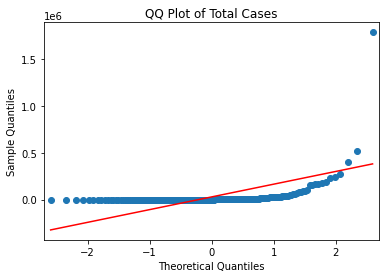
  • 이번에는 qqplot을 그린다.
sm.qqplot(covid_case_df[["total_cases"]].sort_values(["total_cases"]), line = "s")
plt.title("QQ Plot of Total Cases")
Text(0.5, 1.0, 'QQ Plot of Total Cases')

png

Finding Missing Values

데이터 가져오기

import pandas as pd

covidtotals = pd.read_csv("data/covidtotalswithmissings.csv")
print(covidtotals.head())
  iso_code    lastdate     location  total_cases  total_deaths  \
0      AFG  2020-06-01  Afghanistan        15205           257   
1      ALB  2020-06-01      Albania         1137            33   
2      DZA  2020-06-01      Algeria         9394           653   
3      AND  2020-06-01      Andorra          764            51   
4      AGO  2020-06-01       Angola           86             4   

   total_cases_pm  total_deaths_pm  population  pop_density  median_age  \
0         390.589            6.602  38928341.0       54.422        18.6   
1         395.093           11.467   2877800.0      104.871        38.0   
2         214.225           14.891  43851043.0       17.348        29.1   
3        9888.048          660.066     77265.0      163.755         NaN   
4           2.617            0.122  32866268.0       23.890        16.8   

   gdp_per_capita  hosp_beds  
0        1803.987       0.50  
1       11803.431       2.89  
2       13913.839       1.90  
3             NaN        NaN  
4        5819.495        NaN  
  • Missing Value 확인
  • 일부 feature에서 missing value가 있는 것을 확인함.
covidtotals.info()
<class 'pandas.core.frame.DataFrame'>
RangeIndex: 210 entries, 0 to 209
Data columns (total 12 columns):
 #   Column           Non-Null Count  Dtype  
---  ------           --------------  -----  
 0   iso_code         210 non-null    object 
 1   lastdate         210 non-null    object 
 2   location         210 non-null    object 
 3   total_cases      210 non-null    int64  
 4   total_deaths     210 non-null    int64  
 5   total_cases_pm   209 non-null    float64
 6   total_deaths_pm  209 non-null    float64
 7   population       210 non-null    float64
 8   pop_density      198 non-null    float64
 9   median_age       186 non-null    float64
 10  gdp_per_capita   182 non-null    float64
 11  hosp_beds        164 non-null    float64
dtypes: float64(7), int64(2), object(3)
memory usage: 19.8+ KB
  • 데이터를 크게 두개의 기분으로 분류한다.
    • Covid case & Demographic Columns
case_vars = ["location", "total_cases", "total_deaths", "total_cases_pm", "total_deaths_pm"]
demo_vars = ["population", "pop_density", "median_age", "gdp_per_capita", "hosp_beds"]
  • axis 설정을 통해 인구통계와 Covid Cased의 결측치 값을 설정한다.
covidtotals[demo_vars].isnull().sum(axis=0)
population         0
pop_density       12
median_age        24
gdp_per_capita    28
hosp_beds         46
dtype: int64
covidtotals[case_vars].isnull().sum(axis=0)
location           0
total_cases        0
total_deaths       0
total_cases_pm     1
total_deaths_pm    1
dtype: int64
  • 이번에는 행 방향으로 발생한 결측치를 확인한다.
  • 결측치가 없는 행은 156개이고, 1개만 있는 행은 24개 순으로 집계 되었다.
demovars_misscnt = covidtotals[demo_vars].isnull().sum(axis=1)
demovars_misscnt.value_counts()
0    156
1     24
2     12
3     10
4      8
dtype: int64
  • 인구통계 데이터가 3가지 이상 누락된 국가를 나열한다.
    • 5개의 값만 추출했다.
print(covidtotals.loc[demovars_misscnt >= 3, ['location'] + demo_vars].head(5).T)
                     3         5                                24  \
location        Andorra  Anguilla  Bonaire Sint Eustatius and Saba   
population      77265.0   15002.0                          26221.0   
pop_density     163.755       NaN                              NaN   
median_age          NaN       NaN                              NaN   
gdp_per_capita      NaN       NaN                              NaN   
hosp_beds           NaN       NaN                              NaN   

                                    28              64  
location        British Virgin Islands  Faeroe Islands  
population                     30237.0         48865.0  
pop_density                    207.973          35.308  
median_age                         NaN             NaN  
gdp_per_capita                     NaN             NaN  
hosp_beds                          NaN             NaN  
  • 이번에는 코로나 사례 데이터에서 누락값을 확인한다.
    • 홍콩만 사례가 누락된 것을 확인할 수 있다.
totvars_misscnt = covidtotals[case_vars].isnull().sum(axis=1)
totvars_misscnt.value_counts()
0    209
2      1
dtype: int64
print(covidtotals.loc[totvars_misscnt == 2, ['location'] + case_vars].T)
                        87
location         Hong Kong
total_cases              0
total_deaths             0
total_cases_pm         NaN
total_deaths_pm        NaN
print(covidtotals[covidtotals['location'] == "Hong Kong"])
   iso_code    lastdate   location  total_cases  total_deaths  total_cases_pm  \
87      HKG  2020-05-26  Hong Kong            0             0             NaN   

    total_deaths_pm  population  pop_density  median_age  gdp_per_capita  \
87              NaN   7496988.0     7039.714        44.8        56054.92   

    hosp_beds  
87        NaN  

방법 1. Inplace 사용

# 결측치 채우기
covidtotals = pd.read_csv("data/covidtotalswithmissings.csv")
covidtotals2 = covidtotals.copy()
covidtotals2[case_vars].isnull().sum(axis = 0) 
location           0
total_cases        0
total_deaths       0
total_cases_pm     1
total_deaths_pm    1
dtype: int64
covidtotals2.total_cases_pm.fillna(covidtotals2.total_cases/(covidtotals2.population/10000000), inplace = True)
covidtotals2.total_deaths_pm.fillna(covidtotals2.total_deaths/(covidtotals2.population/10000000), inplace = True)
covidtotals2[case_vars].isnull().sum(axis = 0) 
location           0
total_cases        0
total_deaths       0
total_cases_pm     0
total_deaths_pm    0
dtype: int64

방법 2. 매칭을 통한 대체

covidtotals = pd.read_csv("data/covidtotalswithmissings.csv")
covidtotals2 = covidtotals.copy()
covidtotals2[case_vars].isnull().sum(axis = 0) 
location           0
total_cases        0
total_deaths       0
total_cases_pm     1
total_deaths_pm    1
dtype: int64
covidtotals2.loc[:, 'total_cases_pm'] = covidtotals2.loc[:, 'total_cases_pm'].fillna(value=covidtotals2.total_cases/(covidtotals.population/10000000))
covidtotals2.loc[:, 'total_deaths_pm'] = covidtotals2.loc[:, 'total_deaths_pm'].fillna(value=covidtotals2.total_deaths/(covidtotals.population/10000000))
covidtotals2[case_vars].isnull().sum(axis = 0) 
location           0
total_cases        0
total_deaths       0
total_cases_pm     0
total_deaths_pm    0
dtype: int64

References

Walker, M. (2020). Python Data Cleaning Cookbook: Modern techniques and Python tools to detect and remove dirty data and extract key insights. Packt Publishing.

결정 트리 학습 이론

개요

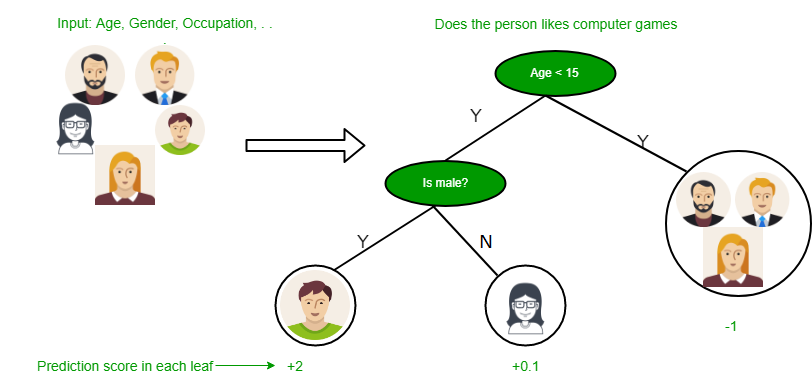
결정 트리의 예

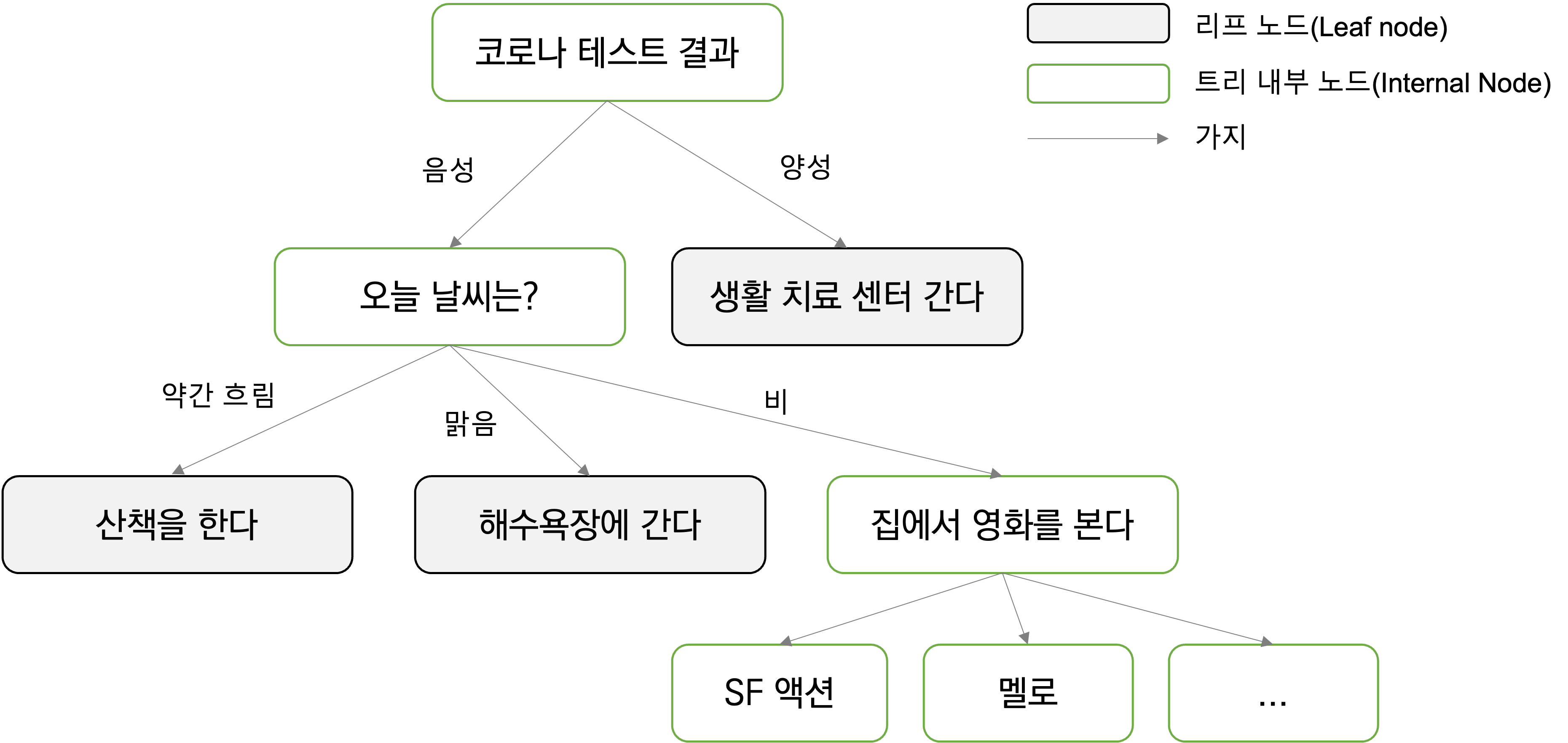
  • 결정 트리는 여러가지 연속된 질문을 학습하여 분류하는 것이 원칙이다.
  • 다음의 간단한 예를 들어본다.

  • 결정 트리는 크게 3가지로 구성이 되어 있다.
    • 트리 내부 노드, 리프 노드, 그리고 가지로 구성이 되어 있다.
    • 어떻게 질문을 하느냐에 따라서 분류가 결정된다.
  • 결정 트리는 숫자에도 적용할 수 있다.
    • 예) 키가 160cm보다 큰가요?

결정 트리의 주요 원리

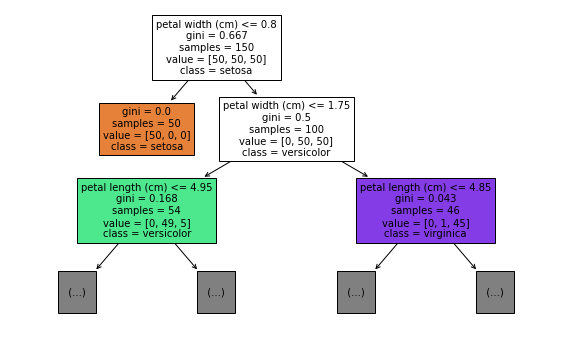
  • 결정 트리는 트리의 루트(Root)에서 시작하여, 정보 이득(Information Gain, IG)가 최대가 되는 특성으로 데이터를 나눔
  • 반복 과정(분류할 수 있는 연속적인 질문)을 통해 계속적으로 분류함
    • 전문 용어로는 Until the leaves are pure.
  • 결정 트리에서 가장 중요한 것은 정보 이득 최대화임(Maximizing Information Gain)

Kaggle Survey Data Transformation Tip

Intro

  • Data Transformation is always important to visualise.
  • Here, I just introduced to get value counts in different dataset.
  • If you are newbie, please be aware of this code before you dive into visualization.
# This Python 3 environment comes with many helpful analytics libraries installed
# It is defined by the kaggle/python Docker image: https://github.com/kaggle/docker-python
# For example, here's several helpful packages to load

import numpy as np # linear algebra
import pandas as pd # data processing, CSV file I/O (e.g. pd.read_csv)

# Input data files are available in the read-only "../input/" directory
# For example, running this (by clicking run or pressing Shift+Enter) will list all files under the input directory

import os
for dirname, _, filenames in os.walk('/kaggle/input'):
    for filename in filenames:
        print(os.path.join(dirname, filename))

# You can write up to 20GB to the current directory (/kaggle/working/) that gets preserved as output when you create a version using "Save & Run All" 
# You can also write temporary files to /kaggle/temp/, but they won't be saved outside of the current session
/kaggle/input/kaggle-survey-2021/kaggle_survey_2021_responses.csv
/kaggle/input/kaggle-survey-2021/supplementary_data/kaggle_survey_2021_methodology.pdf
/kaggle/input/kaggle-survey-2021/supplementary_data/kaggle_survey_2021_answer_choices.pdf

Data Import

  • Import raw data and split into questions dataset and survey dataset.
df = pd.read_csv("../input/kaggle-survey-2021/kaggle_survey_2021_responses.csv")
questions = df.iloc[0, :].T
questions
/opt/conda/lib/python3.7/site-packages/IPython/core/interactiveshell.py:3441: DtypeWarning: Columns (0,195,201,285,286,287,288,289,290,291,292) have mixed types.Specify dtype option on import or set low_memory=False.
  exec(code_obj, self.user_global_ns, self.user_ns)


Time from Start to Finish (seconds)                                Duration (in seconds)
Q1                                                           What is your age (# years)?
Q2                                                What is your gender? - Selected Choice
Q3                                             In which country do you currently reside?
Q4                                     What is the highest level of formal education ...
                                                             ...                        
Q38_B_Part_8                           In the next 2 years, do you hope to become mor...
Q38_B_Part_9                           In the next 2 years, do you hope to become mor...
Q38_B_Part_10                          In the next 2 years, do you hope to become mor...
Q38_B_Part_11                          In the next 2 years, do you hope to become mor...
Q38_B_OTHER                            In the next 2 years, do you hope to become mor...
Name: 0, Length: 369, dtype: object
df = df.iloc[1:, :]

Quick Data Review

  • All survey responses are count-based dataset.
  • It’s easy to check using value counts()
df['Q1'].value_counts()
25-29    4931
18-21    4901
22-24    4694
30-34    3441
35-39    2504
40-44    1890
45-49    1375
50-54     964
55-59     592
60-69     553
70+       128
Name: Q1, dtype: int64

Problem

  • Some questions are not easy to counts because of Supplementary Questions.
questions.index.tolist()[7:20]
['Q7_Part_1',
 'Q7_Part_2',
 'Q7_Part_3',
 'Q7_Part_4',
 'Q7_Part_5',
 'Q7_Part_6',
 'Q7_Part_7',
 'Q7_Part_8',
 'Q7_Part_9',
 'Q7_Part_10',
 'Q7_Part_11',
 'Q7_Part_12',
 'Q7_OTHER']
def sub_questions_count(question_num, part_num, text = False):
  part_questions = []

  if text in ["A", "B"]:
    part_questions = ['Q' + str(question_num) + "_" + text + '_Part_' + str(j) for j in range(1, part_num)]
    part_questions.append('Q' + str(question_num) + "_" + text + '_OTHER')
  else:
    part_questions = ['Q' + str(question_num) + '_Part_' + str(j) for j in range(1, part_num)]
    part_questions.append('Q' + str(question_num) + '_OTHER')

  # category count
  categories = []
  counts = []
  for i in part_questions:
    category = df[i].value_counts().index[0]
    val = df[i].value_counts()[0]
    categories.append(category)
    counts.append(val)

  combined_df = pd.DataFrame()
  combined_df['Category'] = categories
  combined_df['Count'] = counts

  combined_df = combined_df.sort_values(['Count'], ascending = False)
  return combined_df

Test

  • Case 1
# Test 
# 'Q38_B_Part_11',
print(sub_questions_count(38, 11, "B").reset_index(drop=True))
                  Category  Count
0             TensorBoard    4239
1                  MLflow    2747
2        Weights & Biases    1583
3              Neptune.ai    1276
4                 ClearML    1020
5                Polyaxon     737
6                Guild.ai     729
7    Domino Model Monitor     666
8                Comet.ml     633
9      Sacred + Omniboard     591
10                   Other    377

Case 2.