Programming

추천 시스템 개요 및 이론, Baseline Code

I. 개요

  • 대고객 대상으로 한 대부분의 플랫폼 서비스 업체들은 고객 개개인에게 맞춤형의 추천 서비스를 도입하고 있음
    • 전자상거래 업체, 유투브, 애플 뮤직 등
  • ML의 여러 알고리즘 중 비즈니스 관점에 부합하는 기법이 추천 시스템.
  • 추천 시스템의 진정한 묘미는 사용자 본인도 모르는 취향 발견, 재구매로 연결하도록 설계
  • 누가 필요할까?
    • 모든 플랫폼 서비스
    • 이유1: 플랫폼은 다수의 판매자와 소비자를 필요로 함, 문제는 카테고리와 메뉴구성이 복잡해지면 소비자의 제품 선택에 부작용
    • 이유2: 만족도가 떨어지면 고객은 그 플랫폼을 떠날 가능성이 크며, 이는 플랫폼 서비스의 매출 하락과 직결
    • 모든 플랫폼 서비스는 기본적으로 추천서비스를 장착하고 싶어함
  • 영화 데이터를 기준으로 추천시스템을 단계별로 구현함을 목표로 함

II. 추천시스템의 유형 및 역사

  • 추천시스템의 유형과 간단한 역사에 대해 배워보도록 한다.

(1) 유형

  • 크게 세가지로 구분됨.
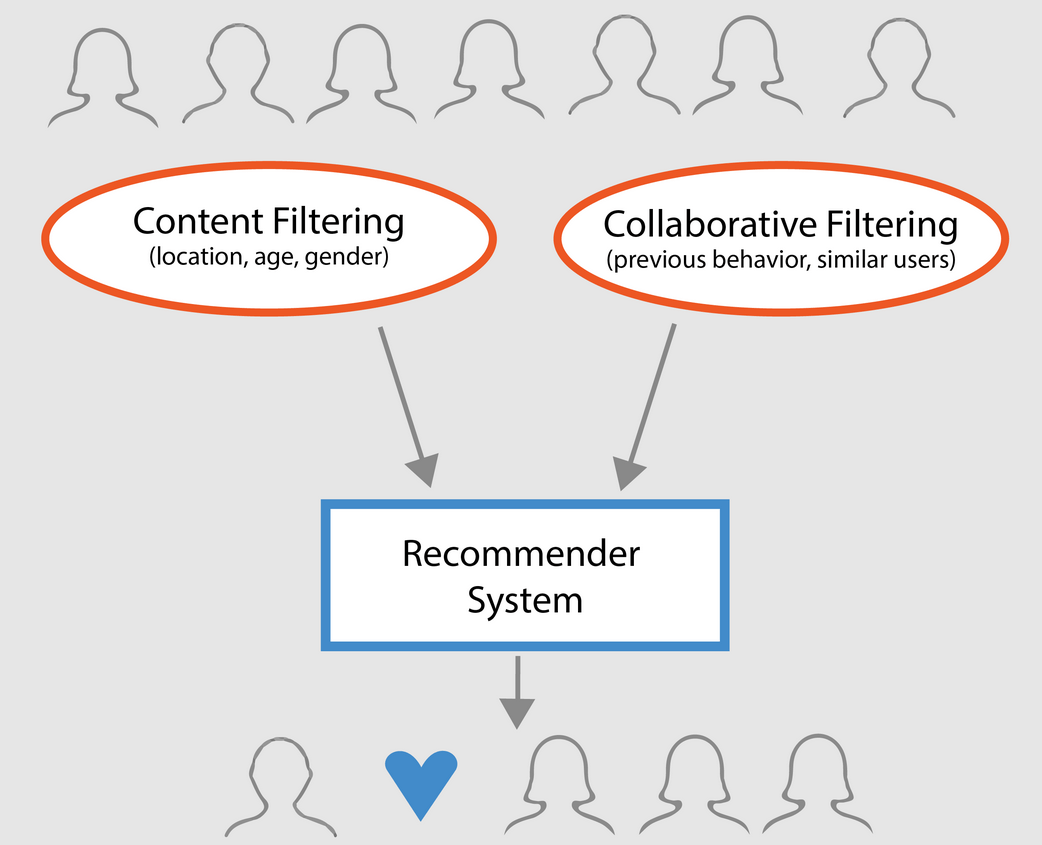
    • Demographic Filtering
    • 콘텐츠 기반 필터링 (Content Filtering)
    • 협업 필터링 (Collaborative Filtering)
      • 최근접 이웃(Nearest Neighbor)
      • 잠재 요인(Latent Factor)

(2) 역사

  • 초창기: 콘텐츠 기반 필터링 또는 최근접 이웃 기반 협업 필터링이 주로 사용됨.
  • 중기: 넷플릭스 추천 시스템 경연 대회에서 행렬 분해 (Matrix Factorization) 기법을 이용한 잠재요인 협업 필터링 방식으로 우승한 뒤, 유명해짐.
  • 최근: 개인화 특성을 강화하기 위해서 하이브리드 형식으로 콘텐츠 기반과 협업 기반을 적절히 결합해 사용하는 경우도 늘고 있음

III. Demographic Filtering

  • 가장 기초적이면서 Simple한 추천시스템 방식
  • 같은 영화를 인구통계학에 기반하여 각 사용자에게 추천
  • 그런데, 영화추천 시, 주로 인기도가 높은 대중적인 영화 위주 (예를 들면 Top 250개)만 선별하여 각 사용자에게 전달. 대중적인 영화들은 영화를 보지 않는 다른 일반 관객들에게게 호감을 가질 가능성이 더 높을 것으로 추정
  • 필요조건
    • 영화 평점 점수
    • 평점 점수 기반 영화 정렬

(1) 데이터 수집

(2) 데이터 설명

  • 여러 데이터들이 있는데, 관련 내용은 캐글 본문의 것을 그대로 사용한다.
    • movies_metadata.csv: The main Movies Metadata file. Contains information on 45,000 movies featured in the Full MovieLens dataset. Features include posters, backdrops, budget, revenue, release dates, languages, production countries and companies.
    • keywords.csv: Contains the movie plot keywords for our MovieLens movies. Available in the form of a stringified JSON Object.
    • credits.csv: Consists of Cast and Crew Information for all our movies. Available in the form of a stringified JSON Object.
    • links.csv: The file that contains the TMDB and IMDB IDs of all the movies featured in the Full MovieLens dataset.
    • links_small.csv: Contains the TMDB and IMDB IDs of a small subset of 9,000 movies of the Full Dataset.
    • ratings_small.csv: The subset of 100,000 ratings from 700 users on 9,000 movies.

(3) 구글 드라이브와 연동

  • 구글 드라이브와 연동하여 pandas를 활용하여 데이터를 수집한다.
  • 구글 드라이브와 연동하는 방법에 대해서는 Colab + Drive + Github Workflow에서 확인한다.
from google.colab import drive # 패키지 불러오기 
from os.path import join  

ROOT = "/content/drive"     # 드라이브 기본 경로
print(ROOT)                 # print content of ROOT (Optional)
drive.mount(ROOT)           # 드라이브 기본 경로 Mount

MY_GOOGLE_DRIVE_PATH = 'My Drive/Colab Notebooks/your/path' # 프로젝트 경로
PROJECT_PATH = join(ROOT, MY_GOOGLE_DRIVE_PATH) # 프로젝트 경로
print(PROJECT_PATH)
/content/drive
Go to this URL in a browser: https://accounts.google.com/o/oauth2/auth?client_id=947318989803-6bn6qk8qdgf4n4g3pfee6491hc0brc4i.apps.googleusercontent.com&redirect_uri=urn%3aietf%3awg%3aoauth%3a2.0%3aoob&response_type=code&scope=email%20https%3a%2f%2fwww.googleapis.com%2fauth%2fdocs.test%20https%3a%2f%2fwww.googleapis.com%2fauth%2fdrive%20https%3a%2f%2fwww.googleapis.com%2fauth%2fdrive.photos.readonly%20https%3a%2f%2fwww.googleapis.com%2fauth%2fpeopleapi.readonly

Enter your authorization code:
··········
%cd "{PROJECT_PATH}"
!ls
data  source
import pandas as pd
import pandas_profiling
import numpy as np
import matplotlib as mpl
import matplotlib.pyplot as plt
from matplotlib.pyplot import figure
import seaborn as sns

from IPython.core.display import display, HTML
from pandas_profiling import ProfileReport
/usr/local/lib/python3.6/dist-packages/statsmodels/tools/_testing.py:19: FutureWarning: pandas.util.testing is deprecated. Use the functions in the public API at pandas.testing instead.
  import pandas.util.testing as tm
import pandas as pd
metadata = pd.read_csv('data/movies_metadata.csv', low_memory=False)
metadata.head(3)
adult belongs_to_collection budget genres homepage id imdb_id original_language original_title overview popularity poster_path production_companies production_countries release_date revenue runtime spoken_languages status tagline title video vote_average vote_count
0 False {'id': 10194, 'name': 'Toy Story Collection', ... 30000000 [{'id': 16, 'name': 'Animation'}, {'id': 35, '... http://toystory.disney.com/toy-story 862 tt0114709 en Toy Story Led by Woody, Andy's toys live happily in his ... 21.946943 /rhIRbceoE9lR4veEXuwCC2wARtG.jpg [{'name': 'Pixar Animation Studios', 'id': 3}] [{'iso_3166_1': 'US', 'name': 'United States o... 1995-10-30 373554033.0 81.0 [{'iso_639_1': 'en', 'name': 'English'}] Released NaN Toy Story False 7.7 5415.0
1 False NaN 65000000 [{'id': 12, 'name': 'Adventure'}, {'id': 14, '... NaN 8844 tt0113497 en Jumanji When siblings Judy and Peter discover an encha... 17.015539 /vzmL6fP7aPKNKPRTFnZmiUfciyV.jpg [{'name': 'TriStar Pictures', 'id': 559}, {'na... [{'iso_3166_1': 'US', 'name': 'United States o... 1995-12-15 262797249.0 104.0 [{'iso_639_1': 'en', 'name': 'English'}, {'iso... Released Roll the dice and unleash the excitement! Jumanji False 6.9 2413.0
2 False {'id': 119050, 'name': 'Grumpy Old Men Collect... 0 [{'id': 10749, 'name': 'Romance'}, {'id': 35, ... NaN 15602 tt0113228 en Grumpier Old Men A family wedding reignites the ancient feud be... 11.7129 /6ksm1sjKMFLbO7UY2i6G1ju9SML.jpg [{'name': 'Warner Bros.', 'id': 6194}, {'name'... [{'iso_3166_1': 'US', 'name': 'United States o... 1995-12-22 0.0 101.0 [{'iso_639_1': 'en', 'name': 'English'}] Released Still Yelling. Still Fighting. Still Ready for... Grumpier Old Men False 6.5 92.0

(4) 평점 가중치 함수 구현

  • 여기에서 주목해야 하는 것이 있는데, vote_averagevote_count를 유심히 봐야한다.
  • 3명이 투표해서 얻은 평점 8.7의 영화 Vs. 100명이 투표해서 얻은 평점 8.0의 영화 중 어느 것이 더 좋다고 볼 수 있을까?
  • 이러한 부분을 고려하여 가중치 공식을 만든다. (wr:Weighted Rating)

$$ wr = \left (\frac{\nu }{\nu+\mu } \times R \right ) + \left (\frac{\nu }{\nu+\mu } \times C \right ) $$

About Dictionaries

강의 홍보

I. 개요

  • 이번 시간부터 본격적으로 파이썬의 기초 자료형에 대해 간단한 튜토리얼을 준비했다.
  • 데이터 분석과는 큰 관계가 없을 수 있지만, 데이터 정제 할 때, 도움이 되기도 한다.
  • 그 중에서 면접의 단골질문과 같은 Dictionary에 대해 나누는 시간을 가졌다.

II. Dictionary의 기본적인 특징

  • Dictionary는 영어 원뜻 그대로 사전을 생각하면 된다.
  • DictionaryList와 유사한 부분이 많다.
    • List와 같이 Mutable이라는 뜻을 포함한다.
    • List와 같이 다른 Dictionary, list 등을 포함시킬 수 있다.
  • 차이점은 원소에 대한 접근방법의 차이다.
    • List에서 각 원소에 대한 접근법은 index을 활용한다.
    • Dictionary에서 각 원소에 대한 접근법은 keys에 의해 접근한다.

III. Dictionary 정의

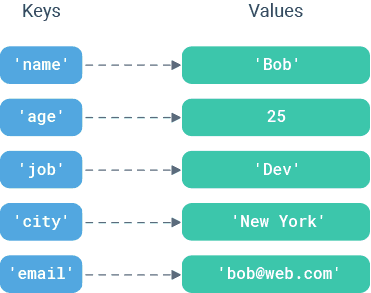
  • 로고사진처럼, Dictionarykey-value로 구성 되어 있다.
  • Dictionary를 정의하는 방법에는 여러가지가 있다.

(1) 기본 { }를 활용한 방법

  • 기본적인 문법은 아래와 같다.
d = {
    <>: <>,
    <>: <>,
      .
      .
      .
    <>: <>,
}
  • 간단하게 국내 야구팀을 Dictionary 형태로 만들어보자.
KOR_team1 = {
    "인천"  : "SK", 
    "서울1" : "LG", 
    "서울2" : "두산", 
    "창원"  : "NC",
    "광주"  : "기아",
    "대구"  : "삼성",
    "대전"  : "한화",
    "부산"  : "롯데",
    "수원"  : "KT",
    "고척"  : "키움",
}
KOR_team1
{'고척': '키움',
 '광주': '기아',
 '대구': '삼성',
 '대전': '한화',
 '부산': '롯데',
 '서울1': 'LG',
 '서울2': '두산',
 '수원': 'KT',
 '인천': 'SK',
 '창원': 'NC'}

(2) 내장함수 dict()를 활용하는 방법

  • key-value를 활용하는데, 이 때 tuple 형태로 작성한다.
d = dict([
    (<>, <>),
    (<>, <값),
      .
      .
      .
    (<>, <>)
])
  • 똑같이 야구팀을 작성한다.
KOR_team2 = dict([
  ("인천", "SK"), 
  ("서울1", "LG"), 
  ("서울2", "두산"), 
  ("창원", "NC"), 
  ("광주", "기아"), 
  ("대구", "삼성"), 
  ("대전", "한화"), 
  ("부산", "롯데"), 
  ("수원", "KT"), 
  ("고척", "키움")
])

KOR_team2
{'고척': '키움',
 '광주': '기아',
 '대구': '삼성',
 '대전': '한화',
 '부산': '롯데',
 '서울1': 'LG',
 '서울2': '두산',
 '수원': 'KT',
 '인천': 'SK',
 '창원': 'NC'}

(3) dict with spring

  • dict() 함수 안에 문자열 변수를 입력하는 형태로 코드를 작성한다.
KOR_team3 = dict(
  인천 = "SK", 
  서울1 = "LG", 
  서울2 = "두산", 
  창원 = "NC", 
  광주 = "기아", 
  대구 = "삼성", 
  대전 = "한화", 
  부산 = "롯데", 
  수원 = "KT", 
  고척 = "키움" 
)

KOR_team3
{'고척': '키움',
 '광주': '기아',
 '대구': '삼성',
 '대전': '한화',
 '부산': '롯데',
 '서울1': 'LG',
 '서울2': '두산',
 '수원': 'KT',
 '인천': 'SK',
 '창원': 'NC'}
  • 실제 Dictionary 형태로 정의가 되었는지 확인해본다.
print(type(KOR_team1))
print(type(KOR_team2))
print(type(KOR_team3))
<class 'dict'>
<class 'dict'>
<class 'dict'>

IV. Dictionary 접근법

  • Dictionary 원소 접근법은 indexing이 아니라 key값에 의해 결정된다.
print(KOR_team1['인천'])
print(KOR_team1['부산'])
SK
롯데
  • 만약에 전주에 새로운 야구팀(현대)이 생겼다고 가정하자.
  • 추가하는 소스코드는 아래와 같다.
KOR_team1['전주'] = "현대"
KOR_team1
{'고척': '키움',
 '광주': '기아',
 '대구': '삼성',
 '대전': '한화',
 '부산': '롯데',
 '서울1': 'LG',
 '서울2': '두산',
 '수원': 'KT',
 '인천': 'SK',
 '전주': '현대',
 '창원': 'NC'}
  • 전주: 현대가 추가된 것을 확인할 수 있다.
  • 이번에는 방금 추가한 전주: 현대를 삭제하도록 하자. (del) 함수 사용
del KOR_team1['전주']
KOR_team1
{'고척': '키움',
 '광주': '기아',
 '대구': '삼성',
 '대전': '한화',
 '부산': '롯데',
 '서울1': 'LG',
 '서울2': '두산',
 '수원': 'KT',
 '인천': 'SK',
 '창원': 'NC'}
  • 정상적으로 삭제가 된 것을 확인할 수 있다.

V. Dictionary Using Integer

  • 이전까지 접근한 것은 문자를 입력해서 접근했다.
  • Integer로 활용하는 방법은 없을까?
dic = {0: 'a', 1: 'b', 2: 'c', 3: 'd'}
dic
{0: 'a', 1: 'b', 2: 'c', 3: 'd'}
print(dic[0])
print(dic[1])
a
b
  • 그러나 주의해야 하는 것은 diclist가 아니다.
  • 즉, list에서 할 수 있었던, slicing이나 append를 사용할 수 없다.
    • 관련 에러 몇개를 확인해보자.
dic.append('e')
---------------------------------------------------------------------------

AttributeError                            Traceback (most recent call last)

<ipython-input-20-8bfa5988d009> in <module>()
----> 1 dic.append('e')


AttributeError: 'dict' object has no attribute 'append'
  • AttributeError: 'dict' object has no attribute 'append' 이 뜻이 함의하는 것은 dictionary에는 append라는 속성값이 없다는 뜻이다.
dic[0:2]
---------------------------------------------------------------------------

TypeError                                 Traceback (most recent call last)

<ipython-input-21-82c17d59c309> in <module>()
----> 1 dic[0:2]


TypeError: unhashable type: 'slice'
  • 마찬가지로 list에서 작동했던 slice는 여기에서는 존재하지 않는다.

VI. Dictionary와 관련된 여러 함수 소개

  • Dictionary와 함께 사용되면 좋은 함수들을 간단하게 소개 한다.

(1) d.clear()

  • 먼저 아래 코드를 확인해보자.
dic = {'A': 1, 'B': 2, 'C': 3}
dic
{'A': 1, 'B': 2, 'C': 3}
  • clear() 함수 적용 뒤 결과값을 확인해보자.
dic.clear()
dic
{}
  • 결과값을 확인해보니 모두 삭제된 것을 확인할 수 있다.

(2) d.get()

  • get()함수는 key값을 활용해서 value값을 가져오는 함수다.
  • 소스코드를 통해 확인하자.
dic = {'A': 1, 'B': 2, 'C': 3}
print(dic.get('B'))
print(dic.get('Z'))
2
None
  • .get('B')에 해당하는 Dictionary값이 존재하기 때문에 2를 반환한다.
  • .get('Z')에 해당하는 Dictionary값이 존재하지 않기 때문에 None을 반환한다.
    • 그런데 None을 반환하기 보다 특정 숫자 또는 문자로 출력하고 싶다면 다음과 같이 입력하면 된다.
print(dic.get('z', 0))
print(dic.get('z', "없음"))
0
없음

(3) d.keys()

  • Dictionarykeyvalue로 구성되어 있는데, keys()의 뜻은 현재 구성되어 있는 Dictionary에서 keys()dict_keys 형태로 반환한다.
    • 이 때, list로 변환을 하려면 list()를 활용하면 된다.
dic = {'A': 1, 'B': 2, 'C': 3}
print(dic.keys())
print(list(dic.keys()))
dict_keys(['A', 'B', 'C'])
['A', 'B', 'C']

(4) d.values()

  • keys()를 활용하여 key를 반환했던 것처럼, values()를 활용하여 value를 진행하자.
    • 코드는 위와 동일하다. 다만, 함수만 바꾼다.
dic = {'A': 1, 'B': 2, 'C': 3}
print(dic.values())
print(list(dic.values()))
dict_values([1, 2, 3])
[1, 2, 3]
  • 그 외에도 pop(), popitem(), update()를 활용법을 익혀본다.

VII. Reference

w3schools. Python Dictionaries. Retrieved June 20, 2020, from https://www.w3schools.com/python/python_dictionaries.asp

The difference betwen Lists and Tuples in Python

강의 홍보

I. 개요

  • 이번 시간부터 본격적으로 파이썬의 기초 자료형에 대해 간단한 튜토리얼을 준비했다.
  • 데이터 분석과는 큰 관계가 없을 수 있지만, 데이터 정제 할 때, 도움이 되기도 한다.
  • 그 중에서 면접의 단골질문과 같은 Lists & Tuple에 대해 나누는 시간을 가졌다.

II. Lists

  • 먼저 Lists[] 형태로 정의가 된다.
alphabet = ['A', 'B', 'C', 'D']
print(alphabet)
['A', 'B', 'C', 'D']
  • 코드는 간단하다. 그러나 함의하고 있는 내용은 다음과 같다.
    • List는 정렬(ordered)되었다.
    • List는 다양한 형태의 데이터 유형을 담을 수 있다.
    • List안에 있는 값은 인덱스로 접근한다.
    • List안에 또다른 List를 담을 수 있다.
    • List는 변하기 쉽다.
    • List는 동적이다.

(1) List는 정렬(ordered)되었다.

  • 우선 코드로 확인하자.
a1 = [1, 2, 3, 4]
a2 = [2, 3, 4, 1]

a1 == a2
False
a1 is a2
False
[1, 2, 3, 4] == [2, 3, 4, 1]
False
  • 일련의 코드는 a1a2가 같지 않다는 것을 프로그래밍적으로 증명한 것이다.
    • 좀 더 쉽게 표현하면 List안에 있는 값은 순서가 있다는 뜻이다.

(2) List는 다양한 형태의 데이터 유형을 담을 수 있다.

  • List의 편리성이기도 하지만, 분석시에는 데이터프레임으로 변환할 때 큰 애로사항이 되기도 한다.
  • 우선, 코드로 확인해보자.
multi_values = [11.1, 'foo', 3, 5, 'bar', True, False, 3.1245]
print(multi_values)
[11.1, 'foo', 3, 5, 'bar', True, False, 3.1245]
  • 또한, List는 다양한 함수, class, 심지어는 모듈도 담을 수 있다.
float
float
len
<function len>
def temp():
  pass
temp
<function __main__.temp>
import math
math
<module 'math' (built-in)>
multi_objects = [float, len, temp, math]
multi_objects
[float, <function len>, <function __main__.temp>, <module 'math' (built-in)>]

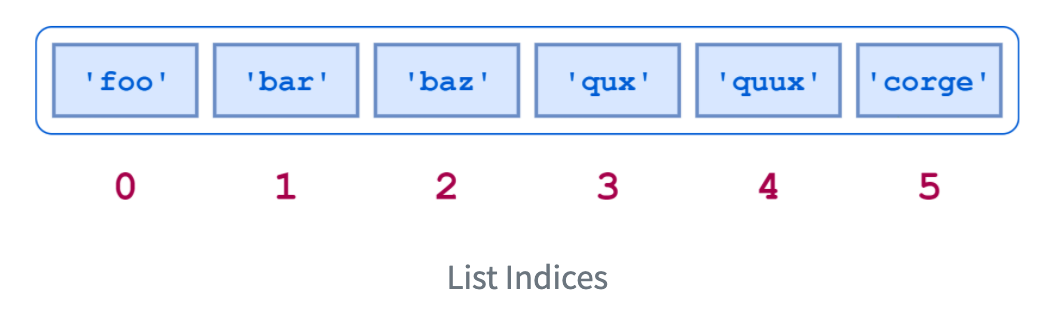
(3) List안에 있는 값은 인덱스로 접근한다.

  • 다음 그림이 인덱스로 접근하는 기본적인 방법이다.
    • 참고로 또다른 분석 언어인 R0이 아닌 1부터 시작한다.
  • 소스코드로 빠르게 확인해보자.
temp = ["A", "B", "C", "D", "E"]
temp[0]
'A'
temp[1]
'B'
temp[4]
'E'
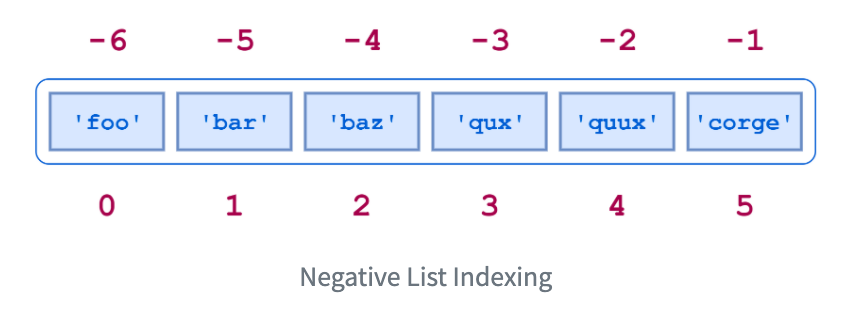
  • 그런데, Negative List 형태로도 접근할 수 있다.
    • -1, -2와 같은 형태로 접근하는 것이다.
  • 코드를 통해 확인해보자.
temp[-1]
'E'
temp[-4]
'B'
temp[-5]
'A'
  • 슬라이싱을 활용한 인덱스 접근법도 있다.
    • temp[m:n] 형태로 From M to N으로 접근한다.
  • 코드를 통해서 확인해보자.
temp[0:5]
['A', 'B', 'C', 'D', 'E']
temp[2:4]
['C', 'D']
temp[-5:-1]
['A', 'B', 'C', 'D']
temp[-5:]
['A', 'B', 'C', 'D', 'E']
  • 이 외에도, 슬라이싱 기법을 활용한 다양한 접근법이 있다. 스택오버플로우의 문서를 확인해보면 보다 더 많은 정보를 얻을 수 있다.

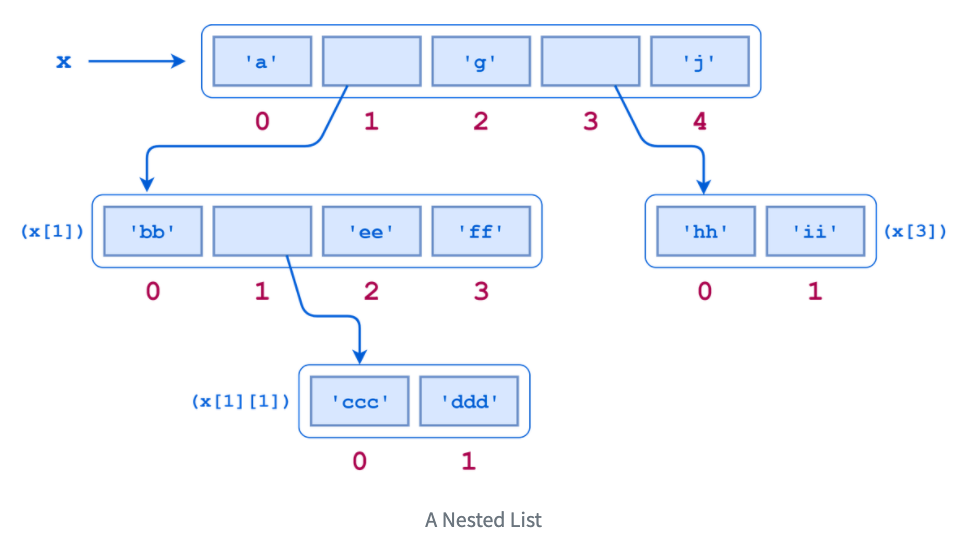
(4) List안에 또다른 List를 담을 수 있다.

  • List안에 다양한 객체가 들어가 있음을 확인했다.
  • 그런데, List안에 또 다른 List가 들어갈 수도 있다.

Google Colab with Kaggle - Beginner

I. 개요

  • 데이터 시각화와 변환에 대해 짧게 익혔다면 바로 실전 데이터를 활용한다.
  • 이론이 조금 부족하게 느껴질 수 있지만, 모든 것을 다 알려드릴 수는 없다.
    • 결국 공부는 스스로 해야 한다.
  • 이 강의의 목적이 Kaggle 데이터를 활용한 Python 포트폴리오 제작 강의임을 잊지 말자.

II. Kaggle KPI 설치

  • Google Colab에서 Kaggle API를 불러오려면 다음 소스코드를 실행한다.
!pip install kaggle
Requirement already satisfied: kaggle in /usr/local/lib/python3.6/dist-packages (1.5.6)
Requirement already satisfied: requests in /usr/local/lib/python3.6/dist-packages (from kaggle) (2.23.0)
Requirement already satisfied: python-dateutil in /usr/local/lib/python3.6/dist-packages (from kaggle) (2.8.1)
Requirement already satisfied: six>=1.10 in /usr/local/lib/python3.6/dist-packages (from kaggle) (1.12.0)
Requirement already satisfied: tqdm in /usr/local/lib/python3.6/dist-packages (from kaggle) (4.41.1)
Requirement already satisfied: urllib3<1.25,>=1.21.1 in /usr/local/lib/python3.6/dist-packages (from kaggle) (1.24.3)
Requirement already satisfied: certifi in /usr/local/lib/python3.6/dist-packages (from kaggle) (2020.4.5.1)
Requirement already satisfied: python-slugify in /usr/local/lib/python3.6/dist-packages (from kaggle) (4.0.0)
Requirement already satisfied: chardet<4,>=3.0.2 in /usr/local/lib/python3.6/dist-packages (from requests->kaggle) (3.0.4)
Requirement already satisfied: idna<3,>=2.5 in /usr/local/lib/python3.6/dist-packages (from requests->kaggle) (2.9)
Requirement already satisfied: text-unidecode>=1.3 in /usr/local/lib/python3.6/dist-packages (from python-slugify->kaggle) (1.3)

III. Kaggle Token 다운로드

  • Kaggle에서 API Token을 다운로드 받는다.
  • [Kaggle]-[My Account]-[API]-[Create New API Token]을 누르면 kaggle.json 파일이 다운로드 된다.
  • 이 파일을 바탕화면에 옮긴 뒤, 아래 코드를 실행 시킨다.
from google.colab import files
uploaded = files.upload()
for fn in uploaded.keys():
  print('uploaded file "{name}" with length {length} bytes'.format(
      name=fn, length=len(uploaded[fn])))
  
# kaggle.json을 아래 폴더로 옮긴 뒤, file을 사용할 수 있도록 권한을 부여한다. 
!mkdir -p ~/.kaggle/ && mv kaggle.json ~/.kaggle/ && chmod 600 ~/.kaggle/kaggle.json

Upload widget is only available when the cell has been executed in the current browser session. Please rerun this cell to enable.

EDA with Housing Price Prediction - Handling Outliers

강의 홍보

I. 개요

  • 이제 본격적으로 Kaggle 데이터를 활용하여 분석을 진행한다.
  • 데이터는 이미 다운 받은 상태를 전제로 하며, 만약에 데이터가 없다면 이전 포스팅에서 절차를 확인하기 바란다. (미리보기 가능)

II. 구글 드라이브 연동

  • 구글 코랩을 시작하면 언제든지 가장 먼저 해야 하는 것은 드라이브 연동이다.
from google.colab import drive # 패키지 불러오기 
from os.path import join  

ROOT = "/content/drive"     # 드라이브 기본 경로
print(ROOT)                 # print content of ROOT (Optional)
drive.mount(ROOT)           # 드라이브 기본 경로 Mount

MY_GOOGLE_DRIVE_PATH = 'My Drive/Colab Notebooks/inflearn_kaggle/' # 프로젝트 경로
PROJECT_PATH = join(ROOT, MY_GOOGLE_DRIVE_PATH) # 프로젝트 경로
print(PROJECT_PATH)
/content/drive
Go to this URL in a browser: https://accounts.google.com/o/oauth2/auth?client_id=947318989803-6bn6qk8qdgf4n4g3pfee6491hc0brc4i.apps.googleusercontent.com&redirect_uri=urn%3aietf%3awg%3aoauth%3a2.0%3aoob&response_type=code&scope=email%20https%3a%2f%2fwww.googleapis.com%2fauth%2fdocs.test%20https%3a%2f%2fwww.googleapis.com%2fauth%2fdrive%20https%3a%2f%2fwww.googleapis.com%2fauth%2fdrive.photos.readonly%20https%3a%2f%2fwww.googleapis.com%2fauth%2fpeopleapi.readonly

Enter your authorization code:
··········
Mounted at /content/drive
/content/drive/My Drive/Colab Notebooks/inflearn_kaggle/
%cd "{PROJECT_PATH}"
/content/drive/My Drive/Colab Notebooks/inflearn_kaggle
  • 위 코드가 에러 없이 돌아간다면 이제 데이터를 불러올 차례다.
!ls
data  docs  source
  • 필자는 inflearn_kaggle 폴더안에 data, docs, source 등의 하위 폴더를 추가로 만들었다.
  • 즉, data 안에 다운로드 받은 파일이 있을 것이다.

III. 캐글 데이터 수집 및 EDA

  • 우선 데이터를 수집하기에 앞서서 EDA에 관한 필수 패키지를 설치하자.
import pandas as pd
import pandas_profiling
import numpy as np
import matplotlib as mpl
import matplotlib.pyplot as plt
from matplotlib.pyplot import figure
import seaborn as sns

from IPython.core.display import display, HTML
from pandas_profiling import ProfileReport
/usr/local/lib/python3.6/dist-packages/statsmodels/tools/_testing.py:19: FutureWarning: pandas.util.testing is deprecated. Use the functions in the public API at pandas.testing instead.
  import pandas.util.testing as tm
%matplotlib inline
import matplotlib.pylab as plt

plt.rcParams["figure.figsize"] = (14,4)
plt.rcParams['lines.linewidth'] = 2
plt.rcParams['lines.color'] = 'r'
plt.rcParams['axes.grid'] = True 

(1) 데이터 수집

  • 지난 시간에 받은 데이터가 총 4개임을 확인했다.
    • data_description.txt
    • sample_submission.csv
    • test.csv
    • train.csv
  • 여기에서는 우선 test.csv & train.csv 파일을 받도록 한다.
train = pd.read_csv('data/train.csv')
test = pd.read_csv('data/test.csv')
print("data import is done")
data import is done

(2) 데이터 확인

  • Kaggle 데이터를 불러오면 우선 확인해야 하는 것은 데이터셋의 크기다.
    • 변수의 갯수
    • Numeric 변수 & Categorical 변수의 개수 등을 파악해야 한다.
  • Point 1 - train데이터에서 굳이 훈련데이터와 테스트 데이터를 구분할 필요는 없다.
    • 보통 Kaggle에서는 테스트 데이터를 주기적으로 업데이트 해준다.
  • Point 2 - 보통 test 데이터의 변수의 개수가 하나 더 작다.
train.shape, test.shape
((1460, 81), (1459, 80))
  • 그 후 train데이터의 상위 5개의 데이터만 확인한다.
display(train.head())
Id MSSubClass MSZoning LotFrontage LotArea Street Alley LotShape LandContour Utilities LotConfig LandSlope Neighborhood Condition1 Condition2 BldgType HouseStyle OverallQual OverallCond YearBuilt YearRemodAdd RoofStyle RoofMatl Exterior1st Exterior2nd MasVnrType MasVnrArea ExterQual ExterCond Foundation BsmtQual BsmtCond BsmtExposure BsmtFinType1 BsmtFinSF1 BsmtFinType2 BsmtFinSF2 BsmtUnfSF TotalBsmtSF Heating ... CentralAir Electrical 1stFlrSF 2ndFlrSF LowQualFinSF GrLivArea BsmtFullBath BsmtHalfBath FullBath HalfBath BedroomAbvGr KitchenAbvGr KitchenQual TotRmsAbvGrd Functional Fireplaces FireplaceQu GarageType GarageYrBlt GarageFinish GarageCars GarageArea GarageQual GarageCond PavedDrive WoodDeckSF OpenPorchSF EnclosedPorch 3SsnPorch ScreenPorch PoolArea PoolQC Fence MiscFeature MiscVal MoSold YrSold SaleType SaleCondition SalePrice
0 1 60 RL 65.0 8450 Pave NaN Reg Lvl AllPub Inside Gtl CollgCr Norm Norm 1Fam 2Story 7 5 2003 2003 Gable CompShg VinylSd VinylSd BrkFace 196.0 Gd TA PConc Gd TA No GLQ 706 Unf 0 150 856 GasA ... Y SBrkr 856 854 0 1710 1 0 2 1 3 1 Gd 8 Typ 0 NaN Attchd 2003.0 RFn 2 548 TA TA Y 0 61 0 0 0 0 NaN NaN NaN 0 2 2008 WD Normal 208500
1 2 20 RL 80.0 9600 Pave NaN Reg Lvl AllPub FR2 Gtl Veenker Feedr Norm 1Fam 1Story 6 8 1976 1976 Gable CompShg MetalSd MetalSd None 0.0 TA TA CBlock Gd TA Gd ALQ 978 Unf 0 284 1262 GasA ... Y SBrkr 1262 0 0 1262 0 1 2 0 3 1 TA 6 Typ 1 TA Attchd 1976.0 RFn 2 460 TA TA Y 298 0 0 0 0 0 NaN NaN NaN 0 5 2007 WD Normal 181500
2 3 60 RL 68.0 11250 Pave NaN IR1 Lvl AllPub Inside Gtl CollgCr Norm Norm 1Fam 2Story 7 5 2001 2002 Gable CompShg VinylSd VinylSd BrkFace 162.0 Gd TA PConc Gd TA Mn GLQ 486 Unf 0 434 920 GasA ... Y SBrkr 920 866 0 1786 1 0 2 1 3 1 Gd 6 Typ 1 TA Attchd 2001.0 RFn 2 608 TA TA Y 0 42 0 0 0 0 NaN NaN NaN 0 9 2008 WD Normal 223500
3 4 70 RL 60.0 9550 Pave NaN IR1 Lvl AllPub Corner Gtl Crawfor Norm Norm 1Fam 2Story 7 5 1915 1970 Gable CompShg Wd Sdng Wd Shng None 0.0 TA TA BrkTil TA Gd No ALQ 216 Unf 0 540 756 GasA ... Y SBrkr 961 756 0 1717 1 0 1 0 3 1 Gd 7 Typ 1 Gd Detchd 1998.0 Unf 3 642 TA TA Y 0 35 272 0 0 0 NaN NaN NaN 0 2 2006 WD Abnorml 140000
4 5 60 RL 84.0 14260 Pave NaN IR1 Lvl AllPub FR2 Gtl NoRidge Norm Norm 1Fam 2Story 8 5 2000 2000 Gable CompShg VinylSd VinylSd BrkFace 350.0 Gd TA PConc Gd TA Av GLQ 655 Unf 0 490 1145 GasA ... Y SBrkr 1145 1053 0 2198 1 0 2 1 4 1 Gd 9 Typ 1 TA Attchd 2000.0 RFn 3 836 TA TA Y 192 84 0 0 0 0 NaN NaN NaN 0 12 2008 WD Normal 250000
... ... ... ... ... ... ... ... ... ... ... ... ... ... ... ... ... ... ... ... ... ... ... ... ... ... ... ... ... ... ... ... ... ... ... ... ... ... ... ... ... ... ... ... ... ... ... ... ... ... ... ... ... ... ... ... ... ... ... ... ... ... ... ... ... ... ... ... ... ... ... ... ... ... ... ... ... ... ... ... ... ...
1455 1456 60 RL 62.0 7917 Pave NaN Reg Lvl AllPub Inside Gtl Gilbert Norm Norm 1Fam 2Story 6 5 1999 2000 Gable CompShg VinylSd VinylSd None 0.0 TA TA PConc Gd TA No Unf 0 Unf 0 953 953 GasA ... Y SBrkr 953 694 0 1647 0 0 2 1 3 1 TA 7 Typ 1 TA Attchd 1999.0 RFn 2 460 TA TA Y 0 40 0 0 0 0 NaN NaN NaN 0 8 2007 WD Normal 175000
1456 1457 20 RL 85.0 13175 Pave NaN Reg Lvl AllPub Inside Gtl NWAmes Norm Norm 1Fam 1Story 6 6 1978 1988 Gable CompShg Plywood Plywood Stone 119.0 TA TA CBlock Gd TA No ALQ 790 Rec 163 589 1542 GasA ... Y SBrkr 2073 0 0 2073 1 0 2 0 3 1 TA 7 Min1 2 TA Attchd 1978.0 Unf 2 500 TA TA Y 349 0 0 0 0 0 NaN MnPrv NaN 0 2 2010 WD Normal 210000
1457 1458 70 RL 66.0 9042 Pave NaN Reg Lvl AllPub Inside Gtl Crawfor Norm Norm 1Fam 2Story 7 9 1941 2006 Gable CompShg CemntBd CmentBd None 0.0 Ex Gd Stone TA Gd No GLQ 275 Unf 0 877 1152 GasA ... Y SBrkr 1188 1152 0 2340 0 0 2 0 4 1 Gd 9 Typ 2 Gd Attchd 1941.0 RFn 1 252 TA TA Y 0 60 0 0 0 0 NaN GdPrv Shed 2500 5 2010 WD Normal 266500
1458 1459 20 RL 68.0 9717 Pave NaN Reg Lvl AllPub Inside Gtl NAmes Norm Norm 1Fam 1Story 5 6 1950 1996 Hip CompShg MetalSd MetalSd None 0.0 TA TA CBlock TA TA Mn GLQ 49 Rec 1029 0 1078 GasA ... Y FuseA 1078 0 0 1078 1 0 1 0 2 1 Gd 5 Typ 0 NaN Attchd 1950.0 Unf 1 240 TA TA Y 366 0 112 0 0 0 NaN NaN NaN 0 4 2010 WD Normal 142125
1459 1460 20 RL 75.0 9937 Pave NaN Reg Lvl AllPub Inside Gtl Edwards Norm Norm 1Fam 1Story 5 6 1965 1965 Gable CompShg HdBoard HdBoard None 0.0 Gd TA CBlock TA TA No BLQ 830 LwQ 290 136 1256 GasA ... Y SBrkr 1256 0 0 1256 1 0 1 1 3 1 TA 6 Typ 0 NaN Attchd 1965.0 Fin 1 276 TA TA Y 736 68 0 0 0 0 NaN NaN NaN 0 6 2008 WD Normal 147500

1460 rows × 81 columns

구글 텐서플로우 공인 자격증 취득 방법

I. Python 개발환경 (2020.06.20) 기준

  • 텐서플로 자격증 시험은 PyCharm에서 실행된다.
  • 텐서플로 버전 2.x을 사용하고, (1.x) 사용하지 않는다.
  • 파이썬 버전은 3.7을 사용한다. 만약 현재 다른 버전을 사용한다면, 별도로 선정해야 하는 번거로움이 있다.
  • 추가 확인 사항
    • 우선, 인터넷 환경이 안정적이어야 한다.
    • PyCharm 기반 구성에 대해 익숙해져야 한다.

작성 중…

Ch22 Cleaner Null Handling with Coalesce

I. 구글 클라우드 설정

본격적인 빅쿼리 실습에 앞서서, Python과 연동하는 예제를 준비하였다. 빅쿼리 시작에 앞서서 선행적으로 클라우드 사용을 해야 한다.

  1. 만약 GCP 프로젝트가 없다면, 계정을 연동한다. Go to Cloud Resource Manager
  2. 그리고, 비용결제를 위한 카드를 등록한다. Enable billing
  3. 마지막으로 BigQuery API를 사용해야 하기 때문에 빅쿼리 API 사용허가를 내준다.Enable BigQuery

위 API를 이용하지 않으면 Python 또는 R과 연동해서 사용할 수는 없다. 자주 쓰는것이 아니라면 비용은 거의 발생하지 않으니 염려하지 않아도 된다. 비용관리에 대한 자세한 내용은 BigQuery 권장사항: 비용 관리에서 확인하기를 바란다.

EDA with Housing Price Prediction - Handling Missing Values

강의 홍보

I. 개요

  • 이제 본격적으로 Kaggle 데이터를 활용하여 분석을 진행한다.
  • 데이터는 이미 다운 받은 상태를 전제로 하며, 만약에 데이터가 없다면 이전 포스팅에서 절차를 확인하기 바란다. (미리보기 가능)

II. 구글 드라이브 연동

  • 구글 코랩을 시작하면 언제든지 가장 먼저 해야 하는 것은 드라이브 연동이다.
from google.colab import drive # 패키지 불러오기 
from os.path import join  

ROOT = "/content/drive"     # 드라이브 기본 경로
print(ROOT)                 # print content of ROOT (Optional)
drive.mount(ROOT)           # 드라이브 기본 경로 Mount

MY_GOOGLE_DRIVE_PATH = 'My Drive/Colab Notebooks/inflearn_kaggle/' # 프로젝트 경로
PROJECT_PATH = join(ROOT, MY_GOOGLE_DRIVE_PATH) # 프로젝트 경로
print(PROJECT_PATH)
/content/drive
Go to this URL in a browser: https://accounts.google.com/o/oauth2/auth?client_id=947318989803-6bn6qk8qdgf4n4g3pfee6491hc0brc4i.apps.googleusercontent.com&redirect_uri=urn%3aietf%3awg%3aoauth%3a2.0%3aoob&response_type=code&scope=email%20https%3a%2f%2fwww.googleapis.com%2fauth%2fdocs.test%20https%3a%2f%2fwww.googleapis.com%2fauth%2fdrive%20https%3a%2f%2fwww.googleapis.com%2fauth%2fdrive.photos.readonly%20https%3a%2f%2fwww.googleapis.com%2fauth%2fpeopleapi.readonly

Enter your authorization code:
··········
Mounted at /content/drive
/content/drive/My Drive/Colab Notebooks/inflearn_kaggle/
%cd "{PROJECT_PATH}"
/content/drive/My Drive/Colab Notebooks/inflearn_kaggle
  • 위 코드가 에러 없이 돌아간다면 이제 데이터를 불러올 차례다.
!ls
data  docs  source
  • 필자는 inflearn_kaggle 폴더안에 data, docs, source 등의 하위 폴더를 추가로 만들었다.
  • 즉, data 안에 다운로드 받은 파일이 있을 것이다.

III. 캐글 데이터 수집 및 EDA

  • 우선 데이터를 수집하기에 앞서서 EDA에 관한 필수 패키지를 설치하자.
import pandas as pd
import pandas_profiling
import numpy as np
import matplotlib as mpl
import matplotlib.pyplot as plt
from matplotlib.pyplot import figure
import seaborn as sns

from IPython.core.display import display, HTML
from pandas_profiling import ProfileReport
/usr/local/lib/python3.6/dist-packages/statsmodels/tools/_testing.py:19: FutureWarning: pandas.util.testing is deprecated. Use the functions in the public API at pandas.testing instead.
  import pandas.util.testing as tm
%matplotlib inline
import matplotlib.pylab as plt

plt.rcParams["figure.figsize"] = (14,4)
plt.rcParams['lines.linewidth'] = 2
plt.rcParams['lines.color'] = 'r'
plt.rcParams['axes.grid'] = True 

(1) 데이터 수집

  • 지난 시간에 받은 데이터가 총 4개임을 확인했다.
    • data_description.txt
    • sample_submission.csv
    • test.csv
    • train.csv
  • 여기에서는 우선 test.csv & train.csv 파일을 받도록 한다.
train = pd.read_csv('data/train.csv')
test = pd.read_csv('data/test.csv')
print("data import is done")
data import is done

(2) 데이터 확인

  • Kaggle 데이터를 불러오면 우선 확인해야 하는 것은 데이터셋의 크기다.
    • 변수의 갯수
    • Numeric 변수 & Categorical 변수의 개수 등을 파악해야 한다.
  • Point 1 - train데이터에서 굳이 훈련데이터와 테스트 데이터를 구분할 필요는 없다.
    • 보통 Kaggle에서는 테스트 데이터를 주기적으로 업데이트 해준다.
  • Point 2 - 보통 test 데이터의 변수의 개수가 하나 더 작다.
train.shape, test.shape
((1460, 81), (1459, 80))
  • 그 후 train데이터의 상위 5개의 데이터만 확인한다.
display(train.head())
Id MSSubClass MSZoning LotFrontage LotArea Street Alley LotShape LandContour Utilities LotConfig LandSlope Neighborhood Condition1 Condition2 BldgType HouseStyle OverallQual OverallCond YearBuilt YearRemodAdd RoofStyle RoofMatl Exterior1st Exterior2nd MasVnrType MasVnrArea ExterQual ExterCond Foundation BsmtQual BsmtCond BsmtExposure BsmtFinType1 BsmtFinSF1 BsmtFinType2 BsmtFinSF2 BsmtUnfSF TotalBsmtSF Heating ... CentralAir Electrical 1stFlrSF 2ndFlrSF LowQualFinSF GrLivArea BsmtFullBath BsmtHalfBath FullBath HalfBath BedroomAbvGr KitchenAbvGr KitchenQual TotRmsAbvGrd Functional Fireplaces FireplaceQu GarageType GarageYrBlt GarageFinish GarageCars GarageArea GarageQual GarageCond PavedDrive WoodDeckSF OpenPorchSF EnclosedPorch 3SsnPorch ScreenPorch PoolArea PoolQC Fence MiscFeature MiscVal MoSold YrSold SaleType SaleCondition SalePrice
0 1 60 RL 65.0 8450 Pave NaN Reg Lvl AllPub Inside Gtl CollgCr Norm Norm 1Fam 2Story 7 5 2003 2003 Gable CompShg VinylSd VinylSd BrkFace 196.0 Gd TA PConc Gd TA No GLQ 706 Unf 0 150 856 GasA ... Y SBrkr 856 854 0 1710 1 0 2 1 3 1 Gd 8 Typ 0 NaN Attchd 2003.0 RFn 2 548 TA TA Y 0 61 0 0 0 0 NaN NaN NaN 0 2 2008 WD Normal 208500
1 2 20 RL 80.0 9600 Pave NaN Reg Lvl AllPub FR2 Gtl Veenker Feedr Norm 1Fam 1Story 6 8 1976 1976 Gable CompShg MetalSd MetalSd None 0.0 TA TA CBlock Gd TA Gd ALQ 978 Unf 0 284 1262 GasA ... Y SBrkr 1262 0 0 1262 0 1 2 0 3 1 TA 6 Typ 1 TA Attchd 1976.0 RFn 2 460 TA TA Y 298 0 0 0 0 0 NaN NaN NaN 0 5 2007 WD Normal 181500
2 3 60 RL 68.0 11250 Pave NaN IR1 Lvl AllPub Inside Gtl CollgCr Norm Norm 1Fam 2Story 7 5 2001 2002 Gable CompShg VinylSd VinylSd BrkFace 162.0 Gd TA PConc Gd TA Mn GLQ 486 Unf 0 434 920 GasA ... Y SBrkr 920 866 0 1786 1 0 2 1 3 1 Gd 6 Typ 1 TA Attchd 2001.0 RFn 2 608 TA TA Y 0 42 0 0 0 0 NaN NaN NaN 0 9 2008 WD Normal 223500
3 4 70 RL 60.0 9550 Pave NaN IR1 Lvl AllPub Corner Gtl Crawfor Norm Norm 1Fam 2Story 7 5 1915 1970 Gable CompShg Wd Sdng Wd Shng None 0.0 TA TA BrkTil TA Gd No ALQ 216 Unf 0 540 756 GasA ... Y SBrkr 961 756 0 1717 1 0 1 0 3 1 Gd 7 Typ 1 Gd Detchd 1998.0 Unf 3 642 TA TA Y 0 35 272 0 0 0 NaN NaN NaN 0 2 2006 WD Abnorml 140000
4 5 60 RL 84.0 14260 Pave NaN IR1 Lvl AllPub FR2 Gtl NoRidge Norm Norm 1Fam 2Story 8 5 2000 2000 Gable CompShg VinylSd VinylSd BrkFace 350.0 Gd TA PConc Gd TA Av GLQ 655 Unf 0 490 1145 GasA ... Y SBrkr 1145 1053 0 2198 1 0 2 1 4 1 Gd 9 Typ 1 TA Attchd 2000.0 RFn 3 836 TA TA Y 192 84 0 0 0 0 NaN NaN NaN 0 12 2008 WD Normal 250000
... ... ... ... ... ... ... ... ... ... ... ... ... ... ... ... ... ... ... ... ... ... ... ... ... ... ... ... ... ... ... ... ... ... ... ... ... ... ... ... ... ... ... ... ... ... ... ... ... ... ... ... ... ... ... ... ... ... ... ... ... ... ... ... ... ... ... ... ... ... ... ... ... ... ... ... ... ... ... ... ... ...
1455 1456 60 RL 62.0 7917 Pave NaN Reg Lvl AllPub Inside Gtl Gilbert Norm Norm 1Fam 2Story 6 5 1999 2000 Gable CompShg VinylSd VinylSd None 0.0 TA TA PConc Gd TA No Unf 0 Unf 0 953 953 GasA ... Y SBrkr 953 694 0 1647 0 0 2 1 3 1 TA 7 Typ 1 TA Attchd 1999.0 RFn 2 460 TA TA Y 0 40 0 0 0 0 NaN NaN NaN 0 8 2007 WD Normal 175000
1456 1457 20 RL 85.0 13175 Pave NaN Reg Lvl AllPub Inside Gtl NWAmes Norm Norm 1Fam 1Story 6 6 1978 1988 Gable CompShg Plywood Plywood Stone 119.0 TA TA CBlock Gd TA No ALQ 790 Rec 163 589 1542 GasA ... Y SBrkr 2073 0 0 2073 1 0 2 0 3 1 TA 7 Min1 2 TA Attchd 1978.0 Unf 2 500 TA TA Y 349 0 0 0 0 0 NaN MnPrv NaN 0 2 2010 WD Normal 210000
1457 1458 70 RL 66.0 9042 Pave NaN Reg Lvl AllPub Inside Gtl Crawfor Norm Norm 1Fam 2Story 7 9 1941 2006 Gable CompShg CemntBd CmentBd None 0.0 Ex Gd Stone TA Gd No GLQ 275 Unf 0 877 1152 GasA ... Y SBrkr 1188 1152 0 2340 0 0 2 0 4 1 Gd 9 Typ 2 Gd Attchd 1941.0 RFn 1 252 TA TA Y 0 60 0 0 0 0 NaN GdPrv Shed 2500 5 2010 WD Normal 266500
1458 1459 20 RL 68.0 9717 Pave NaN Reg Lvl AllPub Inside Gtl NAmes Norm Norm 1Fam 1Story 5 6 1950 1996 Hip CompShg MetalSd MetalSd None 0.0 TA TA CBlock TA TA Mn GLQ 49 Rec 1029 0 1078 GasA ... Y FuseA 1078 0 0 1078 1 0 1 0 2 1 Gd 5 Typ 0 NaN Attchd 1950.0 Unf 1 240 TA TA Y 366 0 112 0 0 0 NaN NaN NaN 0 4 2010 WD Normal 142125
1459 1460 20 RL 75.0 9937 Pave NaN Reg Lvl AllPub Inside Gtl Edwards Norm Norm 1Fam 1Story 5 6 1965 1965 Gable CompShg HdBoard HdBoard None 0.0 Gd TA CBlock TA TA No BLQ 830 LwQ 290 136 1256 GasA ... Y SBrkr 1256 0 0 1256 1 0 1 1 3 1 TA 6 Typ 0 NaN Attchd 1965.0 Fin 1 276 TA TA Y 736 68 0 0 0 0 NaN NaN NaN 0 6 2008 WD Normal 147500

1460 rows × 81 columns

Python 사용자 정의 함수에 대한 이해 2편 - Simple Decorator

공지

제 수업을 듣는 사람들이 계속적으로 실습할 수 있도록 강의 파일을 만들었습니다. 늘 도움이 되기를 바라며. 참고했던 교재 및 Reference는 꼭 확인하셔서 교재 구매 또는 관련 Reference를 확인하시기를 바랍니다.

I. 개요

  • FunctionsDecorators에 관해 나누려고 한다.
  • function는 우리가 생각하는 그 함수가 맞다.
  • decorator도 함수인데, 일종의 확장 개념으로 생각하면 좋다.
  • 지난 시간에 Python 사용자 정의 함수에 대한 이해 1편 - Inner Function를 통해 함수의 기본적인 작동 원리에 대해 배웠다.

II. Simple Decorators

  • Inner Function에 대해 기본적인 개념을 이해하였다면, 이번에는 decorator에 대해 빠르게 학습하는 시간을 준비하였다.
def simple_decorator(func):
  def wrapper():
    print("Before Function")
    func()
    print("After Function")
  return wrapper

def say_something():
  print("hay, say something")

say_something = simple_decorator(say_something)
say_something()
Before Function
hay, say something
After Function
  • 위 소스코드는 지난 시간에 배운 inner function의 개념이 들어가 있다.
  • 보통 decorator라고 말할 수 있는 시점은 say_something = simple_decorator(say_something) 이다.
  • say_something 함수는 wrapper() 함수 안에 있는 inner function을 의미한다.
say_something
<function __main__.simple_decorator.<locals>.wrapper>
  • 그런데, wrapper()는 원래의 say_something()func로 언급하고 있으며, 그 기능을 두 사람 사이에 print()를 호출 한다.
  • 조금 쉽게 말하면: decorators wrap a function, modifying its behavior.
  • 다음 단계로 넘어가기 전에 두 번째 예를 살펴 본다.
    • wrapper()는 일반적인 Python 함수이기 때문에, decorator가 함수를 수정하는 방식은 보다 역동적으로 변할 수 있다.
    • 10시가 넘어가면 함수 호출이 금지하는 것을 짜보도록 한다.
from datetime import datetime
print("the current time is : {nowtime}H".format(nowtime = datetime.now().hour))

def do_not_disturb_me(func):
  def wrapper():
    if 7 <= datetime.now().hour < 10:
      func()
    else:
      pass # 10시가 넘어갔습니다. 지금 11시입니다. 
  return wrapper

def say_loudly():
  print("Hey~~~~~!")

say_loudly = do_not_disturb_me(say_loudly)
say_loudly()
the current time is : 11H
  • 10시가 넘어갔기 때문에, 아무일도 일어나지 않는다.

III. Pie Syntax

  • decorator가 사용되기는 했지만,
say_loudly = do_not_disturb_me(say_loudly)
say_loudly()
  • 즉, 코드의 길이가 길다는 단점이 있다.
    • 이 때, 보통 @symbol을 사용하면 보다 쉽게 사용할 수 있다.
    • 아래코드를 실행하면 위 2줄의 코드가 실행된 것과 똑같이 결과값이 나온다.
from datetime import datetime
print("the current time is : {nowtime}H".format(nowtime = datetime.now().hour))

def my1st_decorator(func):
  def wrapper():
    if 7 <= datetime.now().hour < 10:
      func()
    else:
      pass # 10시가 넘어갔습니다. 지금 11시입니다. 
  return wrapper

@my1st_decorator
def say_loudly():
  print("Hey~~~~~!")
the current time is : 11H
  • 이제 다음시간에는 모듈을 활용하여 decorator의 재사용성에 대해 확인해보는 시간을 갖는다.

IV. Reference

Hjelle, G. A. (2020, May 04). Primer on Python Decorators. Retrieved June 10, 2020, from https://realpython.com/primer-on-python-decorators

EDA with Housing Price Prediction - Handling Categorical Variables

강의 홍보

I. 개요

  • 이제 본격적으로 Kaggle 데이터를 활용하여 분석을 진행한다.
  • 데이터는 이미 다운 받은 상태를 전제로 하며, 만약에 데이터가 없다면 이전 포스팅에서 절차를 확인하기 바란다. (미리보기 가능)

II. 구글 드라이브 연동

  • 구글 코랩을 시작하면 언제든지 가장 먼저 해야 하는 것은 드라이브 연동이다.
from google.colab import drive # 패키지 불러오기 
from os.path import join  

ROOT = "/content/drive"     # 드라이브 기본 경로
print(ROOT)                 # print content of ROOT (Optional)
drive.mount(ROOT)           # 드라이브 기본 경로 Mount

MY_GOOGLE_DRIVE_PATH = 'My Drive/Colab Notebooks/inflearn_kaggle/' # 프로젝트 경로
PROJECT_PATH = join(ROOT, MY_GOOGLE_DRIVE_PATH) # 프로젝트 경로
print(PROJECT_PATH)
/content/drive
Go to this URL in a browser: https://accounts.google.com/o/oauth2/auth?client_id=947318989803-6bn6qk8qdgf4n4g3pfee6491hc0brc4i.apps.googleusercontent.com&redirect_uri=urn%3aietf%3awg%3aoauth%3a2.0%3aoob&response_type=code&scope=email%20https%3a%2f%2fwww.googleapis.com%2fauth%2fdocs.test%20https%3a%2f%2fwww.googleapis.com%2fauth%2fdrive%20https%3a%2f%2fwww.googleapis.com%2fauth%2fdrive.photos.readonly%20https%3a%2f%2fwww.googleapis.com%2fauth%2fpeopleapi.readonly

Enter your authorization code:
··········
Mounted at /content/drive
/content/drive/My Drive/Colab Notebooks/inflearn_kaggle/
%cd "{PROJECT_PATH}"
/content/drive/My Drive/Colab Notebooks/inflearn_kaggle
  • 위 코드가 에러 없이 돌아간다면 이제 데이터를 불러올 차례다.
!ls
data  docs  source
  • 필자는 inflearn_kaggle 폴더안에 data, docs, source 등의 하위 폴더를 추가로 만들었다.
  • 즉, data 안에 다운로드 받은 파일이 있을 것이다.

III. 캐글 데이터 수집 및 EDA

  • 우선 데이터를 수집하기에 앞서서 EDA에 관한 필수 패키지를 설치하자.
import pandas as pd
import pandas_profiling
import numpy as np
import matplotlib as mpl
import matplotlib.pyplot as plt
from matplotlib.pyplot import figure
import seaborn as sns

from IPython.core.display import display, HTML
from pandas_profiling import ProfileReport
/usr/local/lib/python3.6/dist-packages/statsmodels/tools/_testing.py:19: FutureWarning: pandas.util.testing is deprecated. Use the functions in the public API at pandas.testing instead.
  import pandas.util.testing as tm
%matplotlib inline
import matplotlib.pylab as plt

plt.rcParams["figure.figsize"] = (14,4)
plt.rcParams['lines.linewidth'] = 2
plt.rcParams['lines.color'] = 'r'
plt.rcParams['axes.grid'] = True 

(1) 데이터 수집

  • 지난 시간에 받은 데이터가 총 4개임을 확인했다.
    • data_description.txt
    • sample_submission.csv
    • test.csv
    • train.csv
  • 여기에서는 우선 test.csv & train.csv 파일을 받도록 한다.
train = pd.read_csv('data/train.csv')
test = pd.read_csv('data/test.csv')
print("data import is done")
data import is done

(2) 데이터 확인

  • Kaggle 데이터를 불러오면 우선 확인해야 하는 것은 데이터셋의 크기다.
    • 변수의 갯수
    • Numeric 변수 & Categorical 변수의 개수 등을 파악해야 한다.
  • Point 1 - train데이터에서 굳이 훈련데이터와 테스트 데이터를 구분할 필요는 없다.
    • 보통 Kaggle에서는 테스트 데이터를 주기적으로 업데이트 해준다.
  • Point 2 - 보통 test 데이터의 변수의 개수가 하나 더 작다.
train.shape, test.shape
((1460, 81), (1459, 80))
  • 그 후 train데이터의 상위 5개의 데이터만 확인한다.
display(train.head())
Id MSSubClass MSZoning LotFrontage LotArea Street Alley LotShape LandContour Utilities LotConfig LandSlope Neighborhood Condition1 Condition2 BldgType HouseStyle OverallQual OverallCond YearBuilt YearRemodAdd RoofStyle RoofMatl Exterior1st Exterior2nd MasVnrType MasVnrArea ExterQual ExterCond Foundation BsmtQual BsmtCond BsmtExposure BsmtFinType1 BsmtFinSF1 BsmtFinType2 BsmtFinSF2 BsmtUnfSF TotalBsmtSF Heating ... CentralAir Electrical 1stFlrSF 2ndFlrSF LowQualFinSF GrLivArea BsmtFullBath BsmtHalfBath FullBath HalfBath BedroomAbvGr KitchenAbvGr KitchenQual TotRmsAbvGrd Functional Fireplaces FireplaceQu GarageType GarageYrBlt GarageFinish GarageCars GarageArea GarageQual GarageCond PavedDrive WoodDeckSF OpenPorchSF EnclosedPorch 3SsnPorch ScreenPorch PoolArea PoolQC Fence MiscFeature MiscVal MoSold YrSold SaleType SaleCondition SalePrice
0 1 60 RL 65.0 8450 Pave NaN Reg Lvl AllPub Inside Gtl CollgCr Norm Norm 1Fam 2Story 7 5 2003 2003 Gable CompShg VinylSd VinylSd BrkFace 196.0 Gd TA PConc Gd TA No GLQ 706 Unf 0 150 856 GasA ... Y SBrkr 856 854 0 1710 1 0 2 1 3 1 Gd 8 Typ 0 NaN Attchd 2003.0 RFn 2 548 TA TA Y 0 61 0 0 0 0 NaN NaN NaN 0 2 2008 WD Normal 208500
1 2 20 RL 80.0 9600 Pave NaN Reg Lvl AllPub FR2 Gtl Veenker Feedr Norm 1Fam 1Story 6 8 1976 1976 Gable CompShg MetalSd MetalSd None 0.0 TA TA CBlock Gd TA Gd ALQ 978 Unf 0 284 1262 GasA ... Y SBrkr 1262 0 0 1262 0 1 2 0 3 1 TA 6 Typ 1 TA Attchd 1976.0 RFn 2 460 TA TA Y 298 0 0 0 0 0 NaN NaN NaN 0 5 2007 WD Normal 181500
2 3 60 RL 68.0 11250 Pave NaN IR1 Lvl AllPub Inside Gtl CollgCr Norm Norm 1Fam 2Story 7 5 2001 2002 Gable CompShg VinylSd VinylSd BrkFace 162.0 Gd TA PConc Gd TA Mn GLQ 486 Unf 0 434 920 GasA ... Y SBrkr 920 866 0 1786 1 0 2 1 3 1 Gd 6 Typ 1 TA Attchd 2001.0 RFn 2 608 TA TA Y 0 42 0 0 0 0 NaN NaN NaN 0 9 2008 WD Normal 223500
3 4 70 RL 60.0 9550 Pave NaN IR1 Lvl AllPub Corner Gtl Crawfor Norm Norm 1Fam 2Story 7 5 1915 1970 Gable CompShg Wd Sdng Wd Shng None 0.0 TA TA BrkTil TA Gd No ALQ 216 Unf 0 540 756 GasA ... Y SBrkr 961 756 0 1717 1 0 1 0 3 1 Gd 7 Typ 1 Gd Detchd 1998.0 Unf 3 642 TA TA Y 0 35 272 0 0 0 NaN NaN NaN 0 2 2006 WD Abnorml 140000
4 5 60 RL 84.0 14260 Pave NaN IR1 Lvl AllPub FR2 Gtl NoRidge Norm Norm 1Fam 2Story 8 5 2000 2000 Gable CompShg VinylSd VinylSd BrkFace 350.0 Gd TA PConc Gd TA Av GLQ 655 Unf 0 490 1145 GasA ... Y SBrkr 1145 1053 0 2198 1 0 2 1 4 1 Gd 9 Typ 1 TA Attchd 2000.0 RFn 3 836 TA TA Y 192 84 0 0 0 0 NaN NaN NaN 0 12 2008 WD Normal 250000
... ... ... ... ... ... ... ... ... ... ... ... ... ... ... ... ... ... ... ... ... ... ... ... ... ... ... ... ... ... ... ... ... ... ... ... ... ... ... ... ... ... ... ... ... ... ... ... ... ... ... ... ... ... ... ... ... ... ... ... ... ... ... ... ... ... ... ... ... ... ... ... ... ... ... ... ... ... ... ... ... ...
1455 1456 60 RL 62.0 7917 Pave NaN Reg Lvl AllPub Inside Gtl Gilbert Norm Norm 1Fam 2Story 6 5 1999 2000 Gable CompShg VinylSd VinylSd None 0.0 TA TA PConc Gd TA No Unf 0 Unf 0 953 953 GasA ... Y SBrkr 953 694 0 1647 0 0 2 1 3 1 TA 7 Typ 1 TA Attchd 1999.0 RFn 2 460 TA TA Y 0 40 0 0 0 0 NaN NaN NaN 0 8 2007 WD Normal 175000
1456 1457 20 RL 85.0 13175 Pave NaN Reg Lvl AllPub Inside Gtl NWAmes Norm Norm 1Fam 1Story 6 6 1978 1988 Gable CompShg Plywood Plywood Stone 119.0 TA TA CBlock Gd TA No ALQ 790 Rec 163 589 1542 GasA ... Y SBrkr 2073 0 0 2073 1 0 2 0 3 1 TA 7 Min1 2 TA Attchd 1978.0 Unf 2 500 TA TA Y 349 0 0 0 0 0 NaN MnPrv NaN 0 2 2010 WD Normal 210000
1457 1458 70 RL 66.0 9042 Pave NaN Reg Lvl AllPub Inside Gtl Crawfor Norm Norm 1Fam 2Story 7 9 1941 2006 Gable CompShg CemntBd CmentBd None 0.0 Ex Gd Stone TA Gd No GLQ 275 Unf 0 877 1152 GasA ... Y SBrkr 1188 1152 0 2340 0 0 2 0 4 1 Gd 9 Typ 2 Gd Attchd 1941.0 RFn 1 252 TA TA Y 0 60 0 0 0 0 NaN GdPrv Shed 2500 5 2010 WD Normal 266500
1458 1459 20 RL 68.0 9717 Pave NaN Reg Lvl AllPub Inside Gtl NAmes Norm Norm 1Fam 1Story 5 6 1950 1996 Hip CompShg MetalSd MetalSd None 0.0 TA TA CBlock TA TA Mn GLQ 49 Rec 1029 0 1078 GasA ... Y FuseA 1078 0 0 1078 1 0 1 0 2 1 Gd 5 Typ 0 NaN Attchd 1950.0 Unf 1 240 TA TA Y 366 0 112 0 0 0 NaN NaN NaN 0 4 2010 WD Normal 142125
1459 1460 20 RL 75.0 9937 Pave NaN Reg Lvl AllPub Inside Gtl Edwards Norm Norm 1Fam 1Story 5 6 1965 1965 Gable CompShg HdBoard HdBoard None 0.0 Gd TA CBlock TA TA No BLQ 830 LwQ 290 136 1256 GasA ... Y SBrkr 1256 0 0 1256 1 0 1 1 3 1 TA 6 Typ 0 NaN Attchd 1965.0 Fin 1 276 TA TA Y 736 68 0 0 0 0 NaN NaN NaN 0 6 2008 WD Normal 147500

1460 rows × 81 columns