Programming

OCE 패키지 소개

개요

  • 새로운 분야에 대한 자료 정리는 언제나 흥미롭다.
  • 오늘은 해양과학을 분석해보는 시간을 갖는다.
  • 사실 필자는 해양과학을 모른다.

교재

패키지 설치

  • 패키지 홈페이지를 참고한다.
  • 패키지 저자는 CRAN에서 다운로드 받는 것 보다는 깃허브에서 받는 것을 추천한다.
    • 패키지 업데이트가 1년에 몇번 되지 않는다고 조금은 솔직하게 말한다.
# install.packages("oce", dependencies = TRUE)
library(oce)
## Loading required package: gsw
## Loading required package: testthat

Evolution of oce

  • 홈페이지에서 Oce는 오픈 소스 시스템으로 소개하고 있기 때문에, 관련 학문에 종사하는 사람들이 참여 해주는 것이 해당 패키지 발전에 매우 중요한 부분이다.

그래프

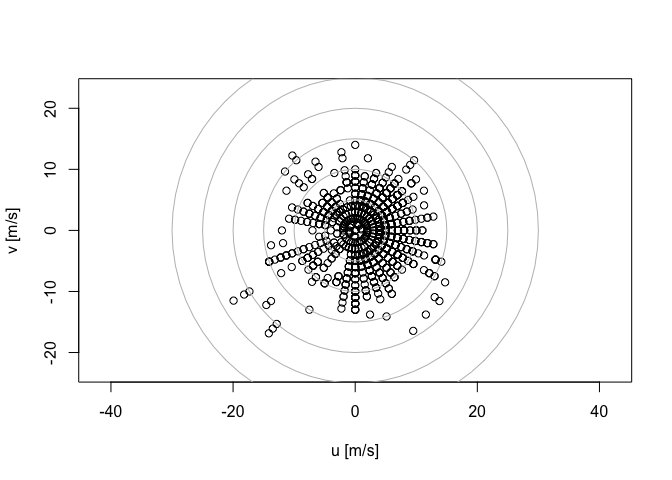
  • 간단한 시각화를 구현해보도록 한다.
data(buoy, package = "ocedata")
theta <- (90 - buoy$direction) * pi / 180
u <- -buoy$wind*cos(theta)
v <- -buoy$wind*sin(theta)
s <- c(-1, 1) * max(buoy$wind, na.rm = TRUE)
plot(u, v, xlab = "u [m/s]", ylab = "v [m/s]", xlim=s, ylim=s, asp=1)
for (ring in seq(5, 30, 5))
  lines(ring*cos(seq(0, 2*pi, pi/32)), 
        ring*sin(seq(0, 2*pi, pi/32)), col="gray")

Validation schemes for 2-nd level models

There are a number of ways to validate second level models (meta-models). In this reading material you will find a description for the most popular ones. If not specified, we assume that the data does not have a time component. We also assume we already validated and fixed hyperparameters for the first level models (models).

Simple holdout scheme

  • Split train data into three parts: partA and partB and partC.
  • Fit N diverse models on partA, predict for partB, partC, test_data getting meta-features partB_meta, partC_meta and test_meta respectively.
  • Fit a metamodel to a partB_meta while validating its hyperparameters on partC_meta.
  • When the metamodel is validated, fit it to [partB_meta, partC_meta] and predict for test_meta.

Meta holdout scheme with OOF meta-features

  • Split train data into K folds. Iterate though each fold: retrain N diverse models on all folds except current fold, predict for the current fold. After this step for each object in train_data we will have N meta-features (also known as out-of-fold predictions, OOF). Let’s call them train_meta.
  • Fit models to whole train data and predict for test data. Let’s call these features test_meta.
  • Split train_meta into two parts: train_metaA and train_metaB. Fit a meta-model to train_metaA while validating its hyperparameters on train_metaB.
  • When the meta-model is validated, fit it to train_meta and predict for test_meta.

Meta KFold scheme with OOF meta-features

  • Obtain OOF predictions train_meta and test metafeatures test_meta using b.1 and b.2.
  • Use KFold scheme on train_meta to validate hyperparameters for meta-model. A common practice to fix seed for this KFold to be the same as seed for KFold used to get OOF predictions.
  • When the meta-model is validated, fit it to train_meta and predict for test_meta.

Holdout scheme with OOF meta-features

  • Split train data into two parts: partA and partB.
  • Split partA into K folds. Iterate though each fold: retrain N diverse models on all folds except current fold, predict for the current fold. After this step for each object in partA we will have N meta-features (also known as out-of-fold predictions, OOF). Let’s call them partA_meta.
  • Fit models to whole partA and predict for partB and test_data, getting partB_meta and test_meta respectively.
  • Fit a meta-model to a partA_meta, using partB_meta to validate its hyperparameters.
  • When the meta-model is validated basically do 2. and 3. without dividing train_data into parts and then train a meta-model. That is, first get out-of-fold predictions train_meta for the train_data using models. Then train models on train_data, predict for test_data, getting test_meta. Train meta-model on the train_meta and predict for test_meta.

KFold scheme with OOF meta-features

  • To validate the model we basically do d.1 – d.4 but we divide train data into parts partA and partB M times using KFold strategy with M folds.
  • When the meta-model is validated do d.5.

Validation in presence of time component

KFold scheme in time series

In time-series task we usually have a fixed period of time we are asked to predict. Like day, week, month or arbitrary period with duration of T.

Feature Engineering with Housing Price Prediction - Missing Values

강의 홍보

개요

  • Feature Engineering를 이해하고 실습한다.
    • 결측치를 처리한다.

I. 사전 준비작업

  • Kaggle API 설치 후 데이터를 Kaggle에서 직접 가져오는 것을 구현한다.

(1) Kaggle API 설치

  • 구글 코랩에서 API를 불러오려면 다음 소스코드를 실행한다.
!pip install kaggle
Requirement already satisfied: kaggle in /usr/local/lib/python3.6/dist-packages (1.5.6)
Requirement already satisfied: certifi in /usr/local/lib/python3.6/dist-packages (from kaggle) (2020.6.20)
Requirement already satisfied: six>=1.10 in /usr/local/lib/python3.6/dist-packages (from kaggle) (1.15.0)
Requirement already satisfied: python-dateutil in /usr/local/lib/python3.6/dist-packages (from kaggle) (2.8.1)
Requirement already satisfied: urllib3<1.25,>=1.21.1 in /usr/local/lib/python3.6/dist-packages (from kaggle) (1.24.3)
Requirement already satisfied: python-slugify in /usr/local/lib/python3.6/dist-packages (from kaggle) (4.0.1)
Requirement already satisfied: tqdm in /usr/local/lib/python3.6/dist-packages (from kaggle) (4.41.1)
Requirement already satisfied: requests in /usr/local/lib/python3.6/dist-packages (from kaggle) (2.23.0)
Requirement already satisfied: text-unidecode>=1.3 in /usr/local/lib/python3.6/dist-packages (from python-slugify->kaggle) (1.3)
Requirement already satisfied: idna<3,>=2.5 in /usr/local/lib/python3.6/dist-packages (from requests->kaggle) (2.10)
Requirement already satisfied: chardet<4,>=3.0.2 in /usr/local/lib/python3.6/dist-packages (from requests->kaggle) (3.0.4)

(2) Kaggle Token 다운로드

  • Kaggle에서 API Token을 다운로드 받는다.
  • [Kaggle]-[My Account]-[API]-[Create New API Token]을 누르면 kaggle.json 파일이 다운로드 된다.
  • 이 파일을 바탕화면에 옮긴 뒤, 아래 코드를 실행 시킨다.
from google.colab import files
uploaded = files.upload()
for fn in uploaded.keys():
  print('uploaded file "{name}" with length {length} bytes'.format(
      name=fn, length=len(uploaded[fn])))
  
# kaggle.json을 아래 폴더로 옮긴 뒤, file을 사용할 수 있도록 권한을 부여한다. 
!mkdir -p ~/.kaggle/ && mv kaggle.json ~/.kaggle/ && chmod 600 ~/.kaggle/kaggle.json

Upload widget is only available when the cell has been executed in the current browser session. Please rerun this cell to enable.

Python 통계 - 확률의 정의

강의 홍보

확률기초이론

  • 이산확률분포: 베르누이분포, 이항분포, 포아송분포
  • 연속확률분포: 정규분포, 카이제곱분포, t-분포, F-분포
  • 확률이란? 경험 또는 실험의 결과로 특정한 사건(event)이나 결과가 발생할 가능성
    • 예1) 주사위 던져서 1이 나올 가능성 1/6
    • 예2) 비가 올 가능성 30%

(1) 확률의 정의

  • 사건 A의 확률 = $\frac{n(A)}{N}$
    • N = 표본공간(=sample space) = 특정 실험에서 일어날 수 있는 모든 가능성

Python 통계 - T검정 예제

강의 홍보

통계분석을 활용한 문제해결 과정

  • 비즈니스에서 통계는 그저 툴이다.
    • 통계를 몰라도 물건을 파는데 전혀 문제가 없다.
  • 통계는 객관적인 근거를 확보하여 유효한 의사결정을 내리기 위한 그저 도구 (Tool) 이다.
  • 따라서, 마케팅이나 CRM과 같은 경영이슈에서도 통계는 문제해결을 이한 체계적인 절차를 제공한다.
    • 문제정의
    • 가설수립 및 분석방법 설정
    • 유의수준 및 임계치 설정
    • 분석 및 검정 통계량 산출
    • 결과 해석 및 가설 검증

예제를 활용한 통계분석 예제

  • 데이터 분석에서 가장 자주 사용되는 통계 기법 중의 하나는 t-검정이다.
  • 처음 t-검정을 배울 때는 비슷한 용어들이 많아서 혼동이 오기도 했다.
    • z-검정, t-검정, 분산분석
    • 이 중 2개 이하의 집단에서 평균을 비교하는 것은 z-검정, t-검정은 사실 동일한 분석방법이다.
    • 그러나, 실무에서는 t-검정을 자주 사용한다 (모집단의 분산을 알 수 있는 방법이 없다, 이는 자세히 한번 얘기하도록 하겠다)

(1) 문제 정의

  • 이제 부터 상상의 나래를 펼쳐보자.
    • 이제 온라인 쇼핑몰을 운영하는 사장이다.
    • 마케팅 부서에서는 콜센터를 통해 접수된 클레임 고객에 대한 타겟마케팅을 기획한다.
    • 클레임 고객은 상대적으로 매장을 찾는 횟수가 적어져 이탈위험도가 높을 것이라고 예상되기 때문이다.

(2) 가설설정 및 분석방법

  • 이제 가설 설정을 한다.
  • t검정을 실시할 때는 보통의 경우 평균의 차이는 없는 것으로 정한다.
    • $H_{0}$(귀무가설) = A쇼핑 클레임 고객들과 비클레임 고객들의 방문 횟수 차이는 없다.
    • $H_{1}$(연구가설) = A쇼핑 클레임 고객들과 비클레임 고객들의 방문횟수 차이는 있다.
  • 즉, 두 그룹간의 평균 비교이다.

(3) 데이터 수집 및 분석방법

  • 독립표본 t-검정을 수행하기 위해서는 평균과 등분산 여부, 그리고 t-value(검정 통계량)p-value(유의확률)을 출력한다.
    • 가장 중요한 것은 두 그룹간의 분산이 동일한지 확인할 필요가 있다.
  • 먼저 데이터를 불러온다.
# Mount Google Drive
from google.colab import drive # import drive from google colab

ROOT = "/content/drive"     # default location for the drive
print(ROOT)                 # print content of ROOT (Optional)
drive.mount(ROOT)           # we mount the google drive at /content/drive
/content/drive
Drive already mounted at /content/drive; to attempt to forcibly remount, call drive.mount("/content/drive", force_remount=True).
# import join used to join ROOT path and MY_GOOGLE_DRIVE_PATH
from os.path import join  

# path to your project on Google Drive
MY_GOOGLE_DRIVE_PATH = 'My Drive/Colab Notebooks/inflearn/Python/Kaggle_Edu/05_statistics'

PROJECT_PATH = join(ROOT, MY_GOOGLE_DRIVE_PATH)
print(PROJECT_PATH)
/content/drive/My Drive/Colab Notebooks/inflearn/Python/Kaggle_Edu/05_statistics
%cd "{PROJECT_PATH}"
/content/drive/My Drive/Colab Notebooks/inflearn/Python/Kaggle_Edu/05_statistics
import pandas as pd
data = pd.read_csv('python_stat/Ashopping.csv', sep=",", encoding='CP949')
data.head()
고객ID 이탈여부 총_매출액 방문빈도 1회_평균매출액 할인권_사용 횟수 총_할인_금액 고객등급 구매유형 클레임접수여부 구매_카테고리_수 거주지역 성별 고객_나이대 거래기간 할인민감여부 멤버쉽_프로그램_가입전_만족도 멤버쉽_프로그램_가입후_만족도 Recency Frequency Monetary 상품_만족도 매장_만족도 서비스_만족도 상품_품질 상품_다양성 가격_적절성 상품_진열_위치 상품_설명_표시 매장_청결성 공간_편의성 시야_확보성 음향_적절성 안내_표지판_설명 친절성 신속성 책임성 정확성 전문성
0 1 0 4007080 17 235711 1 5445 1 4 0 6 6 1 4 1079 0 5 7 7 3 4 6 5 6 7 7 6 7.0 6.0 6 7 6 6 6 6 6 6 6 6
1 2 1 3168400 14 226314 22 350995 2 4 0 4 4 1 1 537 0 2 3 2 3 3 2 5 4 6 7 6 6.0 NaN 7 7 6 6 6 5 3 6 6 6
2 3 0 2680780 18 148932 6 186045 1 4 1 6 6 1 6 1080 0 6 6 7 3 2 4 6 7 6 7 6 7.0 NaN 6 6 6 6 6 7 7 6 6 7
3 4 0 5946600 17 349800 1 5195 1 4 1 5 5 1 6 1019 0 3 5 7 3 5 3 5 5 6 6 6 5.0 6.0 6 6 5 6 6 6 6 6 5 6
4 5 0 13745950 73 188301 9 246350 1 2 0 6 6 0 6 1086 0 5 6 7 6 7 5 6 6 5 6 6 5.0 6.0 5 6 6 6 5 5 6 6 5 6
  • 데이터를 확인했다면, 이제, 클레임 접수여부에 따라 클레임이 없는 (0)고객과, 클레임이 있는 고객(1) 객체에 저장후 두 그룹의 방문빈도를 추출한다.
  • 우선 클레임이 없는 고객을 뽑자.
import numpy as np
no_claim = data[data.클레임접수여부 == 0]
no_claim_array = np.array(no_claim.방문빈도)
no_claim_array
array([ 17,  14,  73,  26,   6,  17,  19,  88,  39,  12,  27,  21,  56,
        16,  21,  28,  17,  15,  48,  42,  33,   9,  32,  15,  23,  24,
        18,  18,  38,  15,  16,  36,   8,  33,  41,  34,  12,  56,  60,
        27,  10,  39,  48,  24,   8,   7,  25,  19,  33,  22,  30,   9,
        80,  18,  15,  50,  71,  15,  66,  41,  18,   5,  78,  30,  14,
        10,  54,  21,  43,  33,  24,  21,  13,  25,  37,  25,  47,  60,
        21,  23,  18,  26,  28,  31,  58,  88,  19,  38,  37,  20,  33,
        18,  15,   7,  29,  30,   6,  16,  10,  23,  10,  14,  18,  11,
        15,  14,  90,   9,   9,   5,  15,  11,  33,   9,  20,   6,  42,
        17,  78,   9,  20,  37,  14,  17,  25,  52,  19,   9,  26,  16,
        49,  32,  24,  40,  44,  13,  16,  25,  16,  47,  27,   9,  15,
         5,  26,  34,  39,  18,  28,  16,  32,  81,  15,  41,   9,  10,
         9,   8,  56,  12,  65,  10,  45,  60,  22,  52,  15,  61,  18,
        12,  23,  93,  28,  12,  39, 103,  11,  28,   6,  35,   6,  86,
        17, 185,  16,  37,  21,  22,  50,  37,  14,  15,  28,  14,  11,
        31,  31,  59,  26,  20,  29,  23,  11,  29,  11, 108,   6,  37,
        29,  12,  11,  10,  18,  36,  73,  18,  22,  14,  22,  13,  31,
        15,  31,  25,  52,  10,  35,   9,   9,   5,  27,  12,  79,  21,
         8,  11,  64,  22,  60,  31,  15,  48,  18,   8,  31,  14,  46,
       102,  10,  34,   4,  23,  43,  45,   9,  18,  26,  12,   8,  81,
        51,  14,  28,  18,  24,  28,  15,  29,   8,   5,  17,  16,  28,
        36,  27,  11,  10,  20,  13,  54,  23,  14,  27,  13,  38,  38,
        79,  27,  97,   8,  10,  41,   6,  19,  16,  21,  46,  23,  39,
        38,  19,   7,   6,  33,  61,  15,  10, 114,  71,  33,  25,  79,
        13,  29,  34,  30,  19,  23,  40,  15,  17,   8,   3,   7,  21,
         9,  40,  46,  24,  73,  38,  56,  13,  13,  30,  46,   6,  30,
        19,   5,  20,  23,   7,  20,  26,  15,  58,  15,  11,  31,  17,
        10,  14,  20,  10,  50,  21,  37,  30,   6,  16,  23,  21, 102,
        26,  43,   8,  15,  10,  14,  71,  60,  45,  25,  49,  50,   9,
        18,  23,  29, 106,  35,  22,  12, 203,  12,  17,  14,  39,  11,
        19,  29,  22,  21,   9,  22,  11,  21,  58,  10,   5,  16,  39,
        13,  33,  13,  14,  13,  18,  42,  11,  29,  28,  35,   9,  21,
        26,  17,  24,   5,  23,  71,  22,  20,  20,   7,  14,  12,  10,
        16,  18,  30,  25,  22,  15,  18,  43,  33,  46,  14,  12,  24,
        23,  18,  23,   9,  13,  17,  22,   7,  18,  15,  39,  22,  22,
        22,   9,  15,  36,  24,  32,  38, 109,  28,  23,  20,  76,  43,
        25,   5,  46,  10,  22,  18,  30,  75,  34,  11,  17,  43,  39,
        84,  42,  41,  26,  32,  31,  37,  15,  50,  22,  19,   6,  19,
        11,   7,  25,  63,  21,  16,  67,  27,   5,  32,  31, 114,  20,
        21,  14,  80,  19,  14,  32,   4,  15,  37,  24,  14,  11,  10,
        20,  30,  10,  19,   6,  26,  26,   9,   4,  66,  16,  24,  29,
        33,  20,  19,  20,  49,  10,  15,  23])
  • 두번째, 클레임이 있는 고객을 뽑아본다.
claim = data[data.클레임접수여부 == 1]
claim_array = np.array(claim.방문빈도)
claim_array
array([ 18,  17, 109,  15,  21,   9,  12,  28,   5,  12,  12,  13,   8,
        18,  27,  34,  23,  19,  29,  10,  19,  28,  23,  30,  14,  20,
         7,  14,  32,  32,  18,  17,  10,  23,  12,   9,  43,  42,   7,
        12,  73,  26,  27,  25,  29,  37,  32,  45,  34,   7,  29,  26,
        27,  33,  27,  28,   8,  45,  66,  14,  73,  24,  13,  54,  24,
        17,  29,  29,  57,  18,  17,  27,  15,  23,  11,   4,  15,  31,
        21,  21,  11,  19,  34,  41,  18,  45,  10,  72,  18,  82,  10,
        26,  17,  37,  17,   8,  26,  11,  28,  17,  12,  23,  37,  19,
         7,  20,   9,  14,  13,  36,  26,  23,  23,  16,  30,  13,  45,
        30,   6,  44,  32,  19,  20,  24,   7,  14,   7,  65,  31,   6,
        37,  91,  17,  12,  23,  61, 162,  23,  21,  12,  14,  10,  18,
        14,   4,   6,  26,  19,  27,  14,   7,  32,  11,  11,  20,   7,
         7,   7,  27,  16,  26,  10,  12,   8,  12,  25,  14,  18,  30,
        33,  86,  20,  22,  10,  34,  36,   9,  68,  28,  14,  61,   9,
        17,   6,  30,  14,  25,  32,  19,  34,  26,  17,  24,  18,  30,
        15,  15,  96,  17,  18,  19,  24,  16,   6,  27,  31,  15,  38,
        11,   7,  65,  15,   7,  23,   7,  15,  34,  17,  20,  19,  10,
        14,  19,  69,   4,  21,  13,  20,  45,  50,  58,   6,  15,  10,
        10,  19,  32,   6,  38,  36,   6,  39,  16,  20,  48,  26,  21,
        22,   7,   8,  28,   8,  31,  13,  46,  20,   8,  49,   9,  48,
        20,  25,  54,  21,   6,  30,  40,  11,  12,  28,  15,  24,  90,
        22,  15,  14,   7,  77,  39,  11,  18,  16,  55,  15,  12,  17,
        23,  15,  33,  15,  18,  28,   7,  17,  34,  27,  44,  35,  67,
        12,  54,  18,  10,  21,  28,  67,   9, 126,  23,  10,  41,  15,
        21,  21,  42,  18,  31,  13,  20,  19,  39,  26,  11,  22,  64,
         4,  27,  21,  14,  30,  25,  18,  11,  10,  70,  24,  18,  19,
        30,  30,  19, 104,  39,  92,  52,  48,  30,  79,  15,  24,  23,
        14,   8,   9,  21,  18,  11,   7,   8,  13,  21,  23,   2,  12,
        12,  52,  22,  20,   6,  22,   6,  24,  12,  18,  20,  11,  12,
        33,   8,  24,  79,  34,   8,  36,  13,  19,   5,  12,  25,  31,
        27,  17,  11,  65,  29,  18,  10,  28,  22,  12,  18,  20,  27,
        17,  20,  17,   8,  38,  18,  25,  10,   7,  18,  11,  55,   5,
        20,  11,  41,  12,  11,  26,  55,  25,   6,  35,  38,  32,  27,
        11,  10,  11,  55,  22,  12,  18,  10,  15,  32,  13,  29,   8,
        17,  83,  15,   7,   8,  11,  27,  21,  18,  15,  19,   8,  16,
        35,  15,  40,   8])
  • 그 후, stats.bartlett() 함수를 이용하여 등분산 검정을 실시한다.
  • 이 때, 주의해야 하는 것이 있다.
  • 등분산 검정의 귀무가설과 대립가설을 다음과 같다.
    • H0 : 등분산이다.
    • H1 : 이분산이다(등분산이 아니다).
  • 즉, 등분산 가정의 귀무가설을 채택하려면 유의확률인 0.05 > p 나와야 한다.
from scipy import stats
stats.bartlett(no_claim_array, claim_array)
BartlettResult(statistic=13.626177910965525, pvalue=0.00022305349806448475)
  • 여기에서 두 고객 그룹간의 등분산 검정 결과 F값은 13.626, 유의확률은 0.05미만으로 귀무가설이 기각된다.
    • 즉, 두 집단의 분산은 동일하지 않은 것으로 나타났다.
  • 등분산성이 나와야 하는데, 나오지 않아서 입문자들이 조금 당혹스러워 할 수 있다.
    • 굳이 당황할 필요는 없다. 분산이 동일하지 않으면 동일하지 않다고 표시만 해두면 된다. (check: equal_var)
  • 이제 ttest_ind를 활용해서 구하도록 하자.
print(stats.ttest_ind(no_claim_array, claim_array, equal_var=False))
Ttest_indResult(statistic=2.595726838875684, pvalue=0.009577734932789503)
  • 독립표본 t-value2.59이며, p-value 0.0095로 나왔다.
    • 이 의미는 두 그룹간의 평균 방문 빈도에 차이가 있음을 의미한다.
  • 조금 더 구체적으로 구해보자.

(4) 시각화

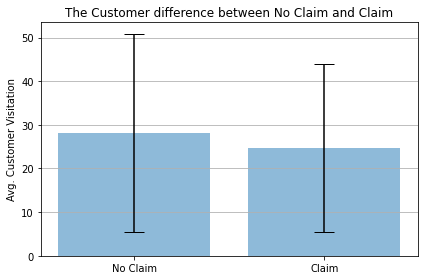
  • 실제 두 그룹간의 차이를 matplotlib을 활용하여 시각화로 구현해본다.
  • 이 때, 각 그룹의 평균(Mean)표준편차(Standard Deviation)를 구한다.
# 평균 계산하기
no_claim_mean = np.mean(no_claim_array)
claim_mean = np.mean(claim_array)
print("클레임이 없는 고객의 평균 방문빈도:", no_claim_mean)
print("클레임이 있는 고객의 평균 방문빈도:", claim_mean)

# 표준편차 구하기
no_claim_std = np.std(no_claim_array)
claim_std = np.std(claim_array)
print("클레임이 없는 고객의 표준편차:", no_claim_std)
print("클레임이 있는 고객의 표준편차:", claim_std)

# 라벨 정리
viz_labels = ['No Claim', 'Claim']
x_pos = np.arange(len(viz_labels))
avg = (no_claim_mean, claim_mean)
error = [no_claim_std, claim_std]
클레임이 없는 고객의 평균 방문빈도: 28.184842883548985
클레임이 있는 고객의 평균 방문빈도: 24.736383442265794
클레임이 없는 고객의 표준편차: 22.7348095052013
클레임이 있는 고객의 표준편차: 19.234427104778828
import matplotlib.pyplot as plt

fig, ax = plt.subplots()
ax.bar(x_pos, avg,
       yerr = error,
       align='center',
       alpha=0.5,
       ecolor='black',
       capsize=10)
ax.set_ylabel('Avg. Customer Visitation')
ax.set_xticks(x_pos)
ax.set_xticklabels(viz_labels)
ax.set_title('The Customer difference between No Claim and Claim')
ax.yaxis.grid(True)

plt.tight_layout()
plt.show()

png

삼성카드 대회 Track-2 - 포지셔닝 분석(2)

대회 소개

  • 삼성카드 데이터분석 공모전이 시행되고 있다.
    • 대회에 처음 참여하는 아시아경제-수강생들을 위해 일종의 가이드라인으로 제안하고자 한다.
  • 본 포스트에서는 기본적인 내용만 전달하고자 함을 밝힌다.
    • Track2 과정은 마케팅 전략 제안이 중요하다!

포지셔닝 분석 개요

  • 마케팅에서 자주 보는 분석 방법중의 하나는 포지셔닝(Positioning) 기법이다.
  • 포지셔닝 분석은 마케팅 통계분석 기법중의 하나로, 기업이나, 상품, 브랜드 같은 개체들의 포지셔닝을 수행하는 다차원 척도법(MDS: Multi-Dimensional Scaling)과 상응분석(Correspondence Analysis)이 있다.
  • 위 두가지 분석 방법 중 무엇을 사용해야 할까?
    • 만약 데이터셋이 주로 등간척도, 비율척도와 같이 구성되어 있다면 다차원 척도법
    • 만약 데이터셋이 주로 명목척도, 서열척도와 같이 구성되어 있다면 상응분석
  • 현재 삼성카드 대회의 주 데이터셋은 명목척도 및 서열척도로 구성되어 있기 때문에 상응분석으로 시작하면 된다.

상응분석

(1) 기본 개념

  • 상응분석을 사용하려면 빈도교차표를 만들어야 한다.
  • 요약하면, 상응분석은 범주형 변수의 빈도를 나타내고 있는 빈도교차표의 행과 열(명목변수의 범주 값들)을 그래프상의 자극점 형태로 표시하는 방법.
  • 이 때, 단순 상응분석은 2개의 변수, 다중 상응분석은 3개 이상의 변수 활용한다.
  • 이 때, 상응분석은 카이제곱 검정과 같이 범주형 변수간의 상호연관성을 바탕으로 진행된다.
    • 따라서, 두 개의 범주형 변수가 서로 연관성을 가지고 있다는 전제하에서 진행된다.

(2) 데이터 불러오기

  • 먼저 필요한 데이터를 불러온다.
  • 필자는 구글 코랩에서 데이터를 불러오기 때문에
%config InlineBackend.figure_format = 'retina'
!sudo apt-get -qq -y install fonts-nanum
The following package was automatically installed and is no longer required:
  libnvidia-common-440
Use 'apt autoremove' to remove it.
The following NEW packages will be installed:
  fonts-nanum
0 upgraded, 1 newly installed, 0 to remove and 39 not upgraded.
Need to get 9,604 kB of archives.
After this operation, 29.5 MB of additional disk space will be used.
Selecting previously unselected package fonts-nanum.
(Reading database ... 144579 files and directories currently installed.)
Preparing to unpack .../fonts-nanum_20170925-1_all.deb ...
Unpacking fonts-nanum (20170925-1) ...
Setting up fonts-nanum (20170925-1) ...
Processing triggers for fontconfig (2.12.6-0ubuntu2) ...
import seaborn as sns
import pandas as pd
import matplotlib.pyplot as plt
import matplotlib as mpl
import matplotlib.font_manager as fm
/usr/local/lib/python3.6/dist-packages/statsmodels/tools/_testing.py:19: FutureWarning: pandas.util.testing is deprecated. Use the functions in the public API at pandas.testing instead.
  import pandas.util.testing as tm
for font in fm.fontManager.ttflist:
    if 'Nanum' in font.name:
        print(font.name, font.fname)
NanumGothic /usr/share/fonts/truetype/nanum/NanumGothic.ttf
NanumSquareRound /usr/share/fonts/truetype/nanum/NanumSquareRoundR.ttf
NanumSquare /usr/share/fonts/truetype/nanum/NanumSquareR.ttf
NanumSquareRound /usr/share/fonts/truetype/nanum/NanumSquareRoundB.ttf
NanumBarunGothic /usr/share/fonts/truetype/nanum/NanumBarunGothicBold.ttf
NanumMyeongjo /usr/share/fonts/truetype/nanum/NanumMyeongjo.ttf
NanumMyeongjo /usr/share/fonts/truetype/nanum/NanumMyeongjoBold.ttf
NanumBarunGothic /usr/share/fonts/truetype/nanum/NanumBarunGothic.ttf
NanumSquare /usr/share/fonts/truetype/nanum/NanumSquareB.ttf
NanumGothic /usr/share/fonts/truetype/nanum/NanumGothicBold.ttf
fontpath = '/usr/share/fonts/truetype/nanum/NanumGothic.ttf'
font = fm.FontProperties(fname=fontpath, size=9)
plt.rc('font', family='NanumGothic') 
plt.rcParams["figure.figsize"] = (20, 10)
plt.rcParams['lines.linewidth'] = 2
plt.rcParams['lines.color'] = 'r'
plt.rcParams['axes.grid'] = True 
mpl.font_manager._rebuild()
fm._rebuild()
  • 한글 텍스트가 잘 나오는지 확인해본다.
font = {'family' : 'NanumGothic',
        'weight' : 'bold',
        'size'   : 22}

plt.rc('font', **font)
plt.text(0.3, 0.3, '한글', size=100)
Text(0.3, 0.3, '한글')

png

삼성카드 대회 Track-2 - 포지셔닝 분석(1)

대회 소개

  • 삼성카드 데이터분석 공모전이 시행되고 있다.
    • 대회에 처음 참여하는 아시아경제-수강생들을 위해 일종의 가이드라인으로 제안하고자 한다.
  • 본 포스트에서는 기본적인 내용만 전달하고자 함을 밝힌다.
    • Track2 과정은 마케팅 전략 제안이 중요하다!

포지셔닝 분석 개요

  • 마케팅에서 자주 보는 분석 방법중의 하나는 포지셔닝(Positioning) 기법이다.
  • 포지셔닝 분석은 마케팅 통계분석 기법중의 하나로, 기업이나, 상품, 브랜드 같은 개체들의 포지셔닝을 수행하는 다차원 척도법(MDS: Multi-Dimensional Scaling)과 상응분석(Correspondence Analysis)이 있다.
  • 위 두가지 분석 방법 중 무엇을 사용해야 할까?
    • 만약 데이터셋이 주로 등간척도, 비율척도와 같이 구성되어 있다면 다차원 척도법
    • 만약 데이터셋이 주로 명목척도, 서열척도와 같이 구성되어 있다면 상응분석
  • 현재 삼성카드 대회의 주 데이터셋은 명목척도 및 서열척도로 구성되어 있기 때문에 상응분석으로 시작하면 된다.

상응분석

  • Correspondence Analysis는 범주형 변수(수준)들 간의 연관성을 분석한 후, 그 결과를 시각적 해석이 용이하도록 그래프화 하는 것임

(1) 기본 개념

  • 상응분석을 사용하려면 빈도교차표를 만들어야 한다.
  • 요약하면, 상응분석은 범주형 변수의 빈도를 나타내고 있는 빈도교차표의 행과 열(명목변수의 범주 값들)을 그래프상의 자극점 형태로 표시하는 방법.
  • 이 때, 단순 상응분석은 2개의 변수, 다중 상응분석은 3개 이상의 변수 활용한다.
  • 이 때, 상응분석은 카이제곱 검정과 같이 범주형 변수간의 상호연관성을 바탕으로 진행된다.
    • 따라서, 두 개의 범주형 변수가 서로 연관성을 가지고 있다는 전제하에서 진행된다.

(2) 데이터 불러오기

  • 먼저 필요한 데이터를 불러온다.
  • 필자는 구글 코랩에서 데이터를 불러오기 때문에
%config InlineBackend.figure_format = 'retina'
!sudo apt-get -qq -y install fonts-nanum
The following package was automatically installed and is no longer required:
  libnvidia-common-440
Use 'apt autoremove' to remove it.
The following NEW packages will be installed:
  fonts-nanum
0 upgraded, 1 newly installed, 0 to remove and 39 not upgraded.
Need to get 9,604 kB of archives.
After this operation, 29.5 MB of additional disk space will be used.
Selecting previously unselected package fonts-nanum.
(Reading database ... 144579 files and directories currently installed.)
Preparing to unpack .../fonts-nanum_20170925-1_all.deb ...
Unpacking fonts-nanum (20170925-1) ...
Setting up fonts-nanum (20170925-1) ...
Processing triggers for fontconfig (2.12.6-0ubuntu2) ...
import seaborn as sns
import pandas as pd
import matplotlib.pyplot as plt
import matplotlib as mpl
import matplotlib.font_manager as fm
/usr/local/lib/python3.6/dist-packages/statsmodels/tools/_testing.py:19: FutureWarning: pandas.util.testing is deprecated. Use the functions in the public API at pandas.testing instead.
  import pandas.util.testing as tm
for font in fm.fontManager.ttflist:
    if 'Nanum' in font.name:
        print(font.name, font.fname)
NanumGothic /usr/share/fonts/truetype/nanum/NanumGothicBold.ttf
NanumBarunGothic /usr/share/fonts/truetype/nanum/NanumBarunGothic.ttf
NanumBarunGothic /usr/share/fonts/truetype/nanum/NanumBarunGothicBold.ttf
NanumSquare /usr/share/fonts/truetype/nanum/NanumSquareB.ttf
NanumMyeongjo /usr/share/fonts/truetype/nanum/NanumMyeongjoBold.ttf
NanumSquareRound /usr/share/fonts/truetype/nanum/NanumSquareRoundB.ttf
NanumSquare /usr/share/fonts/truetype/nanum/NanumSquareR.ttf
NanumMyeongjo /usr/share/fonts/truetype/nanum/NanumMyeongjo.ttf
NanumSquareRound /usr/share/fonts/truetype/nanum/NanumSquareRoundR.ttf
NanumGothic /usr/share/fonts/truetype/nanum/NanumGothic.ttf
fontpath = '/usr/share/fonts/truetype/nanum/NanumGothic.ttf'
font = fm.FontProperties(fname=fontpath, size=9)
plt.rc('font', family='NanumGothic') 
plt.rcParams["figure.figsize"] = (20, 10)
plt.rcParams['lines.linewidth'] = 2
plt.rcParams['lines.color'] = 'r'
plt.rcParams['axes.grid'] = True 
mpl.font_manager._rebuild()
fm._rebuild()
  • 한글 텍스트가 잘 나오는지 확인해본다.
font = {'family' : 'NanumGothic',
        'weight' : 'bold',
        'size'   : 22}

plt.rc('font', **font)
plt.text(0.3, 0.3, '한글', size=100)
Text(0.3, 0.3, '한글')

png

머신러닝 알고리즘 - 결정트리 회귀모형

I. 개요

  • 결정트리 회귀 모형에 대해 배우도록 한다.
  • 트리모형의 일반적인 특징에 대해 익힌다.

II. 결정 트리 모형

  • 결정 트리는 분류, 회귀, 다중출력 작업도 가능한 활용범위가 많은 머신러닝 알고리즘이다.
  • 결정 트리는 최근에 사용하는 랜덤포레스트, XGboost, LightGBM과 같은 모형의 기본 구성 요소이다.

(1) 의사결정 나무 예제

  • 의사 결정 나무에서 자주 사용되는 예제를 우선 확인해보자.

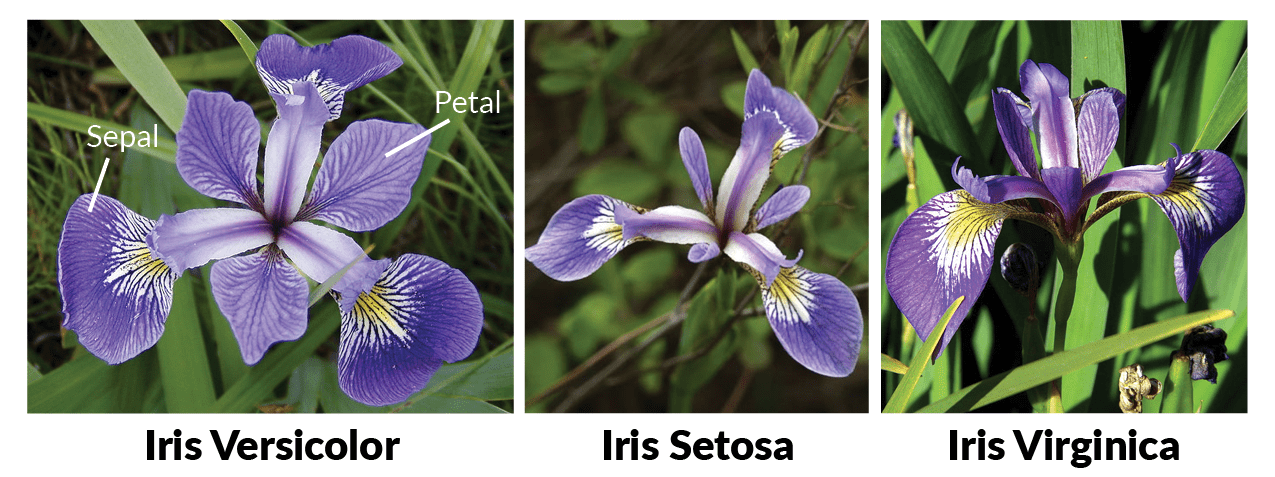
  • 먼저, 데이터셋을 기준으로 IRIS 붓꽃의 종류는 아래와 같이 3가지로 구성되어 있다.

    • Versicolor, Setosa, Virginica
  • 위 이미지에서 보는 것처럼, 종에 따라 잎의 크기가 다른 것을 확인할 수 있다. 이제 예제 데이터를 불러오는 것부터 시작해보자.

Python 통계 - 포지셔닝 분석(2)

강의 홍보

포지셔닝 분석 개요

  • 마케팅에서 자주 보는 분석 방법중의 하나는 포지셔닝(Positioning) 기법이다.
  • 포지셔닝 분석은 마케팅 통계분석 기법중의 하나로, 기업이나, 상품, 브랜드 같은 개체들의 포지셔닝을 수행하는 다차원 척도법(MDS: Multi-Dimensional Scaling)과 상응분석(Correspondence Analysis)이 있다.
  • 위 두가지 분석 방법 중 무엇을 사용해야 할까?
    • 만약 데이터셋이 주로 등간척도, 비율척도와 같이 구성되어 있다면 다차원 척도법
    • 만약 데이터셋이 주로 명목척도, 서열척도와 같이 구성되어 있다면 상응분석
  • 현재 삼성카드 대회의 주 데이터셋은 명목척도 및 서열척도로 구성되어 있기 때문에 상응분석으로 시작하면 된다.

상응분석

  • Correspondence Analysis는 범주형 변수(수준)들 간의 연관성을 분석한 후, 그 결과를 시각적 해석이 용이하도록 그래프화 하는 것임

(1) 기본 개념

  • 상응분석을 사용하려면 빈도교차표를 만들어야 한다.
  • 요약하면, 상응분석은 범주형 변수의 빈도를 나타내고 있는 빈도교차표의 행과 열(명목변수의 범주 값들)을 그래프상의 자극점 형태로 표시하는 방법.
  • 이 때, 단순 상응분석은 2개의 변수, 다중 상응분석은 3개 이상의 변수 활용한다.
  • 이 때, 상응분석은 카이제곱 검정과 같이 범주형 변수간의 상호연관성을 바탕으로 진행된다.
    • 따라서, 두 개의 범주형 변수가 서로 연관성을 가지고 있다는 전제하에서 진행된다.

(2) 데이터 불러오기

  • 먼저 필요한 데이터를 불러온다.
  • 필자는 구글 코랩에서 데이터를 불러오기 때문에
%config InlineBackend.figure_format = 'retina'
!apt -qq -y install fonts-nanum
fonts-nanum is already the newest version (20170925-1).
The following package was automatically installed and is no longer required:
  libnvidia-common-440
Use 'apt autoremove' to remove it.
0 upgraded, 0 newly installed, 0 to remove and 39 not upgraded.
import seaborn as sns
import pandas as pd
import matplotlib.pyplot as plt
import matplotlib as mpl
import matplotlib.font_manager as fm
/usr/local/lib/python3.6/dist-packages/statsmodels/tools/_testing.py:19: FutureWarning: pandas.util.testing is deprecated. Use the functions in the public API at pandas.testing instead.
  import pandas.util.testing as tm
for font in fm.fontManager.ttflist:
    if 'Nanum' in font.name:
        print(font.name, font.fname)
NanumMyeongjo /usr/share/fonts/truetype/nanum/NanumMyeongjo.ttf
NanumSquare /usr/share/fonts/truetype/nanum/NanumSquareR.ttf
NanumSquare /usr/share/fonts/truetype/nanum/NanumSquareB.ttf
NanumBarunGothic /usr/share/fonts/truetype/nanum/NanumBarunGothicBold.ttf
NanumMyeongjo /usr/share/fonts/truetype/nanum/NanumMyeongjoBold.ttf
NanumSquareRound /usr/share/fonts/truetype/nanum/NanumSquareRoundR.ttf
NanumSquareRound /usr/share/fonts/truetype/nanum/NanumSquareRoundB.ttf
NanumBarunGothic /usr/share/fonts/truetype/nanum/NanumBarunGothic.ttf
NanumGothic /usr/share/fonts/truetype/nanum/NanumGothic.ttf
NanumGothic /usr/share/fonts/truetype/nanum/NanumGothicBold.ttf
fontpath = '/usr/share/fonts/truetype/nanum/NanumGothic.ttf'
font = fm.FontProperties(fname=fontpath, size=9)
plt.rc('font', family='NanumGothic') 
plt.rcParams["figure.figsize"] = (20, 10)
plt.rcParams['lines.linewidth'] = 2
plt.rcParams['lines.color'] = 'r'
plt.rcParams['axes.grid'] = True 
mpl.font_manager._rebuild()
fm._rebuild()
font = {'family' : 'NanumGothic',
        'weight' : 'bold',
        'size'   : 22}

plt.rc('font', **font)
plt.text(0.3, 0.3, '한글', size=100)
Text(0.3, 0.3, '한글')

png

Python 통계 - 포지셔닝 분석(1)

강의 홍보

포지셔닝 분석 개요

  • 마케팅에서 자주 보는 분석 방법중의 하나는 포지셔닝(Positioning) 기법이다.
  • 포지셔닝 분석은 마케팅 통계분석 기법중의 하나로, 기업이나, 상품, 브랜드 같은 개체들의 포지셔닝을 수행하는 다차원 척도법(MDS: Multi-Dimensional Scaling)과 상응분석(Correspondence Analysis)이 있다.
  • 위 두가지 분석 방법 중 무엇을 사용해야 할까?
    • 만약 데이터셋이 주로 등간척도, 비율척도와 같이 구성되어 있다면 다차원 척도법
    • 만약 데이터셋이 주로 명목척도, 서열척도와 같이 구성되어 있다면 상응분석
  • 현재 삼성카드 대회의 주 데이터셋은 명목척도 및 서열척도로 구성되어 있기 때문에 상응분석으로 시작하면 된다.

상응분석

  • Correspondence Analysis는 범주형 변수(수준)들 간의 연관성을 분석한 후, 그 결과를 시각적 해석이 용이하도록 그래프화 하는 것임

(1) 기본 개념

  • 상응분석을 사용하려면 빈도교차표를 만들어야 한다.
  • 요약하면, 상응분석은 범주형 변수의 빈도를 나타내고 있는 빈도교차표의 행과 열(명목변수의 범주 값들)을 그래프상의 자극점 형태로 표시하는 방법.
  • 이 때, 단순 상응분석은 2개의 변수, 다중 상응분석은 3개 이상의 변수 활용한다.
  • 이 때, 상응분석은 카이제곱 검정과 같이 범주형 변수간의 상호연관성을 바탕으로 진행된다.
    • 따라서, 두 개의 범주형 변수가 서로 연관성을 가지고 있다는 전제하에서 진행된다.

(2) 데이터 불러오기

  • 먼저 필요한 데이터를 불러온다.
  • 필자는 구글 코랩에서 데이터를 불러오기 때문에
%config InlineBackend.figure_format = 'retina'
!apt -qq -y install fonts-nanum
fonts-nanum is already the newest version (20170925-1).
The following package was automatically installed and is no longer required:
  libnvidia-common-440
Use 'apt autoremove' to remove it.
0 upgraded, 0 newly installed, 0 to remove and 39 not upgraded.
import seaborn as sns
import pandas as pd
import matplotlib.pyplot as plt
import matplotlib as mpl
import matplotlib.font_manager as fm
/usr/local/lib/python3.6/dist-packages/statsmodels/tools/_testing.py:19: FutureWarning: pandas.util.testing is deprecated. Use the functions in the public API at pandas.testing instead.
  import pandas.util.testing as tm
for font in fm.fontManager.ttflist:
    if 'Nanum' in font.name:
        print(font.name, font.fname)
NanumMyeongjo /usr/share/fonts/truetype/nanum/NanumMyeongjoBold.ttf
NanumSquareRound /usr/share/fonts/truetype/nanum/NanumSquareRoundR.ttf
NanumSquare /usr/share/fonts/truetype/nanum/NanumSquareB.ttf
NanumGothic /usr/share/fonts/truetype/nanum/NanumGothicBold.ttf
NanumMyeongjo /usr/share/fonts/truetype/nanum/NanumMyeongjo.ttf
NanumGothic /usr/share/fonts/truetype/nanum/NanumGothic.ttf
NanumBarunGothic /usr/share/fonts/truetype/nanum/NanumBarunGothicBold.ttf
NanumSquareRound /usr/share/fonts/truetype/nanum/NanumSquareRoundB.ttf
NanumBarunGothic /usr/share/fonts/truetype/nanum/NanumBarunGothic.ttf
NanumSquare /usr/share/fonts/truetype/nanum/NanumSquareR.ttf
fontpath = '/usr/share/fonts/truetype/nanum/NanumGothic.ttf'
font = fm.FontProperties(fname=fontpath, size=9)
plt.rc('font', family='NanumGothic') 
plt.rcParams["figure.figsize"] = (20, 10)
plt.rcParams['lines.linewidth'] = 2
plt.rcParams['lines.color'] = 'r'
plt.rcParams['axes.grid'] = True 
mpl.font_manager._rebuild()
fm._rebuild()
font = {'family' : 'NanumGothic',
        'weight' : 'bold',
        'size'   : 22}

plt.rc('font', **font)
plt.text(0.3, 0.3, '한글', size=100)
Text(0.3, 0.3, '한글')

png