Kaggle

Kaggle ML Submission 클래스 만들기

개요

  • 취업 준비생 들에게 필요한 캐글 연습 코드 클래스로 구현함
    • 학습에서 제출까지 자동화하는 것에 목적을 둠
  • 클래스에 대한 기본적인 이해가 있다는 전제하에 작성
  • 전체 코드는 다음과 같다.
import numpy as np
import pandas as pd
import shap
import matplotlib.pyplot as plt

# 데이터 처리 및 모델링 라이브러리
from sklearn.model_selection import train_test_split, cross_val_score
from sklearn.preprocessing import StandardScaler, LabelEncoder, OrdinalEncoder
from sklearn.impute import SimpleImputer
from sklearn.metrics import (
    mean_squared_error, mean_absolute_error, 
    r2_score, mean_absolute_percentage_error
)
from sklearn.ensemble import RandomForestRegressor

# 부스팅 모델
import xgboost as xgb
import lightgbm as lgb
from catboost import CatBoostRegressor

# Matplotlib 설정 
plt.rcParams.update({'font.size': 9})  # 원하는 크기로 설정 (예: 10)

class DataPreprocessor:
    """
    데이터 전처리 클래스
    """
    def __init__(self, train_path, test_path):
        self.train_data = pd.read_csv(train_path)
        self.test_data = pd.read_csv(test_path)
    
    def preprocess(self, target_column):
        """
        데이터 전처리 메서드
        - 결측치 처리 전략 개선
        - 문자열 컬럼 Ordinal Encoding
        """
        # 타겟 분리
        X = self.train_data.drop(columns=[target_column])
        y = self.train_data[target_column]
        X_test = self.test_data.copy()
        
        # 결측치 처리 전략 개선
        def handle_missing_values(df):
            # 숫자형 변수 - 중앙값 대체
            numeric_columns = df.select_dtypes(include=['int64', 'float64']).columns
            df[numeric_columns] = df[numeric_columns].fillna(df[numeric_columns].median())
            
            # 범주형 변수 - 최빈값 대체
            categorical_columns = df.select_dtypes(include=['object']).columns
            df[categorical_columns] = df[categorical_columns].fillna(df[categorical_columns].mode().iloc[0])
            
            return df
        
        # 결측치 처리
        X = handle_missing_values(X)
        X_test = handle_missing_values(X_test)
        
        # 문자열 컬럼 식별
        categorical_columns = X.select_dtypes(include=['object']).columns
        
        # Ordinal Encoder 초기화
        ordinal_encoder = OrdinalEncoder(
            handle_unknown='use_encoded_value', 
            unknown_value=-1
        )
        
        # 훈련 및 테스트 데이터에 인코딩 적용
        if len(categorical_columns) > 0:
            # 전체 데이터 결합하여 인코딩
            combined_categorical = pd.concat([X[categorical_columns], X_test[categorical_columns]])
            
            # 인코더 훈련
            ordinal_encoder.fit(combined_categorical)
            
            # 훈련 데이터 인코딩
            X[categorical_columns] = ordinal_encoder.transform(X[categorical_columns])
            
            # 테스트 데이터 인코딩
            X_test[categorical_columns] = ordinal_encoder.transform(X_test[categorical_columns])
        
        return X, y, X_test, ordinal_encoder

class EvaluationMetrics:
    """
    모델 평가 지표 클래스
    """
    @staticmethod
    def rmse(y_true, y_pred):
        return np.sqrt(mean_squared_error(y_true, y_pred))
    
    @staticmethod
    def mae(y_true, y_pred):
        return mean_absolute_error(y_true, y_pred)
    
    @staticmethod
    def r2(y_true, y_pred):
        return r2_score(y_true, y_pred)
    
    @staticmethod
    def mape(y_true, y_pred):
        return mean_absolute_percentage_error(y_true, y_pred)

class SHAPExplainer:
    """
    SHAP 설명 및 시각화 클래스
    """
    def __init__(self, model, X):
        self.model = model
        self.X = X
    
    def tree_explainer(self):
        """트리 기반 모델용 SHAP 설명"""
        explainer = shap.TreeExplainer(self.model)
        shap_values = explainer.shap_values(self.X)
        return explainer, shap_values
    
    def plot_feature_importance(self, shap_values, feature_names):
        """특성 중요도 플롯"""
        plt.figure(figsize=(10, 6))
        shap.summary_plot(shap_values, self.X, feature_names=feature_names)
        plt.title("SHAP Feature Importance")
        plt.tight_layout()
        plt.show()

class BaseMLDL:
    """
    기본 ML/DL 모델 베이스 클래스
    """
    def __init__(self, X, y, test_size=0.2, random_state=42):
        # 데이터 분할
        self.X_train, self.X_val, self.y_train, self.y_val = train_test_split(
            X, y, test_size=test_size, random_state=random_state
        )
        
        # 스케일링
        self.scaler = StandardScaler()
        self.X_train_scaled = self.scaler.fit_transform(self.X_train)
        self.X_val_scaled = self.scaler.transform(self.X_val)
        
        self.model = None
        self.predictions = None
    
    def train(self):
        raise NotImplementedError("하위 클래스에서 구현해야 합니다.")
    
    def predict(self):
        raise NotImplementedError("하위 클래스에서 구현해야 합니다.")
    
    def evaluate(self):
        """모델 평가"""
        self.predictions = self.predict()
        return {
            'RMSE': EvaluationMetrics.rmse(self.y_val, self.predictions),
            'MAE': EvaluationMetrics.mae(self.y_val, self.predictions),
            'R2': EvaluationMetrics.r2(self.y_val, self.predictions),
            'MAPE': EvaluationMetrics.mape(self.y_val, self.predictions)
        }

# 각 모델 클래스 구현 (RandomForest, XGBoost, LightGBM, CatBoost 등)
class RandomForestModel(BaseMLDL):
    def train(self, n_estimators=100, **kwargs):
        self.model = RandomForestRegressor(n_estimators=n_estimators, **kwargs)
        self.model.fit(self.X_train_scaled, self.y_train)
    
    def predict(self):
        return self.model.predict(self.X_val_scaled)

class XGBoostModel(BaseMLDL):
    def train(self, n_estimators=100, **kwargs):
        self.model = xgb.XGBRegressor(n_estimators=n_estimators, **kwargs)
        self.model.fit(self.X_train_scaled, self.y_train)
    
    def predict(self):
        return self.model.predict(self.X_val_scaled)

class LightGBMModel(BaseMLDL):
    def train(self, n_estimators=100, **kwargs):
        self.model = lgb.LGBMRegressor(n_estimators=n_estimators, **kwargs)
        self.model.fit(self.X_train_scaled, self.y_train)
    
    def predict(self):
        return self.model.predict(self.X_val_scaled)

class CatBoostModel(BaseMLDL):
    def train(self, iterations=100, **kwargs):
        self.model = CatBoostRegressor(iterations=iterations, **kwargs)
        self.model.fit(self.X_train_scaled, self.y_train)
    
    def predict(self):
        return self.model.predict(self.X_val_scaled)

class KaggleSubmission:
    """
    Kaggle 제출 자동화 클래스
    """
    def __init__(self, preprocessor):
        self.preprocessor = preprocessor
    
    def submit(self, model, X_test, submission_path, id_column, target_column):
        """제출 파일 생성"""
        # 테스트 데이터 스케일링
        X_test_scaled = model.scaler.transform(X_test)
        
        # 예측
        predictions = model.model.predict(X_test_scaled)
        
        # 제출 파일 생성
        submission = pd.DataFrame({
            'id' : X_test['id'],
            'Premium Amount' : predictions
        })
        submission.to_csv(submission_path, index=False)
        print(f"제출 파일 생성: {submission_path}")

def compare_shap_feature_importance(models, X, save_path='shap_comparison.png'):
    """
    여러 모델의 SHAP 디테일 특성 중요도를 한 그래프에 시각화 및 저장
    
    Args:
        models (list): 비교할 모델 리스트
        X (pd.DataFrame): 특성 데이터
        save_path (str): 저장할 파일 경로
    """
    # 모델별 SHAP 값 저장할 딕셔너리
    model_shap_values = {}
    
    # 각 모델의 SHAP 값 계산
    for model_info in models:
        model = model_info['model']
        model_name = model_info['name']
        
        try:
            # SHAP 설명자 생성
            shap_explainer = SHAPExplainer(model.model, X)
            _, shap_values = shap_explainer.tree_explainer()
            
            # SHAP 값 저장
            model_shap_values[model_name] = shap_values
        
        except Exception as e:
            print(f"{model_name} SHAP 분석 중 오류: {e}")
    
    # 모델 수에 따른 동적 서브플롯 설정
    n_models = len(model_shap_values)
    
    # 행과 열 계산 (정사각형에 가깝게)
    import math
    n_cols = math.ceil(math.sqrt(n_models))
    n_rows = math.ceil(n_models / n_cols)
    
    # 큰 피규어 생성 (디테일 플롯만)
    plt.figure(figsize=(20*n_cols, 5*n_rows))
    
    # 각 모델의 SHAP 특성 중요도 시각화
    for idx, (model_name, shap_values) in enumerate(model_shap_values.items(), 1):
        plt.subplot(n_rows, n_cols, idx)
        
        # SHAP 디테일 플롯
        shap.summary_plot(
            shap_values, 
            X, 
            show=False,
        )
        plt.gca().set_xlabel('') 
        
        # 제목 추가
        plt.title(f"SHAP Detail - {model_name}", fontsize=11)
    
    plt.tight_layout()
    
    # 피규어 저장 (디테일 플롯만)
    plt.savefig(save_path, dpi=1000, bbox_inches='tight')
    print(f"SHAP 디테일 비교 그래프가 {save_path}에 저장되었습니다.")
    
    # 선택적으로 화면에 표시
    plt.show()

def main():
    # 데이터 전처리
    preprocessor = DataPreprocessor('playground-series-s4e12/train.csv', 'playground-series-s4e12/test.csv')
    X, y, X_test, ordinal_encoder = preprocessor.preprocess('Premium Amount')
    
    # 모델 학습 및 평가
    models = [
        RandomForestModel(X, y),
        XGBoostModel(X, y),
        LightGBMModel(X, y),
        CatBoostModel(X, y),
    ]
    
    # Kaggle 제출 클래스 초기화
    submission_handler = KaggleSubmission(preprocessor)
    
    # 모델별 성능 저장할 딕셔너리
    model_performances = {}
    model_shap_info = []
    
    # 모델별 성능 평가 및 SHAP 분석
    for model in models:
        try:
            # 모델 학습
            model.train()
            
            # 성능 평가
            metrics = model.evaluate()
            print(f"{model.__class__.__name__} 성능:")
            for metric, value in metrics.items():
                print(f"{metric}: {value}")
            
            # 모델 성능 저장 (RMSE를 기준으로)
            model_performances[model.__class__.__name__] = {
                'model': model,
                'rmse': metrics['RMSE']
            }
            
            # SHAP 정보 저장
            model_shap_info.append({
                'name': model.__class__.__name__,
                'model': model
            })
        
        except Exception as model_error:
            print(f"{model.__class__.__name__} 처리 중 오류: {model_error}")
            continue
    
    # 모델 간 SHAP 특성 중요도 비교
    compare_shap_feature_importance(model_shap_info, X)
    
    # 최적 모델 선택 (RMSE 기준 최소값)
    if model_performances:
        best_model_name = min(model_performances, key=lambda k: model_performances[k]['rmse'])
        best_model = model_performances[best_model_name]['model']
        
        print(f"\n최적 모델: {best_model_name}")
        print(f"최적 모델 RMSE: {model_performances[best_model_name]['rmse']}")
        
        # 최적 모델로 Kaggle 제출
        submission_handler.submit(
            best_model, 
            X_test, 
            'best_model_submission.csv', 
            'id', 
            'Premium Amount'
        )
        
        # 모든 모델의 성능 비교 CSV로 저장
        performance_df = pd.DataFrame.from_dict(
            {name: {'RMSE': data['rmse']} for name, data in model_performances.items()}, 
            orient='index'
        )
        performance_df.to_csv('model_performance_comparison.csv')
        print("\n모델 성능 비교 결과가 'model_performance_comparison.csv'에 저장되었습니다.")
    else:
        print("모델 학습에 실패했습니다.")

if __name__ == "__main__":
    main()
  • 코드의 주요 기능은 다음과 같음
    • 데이터 전처리
    • 다양항 모델 학습 및 평가 (Random Forest, XGBoost, LightGBM, CatBoost)
    • SHAP(Shapley Additive Explanations)을 활용한 특성 중요도 분석
    • 모델 성능 비교 및 최적 모델 선택
    • 최적 모델 기반 Kaggle 제출 파일 생성

주요 클래스 설명

DataPreprocessor

  • 데이터 전처리를 담당하는 클래스입니다.
  • 주요 기능:
    • 결측치 처리: 숫자형 데이터는 중앙값, 범주형 데이터는 최빈값으로 대체.
    • Ordinal Encoding: 문자열 데이터를 수치형으로 변환.
    • 훈련 데이터(train.csv)와 테스트 데이터(test.csv)를 받아 전처리 후 반환.
class DataPreprocessor:
    """
    데이터 전처리 클래스
    """
    def __init__(self, train_path, test_path):
        self.train_data = pd.read_csv(train_path)
        self.test_data = pd.read_csv(test_path)
    
    def preprocess(self, target_column):
        """
        데이터 전처리 메서드
        - 결측치 처리 전략 개선
        - 문자열 컬럼 Ordinal Encoding
        """
        # 타겟 분리
        X = self.train_data.drop(columns=[target_column])
        y = self.train_data[target_column]
        X_test = self.test_data.copy()
        
        # 결측치 처리 전략 개선
        def handle_missing_values(df):
            # 숫자형 변수 - 중앙값 대체
            numeric_columns = df.select_dtypes(include=['int64', 'float64']).columns
            df[numeric_columns] = df[numeric_columns].fillna(df[numeric_columns].median())
            
            # 범주형 변수 - 최빈값 대체
            categorical_columns = df.select_dtypes(include=['object']).columns
            df[categorical_columns] = df[categorical_columns].fillna(df[categorical_columns].mode().iloc[0])
            
            return df
        
        # 결측치 처리
        X = handle_missing_values(X)
        X_test = handle_missing_values(X_test)
        
        # 문자열 컬럼 식별
        categorical_columns = X.select_dtypes(include=['object']).columns
        
        # Ordinal Encoder 초기화
        ordinal_encoder = OrdinalEncoder(
            handle_unknown='use_encoded_value', 
            unknown_value=-1
        )
        
        # 훈련 및 테스트 데이터에 인코딩 적용
        if len(categorical_columns) > 0:
            # 전체 데이터 결합하여 인코딩
            combined_categorical = pd.concat([X[categorical_columns], X_test[categorical_columns]])
            
            # 인코더 훈련
            ordinal_encoder.fit(combined_categorical)
            
            # 훈련 데이터 인코딩
            X[categorical_columns] = ordinal_encoder.transform(X[categorical_columns])
            
            # 테스트 데이터 인코딩
            X_test[categorical_columns] = ordinal_encoder.transform(X_test[categorical_columns])
        
        return X, y, X_test, ordinal_encoder

EvaluationMetrics

  • 모델 성능을 평가하기 위한 지표를 제공합니다.
  • 값이 작을수록 모델의 예측이 실제 값과 더 가까움을 의미합니다.
  • 제공되는 지표:
    • RMSE (Root Mean Squared Error)
    • MAE (Mean Absolute Error) : 예측값과 실제값 간 절대 오차의 평균
    • R² Score (결정 계수) : 모델의 예측이 실제 데이터를 얼마나 잘 설명하는지
    • MAPE (Mean Absolute Percentage Error) : 예측값과 실제값 간의 상대적인 오차를 백분율
class EvaluationMetrics:
    """
    모델 평가 지표 클래스
    """
    @staticmethod
    def rmse(y_true, y_pred):
        return np.sqrt(mean_squared_error(y_true, y_pred))
    
    @staticmethod
    def mae(y_true, y_pred):
        return mean_absolute_error(y_true, y_pred)
    
    @staticmethod
    def r2(y_true, y_pred):
        return r2_score(y_true, y_pred)
    
    @staticmethod
    def mape(y_true, y_pred):
        return mean_absolute_percentage_error(y_true, y_pred)
  • @staticmethod 적용 이유
    • EvaluationMetrics 클래스의 메서드는 입력값 y_true, y_pred만 필요하며, 클래스의 상태(속성)와 무관.
    • 따라서 이 메서드를 정적 메서드로 정의하여 클래스의 다른 부분과 독립적으로 동작할 수 있도록 설계
    • 직접 호출 가능 클래스명.메서드명() 형태로 호출

SHAPExplainer

  • SHAP 분석 및 시각화를 담당
  • 주요 기능
    • tree_explainer(): 트리 기반 모델(XGBoost, LightGBM, Random Forest)에서 SHAP 값을 계산.
class SHAPExplainer:
    """
    SHAP 설명 및 시각화 클래스
    """
    def __init__(self, model, X):
        self.model = model
        self.X = X
    
    def tree_explainer(self):
        """트리 기반 모델용 SHAP 설명"""
        explainer = shap.TreeExplainer(self.model)
        shap_values = explainer.shap_values(self.X)
        return explainer, shap_values

BaseMLDL

  • 머신러닝 및 딥러닝 모델의 공통 동작을 정의하는 베이스 클래스
  • 주요 메서드:
    • train(): 모델 학습. (하위 클래스에서 구현)
    • predict(): 모델 예측. (하위 클래스에서 구현)
    • evaluate(): 평가 지표를 계산.
class BaseMLDL:
    """
    기본 ML/DL 모델 베이스 클래스
    """
    def __init__(self, X, y, test_size=0.2, random_state=42):
        # 데이터 분할
        self.X_train, self.X_val, self.y_train, self.y_val = train_test_split(
            X, y, test_size=test_size, random_state=random_state
        )
        
        # 스케일링
        self.scaler = StandardScaler()
        self.X_train_scaled = self.scaler.fit_transform(self.X_train)
        self.X_val_scaled = self.scaler.transform(self.X_val)
        
        self.model = None
        self.predictions = None
    
    def train(self):
        raise NotImplementedError("하위 클래스에서 구현해야 합니다.")
    
    def predict(self):
        raise NotImplementedError("하위 클래스에서 구현해야 합니다.")
    
    def evaluate(self):
        """모델 평가"""
        self.predictions = self.predict()
        return {
            'RMSE': EvaluationMetrics.rmse(self.y_val, self.predictions),
            'MAE': EvaluationMetrics.mae(self.y_val, self.predictions),
            'R2': EvaluationMetrics.r2(self.y_val, self.predictions),
            'MAPE': EvaluationMetrics.mape(self.y_val, self.predictions)
        }

주요 모델 클래스 정의

  • BaseMLDL을 상속받아 각 알고리즘에 맞게 동작을 구현한 클래스.
    • RandomForestModel: Random Forest Regressor 모델.
    • XGBoostModel: XGBoost Regressor 모델.
    • LightGBMModel: LightGBM Regressor 모델.
    • CatBoostModel: CatBoost Regressor 모델.
  • 각 클래스의 train을 재정의할 수 있습니다. 하이퍼파라미터 튜닝을 시행할 수 있다.
# 각 모델 클래스 구현 (RandomForest, XGBoost, LightGBM, CatBoost 등)
class RandomForestModel(BaseMLDL):
    def train(self, n_estimators=100, **kwargs):
        self.model = RandomForestRegressor(n_estimators=n_estimators, **kwargs)
        self.model.fit(self.X_train_scaled, self.y_train)
    
    def predict(self):
        return self.model.predict(self.X_val_scaled)

class XGBoostModel(BaseMLDL):
    def train(self, n_estimators=100, **kwargs):
        self.model = xgb.XGBRegressor(n_estimators=n_estimators, **kwargs)
        self.model.fit(self.X_train_scaled, self.y_train)
    
    def predict(self):
        return self.model.predict(self.X_val_scaled)

class LightGBMModel(BaseMLDL):
    def train(self, n_estimators=100, **kwargs):
        self.model = lgb.LGBMRegressor(n_estimators=n_estimators, **kwargs)
        self.model.fit(self.X_train_scaled, self.y_train)
    
    def predict(self):
        return self.model.predict(self.X_val_scaled)

class CatBoostModel(BaseMLDL):
    def train(self, iterations=100, **kwargs):
        self.model = CatBoostRegressor(iterations=iterations, **kwargs)
        self.model.fit(self.X_train_scaled, self.y_train)
    
    def predict(self):
        return self.model.predict(self.X_val_scaled)

KaggleSubmission

  • 최적 모델을 사용해 Kaggle 제출 파일을 생성

kaggle 한글폰트 적용

개요

  • 캐글에서 한글폰트를 적용하는 방법에 대해 알아본다.
  • 가장 간편한 방법은 폰트를 업로드 한 뒤 업데이트 하는 방식이다.

폰트 확인

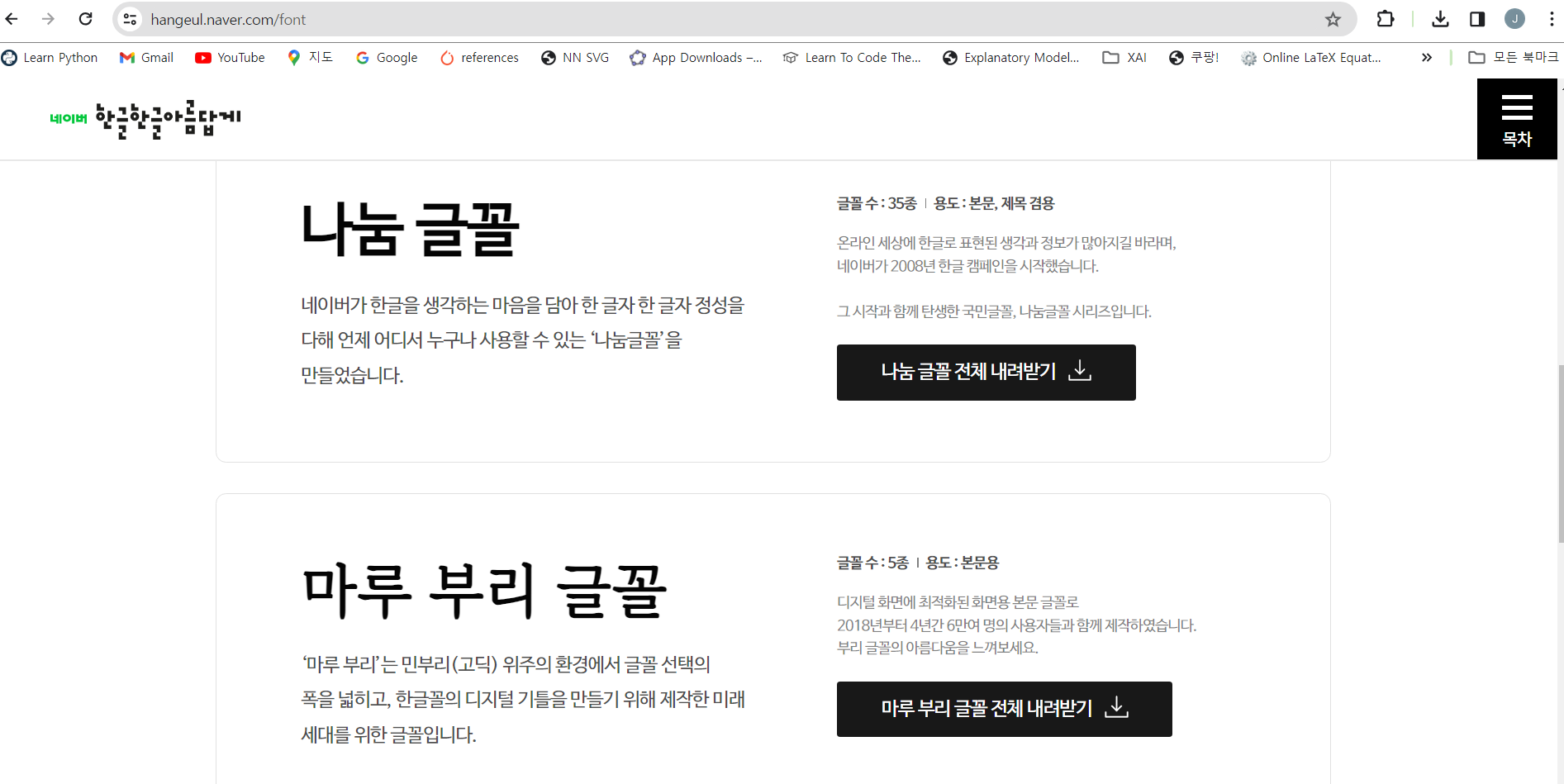
  • 폰트는 아래 사이트에서 다운로드 받는다.
  • 사이트 : https://hangeul.naver.com/font
  • 여기에서 나눔글꼴을 다운로드 받았다.

Untitled

폰트 압축풀기

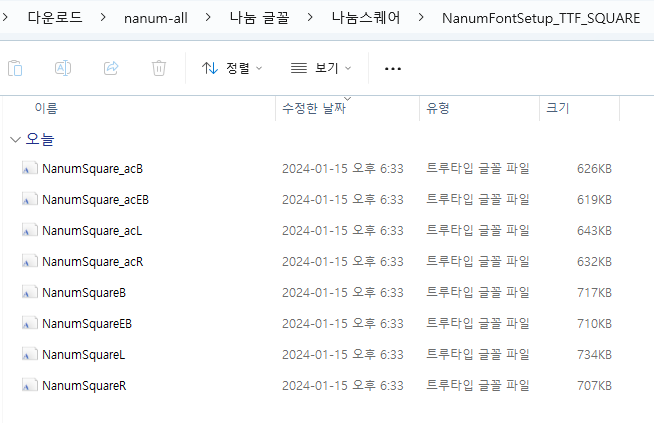
  • 다운로드 폰트를 압축 풀기 하면 매우 다양한 폰트가 확인이 된다.
  • 여기에서 나눔스퀘어 > NanumFontSetup_TTF_SQUARE 파일에서 폰트 목록을 확인한다.

Untitled

폰트 업로드

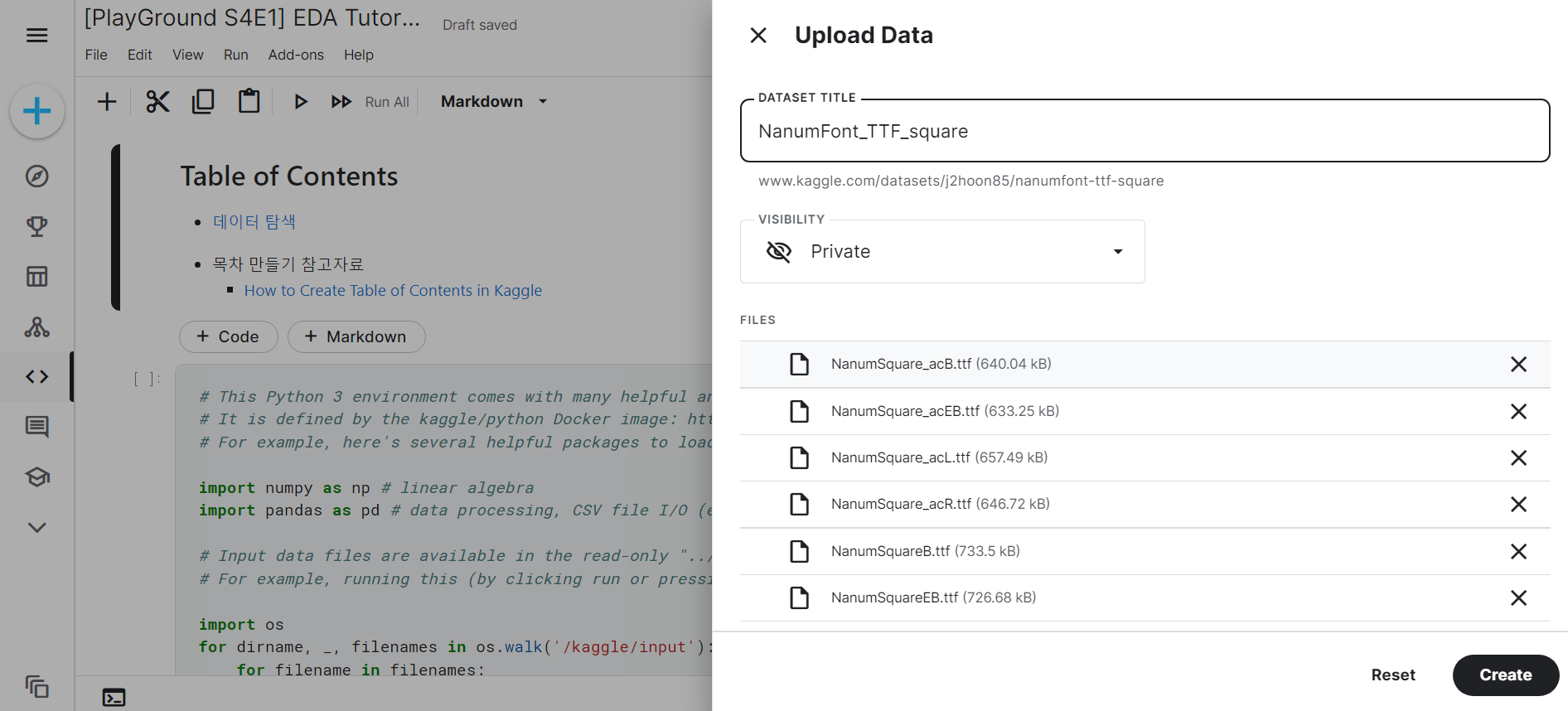
  • 이제 현재 사용하는 캐글 노트북에 추가한다.
  • 임의의 font 폴더명을 입력했다.

Untitled

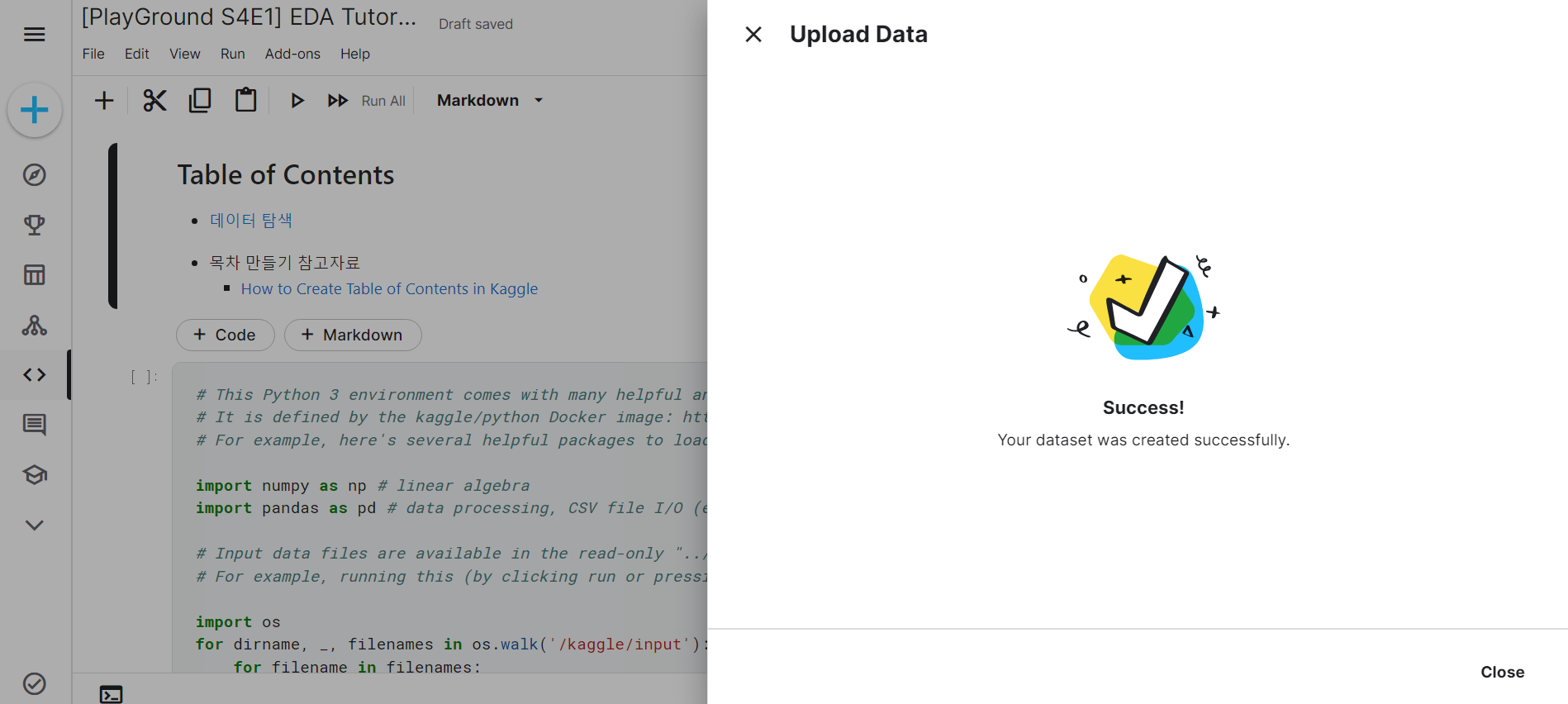
  • Create 버튼을 클릭한다.

Untitled

  • 업로드 이후에 폴더에 폰트가 들어간 것을 확인한다.

Untitled

Kaggle - Colab API 연동

개요

  • API 토큰을 내려받은 후, 구글 코랩에서 데이터를 다운로드 받도록 한다.

API 토큰 발급

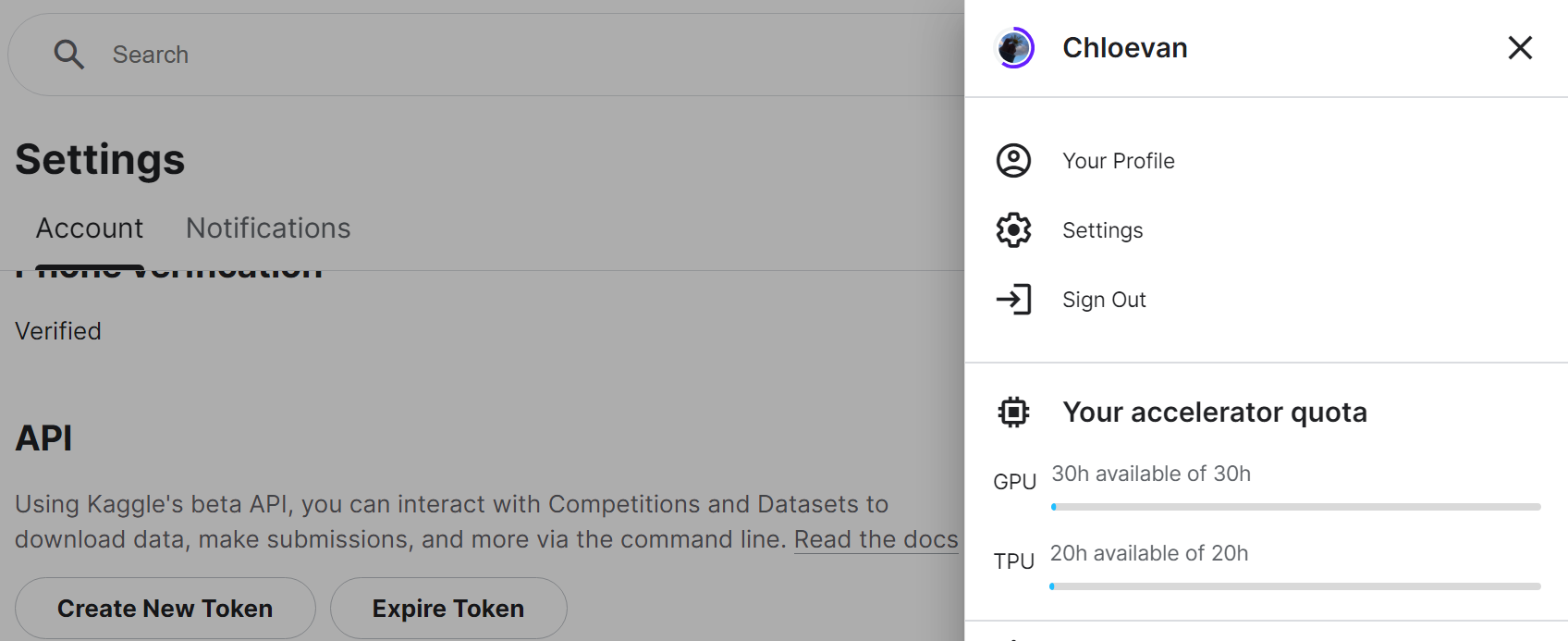
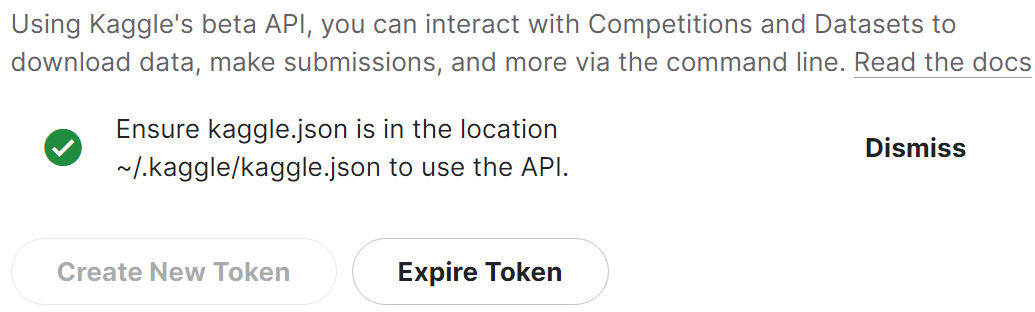
  • Kaggle Profile - Settings - API를 순차적으로 클릭 후, Create New Token 버튼을 클릭한다.

Untitled

  • 아래 화면처럼 다운로드를 받을 수 있다.

Untitled

Google Colab API 코드 업로드

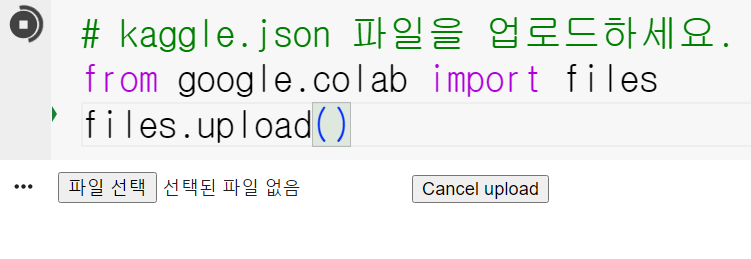
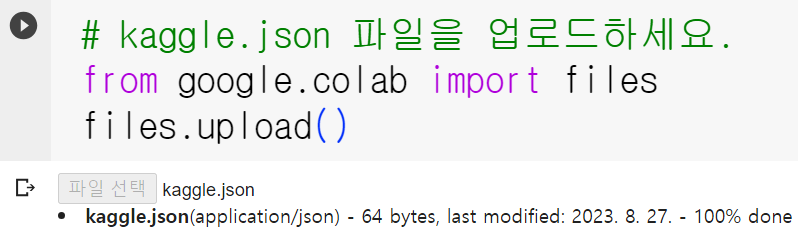
  • 이제 해당 파일을 바탕화면 등 적당한 곳에 위치시킨 후 아래 코드를 실행한다.
# kaggle.json 파일을 업로드하세요.
from google.colab import files
files.upload()

Untitled

Untitled

  • 마지막으로 ~/.kaggle 폴더를 만들고 키 파일을 복사한 후, 보안을 위해 현재 사용자만 이 파일을 읽을 수 있도록 하는 명령어(chmod 600)를 실행한다.
!mkdir ~/.kaggle
!cp kaggle.json ~/.kaggle/
!chmod 600 ~/.kaggle/kaggle.json

캐글 데이터 다운로드

  • 이제 사용할 데이터를 내려받는다.
!kaggle competitions download -c dogs-vs-cats
  • 만약 403 Forbidden 에러 발생 시, 이는 데이터셋에 연관된 규칙에 미동의한 상태로 동의를 진행해야 한다. https://www.kaggle.com/c/dogs-vs-cats/rules 페이지로 이동 후, I Understand and Accept 버튼을 누른다.

Untitled

Kaggle Wandb API 설정

개요

  • Wandb에 접속 후, 활용해본다.

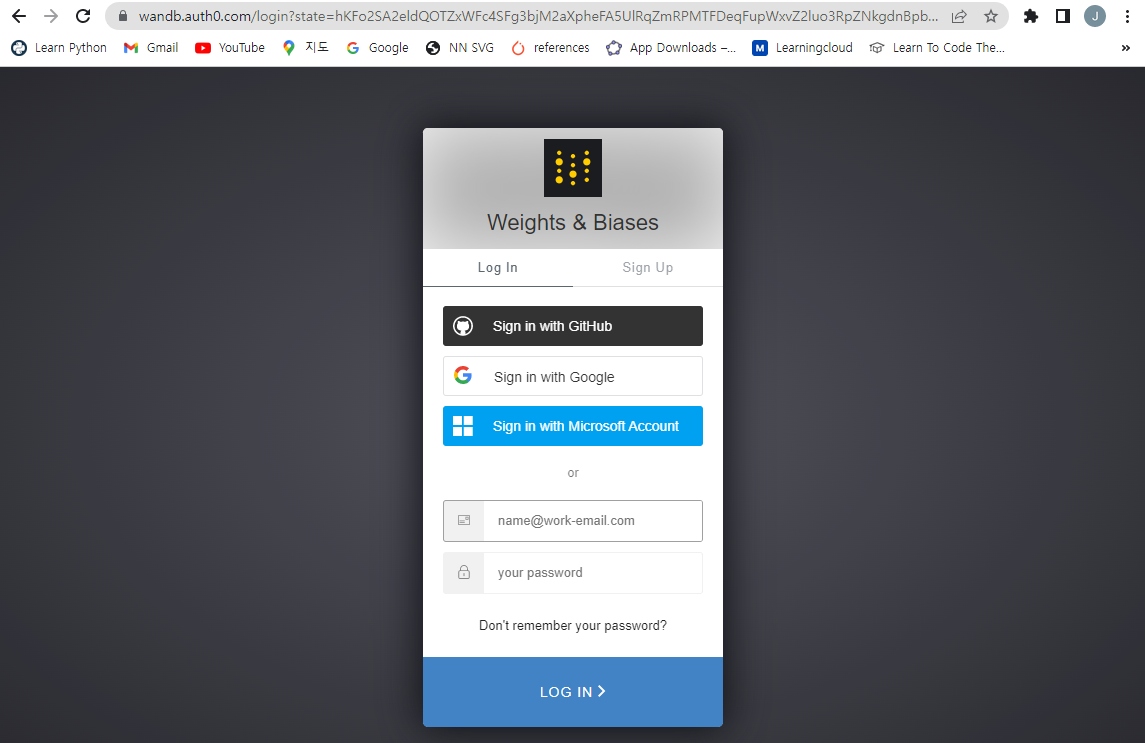
회원가입

Untitled

  • 여기에서 Github로 로그인을 진행한다.

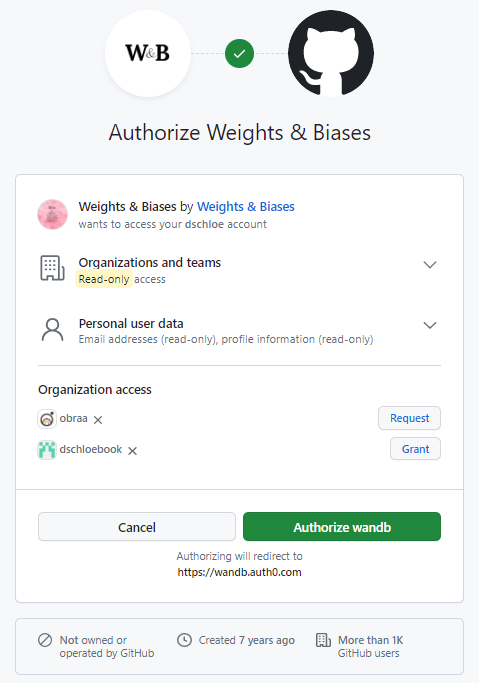
Untitled

  • Authorize wandb를 클릭한다.

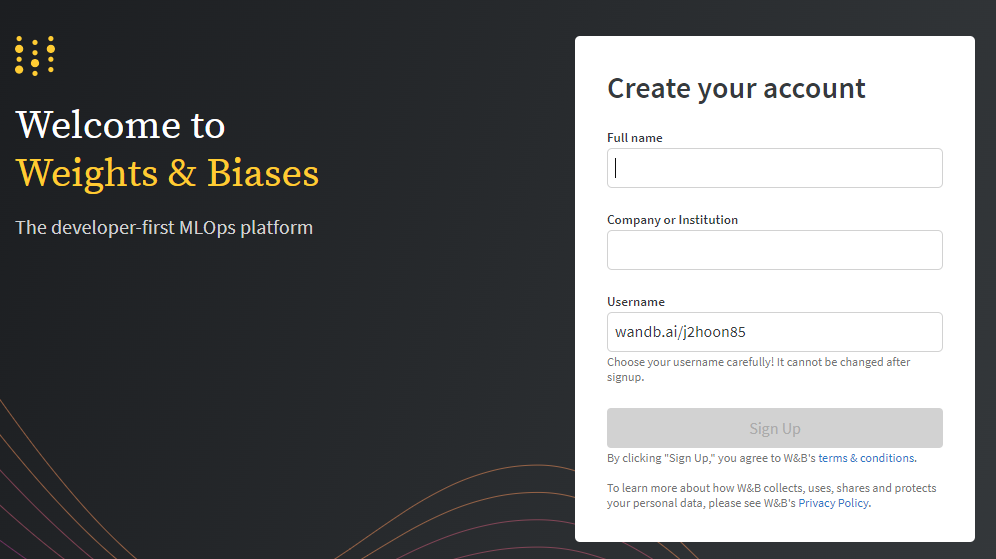
Untitled

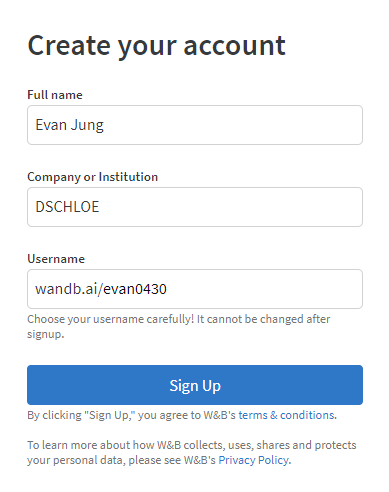
  • Create your account 항목에 Full name과 회사명을 입력한다.

Untitled

  • 아래와 같이 지정했다.

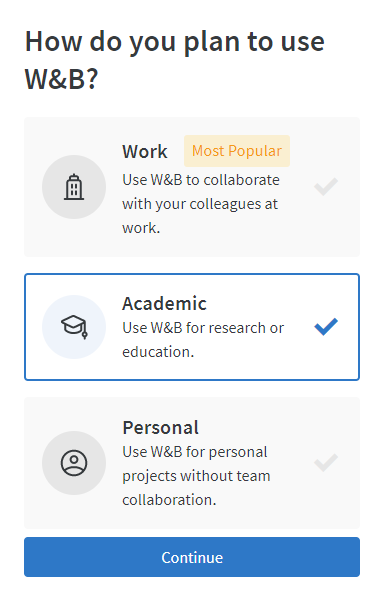
Untitled

  • 교육 목적으로 선택했다.

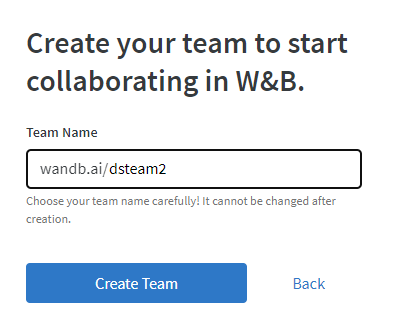
Untitled

  • 팀 이름명을 지정한다.

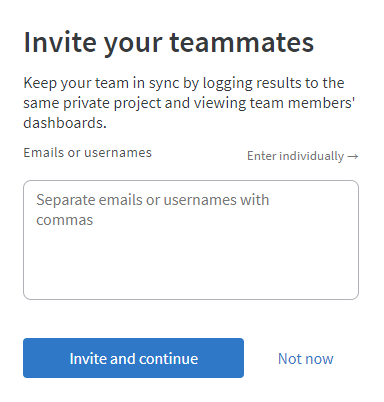
Untitled

  • 추후에 설정한다.

Untitled

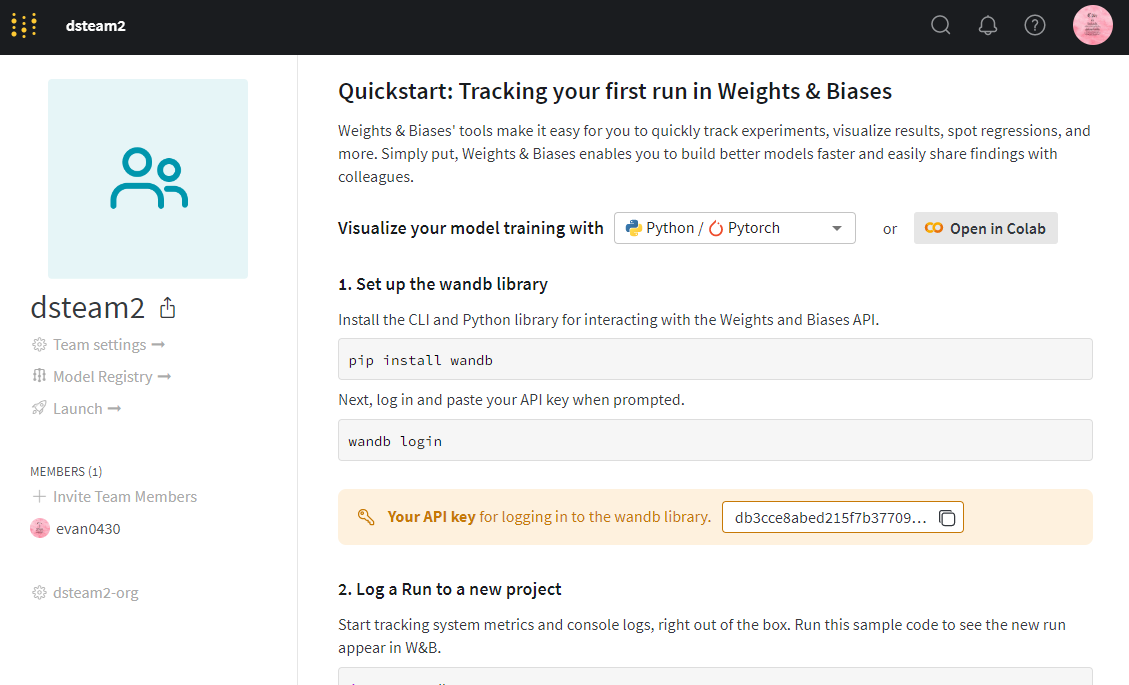
  • API Key가 나타난다.

Untitled

  • 어딘가에 인증키를 저장해둔다. db3cce8abed215f7b3770979a0006861dbcfe4f2

추후 확인 시

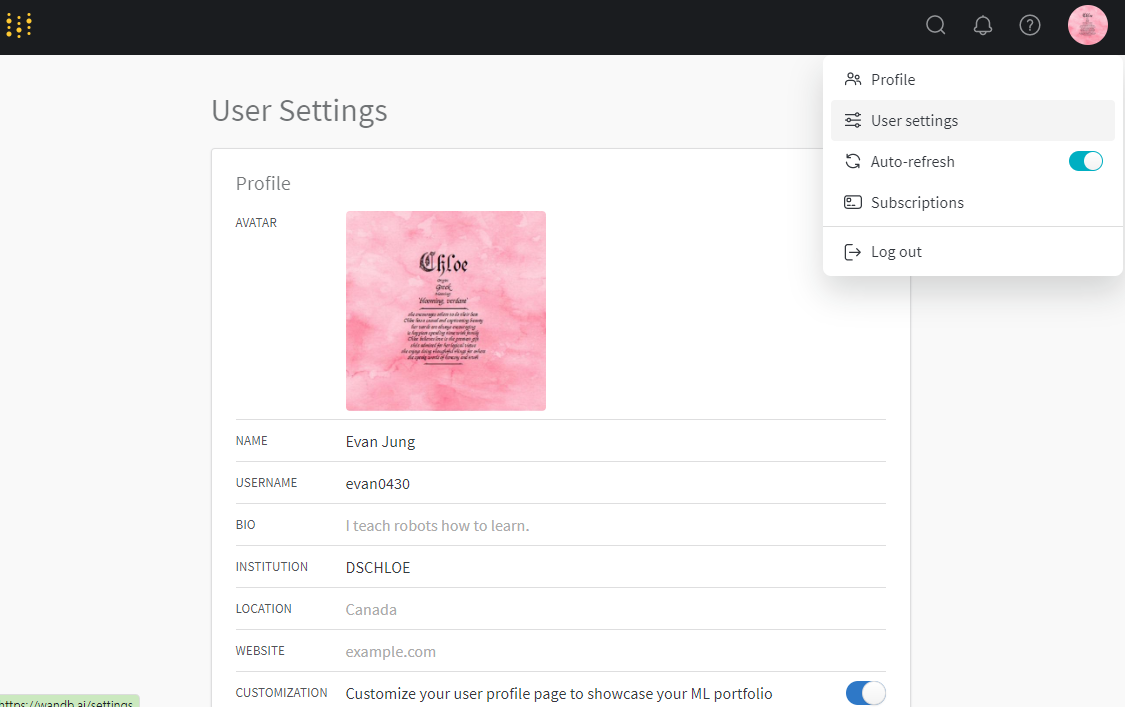
  • User Settings을 클릭한다.

Untitled

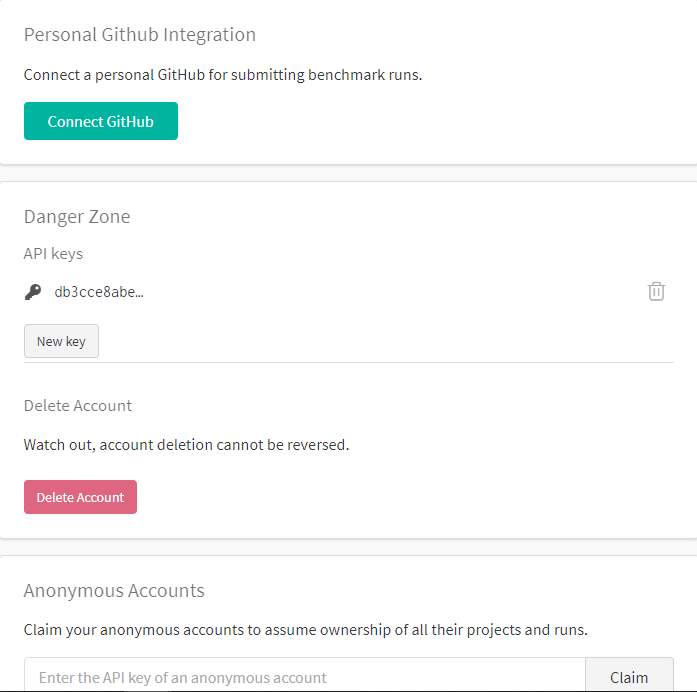
  • Scroll Down 하면 API 키값이 나타난다.

Untitled

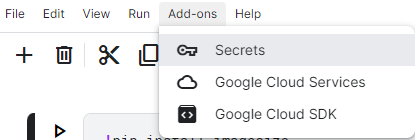
  • 캐글 노트북 상단 메뉴 [Add-ones] - [Secrets]를 클릭한다.

Untitled

PyCaret Kaggle Notebook (Since April 10, 2022)

개요

  • PyCaret이 최근 업데이트 되면서 Kaggle에서 설치 오류가 뜨기 시작함.
  • 해결책은 몇가지 있으나, 그 중 Downgrade 해서 설치 할 예정

캐글 대회 시작

  • 캐글 노트북 시작을 하면 다음 코드가 나타난다. 다음 Cell부터 진행한다.
# This Python 3 environment comes with many helpful analytics libraries installed
# It is defined by the kaggle/python Docker image: https://github.com/kaggle/docker-python
# For example, here's several helpful packages to load

import numpy as np # linear algebra
import pandas as pd # data processing, CSV file I/O (e.g. pd.read_csv)

# Input data files are available in the read-only "../input/" directory
# For example, running this (by clicking run or pressing Shift+Enter) will list all files under the input directory

import os
for dirname, _, filenames in os.walk('/kaggle/input'):
    for filename in filenames:
        print(os.path.join(dirname, filename))

# You can write up to 20GB to the current directory (/kaggle/working/) that gets preserved as output when you create a version using "Save & Run All" 
# You can also write temporary files to /kaggle/temp/, but they won't be saved outside of the current session
/kaggle/input/tabular-playground-series-apr-2022/sample_submission.csv
/kaggle/input/tabular-playground-series-apr-2022/train_labels.csv
/kaggle/input/tabular-playground-series-apr-2022/train.csv
/kaggle/input/tabular-playground-series-apr-2022/test.csv

라이브러리 Downgrade

  • 설치하려고 하는 Library는 PyCaret 2.3.5 버전임 (4월 10일 기준 2.3.10 버전)
  • Scikit-Learn 최신 버전은 1.0대 버전임
  • 이를 낮춰서 진행할 것임
!pip install numpy==1.19.5
!pip install matplotlib==3.4.0
!pip install scikit-learn==0.23.2
!pip install pycaret==2.3.5
Collecting numpy==1.19.5
  Downloading numpy-1.19.5-cp37-cp37m-manylinux2010_x86_64.whl (14.8 MB)
     ━━━━━━━━━━━━━━━━━━━━━━━━━━━━━━━━━━━━━━━━ 14.8/14.8 MB 33.0 MB/s eta 0:00:00
[?25hInstalling collected packages: numpy
  Attempting uninstall: numpy
    Found existing installation: numpy 1.21.5
    Uninstalling numpy-1.21.5:
      Successfully uninstalled numpy-1.21.5
ERROR: pip's dependency resolver does not currently take into account all the packages that are installed. This behaviour is the source of the following dependency conflicts.
tensorflow-io 0.21.0 requires tensorflow-io-gcs-filesystem==0.21.0, which is not installed.
beatrix-jupyterlab 3.1.7 requires google-cloud-bigquery-storage, which is not installed.
thinc 8.0.15 requires typing-extensions<4.0.0.0,>=3.7.4.1; python_version < "3.8", but you have typing-extensions 4.1.1 which is incompatible.
tfx-bsl 1.7.0 requires pyarrow<6,>=1, but you have pyarrow 7.0.0 which is incompatible.
tfx-bsl 1.7.0 requires tensorflow!=2.0.*,!=2.1.*,!=2.2.*,!=2.3.*,!=2.4.*,!=2.5.*,!=2.6.*,!=2.7.*,<3,>=1.15.5, but you have tensorflow 2.6.3 which is incompatible.
tensorflow 2.6.3 requires absl-py~=0.10, but you have absl-py 1.0.0 which is incompatible.
tensorflow 2.6.3 requires six~=1.15.0, but you have six 1.16.0 which is incompatible.
tensorflow 2.6.3 requires typing-extensions<3.11,>=3.7, but you have typing-extensions 4.1.1 which is incompatible.
tensorflow 2.6.3 requires wrapt~=1.12.1, but you have wrapt 1.14.0 which is incompatible.
tensorflow-transform 1.7.0 requires pyarrow<6,>=1, but you have pyarrow 7.0.0 which is incompatible.
tensorflow-transform 1.7.0 requires tensorflow!=2.0.*,!=2.1.*,!=2.2.*,!=2.3.*,!=2.4.*,!=2.5.*,!=2.6.*,!=2.7.*,<2.9,>=1.15.5, but you have tensorflow 2.6.3 which is incompatible.
tensorflow-serving-api 2.8.0 requires tensorflow<3,>=2.8.0, but you have tensorflow 2.6.3 which is incompatible.
spacy 3.2.4 requires typing-extensions<4.0.0.0,>=3.7.4; python_version < "3.8", but you have typing-extensions 4.1.1 which is incompatible.
pdpbox 0.2.1 requires matplotlib==3.1.1, but you have matplotlib 3.5.1 which is incompatible.
imageio 2.16.1 requires numpy>=1.20.0, but you have numpy 1.19.5 which is incompatible.
featuretools 1.8.0 requires numpy>=1.21.0, but you have numpy 1.19.5 which is incompatible.
apache-beam 2.37.0 requires dill<0.3.2,>=0.3.1.1, but you have dill 0.3.4 which is incompatible.
apache-beam 2.37.0 requires httplib2<0.20.0,>=0.8, but you have httplib2 0.20.4 which is incompatible.
apache-beam 2.37.0 requires pyarrow<7.0.0,>=0.15.1, but you have pyarrow 7.0.0 which is incompatible.
Successfully installed numpy-1.19.5
WARNING: Running pip as the 'root' user can result in broken permissions and conflicting behaviour with the system package manager. It is recommended to use a virtual environment instead: https://pip.pypa.io/warnings/venv
Collecting matplotlib==3.4.0
  Downloading matplotlib-3.4.0-cp37-cp37m-manylinux1_x86_64.whl (10.3 MB)
     ━━━━━━━━━━━━━━━━━━━━━━━━━━━━━━━━━━━━━━━━ 10.3/10.3 MB 21.5 MB/s eta 0:00:00
[?25hRequirement already satisfied: pyparsing>=2.2.1 in /opt/conda/lib/python3.7/site-packages (from matplotlib==3.4.0) (3.0.7)
Requirement already satisfied: kiwisolver>=1.0.1 in /opt/conda/lib/python3.7/site-packages (from matplotlib==3.4.0) (1.4.0)
Requirement already satisfied: numpy>=1.16 in /opt/conda/lib/python3.7/site-packages (from matplotlib==3.4.0) (1.19.5)
Requirement already satisfied: python-dateutil>=2.7 in /opt/conda/lib/python3.7/site-packages (from matplotlib==3.4.0) (2.8.2)
Requirement already satisfied: cycler>=0.10 in /opt/conda/lib/python3.7/site-packages (from matplotlib==3.4.0) (0.11.0)
Requirement already satisfied: pillow>=6.2.0 in /opt/conda/lib/python3.7/site-packages (from matplotlib==3.4.0) (9.0.1)
Requirement already satisfied: typing-extensions in /opt/conda/lib/python3.7/site-packages (from kiwisolver>=1.0.1->matplotlib==3.4.0) (4.1.1)
Requirement already satisfied: six>=1.5 in /opt/conda/lib/python3.7/site-packages (from python-dateutil>=2.7->matplotlib==3.4.0) (1.16.0)
Installing collected packages: matplotlib
  Attempting uninstall: matplotlib
    Found existing installation: matplotlib 3.5.1
    Uninstalling matplotlib-3.5.1:
      Successfully uninstalled matplotlib-3.5.1
ERROR: pip's dependency resolver does not currently take into account all the packages that are installed. This behaviour is the source of the following dependency conflicts.
beatrix-jupyterlab 3.1.7 requires google-cloud-bigquery-storage, which is not installed.
pdpbox 0.2.1 requires matplotlib==3.1.1, but you have matplotlib 3.4.0 which is incompatible.
Successfully installed matplotlib-3.4.0
WARNING: Running pip as the 'root' user can result in broken permissions and conflicting behaviour with the system package manager. It is recommended to use a virtual environment instead: https://pip.pypa.io/warnings/venv
Collecting scikit-learn==0.23.2
  Downloading scikit_learn-0.23.2-cp37-cp37m-manylinux1_x86_64.whl (6.8 MB)
     ━━━━━━━━━━━━━━━━━━━━━━━━━━━━━━━━━━━━━━━━ 6.8/6.8 MB 14.8 MB/s eta 0:00:00
[?25hRequirement already satisfied: scipy>=0.19.1 in /opt/conda/lib/python3.7/site-packages (from scikit-learn==0.23.2) (1.7.3)
Requirement already satisfied: joblib>=0.11 in /opt/conda/lib/python3.7/site-packages (from scikit-learn==0.23.2) (1.0.1)
Requirement already satisfied: numpy>=1.13.3 in /opt/conda/lib/python3.7/site-packages (from scikit-learn==0.23.2) (1.19.5)
Requirement already satisfied: threadpoolctl>=2.0.0 in /opt/conda/lib/python3.7/site-packages (from scikit-learn==0.23.2) (3.1.0)
Installing collected packages: scikit-learn
  Attempting uninstall: scikit-learn
    Found existing installation: scikit-learn 1.0.2
    Uninstalling scikit-learn-1.0.2:
      Successfully uninstalled scikit-learn-1.0.2
ERROR: pip's dependency resolver does not currently take into account all the packages that are installed. This behaviour is the source of the following dependency conflicts.
yellowbrick 1.4 requires scikit-learn>=1.0.0, but you have scikit-learn 0.23.2 which is incompatible.
pdpbox 0.2.1 requires matplotlib==3.1.1, but you have matplotlib 3.4.0 which is incompatible.
imbalanced-learn 0.9.0 requires scikit-learn>=1.0.1, but you have scikit-learn 0.23.2 which is incompatible.
hypertools 0.8.0 requires scikit-learn>=0.24, but you have scikit-learn 0.23.2 which is incompatible.
featuretools 1.8.0 requires numpy>=1.21.0, but you have numpy 1.19.5 which is incompatible.
Successfully installed scikit-learn-0.23.2
WARNING: Running pip as the 'root' user can result in broken permissions and conflicting behaviour with the system package manager. It is recommended to use a virtual environment instead: https://pip.pypa.io/warnings/venv
Collecting pycaret==2.3.5
  Downloading pycaret-2.3.5-py3-none-any.whl (288 kB)
     ━━━━━━━━━━━━━━━━━━━━━━━━━━━━━━━━━━━━━━━ 288.6/288.6 KB 1.6 MB/s eta 0:00:00
[?25hRequirement already satisfied: ipywidgets in /opt/conda/lib/python3.7/site-packages (from pycaret==2.3.5) (7.6.5)
Requirement already satisfied: pyLDAvis in /opt/conda/lib/python3.7/site-packages (from pycaret==2.3.5) (3.2.2)
Requirement already satisfied: pandas in /opt/conda/lib/python3.7/site-packages (from pycaret==2.3.5) (1.3.5)
Collecting scipy<=1.5.4
  Downloading scipy-1.5.4-cp37-cp37m-manylinux1_x86_64.whl (25.9 MB)
     ━━━━━━━━━━━━━━━━━━━━━━━━━━━━━━━━━━━━━━━━ 25.9/25.9 MB 30.0 MB/s eta 0:00:00
[?25hRequirement already satisfied: nltk in /opt/conda/lib/python3.7/site-packages (from pycaret==2.3.5) (3.2.4)
Requirement already satisfied: IPython in /opt/conda/lib/python3.7/site-packages (from pycaret==2.3.5) (7.32.0)
Collecting spacy<2.4.0
  Downloading spacy-2.3.7-cp37-cp37m-manylinux_2_17_x86_64.manylinux2014_x86_64.whl (10.4 MB)
     ━━━━━━━━━━━━━━━━━━━━━━━━━━━━━━━━━━━━━━━━ 10.4/10.4 MB 41.9 MB/s eta 0:00:00
[?25hRequirement already satisfied: lightgbm>=2.3.1 in /opt/conda/lib/python3.7/site-packages (from pycaret==2.3.5) (3.3.1)
Requirement already satisfied: yellowbrick>=1.0.1 in /opt/conda/lib/python3.7/site-packages (from pycaret==2.3.5) (1.4)
Requirement already satisfied: textblob in /opt/conda/lib/python3.7/site-packages (from pycaret==2.3.5) (0.17.1)
Requirement already satisfied: plotly>=4.4.1 in /opt/conda/lib/python3.7/site-packages (from pycaret==2.3.5) (5.7.0)
Requirement already satisfied: scikit-plot in /opt/conda/lib/python3.7/site-packages (from pycaret==2.3.5) (0.3.7)
Requirement already satisfied: umap-learn in /opt/conda/lib/python3.7/site-packages (from pycaret==2.3.5) (0.5.2)
Collecting gensim<4.0.0
  Downloading gensim-3.8.3-cp37-cp37m-manylinux1_x86_64.whl (24.2 MB)
     ━━━━━━━━━━━━━━━━━━━━━━━━━━━━━━━━━━━━━━━━ 24.2/24.2 MB 28.5 MB/s eta 0:00:00
[?25hRequirement already satisfied: Boruta in /opt/conda/lib/python3.7/site-packages (from pycaret==2.3.5) (0.3)
Requirement already satisfied: matplotlib in /opt/conda/lib/python3.7/site-packages (from pycaret==2.3.5) (3.4.0)
Requirement already satisfied: pandas-profiling>=2.8.0 in /opt/conda/lib/python3.7/site-packages (from pycaret==2.3.5) (3.1.0)
Collecting imbalanced-learn==0.7.0
  Downloading imbalanced_learn-0.7.0-py3-none-any.whl (167 kB)
     ━━━━━━━━━━━━━━━━━━━━━━━━━━━━━━━━━━━━━━ 167.1/167.1 KB 14.8 MB/s eta 0:00:00
[?25hCollecting mlflow
  Downloading mlflow-1.25.1-py3-none-any.whl (16.8 MB)
     ━━━━━━━━━━━━━━━━━━━━━━━━━━━━━━━━━━━━━━━━ 16.8/16.8 MB 33.2 MB/s eta 0:00:00
[?25hCollecting pyod
  Downloading pyod-0.9.9.tar.gz (116 kB)
     ━━━━━━━━━━━━━━━━━━━━━━━━━━━━━━━━━━━━━━ 116.4/116.4 KB 10.8 MB/s eta 0:00:00
[?25h  Preparing metadata (setup.py) ... [?25ldone
[?25hRequirement already satisfied: kmodes>=0.10.1 in /opt/conda/lib/python3.7/site-packages (from pycaret==2.3.5) (0.12.0)
Requirement already satisfied: wordcloud in /opt/conda/lib/python3.7/site-packages (from pycaret==2.3.5) (1.8.1)
Requirement already satisfied: joblib in /opt/conda/lib/python3.7/site-packages (from pycaret==2.3.5) (1.0.1)
Requirement already satisfied: numpy==1.19.5 in /opt/conda/lib/python3.7/site-packages (from pycaret==2.3.5) (1.19.5)
Requirement already satisfied: seaborn in /opt/conda/lib/python3.7/site-packages (from pycaret==2.3.5) (0.11.2)
Requirement already satisfied: mlxtend>=0.17.0 in /opt/conda/lib/python3.7/site-packages (from pycaret==2.3.5) (0.19.0)
Requirement already satisfied: scikit-learn==0.23.2 in /opt/conda/lib/python3.7/site-packages (from pycaret==2.3.5) (0.23.2)
Requirement already satisfied: cufflinks>=0.17.0 in /opt/conda/lib/python3.7/site-packages (from pycaret==2.3.5) (0.17.3)
Requirement already satisfied: threadpoolctl>=2.0.0 in /opt/conda/lib/python3.7/site-packages (from scikit-learn==0.23.2->pycaret==2.3.5) (3.1.0)
Requirement already satisfied: setuptools>=34.4.1 in /opt/conda/lib/python3.7/site-packages (from cufflinks>=0.17.0->pycaret==2.3.5) (59.8.0)
Requirement already satisfied: colorlover>=0.2.1 in /opt/conda/lib/python3.7/site-packages (from cufflinks>=0.17.0->pycaret==2.3.5) (0.3.0)
Requirement already satisfied: six>=1.9.0 in /opt/conda/lib/python3.7/site-packages (from cufflinks>=0.17.0->pycaret==2.3.5) (1.16.0)
Requirement already satisfied: smart-open>=1.8.1 in /opt/conda/lib/python3.7/site-packages (from gensim<4.0.0->pycaret==2.3.5) (5.2.1)
Requirement already satisfied: pickleshare in /opt/conda/lib/python3.7/site-packages (from IPython->pycaret==2.3.5) (0.7.5)
Requirement already satisfied: backcall in /opt/conda/lib/python3.7/site-packages (from IPython->pycaret==2.3.5) (0.2.0)
Requirement already satisfied: traitlets>=4.2 in /opt/conda/lib/python3.7/site-packages (from IPython->pycaret==2.3.5) (5.1.1)
Requirement already satisfied: pexpect>4.3 in /opt/conda/lib/python3.7/site-packages (from IPython->pycaret==2.3.5) (4.8.0)
Requirement already satisfied: prompt-toolkit!=3.0.0,!=3.0.1,<3.1.0,>=2.0.0 in /opt/conda/lib/python3.7/site-packages (from IPython->pycaret==2.3.5) (3.0.27)
Requirement already satisfied: pygments in /opt/conda/lib/python3.7/site-packages (from IPython->pycaret==2.3.5) (2.11.2)
Requirement already satisfied: jedi>=0.16 in /opt/conda/lib/python3.7/site-packages (from IPython->pycaret==2.3.5) (0.18.1)
Requirement already satisfied: decorator in /opt/conda/lib/python3.7/site-packages (from IPython->pycaret==2.3.5) (5.1.1)
Requirement already satisfied: matplotlib-inline in /opt/conda/lib/python3.7/site-packages (from IPython->pycaret==2.3.5) (0.1.3)
Requirement already satisfied: ipython-genutils~=0.2.0 in /opt/conda/lib/python3.7/site-packages (from ipywidgets->pycaret==2.3.5) (0.2.0)
Requirement already satisfied: jupyterlab-widgets>=1.0.0 in /opt/conda/lib/python3.7/site-packages (from ipywidgets->pycaret==2.3.5) (1.0.2)
Requirement already satisfied: widgetsnbextension~=3.5.0 in /opt/conda/lib/python3.7/site-packages (from ipywidgets->pycaret==2.3.5) (3.5.2)
Requirement already satisfied: nbformat>=4.2.0 in /opt/conda/lib/python3.7/site-packages (from ipywidgets->pycaret==2.3.5) (5.2.0)
Requirement already satisfied: ipykernel>=4.5.1 in /opt/conda/lib/python3.7/site-packages (from ipywidgets->pycaret==2.3.5) (6.9.2)
Requirement already satisfied: wheel in /opt/conda/lib/python3.7/site-packages (from lightgbm>=2.3.1->pycaret==2.3.5) (0.37.1)
Requirement already satisfied: pillow>=6.2.0 in /opt/conda/lib/python3.7/site-packages (from matplotlib->pycaret==2.3.5) (9.0.1)
Requirement already satisfied: python-dateutil>=2.7 in /opt/conda/lib/python3.7/site-packages (from matplotlib->pycaret==2.3.5) (2.8.2)
Requirement already satisfied: kiwisolver>=1.0.1 in /opt/conda/lib/python3.7/site-packages (from matplotlib->pycaret==2.3.5) (1.4.0)
Requirement already satisfied: pyparsing>=2.2.1 in /opt/conda/lib/python3.7/site-packages (from matplotlib->pycaret==2.3.5) (3.0.7)
Requirement already satisfied: cycler>=0.10 in /opt/conda/lib/python3.7/site-packages (from matplotlib->pycaret==2.3.5) (0.11.0)
Requirement already satisfied: pytz>=2017.3 in /opt/conda/lib/python3.7/site-packages (from pandas->pycaret==2.3.5) (2021.3)
Requirement already satisfied: visions[type_image_path]==0.7.4 in /opt/conda/lib/python3.7/site-packages (from pandas-profiling>=2.8.0->pycaret==2.3.5) (0.7.4)
Requirement already satisfied: jinja2>=2.11.1 in /opt/conda/lib/python3.7/site-packages (from pandas-profiling>=2.8.0->pycaret==2.3.5) (3.1.1)
Requirement already satisfied: phik>=0.11.1 in /opt/conda/lib/python3.7/site-packages (from pandas-profiling>=2.8.0->pycaret==2.3.5) (0.12.0)
Requirement already satisfied: requests>=2.24.0 in /opt/conda/lib/python3.7/site-packages (from pandas-profiling>=2.8.0->pycaret==2.3.5) (2.27.1)
Requirement already satisfied: pydantic>=1.8.1 in /opt/conda/lib/python3.7/site-packages (from pandas-profiling>=2.8.0->pycaret==2.3.5) (1.8.2)
Requirement already satisfied: markupsafe~=2.0.1 in /opt/conda/lib/python3.7/site-packages (from pandas-profiling>=2.8.0->pycaret==2.3.5) (2.0.1)
Requirement already satisfied: htmlmin>=0.1.12 in /opt/conda/lib/python3.7/site-packages (from pandas-profiling>=2.8.0->pycaret==2.3.5) (0.1.12)
Requirement already satisfied: tqdm>=4.48.2 in /opt/conda/lib/python3.7/site-packages (from pandas-profiling>=2.8.0->pycaret==2.3.5) (4.63.0)
Requirement already satisfied: multimethod>=1.4 in /opt/conda/lib/python3.7/site-packages (from pandas-profiling>=2.8.0->pycaret==2.3.5) (1.4)
Requirement already satisfied: PyYAML>=5.0.0 in /opt/conda/lib/python3.7/site-packages (from pandas-profiling>=2.8.0->pycaret==2.3.5) (6.0)
Requirement already satisfied: tangled-up-in-unicode==0.1.0 in /opt/conda/lib/python3.7/site-packages (from pandas-profiling>=2.8.0->pycaret==2.3.5) (0.1.0)
Requirement already satisfied: missingno>=0.4.2 in /opt/conda/lib/python3.7/site-packages (from pandas-profiling>=2.8.0->pycaret==2.3.5) (0.4.2)
Requirement already satisfied: attrs>=19.3.0 in /opt/conda/lib/python3.7/site-packages (from visions[type_image_path]==0.7.4->pandas-profiling>=2.8.0->pycaret==2.3.5) (21.4.0)
Requirement already satisfied: networkx>=2.4 in /opt/conda/lib/python3.7/site-packages (from visions[type_image_path]==0.7.4->pandas-profiling>=2.8.0->pycaret==2.3.5) (2.5)
Requirement already satisfied: imagehash in /opt/conda/lib/python3.7/site-packages (from visions[type_image_path]==0.7.4->pandas-profiling>=2.8.0->pycaret==2.3.5) (4.2.1)
Requirement already satisfied: tenacity>=6.2.0 in /opt/conda/lib/python3.7/site-packages (from plotly>=4.4.1->pycaret==2.3.5) (8.0.1)
Collecting catalogue<1.1.0,>=0.0.7
  Downloading catalogue-1.0.0-py2.py3-none-any.whl (7.7 kB)
Requirement already satisfied: wasabi<1.1.0,>=0.4.0 in /opt/conda/lib/python3.7/site-packages (from spacy<2.4.0->pycaret==2.3.5) (0.9.1)
Collecting thinc<7.5.0,>=7.4.1
  Downloading thinc-7.4.5-cp37-cp37m-manylinux2014_x86_64.whl (1.0 MB)
     ━━━━━━━━━━━━━━━━━━━━━━━━━━━━━━━━━━━━━━━━ 1.0/1.0 MB 49.3 MB/s eta 0:00:00
[?25hRequirement already satisfied: murmurhash<1.1.0,>=0.28.0 in /opt/conda/lib/python3.7/site-packages (from spacy<2.4.0->pycaret==2.3.5) (1.0.6)
Requirement already satisfied: blis<0.8.0,>=0.4.0 in /opt/conda/lib/python3.7/site-packages (from spacy<2.4.0->pycaret==2.3.5) (0.7.7)
Collecting plac<1.2.0,>=0.9.6
  Downloading plac-1.1.3-py2.py3-none-any.whl (20 kB)
Requirement already satisfied: cymem<2.1.0,>=2.0.2 in /opt/conda/lib/python3.7/site-packages (from spacy<2.4.0->pycaret==2.3.5) (2.0.6)
Collecting srsly<1.1.0,>=1.0.2
  Downloading srsly-1.0.5-cp37-cp37m-manylinux2014_x86_64.whl (184 kB)
     ━━━━━━━━━━━━━━━━━━━━━━━━━━━━━━━━━━━━━━ 184.3/184.3 KB 16.8 MB/s eta 0:00:00
[?25hRequirement already satisfied: preshed<3.1.0,>=3.0.2 in /opt/conda/lib/python3.7/site-packages (from spacy<2.4.0->pycaret==2.3.5) (3.0.6)
Collecting yellowbrick>=1.0.1
  Downloading yellowbrick-1.3.post1-py3-none-any.whl (271 kB)
     ━━━━━━━━━━━━━━━━━━━━━━━━━━━━━━━━━━━━━━ 271.4/271.4 KB 22.2 MB/s eta 0:00:00
[?25hRequirement already satisfied: alembic in /opt/conda/lib/python3.7/site-packages (from mlflow->pycaret==2.3.5) (1.7.7)
Requirement already satisfied: Flask in /opt/conda/lib/python3.7/site-packages (from mlflow->pycaret==2.3.5) (2.1.1)
Collecting gunicorn
  Downloading gunicorn-20.1.0-py3-none-any.whl (79 kB)
     ━━━━━━━━━━━━━━━━━━━━━━━━━━━━━━━━━━━━━━━━ 79.5/79.5 KB 7.9 MB/s eta 0:00:00
[?25hRequirement already satisfied: importlib-metadata!=4.7.0,>=3.7.0 in /opt/conda/lib/python3.7/site-packages (from mlflow->pycaret==2.3.5) (4.11.3)
Collecting querystring-parser
  Downloading querystring_parser-1.2.4-py2.py3-none-any.whl (7.9 kB)
Requirement already satisfied: docker>=4.0.0 in /opt/conda/lib/python3.7/site-packages (from mlflow->pycaret==2.3.5) (5.0.3)
Requirement already satisfied: sqlparse>=0.3.1 in /opt/conda/lib/python3.7/site-packages (from mlflow->pycaret==2.3.5) (0.4.2)
Requirement already satisfied: gitpython>=2.1.0 in /opt/conda/lib/python3.7/site-packages (from mlflow->pycaret==2.3.5) (3.1.27)
Requirement already satisfied: protobuf>=3.7.0 in /opt/conda/lib/python3.7/site-packages (from mlflow->pycaret==2.3.5) (3.19.4)
Requirement already satisfied: packaging in /opt/conda/lib/python3.7/site-packages (from mlflow->pycaret==2.3.5) (21.3)
Requirement already satisfied: click>=7.0 in /opt/conda/lib/python3.7/site-packages (from mlflow->pycaret==2.3.5) (8.0.4)
Collecting prometheus-flask-exporter
  Downloading prometheus_flask_exporter-0.20.1-py3-none-any.whl (18 kB)
Requirement already satisfied: entrypoints in /opt/conda/lib/python3.7/site-packages (from mlflow->pycaret==2.3.5) (0.4)
Collecting databricks-cli>=0.8.7
  Downloading databricks-cli-0.16.6.tar.gz (62 kB)
     ━━━━━━━━━━━━━━━━━━━━━━━━━━━━━━━━━━━━━━━━ 62.2/62.2 KB 5.8 MB/s eta 0:00:00
[?25h  Preparing metadata (setup.py) ... [?25ldone
[?25hRequirement already satisfied: cloudpickle in /opt/conda/lib/python3.7/site-packages (from mlflow->pycaret==2.3.5) (2.0.0)
Requirement already satisfied: sqlalchemy in /opt/conda/lib/python3.7/site-packages (from mlflow->pycaret==2.3.5) (1.4.32)
Requirement already satisfied: future in /opt/conda/lib/python3.7/site-packages (from pyLDAvis->pycaret==2.3.5) (0.18.2)
Requirement already satisfied: funcy in /opt/conda/lib/python3.7/site-packages (from pyLDAvis->pycaret==2.3.5) (1.17)
Requirement already satisfied: numexpr in /opt/conda/lib/python3.7/site-packages (from pyLDAvis->pycaret==2.3.5) (2.8.1)
Requirement already satisfied: numba>=0.35 in /opt/conda/lib/python3.7/site-packages (from pyod->pycaret==2.3.5) (0.55.1)
Requirement already satisfied: statsmodels in /opt/conda/lib/python3.7/site-packages (from pyod->pycaret==2.3.5) (0.13.2)
Requirement already satisfied: pynndescent>=0.5 in /opt/conda/lib/python3.7/site-packages (from umap-learn->pycaret==2.3.5) (0.5.6)
Requirement already satisfied: pyjwt>=1.7.0 in /opt/conda/lib/python3.7/site-packages (from databricks-cli>=0.8.7->mlflow->pycaret==2.3.5) (2.3.0)
Requirement already satisfied: oauthlib>=3.1.0 in /opt/conda/lib/python3.7/site-packages (from databricks-cli>=0.8.7->mlflow->pycaret==2.3.5) (3.2.0)
Requirement already satisfied: tabulate>=0.7.7 in /opt/conda/lib/python3.7/site-packages (from databricks-cli>=0.8.7->mlflow->pycaret==2.3.5) (0.8.9)
Requirement already satisfied: websocket-client>=0.32.0 in /opt/conda/lib/python3.7/site-packages (from docker>=4.0.0->mlflow->pycaret==2.3.5) (1.3.1)
Requirement already satisfied: typing-extensions>=3.7.4.3 in /opt/conda/lib/python3.7/site-packages (from gitpython>=2.1.0->mlflow->pycaret==2.3.5) (4.1.1)
Requirement already satisfied: gitdb<5,>=4.0.1 in /opt/conda/lib/python3.7/site-packages (from gitpython>=2.1.0->mlflow->pycaret==2.3.5) (4.0.9)
Requirement already satisfied: zipp>=0.5 in /opt/conda/lib/python3.7/site-packages (from importlib-metadata!=4.7.0,>=3.7.0->mlflow->pycaret==2.3.5) (3.7.0)
Requirement already satisfied: psutil in /opt/conda/lib/python3.7/site-packages (from ipykernel>=4.5.1->ipywidgets->pycaret==2.3.5) (5.9.0)
Requirement already satisfied: debugpy<2.0,>=1.0.0 in /opt/conda/lib/python3.7/site-packages (from ipykernel>=4.5.1->ipywidgets->pycaret==2.3.5) (1.5.1)
Requirement already satisfied: tornado<7.0,>=4.2 in /opt/conda/lib/python3.7/site-packages (from ipykernel>=4.5.1->ipywidgets->pycaret==2.3.5) (6.1)
Requirement already satisfied: jupyter-client<8.0 in /opt/conda/lib/python3.7/site-packages (from ipykernel>=4.5.1->ipywidgets->pycaret==2.3.5) (7.1.2)
Requirement already satisfied: nest-asyncio in /opt/conda/lib/python3.7/site-packages (from ipykernel>=4.5.1->ipywidgets->pycaret==2.3.5) (1.5.4)
Requirement already satisfied: parso<0.9.0,>=0.8.0 in /opt/conda/lib/python3.7/site-packages (from jedi>=0.16->IPython->pycaret==2.3.5) (0.8.3)
Requirement already satisfied: jsonschema!=2.5.0,>=2.4 in /opt/conda/lib/python3.7/site-packages (from nbformat>=4.2.0->ipywidgets->pycaret==2.3.5) (4.4.0)
Requirement already satisfied: jupyter-core in /opt/conda/lib/python3.7/site-packages (from nbformat>=4.2.0->ipywidgets->pycaret==2.3.5) (4.9.2)
Requirement already satisfied: llvmlite<0.39,>=0.38.0rc1 in /opt/conda/lib/python3.7/site-packages (from numba>=0.35->pyod->pycaret==2.3.5) (0.38.0)
Requirement already satisfied: ptyprocess>=0.5 in /opt/conda/lib/python3.7/site-packages (from pexpect>4.3->IPython->pycaret==2.3.5) (0.7.0)
Requirement already satisfied: wcwidth in /opt/conda/lib/python3.7/site-packages (from prompt-toolkit!=3.0.0,!=3.0.1,<3.1.0,>=2.0.0->IPython->pycaret==2.3.5) (0.2.5)
Requirement already satisfied: urllib3<1.27,>=1.21.1 in /opt/conda/lib/python3.7/site-packages (from requests>=2.24.0->pandas-profiling>=2.8.0->pycaret==2.3.5) (1.26.8)
Requirement already satisfied: certifi>=2017.4.17 in /opt/conda/lib/python3.7/site-packages (from requests>=2.24.0->pandas-profiling>=2.8.0->pycaret==2.3.5) (2021.10.8)
Requirement already satisfied: charset-normalizer~=2.0.0 in /opt/conda/lib/python3.7/site-packages (from requests>=2.24.0->pandas-profiling>=2.8.0->pycaret==2.3.5) (2.0.12)
Requirement already satisfied: idna<4,>=2.5 in /opt/conda/lib/python3.7/site-packages (from requests>=2.24.0->pandas-profiling>=2.8.0->pycaret==2.3.5) (3.3)
Requirement already satisfied: notebook>=4.4.1 in /opt/conda/lib/python3.7/site-packages (from widgetsnbextension~=3.5.0->ipywidgets->pycaret==2.3.5) (6.4.10)
Requirement already satisfied: importlib-resources in /opt/conda/lib/python3.7/site-packages (from alembic->mlflow->pycaret==2.3.5) (5.4.0)
Requirement already satisfied: Mako in /opt/conda/lib/python3.7/site-packages (from alembic->mlflow->pycaret==2.3.5) (1.2.0)
Requirement already satisfied: greenlet!=0.4.17 in /opt/conda/lib/python3.7/site-packages (from sqlalchemy->mlflow->pycaret==2.3.5) (1.1.2)
Requirement already satisfied: Werkzeug>=2.0 in /opt/conda/lib/python3.7/site-packages (from Flask->mlflow->pycaret==2.3.5) (2.0.3)
Requirement already satisfied: itsdangerous>=2.0 in /opt/conda/lib/python3.7/site-packages (from Flask->mlflow->pycaret==2.3.5) (2.1.2)
Requirement already satisfied: prometheus-client in /opt/conda/lib/python3.7/site-packages (from prometheus-flask-exporter->mlflow->pycaret==2.3.5) (0.13.1)
Requirement already satisfied: patsy>=0.5.2 in /opt/conda/lib/python3.7/site-packages (from statsmodels->pyod->pycaret==2.3.5) (0.5.2)
Requirement already satisfied: smmap<6,>=3.0.1 in /opt/conda/lib/python3.7/site-packages (from gitdb<5,>=4.0.1->gitpython>=2.1.0->mlflow->pycaret==2.3.5) (3.0.5)
Requirement already satisfied: pyrsistent!=0.17.0,!=0.17.1,!=0.17.2,>=0.14.0 in /opt/conda/lib/python3.7/site-packages (from jsonschema!=2.5.0,>=2.4->nbformat>=4.2.0->ipywidgets->pycaret==2.3.5) (0.18.1)
Requirement already satisfied: pyzmq>=13 in /opt/conda/lib/python3.7/site-packages (from jupyter-client<8.0->ipykernel>=4.5.1->ipywidgets->pycaret==2.3.5) (22.3.0)
Requirement already satisfied: terminado>=0.8.3 in /opt/conda/lib/python3.7/site-packages (from notebook>=4.4.1->widgetsnbextension~=3.5.0->ipywidgets->pycaret==2.3.5) (0.13.3)
Requirement already satisfied: argon2-cffi in /opt/conda/lib/python3.7/site-packages (from notebook>=4.4.1->widgetsnbextension~=3.5.0->ipywidgets->pycaret==2.3.5) (21.3.0)
Requirement already satisfied: Send2Trash>=1.8.0 in /opt/conda/lib/python3.7/site-packages (from notebook>=4.4.1->widgetsnbextension~=3.5.0->ipywidgets->pycaret==2.3.5) (1.8.0)
Requirement already satisfied: nbconvert>=5 in /opt/conda/lib/python3.7/site-packages (from notebook>=4.4.1->widgetsnbextension~=3.5.0->ipywidgets->pycaret==2.3.5) (6.5.0)
Requirement already satisfied: PyWavelets in /opt/conda/lib/python3.7/site-packages (from imagehash->visions[type_image_path]==0.7.4->pandas-profiling>=2.8.0->pycaret==2.3.5) (1.3.0)
Requirement already satisfied: jupyterlab-pygments in /opt/conda/lib/python3.7/site-packages (from nbconvert>=5->notebook>=4.4.1->widgetsnbextension~=3.5.0->ipywidgets->pycaret==2.3.5) (0.1.2)
Requirement already satisfied: mistune<2,>=0.8.1 in /opt/conda/lib/python3.7/site-packages (from nbconvert>=5->notebook>=4.4.1->widgetsnbextension~=3.5.0->ipywidgets->pycaret==2.3.5) (0.8.4)
Requirement already satisfied: nbclient>=0.5.0 in /opt/conda/lib/python3.7/site-packages (from nbconvert>=5->notebook>=4.4.1->widgetsnbextension~=3.5.0->ipywidgets->pycaret==2.3.5) (0.5.13)
Requirement already satisfied: defusedxml in /opt/conda/lib/python3.7/site-packages (from nbconvert>=5->notebook>=4.4.1->widgetsnbextension~=3.5.0->ipywidgets->pycaret==2.3.5) (0.7.1)
Requirement already satisfied: pandocfilters>=1.4.1 in /opt/conda/lib/python3.7/site-packages (from nbconvert>=5->notebook>=4.4.1->widgetsnbextension~=3.5.0->ipywidgets->pycaret==2.3.5) (1.5.0)
Requirement already satisfied: bleach in /opt/conda/lib/python3.7/site-packages (from nbconvert>=5->notebook>=4.4.1->widgetsnbextension~=3.5.0->ipywidgets->pycaret==2.3.5) (4.1.0)
Requirement already satisfied: tinycss2 in /opt/conda/lib/python3.7/site-packages (from nbconvert>=5->notebook>=4.4.1->widgetsnbextension~=3.5.0->ipywidgets->pycaret==2.3.5) (1.1.1)
Requirement already satisfied: beautifulsoup4 in /opt/conda/lib/python3.7/site-packages (from nbconvert>=5->notebook>=4.4.1->widgetsnbextension~=3.5.0->ipywidgets->pycaret==2.3.5) (4.10.0)
Requirement already satisfied: argon2-cffi-bindings in /opt/conda/lib/python3.7/site-packages (from argon2-cffi->notebook>=4.4.1->widgetsnbextension~=3.5.0->ipywidgets->pycaret==2.3.5) (21.2.0)
Requirement already satisfied: cffi>=1.0.1 in /opt/conda/lib/python3.7/site-packages (from argon2-cffi-bindings->argon2-cffi->notebook>=4.4.1->widgetsnbextension~=3.5.0->ipywidgets->pycaret==2.3.5) (1.15.0)
Requirement already satisfied: soupsieve>1.2 in /opt/conda/lib/python3.7/site-packages (from beautifulsoup4->nbconvert>=5->notebook>=4.4.1->widgetsnbextension~=3.5.0->ipywidgets->pycaret==2.3.5) (2.3.1)
Requirement already satisfied: webencodings in /opt/conda/lib/python3.7/site-packages (from bleach->nbconvert>=5->notebook>=4.4.1->widgetsnbextension~=3.5.0->ipywidgets->pycaret==2.3.5) (0.5.1)
Requirement already satisfied: pycparser in /opt/conda/lib/python3.7/site-packages (from cffi>=1.0.1->argon2-cffi-bindings->argon2-cffi->notebook>=4.4.1->widgetsnbextension~=3.5.0->ipywidgets->pycaret==2.3.5) (2.21)
Building wheels for collected packages: pyod, databricks-cli
  Building wheel for pyod (setup.py) ... [?25ldone
[?25h  Created wheel for pyod: filename=pyod-0.9.9-py3-none-any.whl size=139325 sha256=d0a36e8fd0573bc188a9e8f06c62d07c3ca5c12d5e2466310139677ba7731700
  Stored in directory: /root/.cache/pip/wheels/68/32/f0/0dc3050775e77b6661a116b70817b02b4305fa253269d6d998
  Building wheel for databricks-cli (setup.py) ... [?25ldone
[?25h  Created wheel for databricks-cli: filename=databricks_cli-0.16.6-py3-none-any.whl size=112631 sha256=3ae75cdf238ec349a4cf775a5fd33709acb1b17e8f1c1265eb3de4fe7c88fa22
  Stored in directory: /root/.cache/pip/wheels/96/c1/f8/d75a22e789ab6a4dff11f18338c3af4360189aa371295cc934
Successfully built pyod databricks-cli
Installing collected packages: srsly, plac, scipy, querystring-parser, gunicorn, gensim, catalogue, yellowbrick, thinc, imbalanced-learn, databricks-cli, spacy, pyod, prometheus-flask-exporter, mlflow, pycaret
  Attempting uninstall: srsly
    Found existing installation: srsly 2.4.2
    Uninstalling srsly-2.4.2:
      Successfully uninstalled srsly-2.4.2
  Attempting uninstall: scipy
    Found existing installation: scipy 1.7.3
    Uninstalling scipy-1.7.3:
      Successfully uninstalled scipy-1.7.3
  Attempting uninstall: gensim
    Found existing installation: gensim 4.0.1
    Uninstalling gensim-4.0.1:
      Successfully uninstalled gensim-4.0.1
  Attempting uninstall: catalogue
    Found existing installation: catalogue 2.0.7
    Uninstalling catalogue-2.0.7:
      Successfully uninstalled catalogue-2.0.7
  Attempting uninstall: yellowbrick
    Found existing installation: yellowbrick 1.4
    Uninstalling yellowbrick-1.4:
      Successfully uninstalled yellowbrick-1.4
  Attempting uninstall: thinc
    Found existing installation: thinc 8.0.15
    Uninstalling thinc-8.0.15:
      Successfully uninstalled thinc-8.0.15
  Attempting uninstall: imbalanced-learn
    Found existing installation: imbalanced-learn 0.9.0
    Uninstalling imbalanced-learn-0.9.0:
      Successfully uninstalled imbalanced-learn-0.9.0
  Attempting uninstall: spacy
    Found existing installation: spacy 3.2.4
    Uninstalling spacy-3.2.4:
      Successfully uninstalled spacy-3.2.4
ERROR: pip's dependency resolver does not currently take into account all the packages that are installed. This behaviour is the source of the following dependency conflicts.
scattertext 0.1.6 requires gensim>=4.0.0, but you have gensim 3.8.3 which is incompatible.
pymc3 3.11.5 requires scipy<1.8.0,>=1.7.3, but you have scipy 1.5.4 which is incompatible.
pdpbox 0.2.1 requires matplotlib==3.1.1, but you have matplotlib 3.4.0 which is incompatible.
hypertools 0.8.0 requires scikit-learn>=0.24, but you have scikit-learn 0.23.2 which is incompatible.
featuretools 1.8.0 requires numpy>=1.21.0, but you have numpy 1.19.5 which is incompatible.
en-core-web-sm 3.2.0 requires spacy<3.3.0,>=3.2.0, but you have spacy 2.3.7 which is incompatible.
en-core-web-lg 3.2.0 requires spacy<3.3.0,>=3.2.0, but you have spacy 2.3.7 which is incompatible.
Successfully installed catalogue-1.0.0 databricks-cli-0.16.6 gensim-3.8.3 gunicorn-20.1.0 imbalanced-learn-0.7.0 mlflow-1.25.1 plac-1.1.3 prometheus-flask-exporter-0.20.1 pycaret-2.3.5 pyod-0.9.9 querystring-parser-1.2.4 scipy-1.5.4 spacy-2.3.7 srsly-1.0.5 thinc-7.4.5 yellowbrick-1.3.post1
WARNING: Running pip as the 'root' user can result in broken permissions and conflicting behaviour with the system package manager. It is recommended to use a virtual environment instead: https://pip.pypa.io/warnings/venv


테스트

  • 분류를 위한 필수 라이브러리를 가져왔다.
from pycaret.classification import *
import warnings
warnings.filterwarnings("ignore")
  • 데이터를 불러오는 코드다.
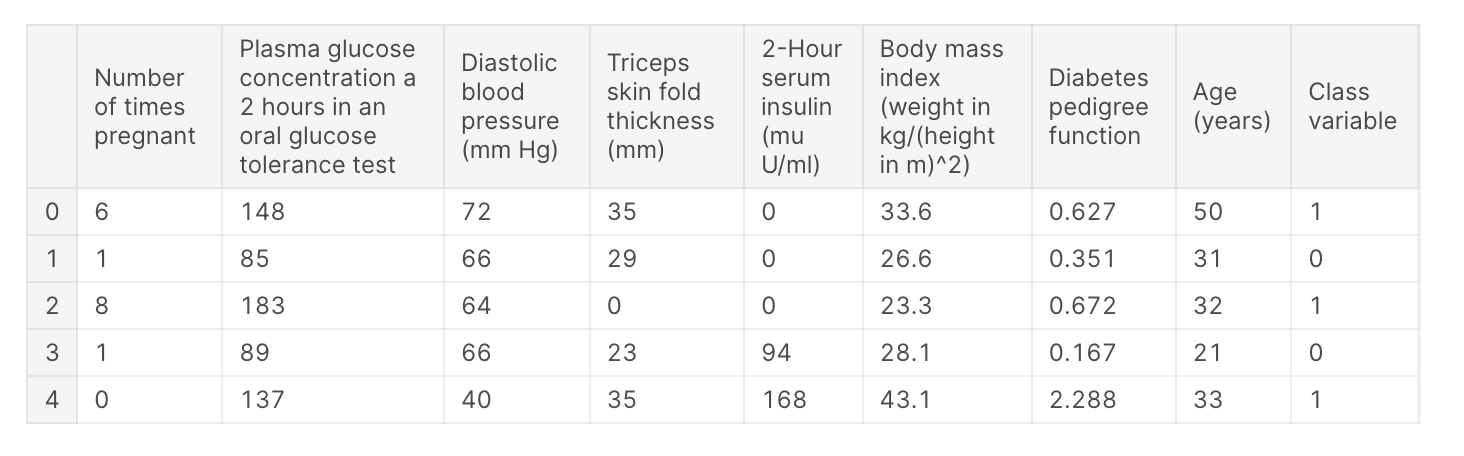
from pycaret.datasets import get_data
data = get_data('diabetes')

png

Convert Plotly Jupyterlab to HTML

개요

  • jupyter notebook에서 plotly 기반의 시각화를 작성한다.
  • jupyter notebook에서 html로 변환 시, plotly로 작성된 코드는 나타나지 않았다.
  • 이 때 필수적으로 입력해야 할 코드를 작성한다.

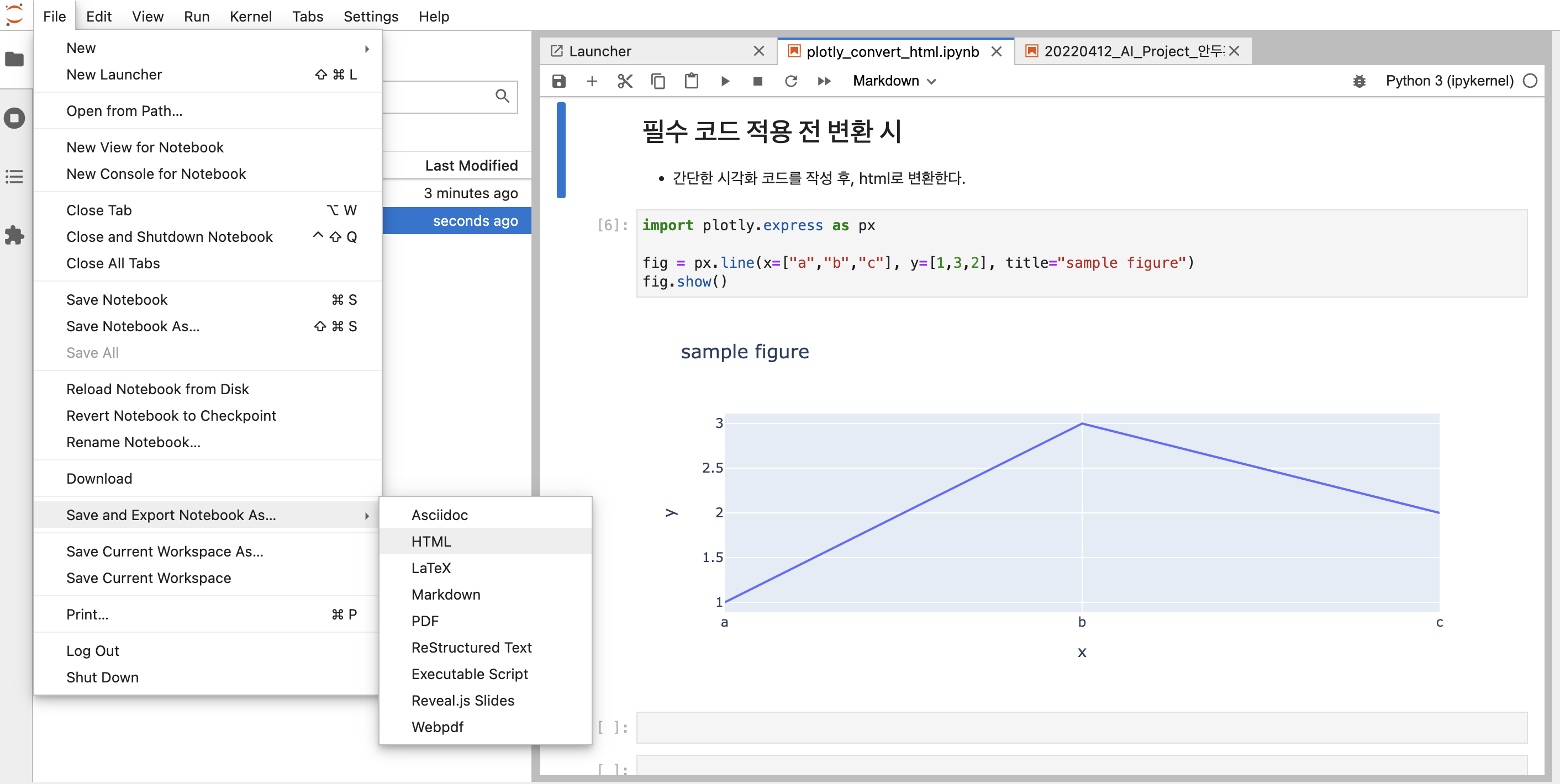
필수 코드 적용 전 변환 시

  • 간단한 시각화 코드를 작성 후, html로 변환한다.
import plotly.express as px

fig = px.line(x=["a","b","c"], y=[1,3,2], title="sample figure")
fig.show()
  • 아래 그림은 일반적으로 JupyterLab 에디터에서 HTML로 변환하는 과정이다.
    • File - Save and Export Notebook As… - HTML 순차적으로 클릭한다.

Screen Shot 2022-04-11 at 10.56.22 PM.png

Kaggle Survey Data Transformation Tip

Intro

  • Data Transformation is always important to visualise.
  • Here, I just introduced to get value counts in different dataset.
  • If you are newbie, please be aware of this code before you dive into visualization.
# This Python 3 environment comes with many helpful analytics libraries installed
# It is defined by the kaggle/python Docker image: https://github.com/kaggle/docker-python
# For example, here's several helpful packages to load

import numpy as np # linear algebra
import pandas as pd # data processing, CSV file I/O (e.g. pd.read_csv)

# Input data files are available in the read-only "../input/" directory
# For example, running this (by clicking run or pressing Shift+Enter) will list all files under the input directory

import os
for dirname, _, filenames in os.walk('/kaggle/input'):
    for filename in filenames:
        print(os.path.join(dirname, filename))

# You can write up to 20GB to the current directory (/kaggle/working/) that gets preserved as output when you create a version using "Save & Run All" 
# You can also write temporary files to /kaggle/temp/, but they won't be saved outside of the current session
/kaggle/input/kaggle-survey-2021/kaggle_survey_2021_responses.csv
/kaggle/input/kaggle-survey-2021/supplementary_data/kaggle_survey_2021_methodology.pdf
/kaggle/input/kaggle-survey-2021/supplementary_data/kaggle_survey_2021_answer_choices.pdf

Data Import

  • Import raw data and split into questions dataset and survey dataset.
df = pd.read_csv("../input/kaggle-survey-2021/kaggle_survey_2021_responses.csv")
questions = df.iloc[0, :].T
questions
/opt/conda/lib/python3.7/site-packages/IPython/core/interactiveshell.py:3441: DtypeWarning: Columns (0,195,201,285,286,287,288,289,290,291,292) have mixed types.Specify dtype option on import or set low_memory=False.
  exec(code_obj, self.user_global_ns, self.user_ns)


Time from Start to Finish (seconds)                                Duration (in seconds)
Q1                                                           What is your age (# years)?
Q2                                                What is your gender? - Selected Choice
Q3                                             In which country do you currently reside?
Q4                                     What is the highest level of formal education ...
                                                             ...                        
Q38_B_Part_8                           In the next 2 years, do you hope to become mor...
Q38_B_Part_9                           In the next 2 years, do you hope to become mor...
Q38_B_Part_10                          In the next 2 years, do you hope to become mor...
Q38_B_Part_11                          In the next 2 years, do you hope to become mor...
Q38_B_OTHER                            In the next 2 years, do you hope to become mor...
Name: 0, Length: 369, dtype: object
df = df.iloc[1:, :]

Quick Data Review

  • All survey responses are count-based dataset.
  • It’s easy to check using value counts()
df['Q1'].value_counts()
25-29    4931
18-21    4901
22-24    4694
30-34    3441
35-39    2504
40-44    1890
45-49    1375
50-54     964
55-59     592
60-69     553
70+       128
Name: Q1, dtype: int64

Problem

  • Some questions are not easy to counts because of Supplementary Questions.
questions.index.tolist()[7:20]
['Q7_Part_1',
 'Q7_Part_2',
 'Q7_Part_3',
 'Q7_Part_4',
 'Q7_Part_5',
 'Q7_Part_6',
 'Q7_Part_7',
 'Q7_Part_8',
 'Q7_Part_9',
 'Q7_Part_10',
 'Q7_Part_11',
 'Q7_Part_12',
 'Q7_OTHER']
def sub_questions_count(question_num, part_num, text = False):
  part_questions = []

  if text in ["A", "B"]:
    part_questions = ['Q' + str(question_num) + "_" + text + '_Part_' + str(j) for j in range(1, part_num)]
    part_questions.append('Q' + str(question_num) + "_" + text + '_OTHER')
  else:
    part_questions = ['Q' + str(question_num) + '_Part_' + str(j) for j in range(1, part_num)]
    part_questions.append('Q' + str(question_num) + '_OTHER')

  # category count
  categories = []
  counts = []
  for i in part_questions:
    category = df[i].value_counts().index[0]
    val = df[i].value_counts()[0]
    categories.append(category)
    counts.append(val)

  combined_df = pd.DataFrame()
  combined_df['Category'] = categories
  combined_df['Count'] = counts

  combined_df = combined_df.sort_values(['Count'], ascending = False)
  return combined_df

Test

  • Case 1
# Test 
# 'Q38_B_Part_11',
print(sub_questions_count(38, 11, "B").reset_index(drop=True))
                  Category  Count
0             TensorBoard    4239
1                  MLflow    2747
2        Weights & Biases    1583
3              Neptune.ai    1276
4                 ClearML    1020
5                Polyaxon     737
6                Guild.ai     729
7    Domino Model Monitor     666
8                Comet.ml     633
9      Sacred + Omniboard     591
10                   Other    377

Case 2.

Home Credit Default - Data Visualization

공지

  • 본 포스트는 재직자 교육을 위해 만든 강의안의 일부입니다.

Introduction

대회 개요

Many people struggle to get loans due to insufficient or non-existent credit histories. And, unfortunately, this population is often taken advantage of by untrustworthy lenders. Home Credit strives to broaden financial inclusion for the unbanked population by providing a positive and safe borrowing experience. In order to make sure this underserved population has a positive loan experience, Home Credit makes use of a variety of alternative data–including telco and transactional information–to predict their clients’ repayment abilities. While Home Credit is currently using various statistical and machine learning methods to make these predictions, they’re challenging Kagglers to help them unlock the full potential of their data. Doing so will ensure that clients capable of repayment are not rejected and that loans are given with a principal, maturity, and repayment calendar that will empower their clients to be successful.

Kaggle-Python-Bigquery 연동 예제

1줄 요약

  • 캐글 데이터를 빅쿼리에 넣어보

캐글 데이터 다운로드

  • 캐글 데이터를 다운로드 받습니다.
!pip install kaggle
Requirement already satisfied: kaggle in /usr/local/lib/python3.7/dist-packages (1.5.12)
Requirement already satisfied: six>=1.10 in /usr/local/lib/python3.7/dist-packages (from kaggle) (1.15.0)
Requirement already satisfied: requests in /usr/local/lib/python3.7/dist-packages (from kaggle) (2.23.0)
Requirement already satisfied: urllib3 in /usr/local/lib/python3.7/dist-packages (from kaggle) (1.24.3)
Requirement already satisfied: certifi in /usr/local/lib/python3.7/dist-packages (from kaggle) (2020.12.5)
Requirement already satisfied: python-dateutil in /usr/local/lib/python3.7/dist-packages (from kaggle) (2.8.1)
Requirement already satisfied: tqdm in /usr/local/lib/python3.7/dist-packages (from kaggle) (4.41.1)
Requirement already satisfied: python-slugify in /usr/local/lib/python3.7/dist-packages (from kaggle) (4.0.1)
Requirement already satisfied: idna<3,>=2.5 in /usr/local/lib/python3.7/dist-packages (from requests->kaggle) (2.10)
Requirement already satisfied: chardet<4,>=3.0.2 in /usr/local/lib/python3.7/dist-packages (from requests->kaggle) (3.0.4)
Requirement already satisfied: text-unidecode>=1.3 in /usr/local/lib/python3.7/dist-packages (from python-slugify->kaggle) (1.3)
!mkdir ~/.kaggle
!echo '{"username":"your_id","key":"your_key"}' > ~/.kaggle/kaggle.json
!chmod 600 ~/.kaggle/kaggle.json
!kaggle competitions download -c tabular-playground-series-apr-2021
Warning: Looks like you're using an outdated API Version, please consider updating (server 1.5.12 / client 1.5.4)
Downloading test.csv.zip to /content
  0% 0.00/2.07M [00:00<?, ?B/s]
100% 2.07M/2.07M [00:00<00:00, 59.0MB/s]
Downloading train.csv.zip to /content
  0% 0.00/2.13M [00:00<?, ?B/s]
100% 2.13M/2.13M [00:00<00:00, 69.3MB/s]
Downloading sample_submission.csv to /content
  0% 0.00/879k [00:00<?, ?B/s]
100% 879k/879k [00:00<00:00, 124MB/s]
!ls
sample_data  sample_submission.csv  test.csv.zip  train.csv.zip
!unzip "*.zip"
Archive:  train.csv.zip
  inflating: train.csv               

Archive:  test.csv.zip
  inflating: test.csv                

2 archives were successfully processed.

사용자 계정 인증

from google.colab import auth
auth.authenticate_user()
print('Authenticated')
Authenticated

빅쿼리 사용 예제

  • 빅쿼리 사용에 앞서서 세팅을 해야 합니다.

ACEA Water, Intro to Time Series Forecasting

강의 홍보

Overview

Can you build a model to predict the amount of water in each waterbody to help preserve this natural resource? This is an Analytics competition where your task is to create a Notebook that best addresses the Evaluation criteria below. Submissions should be shared directly with host and will be judged by the Acea Group based on how well they addrss: