Iteration

Python for loop example

강의 홍보

I. 개요

  • 지난 시간에 for_loop의 기본적인 개념에 대해 살펴봤다.
  • 이번 시간에는 for_loop의 실제 다양한 활용 방안에 대해 살펴본다.

II. 데이터 시각화

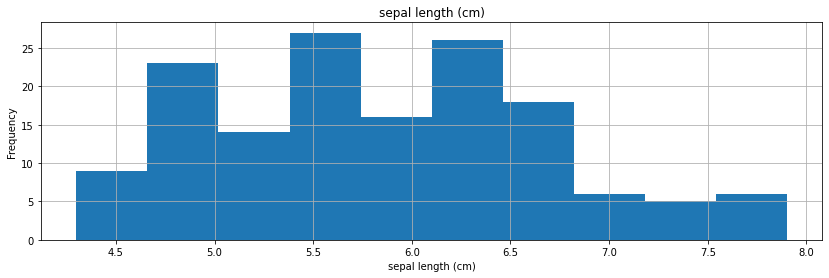
  • 변수의 개수에 상관없이 for-loop를 활용하면 무한대로 시각화를 작성할 수 있다.
  • 빠르게 코드로 확인해본다.
  • IRIS 데이터를 수집하는 코드를 작성한다.
import numpy as np
import pandas as pd
import matplotlib.pyplot as plt
import seaborn as sns
from sklearn import datasets

iris = datasets.load_iris()
df = pd.DataFrame(iris.data, columns=iris.feature_names)
print(df.head())
   sepal length (cm)  sepal width (cm)  petal length (cm)  petal width (cm)
0                5.1               3.5                1.4               0.2
1                4.9               3.0                1.4               0.2
2                4.7               3.2                1.3               0.2
3                4.6               3.1                1.5               0.2
4                5.0               3.6                1.4               0.2
  • 변수별로 시각화를 작성하기 위해, 우선 변수명을 List에 포함한다.
feature_names = iris.feature_names
print(feature_names)
['sepal length (cm)', 'sepal width (cm)', 'petal length (cm)', 'petal width (cm)']
  • 다음 코드는 시각화 작성을 위한 기본 환경설정이다.
  • figsizeJupyter Notebook에 맞게 최적화 되어 있기는 하지만, 수정할 수 있다.
%matplotlib inline
import matplotlib.pylab as plt

plt.rcParams["figure.figsize"] = (14,4)
plt.rcParams['lines.linewidth'] = 2
plt.rcParams['lines.color'] = 'r'
plt.rcParams['axes.grid'] = True 
  • 그리고 마지막으로 for-loop 활용하는 시각화를 작성한다.
for fea in feature_names:
  data = df.copy()
  # iris.sepal_length[:20].plot(kind='bar', rot=0)
  data[fea].plot(kind='hist', rot=0)
  plt.xlabel(fea)
  plt.title(fea)
  plt.show()

png

Python for loops in different ways

강의 홍보

I. 개요

  • 여러 형태의 반복문을 배우고 실습한다.
  • 한줄로 작성하는 반복문을 배우고 실습한다.

II. For Loop Basic Syntax

  • 파이썬의 기본 문법은 아래와 같다.
for <변수> in <iterable>:
    <코드>
  • 여기에서 iterable의 개념은 listtuple을 의미한다.
  • 간단하게 for_loop 코드를 작성해보자.
    • 우선, A라는 리스트 객체를 작성한다.
    • for_loop를 활용해서 리스트 안에 있는 것을 하나씩 출력한다.
A = ["철수", "영희", "길동"]
for i in A:
  print(i)
철수
영희
길동

(1) Iterables

  • Iteration을 한국어로 번역하면 되풀이다.
  • 그런데, 어떤 데이터 유형이 되풀이를 할 수 있을가?
    • ListTuple이 되풀이가 될 수 있는 소재인 것은 확실하다.
  • 어떤 객체(=Object)가 있을 때, 이 객체가 iterable 한것인지, 또는 아닌지 확인하는 함수(iter())도 있다.
print(iter("ABC"))
<str_iterator object at 0x7f2464faeb00>
print(iter(["A", "B", "C"]))
<list_iterator object at 0x7f2464faedd8>
print(iter(("A", "B", "C")))
<tuple_iterator object at 0x7f2464faedd8>
print(iter({"A": 1, "B": 3, "C": 3}))
<dict_keyiterator object at 0x7f2464fdd458>
  • 그런데, 수치형의 경우에는 iteration이 적용되지 않는다.
iter(100)
---------------------------------------------------------------------------
TypeError                                 Traceback (most recent call last)
<ipython-input-48-f3bbc5ecfc9b> in <module>()
----> 1 print(iter(100))

TypeError: 'int' object is not iterable
iter(3.14)
---------------------------------------------------------------------------
TypeError                                 Traceback (most recent call last)
<ipython-input-12-eb85da4c3f57> in <module>()
----> 1 iter(3.14)

TypeError: 'float' object is not iterable
  • 단일 수치형 데이터를 제외하고는 사실상 모든 데이터가 iterable의 성질을 가지고 있다.

(2) next()

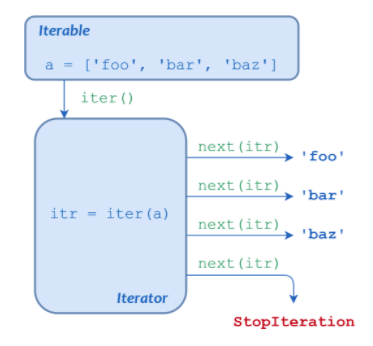
  • next()iterator에서의 next value를 의미한다.
  • 다음 코드를 확인해보자.
A = ["철수", "영희", "길동"]
iterable = iter(A)
iterable

<list_iterator at 0x7f2464fb7dd8>