Elasticsearch

Logstash 실행 및 확인 - 기본예제

개요

  • Logstash 기본 설치 과정을 확인한다.
  • Logstash 활용 예제를 확인한다.

사전준비

  • 기존에 Elasticsearch와 Kibana 실행 방법을 알고 있어야 한다.
  • 모든 코드는 Windows 에서 실행하였다.

Logstash의 역할

  • 데이터 수집 (Ingest) - 데이터 변환 및 처리 (Processing / Filtering) - 데이터 출력 (Output)

데이터 수집

  • 다양한 데이터 소스로부터 데이터 수집
    • 로그파일
    • TCP/UDP/HTTP 요청
    • Kafka, Redis, JDBC(DB) 등

데이터 변환 및 처리 (Processing / Filtering)

  • 주요 내용

    • Logstash는 수집한 원시 데이터를 구조화된 형식으로 파싱하고 정제 및 가공
    • 정규표현식 기반 grok 필터로 로그 파싱
    • 날짜 포맷 통일 (date)
    • 필드 추가/삭제/이름 변경
    • 조건 분기 처리 (if, else)
    • JSON, CSV 파싱
    • 지오IP, 위치 정보 추가 등
  • 예시 코드

Elasticsearch - Transformers 임베딩 입력 저장 (Local Mode)

개요

  • 엘라스틱서치에서 밀집 벡터 위한 매핑 구성 방법 살펴보기
  • 밀집 벡터가 저장될 embedding 이라는 필드 정의
  • Python 코드로 엘라스틱서치 코드 구현

코드 전체 시나리오

  • Elasticsearch에 연결 및 인덱스 초기화
  • dense_vector 타입으로 매핑 정의
  • 문서 배열 정의
  • BERT 모델을 이용해 각 문서를 벡터 임베딩
  • 벡터 포함 문서를 Elasticsearch에 색인

Elasticsearch 클라이언트 연결

  • 로컬에서 실행 중인 Elasticsearch 서버에 접속
  • basic_auth: 로그인 자격 (ID: elastic, PW: 123456)
  • verify_certs=False: 인증서 검증 생략 (로컬에서 SSL 없이 사용 시 편의용)
es_admin = Elasticsearch("http://localhost:9200", 
                         basic_auth=("elastic", "123456"), 
                         verify_certs=False)

Mapping 정의 및 인덱스 생성

  • dense_vector: 벡터 검색용 필드 (벡터 유사도 기반 검색 가능)
  • dims: BERT의 출력 벡터는 기본적으로 768차원이므로 그에 맞춤
mapping = {
    "properties": {
        "embedding": {
            "type": "dense_vector",
            "dims": 768  # BERT의 출력 벡터 차원 수
        }
    }
}

기존 인덱스 삭제 후 새로 생성

  • 기존에 있던 chapter-2 인덱스를 삭제 (중복 방지)
  • 새로운 인덱스를 위에서 정의한 벡터 매핑으로 생성
try:
    es_admin.indices.delete(index="chapter-2")
    print("기존 chapter-2 인덱스를 삭제했습니다.")
except:
    print("chapter-2 인덱스가 존재하지 않습니다.")

es_admin.indices.create(index="chapter-2", body={'mappings': mapping})
print("새로운 chapter-2 인덱스를 생성했습니다.")

색인할 문서 데이터 구성

  • titletext로 구성된 단순 문서 리스트
  • text는 BERT 임베딩의 입력값이 된다
docs = [
    {"title": "Document 1", "text": "This is the first document"},
    {"title": "Document 2", "text": "This is the second document"},
    {"title": "Document 3", "text": "This is the third document"}
]

BERT 모델과 토크나이저 초기화

  • bert-base-uncased: Hugging Face에서 사전 학습된 BERT 모델
  • AutoTokenizer: 입력 텍스트를 BERT가 이해할 수 있는 토큰으로 변환
  • AutoModel: 텍스트에 대한 BERT 임베딩 추출
tokenizer = AutoTokenizer.from_pretrained("bert-base-uncased")
model = AutoModel.from_pretrained("bert-base-uncased")

BERT 임베딩 생성

  • tokenizer(...): 텍스트를 토큰화하고 PyTorch 텐서로 변환
  • model(**inputs): BERT 실행 → 각 토큰에 대한 임베딩 벡터 반환
  • last_hidden_state.mean(dim=1): 문장의 전체 임베딩을 mean pooling으로 하나의 벡터로 압축 (1×768 벡터)
  • squeeze(0).numpy(): 불필요한 batch 차원 제거 후 NumPy로 변환
  • tolist(): Elasticsearch에 저장 가능하게 리스트 형태로 변환
for doc in docs:
    text = doc["text"]
    inputs = tokenizer(text, return_tensors="pt", padding=True, truncation=True)
    with torch.no_grad():
        outputs = model(**inputs).last_hidden_state.mean(dim=1).squeeze(0).numpy() 
        doc["embedding"] = outputs.tolist()

Elasticsearch에 색인

  • 각 문서를 chapter-2 인덱스에 색인
  • Elasticsearch는 embedding 필드를 dense_vector로 저장하며, 향후 벡터 검색에도 사용 가능
for doc in docs:
    es_admin.index(index="chapter-2", body=doc)

확인

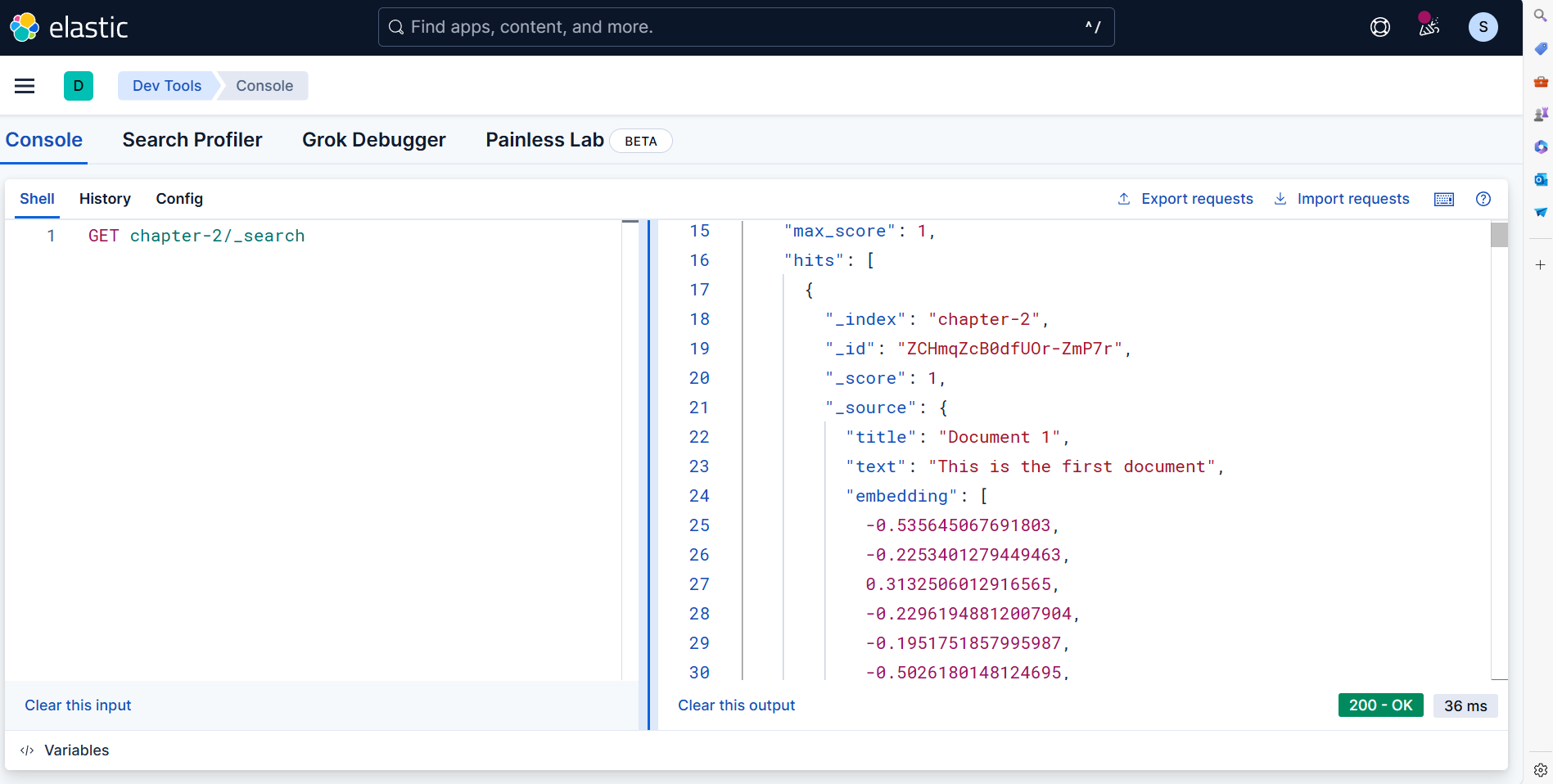
  • Kibana | Management | Dev Tools에서 색인된 문서 조회
GET chapter-2/_search

image.png

엘라스틱 클라우드에 데이터 추가하기 - 예제 (2025, 06)

CH03 - 데이터 추가

개요

  • Cloud에 데이터 추가

이전 예제 확인

파이썬 코드

# 필요한 라이브러리들을 가져옵니다
import time                    # 시간 지연을 위한 라이브러리
import requests               # HTTP 요청을 위한 라이브러리
from bs4 import BeautifulSoup # HTML 파싱을 위한 라이브러리
from elasticsearch import Elasticsearch  # Elasticsearch 클라이언트

# ✅ Elastic Cloud 연결 (API 키 인증 방식)
# Elastic Cloud의 클러스터에 API 키를 사용하여 연결합니다
# API 키는 사용자명/비밀번호 대신 더 안전한 인증 방식입니다
es = Elasticsearch(
    "your_cloud_url",  # Elastic Cloud 클러스터 URL
    api_key="your_api_key"  # API 키
)

# 저장할 인덱스 이름을 상수로 정의합니다
INDEX_NAME = "evan-elk-search"

# ✅ 인덱스 생성 (존재하지 않으면 새로 생성)
# Elasticsearch에서 데이터를 저장할 인덱스가 있는지 확인하고, 없으면 새로 생성합니다
if not es.indices.exists(index=INDEX_NAME):
    es.indices.create(index=INDEX_NAME)  # 새 인덱스 생성
    print(f"✅ Index '{INDEX_NAME}' created.")
else:
    print(f"✅ Index '{INDEX_NAME}' already exists.")

# ✅ 명언 수집 함수 정의
def get_quotes():
    """
    quotes.toscrape.com 웹사이트에서 명언들을 수집하는 함수
    
    Returns:
        list: 수집된 명언 요소들의 리스트 (BeautifulSoup 객체들)
    """
    res = requests.get("http://quotes.toscrape.com")  # 웹사이트에 GET 요청
    soup = BeautifulSoup(res.text, "html.parser")     # HTML을 파싱
    return soup.select(".quote")                       # .quote 클래스를 가진 요소들을 선택하여 반환

# ✅ 30초 간격으로 명언들을 하나씩 저장
# 수집된 명언들을 가져옵니다
quotes = get_quotes()

# 각 명언을 순회하면서 Elastic Cloud에 저장합니다
for i, q in enumerate(quotes):
    # 명언 데이터를 딕셔너리 형태로 구성합니다
    doc = {
        "text": q.select_one(".text").text.strip(),      # 명언 텍스트 추출 (공백 제거)
        "author": q.select_one(".author").text.strip(),  # 저자 이름 추출 (공백 제거)
        "tags": [tag.text for tag in q.select(".tag")]   # 태그들을 리스트로 추출
    }
    
    # Elastic Cloud에 문서를 저장합니다
    res = es.index(index=INDEX_NAME, document=doc)
    print(f"[{i+1}] ✅ Saved to Elastic Cloud: {res['_id']}")  # 저장된 문서의 ID 출력
    
    # 30초 대기 (다음 명언 저장 전)
    time.sleep(30)
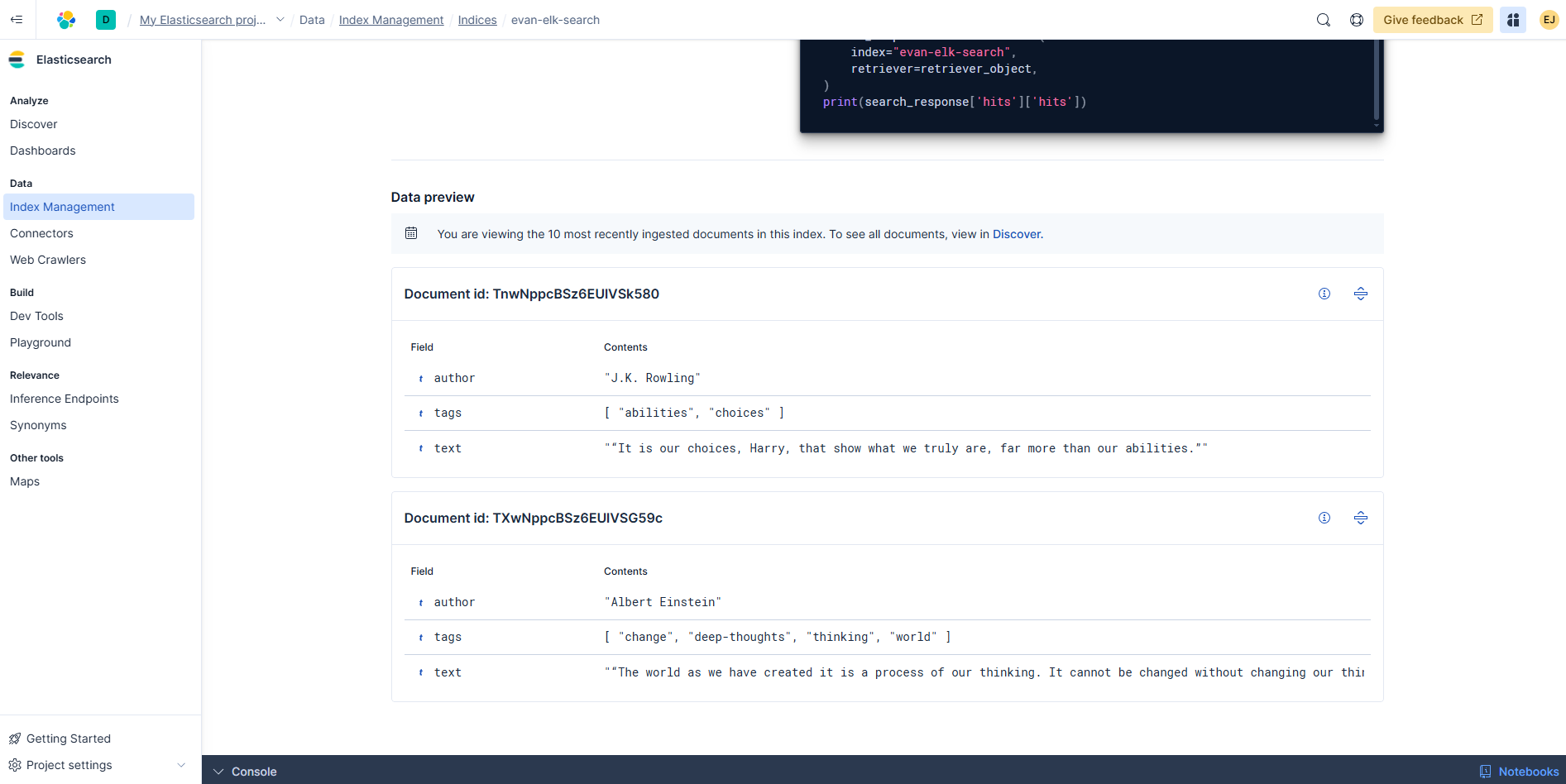
  • 클라우드에서 확인

image.png

엘라스틱 서치 시작하기 - 예제 (2025, 06)

개요

  • 엘라스틱 클라우드 활용 예제 확인

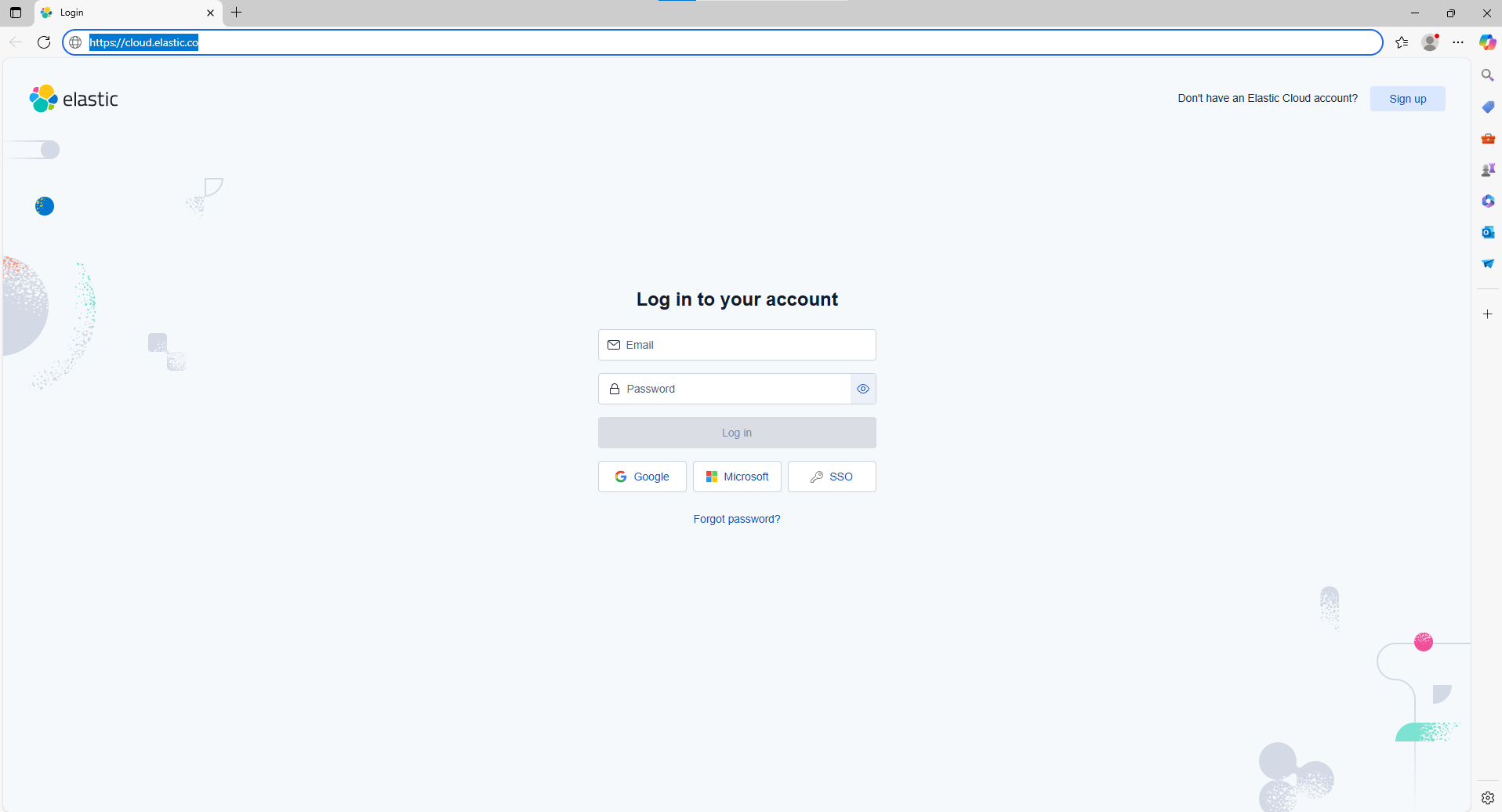
회원가입

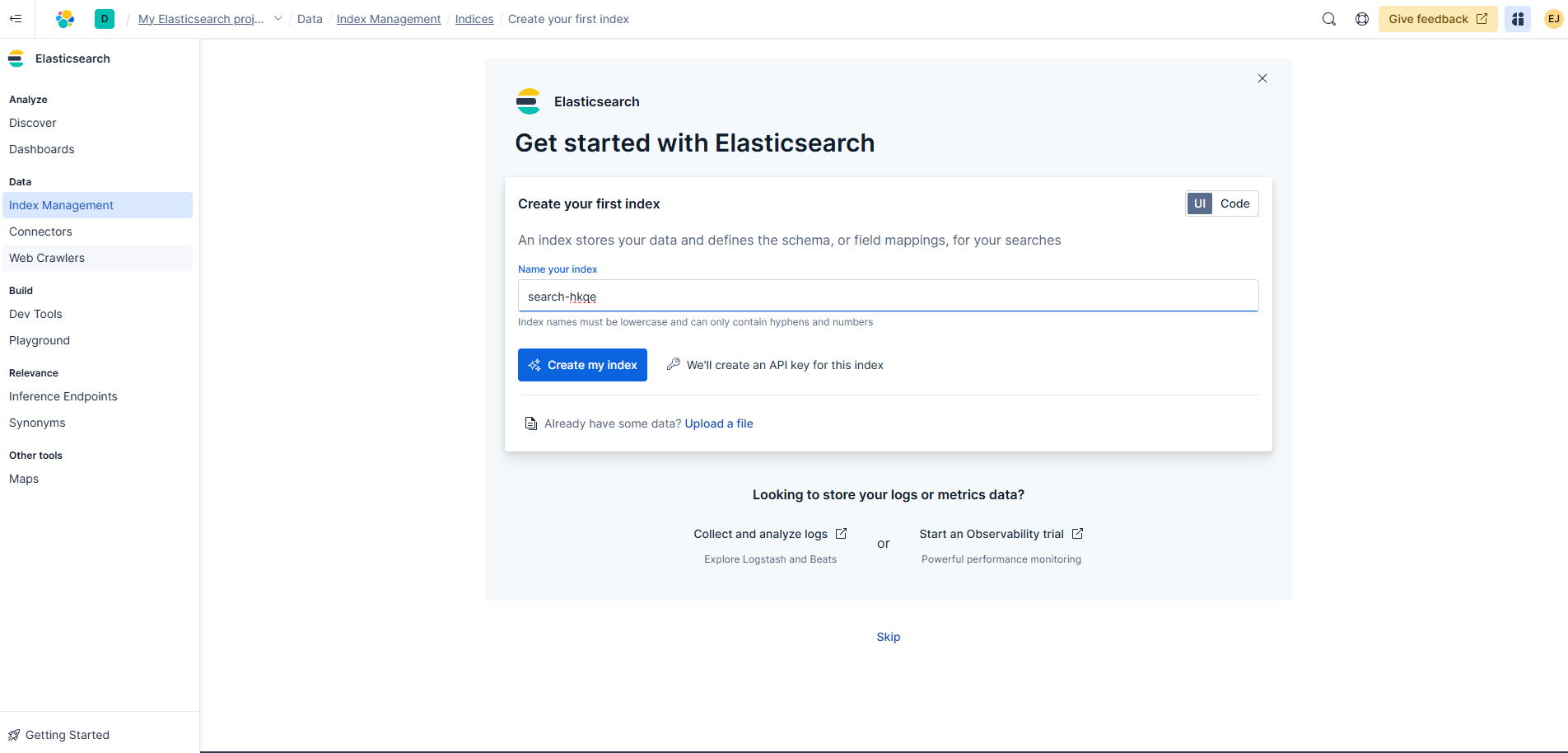
image.png

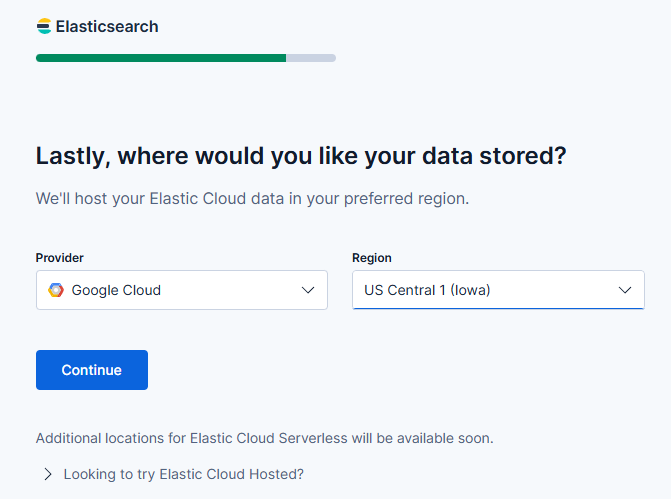
  • 가입 중간에 데이터 저장하는 공간이 있는데, 필자는 GCP를 선택하였다.

image.png

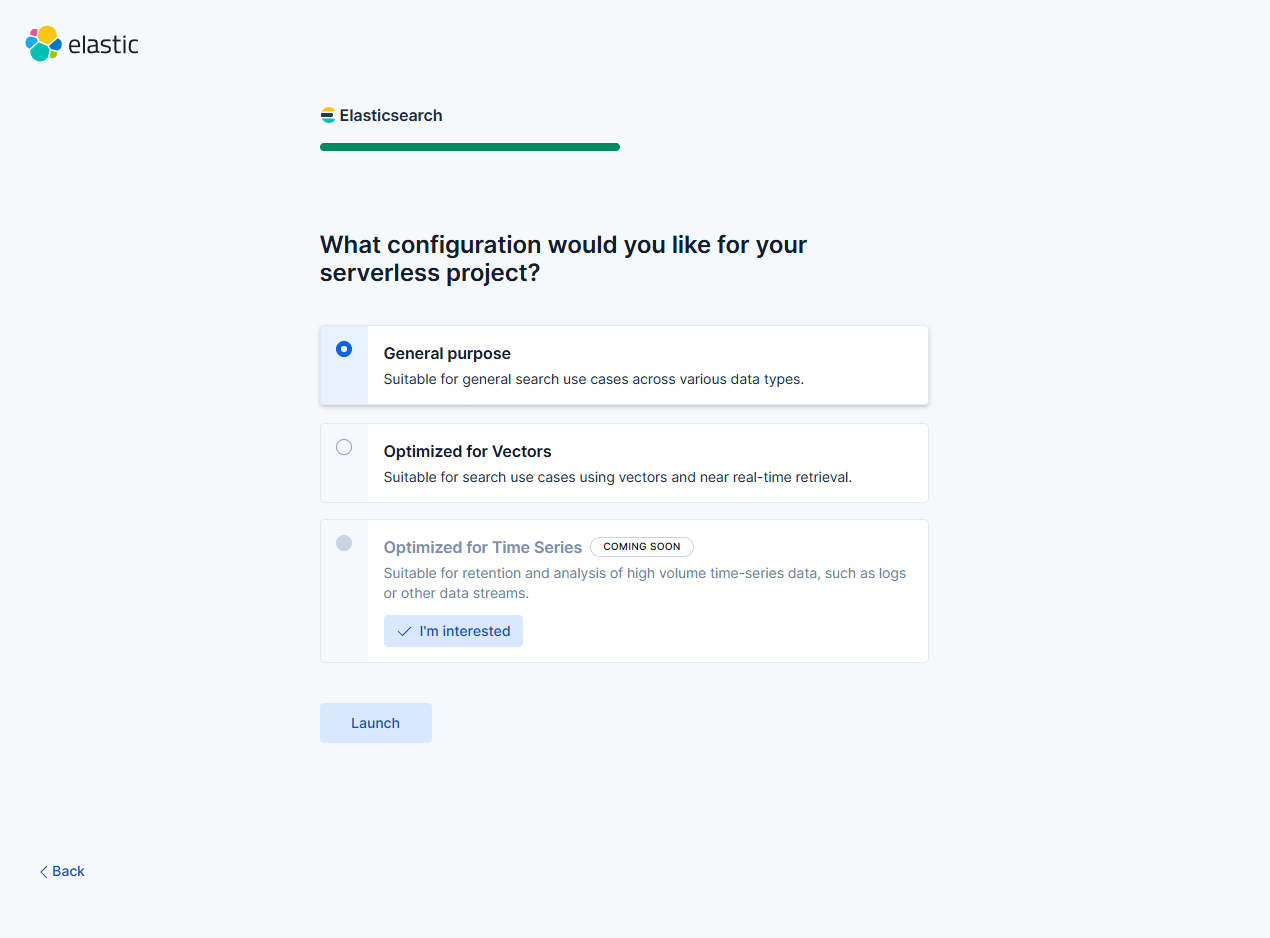
  • 다음 화면에서는 다음과 같이 지정하였다. General Purpose

image.png

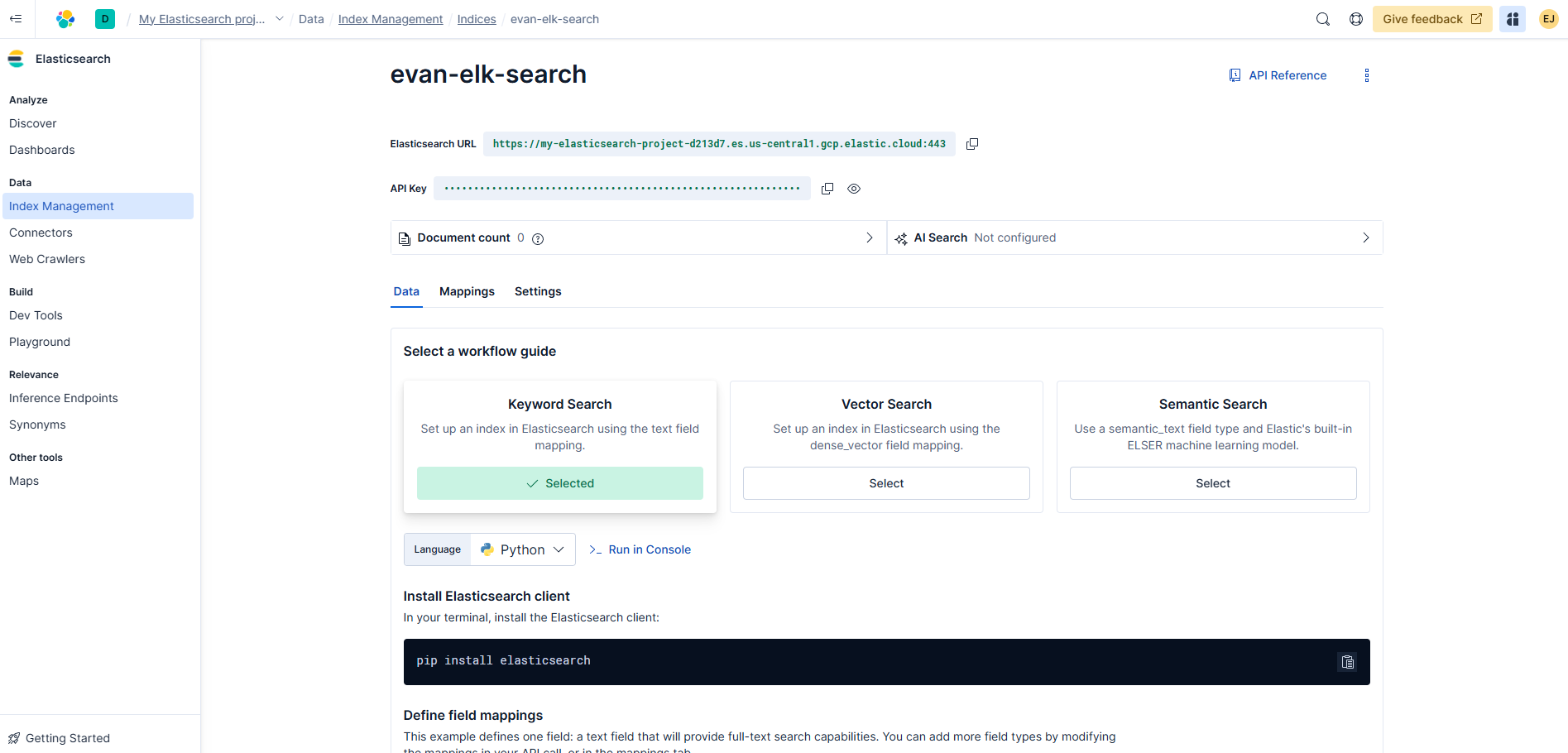
  • 인덱스 명 : evan-elk-search

image.png

  • 인덱스 명을 확인하면 다음과 같다.
  • URL과 API 주소를 확인한다.
    • URL : your_url
    • your_api_key

image.png

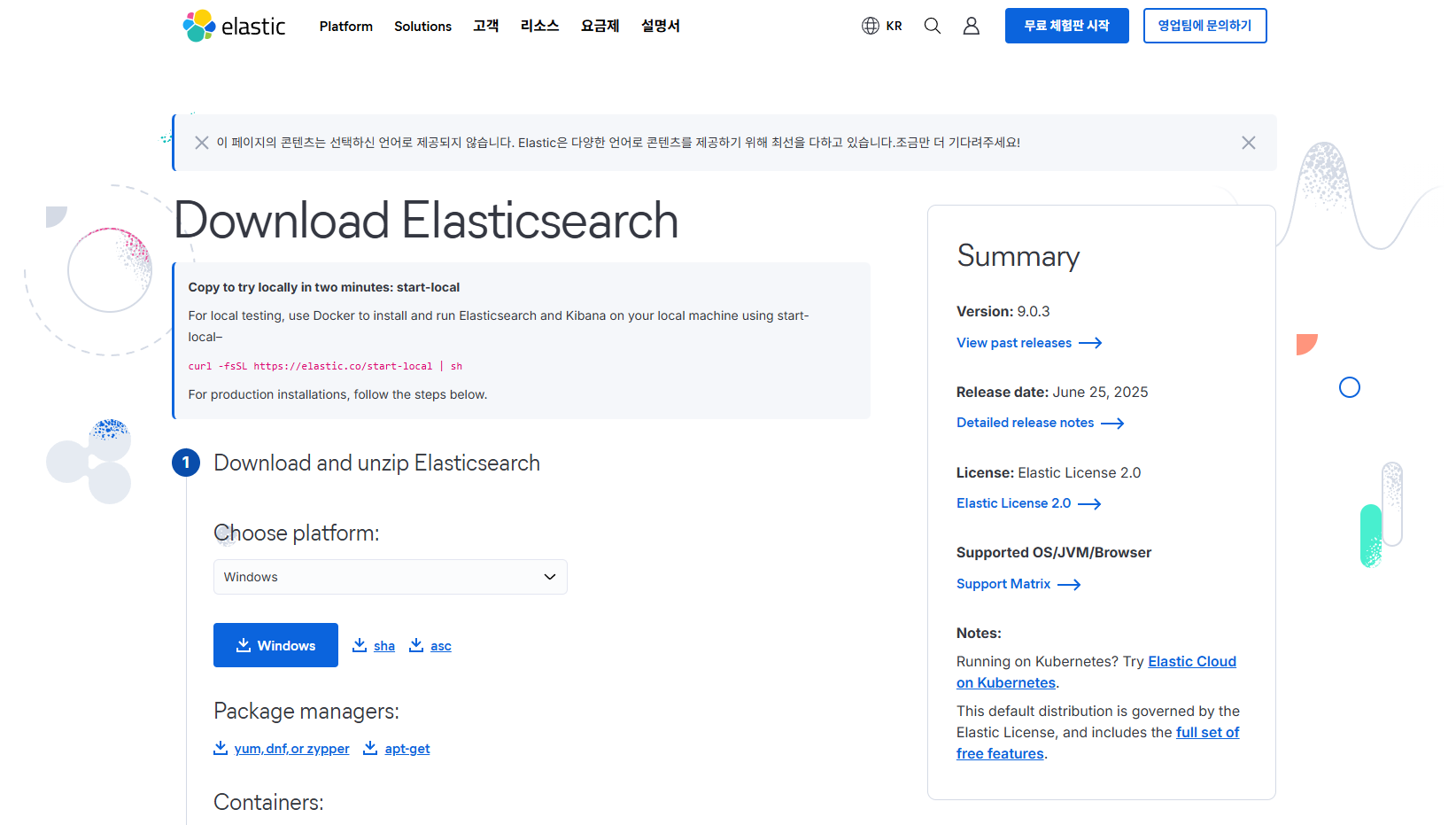
설치 및 예제 확인

Windows 10

image.png

  • 압축 파일을 해제하고 C 드라이브쪽으로 폴더를 이동시킨다.

Airflow를 활용한 PostgreSQL에서 Elasticsearch로 데이터 마이그레이션 예제

강의 홍보

개요

  • Airflow를 활용하여 PostgreSQL에 저장된 데이터를 디스크로 다운로드 받고, 그리고 그 파일을 다시 읽어서 Elasticsearch에 저장하도록 한다.
  • 전체적인 흐름은 getData from PostgreSQL >> insertData to Elasticsearch 로 저장할 수 있다.

전체 코드 실행

  • 우선 전체 코드를 실행하도록 한다.
import datetime as dt
from datetime import timedelta
from airflow import DAG
from airflow.operators.bash import BashOperator
from airflow.operators.python import PythonOperator
import pandas as pd
import psycopg2 as db
from elasticsearch import Elasticsearch

def queryPostgresql():
    conn_string="dbname='python_dataengineering' host='localhost' user='postgres' password='evan'"
    conn = db.connect(conn_string)
    df = pd.read_sql("select name, city from users", conn)
    df.to_csv("dags/postgresqldata.csv")
    print("----------Data Saved------------")

def insertElasticsearch():
    es=Elasticsearch()
    df = pd.read_csv("dags/postgresqldata.csv")
    print(df.head())
    for i, r in df.iterrows():
        doc = r.to_json()
        res = es.index(index="frompostgresql", doc_type="doc", body=doc)
        print(res)

default_args = {
    'owner': 'evan',
    'start_date': dt.datetime(2021, 9, 15),
    'retries': 1,
    'retry_delay': dt.timedelta(minutes=5),
}

with DAG('MyDBdag',
         default_args = default_args,
         schedule_interval=timedelta(minutes=5),
         ) as dag:

    print_starting = BashOperator(task_id='starting',
                                  bash_command='echo "I am reading the PostgreSQL now....."')

    getData = PythonOperator(task_id='QueryPostgreSQL',
                             python_callable=queryPostgresql)

    insertData = PythonOperator(task_id="InsertDataElasticsearch",
                                python_callable=insertElasticsearch)

print_starting >> getData >> insertData
(venv) $ airflow webserver
(venv) $ airflow scheduler

결과 확인

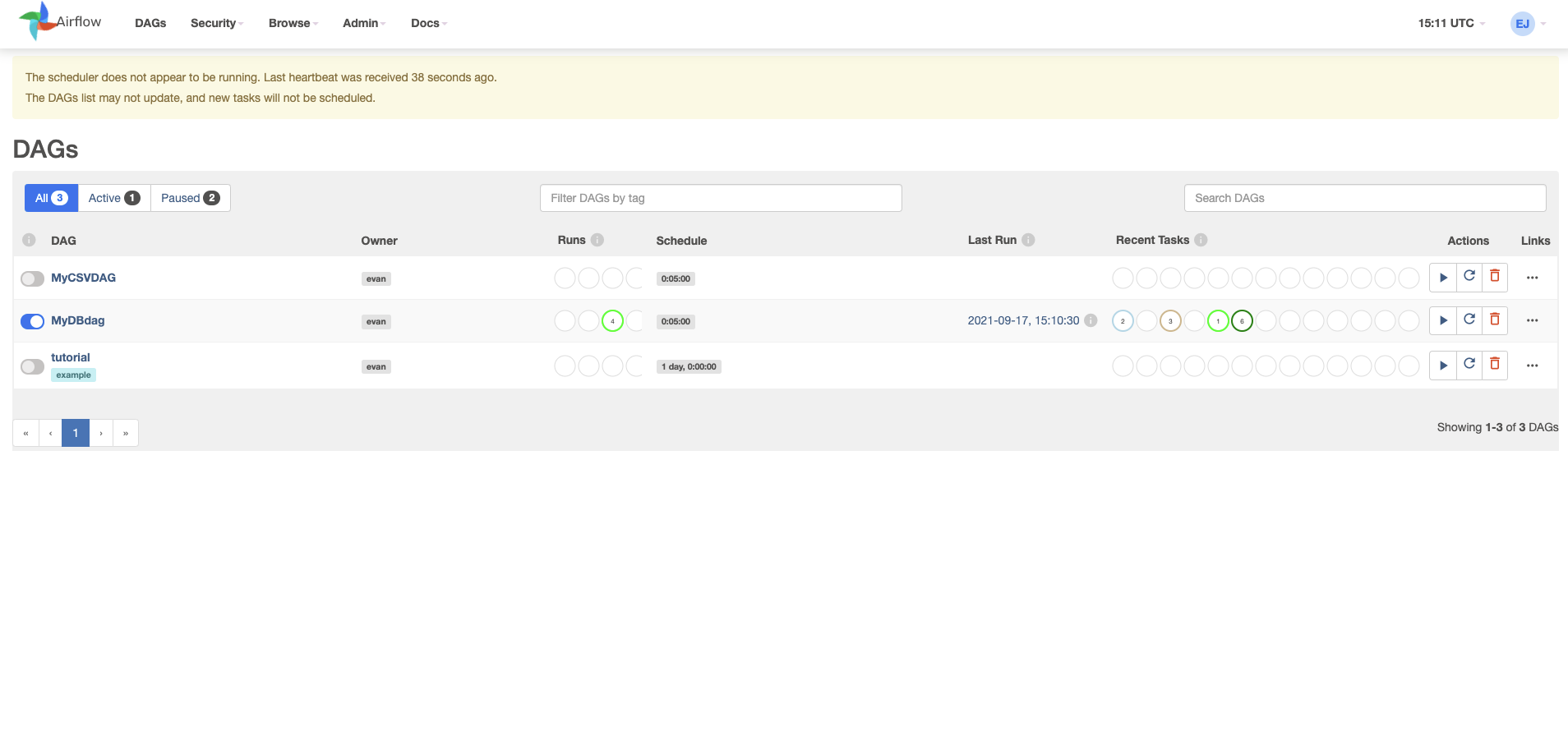
  • 브라우저로 [http://localhost:8080](http://localhost:8080) 에 접속한다.
  • MyDBdag 를 실행 후, 클릭한다.

airflow_01.png

파이썬을 활용한 엘라스틱서치에서 데이터 추출

강의 홍보

개요

  • 데이터를 질의하는 방법과 데이터를 삽입하는 방법은 동일하다.
  • 다만, 이 때에는 search 메서드를 사용하다.
  • 또한, doc 문서도 조금 다르다.
  • 기본적으로 SQL 과 문법이 다르기 때문에 공식문서를 확인한다.

실행

실습 1 - 전체 데이터 확인

  • 먼저 아래코드를 복사한 뒤 붙여넣기 하여 실행시켜보도록 한다.
    • 결괏값까지 직접 확인하도록 한다.
from elasticsearch import Elasticsearch
from pandas.io.json import json_normalize

es = Elasticsearch()

doc={"query":{"match_all":{}}}
res=es.search(index="users", body=doc, size=10)
print(res['hits']['hits'])

# 각 문서의 `_source`필드 출력만 가능
# for doc in res['hits']['hits']:
#   print(doc['_source'])

# pandas DataFrame
print("----------")
df = json_normalize(res['hits']['hits'])
print(df)
(venv) $ python3 step04_3_elasticsearch_query.py 
/Users/evan/Desktop/data_engineering_python/venv/lib/python3.8/site-packages/elasticsearch/connection/base.py:208: ElasticsearchWarning: Elasticsearch built-in security features are not enabled. Without authentication, your cluster could be accessible to anyone. See https://www.elastic.co/guide/en/elasticsearch/reference/7.14/security-minimal-setup.html to enable security.
  warnings.warn(message, category=ElasticsearchWarning)
[{'_index': 'users', '_type': 'doc', '_id': '4Vam5HsBtoEC6_MiP2z3', '_score': 1.0, '_source': {'name': 'Toni Nguyen', 'street': '6060 Justin Freeway Suite 557', 'city': 'East Aaronstad', 'zip': '43029'}}, {'_index': 'users', '_type': 'doc', '_id': '41bN5HsBtoEC6_Mig2w3', '_score': 1.0, '_source': {'name': 'Jennifer Barr', 'street': '02693 Laura Views Apt. 582', 'city': 'Ericside', 'zip': '50021'}}, {'_index': 'users', '_type': 'doc', '_id': '5FbN5HsBtoEC6_Mig2w4', '_score': 1.0, '_source': {'name': 'Alex White', 'street': '674 Mcclure Islands', 'city': 'Richardfort', 'zip': '91321'}}, {'_index': 'users', '_type': 'doc', '_id': '5VbN5HsBtoEC6_Mig2w4', '_score': 1.0, '_source': {'name': 'Michael Melendez', 'street': '1732 Andrews Lakes Suite 023', 'city': 'West Rachaelhaven', 'zip': '96479'}}, {'_index': 'users', '_type': 'doc', '_id': '5lbN5HsBtoEC6_Mig2w4', '_score': 1.0, '_source': {'name': 'Dennis Moore', 'street': '4901 Barber Turnpike Suite 009', 'city': 'Lake Abigail', 'zip': '91137'}}, {'_index': 'users', '_type': 'doc', '_id': '51bN5HsBtoEC6_Mig2w4', '_score': 1.0, '_source': {'name': 'Angela Santiago', 'street': '2635 Duncan Isle Apt. 292', 'city': 'Garyton', 'zip': '74345'}}, {'_index': 'users', '_type': 'doc', '_id': '6FbN5HsBtoEC6_Mig2w4', '_score': 1.0, '_source': {'name': 'Cynthia Randall', 'street': '8738 Johnson Underpass', 'city': 'Brianshire', 'zip': '02178'}}, {'_index': 'users', '_type': 'doc', '_id': '6VbN5HsBtoEC6_Mig2w4', '_score': 1.0, '_source': {'name': 'James Schneider', 'street': '14248 Gregory Loaf', 'city': 'West Lindamouth', 'zip': '47982'}}, {'_index': 'users', '_type': 'doc', '_id': '6lbN5HsBtoEC6_Mig2w4', '_score': 1.0, '_source': {'name': 'Jonathan George', 'street': '8183 Flores Springs Apt. 129', 'city': 'South Jeffreyland', 'zip': '61791'}}, {'_index': 'users', '_type': 'doc', '_id': '61bN5HsBtoEC6_Mig2w4', '_score': 1.0, '_source': {'name': 'William Cooper', 'street': '338 Jeffrey Canyon Apt. 624', 'city': 'Wilkersonside', 'zip': '01065'}}]
----------
step04_3_elasticsearch_query.py:16: FutureWarning: pandas.io.json.json_normalize is deprecated, use pandas.json_normalize instead
  df = json_normalize(res['hits']['hits'])
  _index _type                   _id  _score      _source.name                  _source.street       _source.city _source.zip
0  users   doc  4Vam5HsBtoEC6_MiP2z3     1.0       Toni Nguyen   6060 Justin Freeway Suite 557     East Aaronstad       43029
1  users   doc  41bN5HsBtoEC6_Mig2w3     1.0     Jennifer Barr      02693 Laura Views Apt. 582           Ericside       50021
2  users   doc  5FbN5HsBtoEC6_Mig2w4     1.0        Alex White             674 Mcclure Islands        Richardfort       91321
3  users   doc  5VbN5HsBtoEC6_Mig2w4     1.0  Michael Melendez    1732 Andrews Lakes Suite 023  West Rachaelhaven       96479
4  users   doc  5lbN5HsBtoEC6_Mig2w4     1.0      Dennis Moore  4901 Barber Turnpike Suite 009       Lake Abigail       91137
5  users   doc  51bN5HsBtoEC6_Mig2w4     1.0   Angela Santiago       2635 Duncan Isle Apt. 292            Garyton       74345
6  users   doc  6FbN5HsBtoEC6_Mig2w4     1.0   Cynthia Randall          8738 Johnson Underpass         Brianshire       02178
7  users   doc  6VbN5HsBtoEC6_Mig2w4     1.0   James Schneider              14248 Gregory Loaf    West Lindamouth       47982
8  users   doc  6lbN5HsBtoEC6_Mig2w4     1.0   Jonathan George    8183 Flores Springs Apt. 129  South Jeffreyland       61791
9  users   doc  61bN5HsBtoEC6_Mig2w4     1.0    William Cooper     338 Jeffrey Canyon Apt. 624      Wilkersonside       01065
  • 이제 코드를 살펴본다.
    • 우선 doc={"query":{"match_all":{}}} 에서 match_all 은 주어진 문서의 모든 문서를 질의하는 요청에 해당함.
    • search 는 크게 index 명은 문서 객체를 의미하며 body 쿼리 내용을 저장하는 곳이다. 그리고, 마지막으로 결과집합의 크기도 지정한다.
    • 검색된 문서들을 출력한다.
      • 출력시 해당 쿼리는 JSON 객체로 반환됨을 유의한다.
    • json_normalize 함수는 JSON 객체를 데이터프레임으로 변환할 때 주로 사용한다.

실습 2 - 질의 응용 (1)

  • 이번에는 match_all 대신에 특정 이름만 출력하도록 한다.
  • 먼저 파이썬 코드를 작성해본다.
    • 여기서 봐야 하는 코드는 doc 이하 구문이다.
from elasticsearch import Elasticsearch

es = Elasticsearch()
doc = {"query": {"match":{"name":"Toni Nguyen"}}}
res = es.search(index="users", body=doc, size=10)
print(res['hits']['hits'][0]['_source'])
  • 이제 해당 코드를 실행하면 특정 이름과 연관된 결괏값만 확인할 수 있을 것이다.
python3 step04_4_elasticsearch_query_match.py 
/Users/evan/Desktop/data_engineering_python/venv/lib/python3.8/site-packages/elasticsearch/connection/base.py:208: ElasticsearchWarning: Elasticsearch built-in security features are not enabled. Without authentication, your cluster could be accessible to anyone. See https://www.elastic.co/guide/en/elasticsearch/reference/7.14/security-minimal-setup.html to enable security.
  warnings.warn(message, category=ElasticsearchWarning)
{'name': 'Toni Nguyen', 'street': '6060 Justin Freeway Suite 557', 'city': 'East Aaronstad', 'zip': '43029'}

실습 3 - 질의 응용 (2)

  • 이번에는 Boolean 연산자 및 필터를 이용해서 좀 더 정밀하게 검색을 하도록 한다.
  • 이 때에는 bool 필드에 must 나, must not, should 를 지정하고 filter 필드에 조건을 지정하는 식이면 좋다.
  • 먼저 파이썬 코드를 확인해본다.
from elasticsearch import Elasticsearch

es = Elasticsearch()
doc = {
    "query": {
        "bool": {
            "must": {
                "match": {"city": "East Aaronstad"}
            },
            "filter": {
                "term":{"zip":"43029"}
            }
        }
    }
}

res = es.search(index="users", body=doc, size=10)
print(res['hits']['hits'][0]['_source'])
  • 먼저, city: East Aaronstad 와 매칭데는 모든 데이터가 조회된다.
  • 그 후에, filter 조건문에서 zip 코드가 43029 번호만 남게 하면 된다.
  • 이제 파일을 실행하여 결괏값을 확인한다.
    • 기존에 이름을 통해 검색한 결과와 동일하게 나타나는 것을 확인할 수 있다.
(venv) $ python3 step04_5_elasticsearch_query_bool.py 
/Users/evan/Desktop/data_engineering_python/venv/lib/python3.8/site-packages/elasticsearch/connection/base.py:208: ElasticsearchWarning: Elasticsearch built-in security features are not enabled. Without authentication, your cluster could be accessible to anyone. See https://www.elastic.co/guide/en/elasticsearch/reference/7.14/security-minimal-setup.html to enable security.
  warnings.warn(message, category=ElasticsearchWarning)
{'name': 'Toni Nguyen', 'street': '6060 Justin Freeway Suite 557', 'city': 'East Aaronstad', 'zip': '43029'}

실습 4 - scroll 메서드 활용한 대형 결과 집합 처리

  • 검색 결과 집합의 크기를 10으로 설정했다. 그러나, 만약 10,000개 이상일 경우에는 부하가 걸리는 등 약간의 어려움이 노출이 된다.
    • 보통 이런 경우, 데이터를 여러번 나누어서 가져와야 하는데, 스크롤 함수를 통해서 해결이 가능하다.
  • 먼저 코드를 통해서 다수의 데이터를 가져오도록 한다.
from elasticsearch import Elasticsearch

es = Elasticsearch()
res = es.search(
    index='users',
    doc_type='doc',
    scroll='20m',
    size=500,
    body={'query':{'match_all':{}}}
)

sid = res['_scroll_id']
size = res['hits']['total']['value']
while (size > 0):
    res = es.scroll(scroll_id= sid, scroll='20m')
    sid = res['_scroll_id']
    size = len(res['hits']['hits'])
    idx = 0
    for doc in res['hits']['hits']:
        print(doc['_source'])
        if idx == 5:
            break
        idx += 1
  • 먼저 search() 에서 size는 500개로 설정한다.
  • _scroll_id 는 scroll 호출 시 찌정한다.
  • while 반복문을 이용하여 스크롤링을 시작한다. 이 때, 이 루프는 size가 0보다 큰 동안만 반복하며, size가 0이면 더 이상의 데이터가 없다는 것을 의미 한다.
  • sid와 size는 데이터를 더 가져오기 위해 새로운 스크롤 ID와 크기를 저장하는 것을 말한다.
    • for 반복문 내의 if 조건문은 삭제 후 실행하면 모든 데이터가 나타나게 된다.
  • 이제 파일을 실행해본다.
(venv) $ python3 step04_6_elasticsearch_scroll.py 
/Users/evan/Desktop/data_engineering_python/venv/lib/python3.8/site-packages/elasticsearch/connection/base.py:208: ElasticsearchWarning: Elasticsearch built-in security features are not enabled. Without authentication, your cluster could be accessible to anyone. See https://www.elastic.co/guide/en/elasticsearch/reference/7.14/security-minimal-setup.html to enable security.
  warnings.warn(message, category=ElasticsearchWarning)
/Users/evan/Desktop/data_engineering_python/venv/lib/python3.8/site-packages/elasticsearch/connection/base.py:208: ElasticsearchWarning: [types removal] Specifying types in search requests is deprecated.
  warnings.warn(message, category=ElasticsearchWarning)
{'name': 'Roberta Garrett', 'street': '622 Mullen Run', 'city': 'Johnbury', 'zip': '99188'}
{'name': 'Dr. Gregory Pitts', 'street': '2713 Anne Bridge', 'city': 'Tracychester', 'zip': '15536'}
{'name': 'Parker Rodriguez', 'street': '99259 Michelle Islands Suite 573', 'city': 'Grayview', 'zip': '94752'}
{'name': 'James Key', 'street': '6371 Claudia Neck', 'city': 'Zoetown', 'zip': '56028'}
{'name': 'John Manning', 'street': '22124 White Motorway', 'city': 'West John', 'zip': '79730'}
{'name': 'Sara Davidson', 'street': '339 Brian Landing', 'city': 'Larsonfurt', 'zip': '83689'}
{'name': 'Michael Sanders', 'street': '98018 Smith Trafficway Apt. 221', 'city': 'North Lisa', 'zip': '16332'}
{'name': 'Diana Schultz', 'street': '1902 Kristin Dale Apt. 983', 'city': 'Harveybury', 'zip': '77036'}
{'name': 'Amber Pratt', 'street': '40199 Harry Brooks Suite 081', 'city': 'Sharonmouth', 'zip': '08817'}
{'name': 'Michelle Cook', 'street': '24013 Alvarado Rest', 'city': 'Evanside', 'zip': '26897'}
{'name': 'Carmen Spears', 'street': '02924 Pearson Turnpike', 'city': 'West Heathermouth', 'zip': '20586'}
{'name': 'Kimberly Baker', 'street': '2997 Sloan Parkway Apt. 846', 'city': 'Tracyshire', 'zip': '04234'}
{'name': 'James Wilkinson', 'street': '063 Mark Mills Suite 670', 'city': 'Lewisburgh', 'zip': '69009'}
{'name': 'Valerie Fitzpatrick', 'street': '48374 Smith Throughway', 'city': 'Gonzalezhaven', 'zip': '86867'}
{'name': 'Ricardo Kim', 'street': '40378 Riley Trafficway', 'city': 'Lake Jared', 'zip': '05818'}
{'name': 'Charles Walker', 'street': '038 Reid Centers', 'city': 'North Travis', 'zip': '44111'}
{'name': 'Suzanne Mendoza', 'street': '36816 Owens Streets Suite 897', 'city': 'Elizabethhaven', 'zip': '26540'}
{'name': 'Adam Hamilton', 'street': '19219 Davis Falls', 'city': 'New Ryan', 'zip': '43903'}

References
파이썬과 엘라스틱서치 DB 연동

강의 홍보

개요

  • NoSQL 데이터베이스 시스템의 하나인 Elasticsearch 를 다루는 방법을 설명한다.
  • NoSQL 은 데이터를 행들과 열들로 저장하지 않는 데이터베이스를 말한다.
  • 대개 JSON문서 형태로 저장하고, SQL이 아닌 절의 언어를 주로 사용한다.

설치

  • 먼저 설치를 진행한다.
(venv) $ pip3 install elasticsearch
Collecting elasticsearch
  Downloading elasticsearch-7.14.1-py2.py3-none-any.whl (363 kB)
     |████████████████████████████████| 363 kB 5.7 MB/s 
Requirement already satisfied: certifi in /Users/evan/Desktop/data_engineering_python/venv/lib/python3.8/site-packages (from elasticsearch) (2021.5.30)
Requirement already satisfied: urllib3<2,>=1.21.1 in /Users/evan/Desktop/data_engineering_python/venv/lib/python3.8/site-packages (from elasticsearch) (1.26.6)
Installing collected packages: elasticsearch
Successfully installed elasticsearch-7.14.1
  • 설치 이후에는 현재 버전을 확인하기 위해 아래와 같이 .py 형태로 작성 후, 터미널에서 실행한다.
import elasticsearch
print(elasticsearch.__version__)
(venv) $ python3 step04_1_elasticsearch.py 
(7, 14, 1)
  • 버전까지 확인했다면, 파이썬에서 Elasticsearch 을 실행할 수 있다.

실습 1 - 데이터 삽입

  • 데이터를 Elasticsearch 에 삽입하는 소스코드를 생성해본다.
import elasticsearch
from elasticsearch import Elasticsearch
from faker import Faker

fake = Faker()

print(elasticsearch.__version__)
es = Elasticsearch()

# 데이터 생성 및 삽입
doc={"name": fake.name(),"street": fake.street_address(), "city": fake.city(),"zip":fake.zipcode()}
res=es.index(index="users",doc_type="doc",body=doc)
print(res['result']) # created
(venv) $ python3 step04_1_elasticsearch.py 
(7, 14, 1)
/Users/evan/Desktop/data_engineering_python/venv/lib/python3.8/site-packages/elasticsearch/connection/base.py:208: ElasticsearchWarning: Elasticsearch built-in security features are not enabled. Without authentication, your cluster could be accessible to anyone. See https://www.elastic.co/guide/en/elasticsearch/reference/7.14/security-minimal-setup.html to enable security.
  warnings.warn(message, category=ElasticsearchWarning)
/Users/evan/Desktop/data_engineering_python/venv/lib/python3.8/site-packages/elasticsearch/connection/base.py:208: ElasticsearchWarning: [types removal] Specifying types in document index requests is deprecated, use the typeless endpoints instead (/{index}/_doc/{id}, /{index}/_doc, or /{index}/_create/{id}).
  warnings.warn(message, category=ElasticsearchWarning)
created

실습 2 - 다수의 문서 삽입

  • 각 데이터 하나를 생성 후, 입력하는 방식이 아닌, 대량의 문서를 모두 만든 후, 한번엔 데이터를 추가하는 이른바 bulk 를 진행하도록 한다.
  • 우선 전체적인 코드를 추가한다 (파일명: step04_2_elasticsearch_bulk.py).
from elasticsearch import Elasticsearch
from elasticsearch import helpers
from faker import Faker

fake=Faker()
es = Elasticsearch() #or pi {127.0.0.1}

actions = [
  {
    "_index": "users",
    "_type": "doc",
    "_source": {
	"name": fake.name(),
	"street": fake.street_address(), 
	"city": fake.city(),
	"zip":fake.zipcode()}
  }
  for x in range(998) # or for i,r in df.iterrows()
]

response = helpers.bulk(es, actions)
print(response)
  • 색인 이름과 형식을 "_index""_type" 으로 지정해야 한다.
  • "_source" 필드가 NoSQL 에 추가할 JSON 문서이다.
  • 반복문은 해당 문서를 999(색인이 0부터 998까지 반복)개의 데이터를 만든다는 뜻이다.
  • 마지막으로 bulk 를 실행하면 삽입이 진행된다.
(venv) $ python3 step04_2_elasticsearch_bulk.py 
/Users/evan/Desktop/data_engineering_python/venv/lib/python3.8/site-packages/elasticsearch/connection/base.py:208: ElasticsearchWarning: Elasticsearch built-in security features are not enabled. Without authentication, your cluster could be accessible to anyone. See https://www.elastic.co/guide/en/elasticsearch/reference/7.14/security-minimal-setup.html to enable security.
  warnings.warn(message, category=ElasticsearchWarning)
/Users/evan/Desktop/data_engineering_python/venv/lib/python3.8/site-packages/elasticsearch/connection/base.py:208: ElasticsearchWarning: [types removal] Specifying types in bulk requests is deprecated.
  warnings.warn(message, category=ElasticsearchWarning)
(998, [])

실습 3 - 키바나 확인

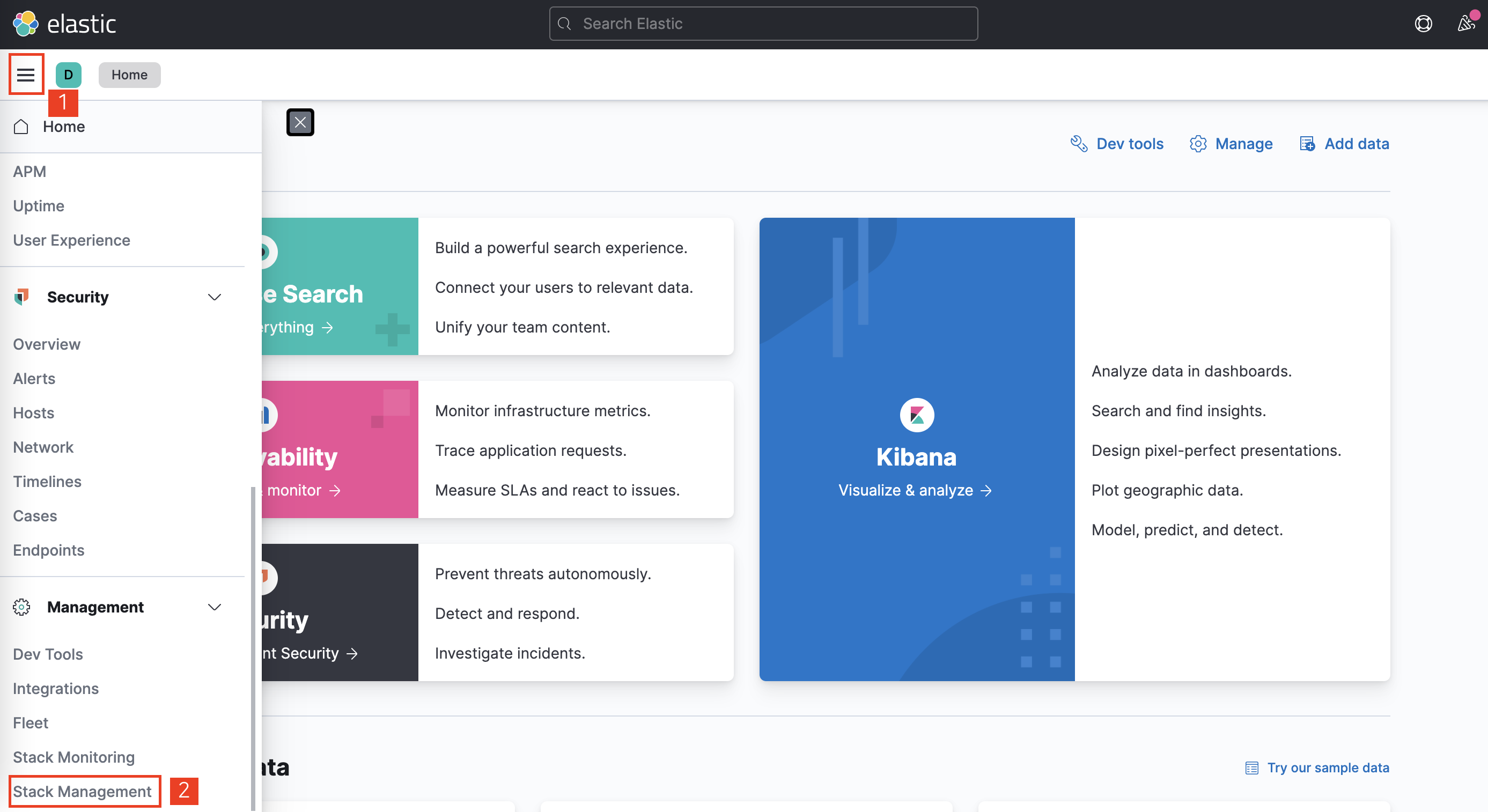
  • 쿼리는 정상적으로 작동이 되었다. 실제 데이터가 잘 들어갔는지 확인하도록 한다. 이 때, 반드시 ElasticsearchKibana 가 먼저 구동이 되고 있어야 한다.
  • 아래 그림과 같이 왼쪽 상단 햄버거 메뉴 - 하단 Management 섹션의 Stack Management 를 클릭한다.

kibana_01.png