I. 들어가며
- 빅데이터 시대에 맞춰서 다양한 툴이 나오는 가운데, Google Colab은 가히 혁명적이라 할 수 있다.
- 과거 높은 사양의 컴퓨터에서만 수행할 수 있었던 머신러닝과 딥러닝을 구글 코랩의 환경에서 무료로 배울 수 있는 기회를 구글이 제공하기 시작했다.
- 간단하게 아래 소스코드를 실행하여 CPU와 GPU의 연산속도를 비교 해보자.
II. Google Colab with R
- Google Colab은 매우 편리하다. 실제 강의를 시작하면서
파이썬 관련 모든 강의안은 Google Colab으로 제작중이다. - 문제는 현재로써는
Google Colab만 지원한다는 점이다. RStudio가 개발용으로 매우 훌륭한 도구이지만, 교육 목적으로는 조금 부족한 감이 있다. (UI 관점에서)- 일단 환경이 다르면 강의하는 입장에서는 여러가지로 어렵다.
- 그래서 이번에 온라인
Tutorial을 제작하면서, Google Colab에서 R을 실행하고 또한 이를 바탕으로 강의를 제작하기로 했다.
III. Set up
%load_ext rpy2.ipython
The rpy2.ipython extension is already loaded. To reload it, use:
  %reload_ext rpy2.ipython
- 간단한
EDA는 Jupyter에서 실행할 수 있다.
IV. R 소스코드 실행
- 이제 간단하게 R 소스코드를 실행해보자.
- 이 때, 임시적으로
%%R 매직 command를 활용한다.
(1) 패키지 설치
- R에서 필요한 필수 패키지를 설치한다.
EDA를 위한 tidyverse 패키지와 머신러닝을 위한 caret패키지를 설치한다.
%%R
# 1. 패키지가 설치 function
install_pkgs <- function(pkg){
  new.pkg <- pkg[!(pkg %in% installed.packages()[, "Package"])]
  if (length(new.pkg))
    install.packages(new.pkg, dependencies = TRUE)
  sapply(pkg, require, character.only = TRUE)
}

pkgs <- c("tidyverse", "nycflights13", "mlbench")
install_pkgs(pkgs)
R[write to console]: Installing packages into ‘/usr/local/lib/R/site-library’
(as ‘lib’ is unspecified)

R[write to console]: trying URL 'https://cran.rstudio.com/src/contrib/nycflights13_1.0.1.tar.gz'
.
.

   tidyverse nycflights13      mlbench
        TRUE         TRUE         TRUE
(2) EDA with tidyverse
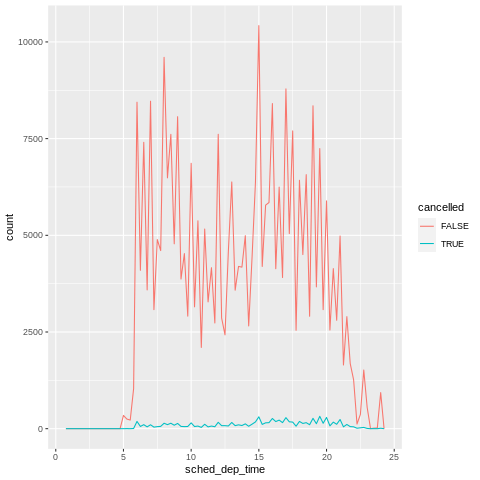
tidyverse 패키지를 활용하여 간단한 EDA를 작업해보자.
%%R
nycflights13::flights %>%
  mutate(
    cancelled = is.na(dep_time),
    sched_hour = sched_dep_time %/% 100,
    sched_min = sched_dep_time %% 100,
    sched_dep_time = sched_hour + sched_min / 60
  ) %>%
  ggplot(mapping = aes(sched_dep_time)) +
    geom_freqpoly(mapping = aes(colour = cancelled), binwidth = 1/4)