강의 홍보
공지
- 본 자료는 강의 수업의 보충 자료로 사용되었습니다.
- 자세한 내용은
Reference를 확인하시기를 바랍니다.
Setup File
- 외부 설정 파일이 필요하다.
shell script에서 작성한다.
%%shell
# clone Mask_RCNN repo and install packages
git clone https://github.com/matterport/Mask_RCNN
cd Mask_RCNN
python setup.py install
Cloning into 'Mask_RCNN'...
remote: Enumerating objects: 956, done.�[K
remote: Total 956 (delta 0), reused 0 (delta 0), pack-reused 956�[K
Receiving objects: 100% (956/956), 116.76 MiB | 34.72 MiB/s, done.
Resolving deltas: 100% (566/566), done.
WARNING:root:Fail load requirements file, so using default ones.
running install
running bdist_egg
running egg_info
creating mask_rcnn.egg-info
writing mask_rcnn.egg-info/PKG-INFO
writing dependency_links to mask_rcnn.egg-info/dependency_links.txt
writing top-level names to mask_rcnn.egg-info/top_level.txt
writing manifest file 'mask_rcnn.egg-info/SOURCES.txt'
reading manifest template 'MANIFEST.in'
writing manifest file 'mask_rcnn.egg-info/SOURCES.txt'
installing library code to build/bdist.linux-x86_64/egg
running install_lib
running build_py
creating build
creating build/lib
creating build/lib/mrcnn
copying mrcnn/model.py -> build/lib/mrcnn
copying mrcnn/config.py -> build/lib/mrcnn
copying mrcnn/utils.py -> build/lib/mrcnn
copying mrcnn/__init__.py -> build/lib/mrcnn
copying mrcnn/visualize.py -> build/lib/mrcnn
copying mrcnn/parallel_model.py -> build/lib/mrcnn
creating build/bdist.linux-x86_64
creating build/bdist.linux-x86_64/egg
creating build/bdist.linux-x86_64/egg/mrcnn
copying build/lib/mrcnn/model.py -> build/bdist.linux-x86_64/egg/mrcnn
copying build/lib/mrcnn/config.py -> build/bdist.linux-x86_64/egg/mrcnn
copying build/lib/mrcnn/utils.py -> build/bdist.linux-x86_64/egg/mrcnn
copying build/lib/mrcnn/__init__.py -> build/bdist.linux-x86_64/egg/mrcnn
copying build/lib/mrcnn/visualize.py -> build/bdist.linux-x86_64/egg/mrcnn
copying build/lib/mrcnn/parallel_model.py -> build/bdist.linux-x86_64/egg/mrcnn
byte-compiling build/bdist.linux-x86_64/egg/mrcnn/model.py to model.cpython-36.pyc
byte-compiling build/bdist.linux-x86_64/egg/mrcnn/config.py to config.cpython-36.pyc
byte-compiling build/bdist.linux-x86_64/egg/mrcnn/utils.py to utils.cpython-36.pyc
byte-compiling build/bdist.linux-x86_64/egg/mrcnn/__init__.py to __init__.cpython-36.pyc
byte-compiling build/bdist.linux-x86_64/egg/mrcnn/visualize.py to visualize.cpython-36.pyc
byte-compiling build/bdist.linux-x86_64/egg/mrcnn/parallel_model.py to parallel_model.cpython-36.pyc
creating build/bdist.linux-x86_64/egg/EGG-INFO
copying mask_rcnn.egg-info/PKG-INFO -> build/bdist.linux-x86_64/egg/EGG-INFO
copying mask_rcnn.egg-info/SOURCES.txt -> build/bdist.linux-x86_64/egg/EGG-INFO
copying mask_rcnn.egg-info/dependency_links.txt -> build/bdist.linux-x86_64/egg/EGG-INFO
copying mask_rcnn.egg-info/top_level.txt -> build/bdist.linux-x86_64/egg/EGG-INFO
zip_safe flag not set; analyzing archive contents...
creating dist
creating 'dist/mask_rcnn-2.1-py3.6.egg' and adding 'build/bdist.linux-x86_64/egg' to it
removing 'build/bdist.linux-x86_64/egg' (and everything under it)
Processing mask_rcnn-2.1-py3.6.egg
Copying mask_rcnn-2.1-py3.6.egg to /usr/local/lib/python3.6/dist-packages
Adding mask-rcnn 2.1 to easy-install.pth file
Installed /usr/local/lib/python3.6/dist-packages/mask_rcnn-2.1-py3.6.egg
Processing dependencies for mask-rcnn==2.1
Finished processing dependencies for mask-rcnn==2.1
- tensorflow_version 2.x 버전 호환이 어렵기 때문에
down grade를 지원한다.
'''
TensorFlow 2 gives: AttributeError: module 'tensorflow' has no attribute 'placeholder'
because MaskRCNN is using TF 1
So downgrade to 1 (default version in Colab is 2?)
'''
%tensorflow_version 1.x
TensorFlow 1.x selected.
(1) 패키지 불러오기
import os
import sys
import random
import math
import numpy as np
import skimage.io
import matplotlib
import matplotlib.pyplot as plt
(2) 경로설정
# 프로젝트 경로 설정
ROOT_DIR = os.path.abspath("./Mask_RCNN/")

# Mask RCNN 불러온다
sys.path.append(ROOT_DIR)  # To find local version of the library
from mrcnn import utils
import mrcnn.model as modellib
from mrcnn import visualize

# COCO config 경로 불러온다.
sys.path.append(os.path.join(ROOT_DIR, "samples/coco/"))
import coco

%matplotlib inline

# 훈련 모형 및 log를 저장한다.
MODEL_DIR = os.path.join(ROOT_DIR, "logs")

# 가중치 파일에 대한 경로를 지정한다.
COCO_MODEL_PATH = os.path.join(ROOT_DIR, "mask_rcnn_coco.h5")

# COCO trained weights 가중치를 불러온다.
if not os.path.exists(COCO_MODEL_PATH):
    utils.download_trained_weights(COCO_MODEL_PATH)

# image 경로 설정
IMAGE_DIR = os.path.join(ROOT_DIR, "images")
Using TensorFlow backend.


Downloading pretrained model to /content/Mask_RCNN/mask_rcnn_coco.h5 ...
... done downloading pretrained model!
(2) Config
MS-COCO 데이터셋을 사용한다.- 이 때,
coco.py 클래스를 설정한다.
class InferenceConfig(coco.CocoConfig):
    # Set batch size to 1 since we'll be running inference on
    # one image at a time. Batch size = GPU_COUNT * IMAGES_PER_GPU
    GPU_COUNT = 1
    IMAGES_PER_GPU = 1

config = InferenceConfig()
config.display()
Configurations:
BACKBONE                       resnet101
BACKBONE_STRIDES               [4, 8, 16, 32, 64]
BATCH_SIZE                     1
BBOX_STD_DEV                   [0.1 0.1 0.2 0.2]
COMPUTE_BACKBONE_SHAPE         None
DETECTION_MAX_INSTANCES        100
DETECTION_MIN_CONFIDENCE       0.7
DETECTION_NMS_THRESHOLD        0.3
FPN_CLASSIF_FC_LAYERS_SIZE     1024
GPU_COUNT                      1
GRADIENT_CLIP_NORM             5.0
IMAGES_PER_GPU                 1
IMAGE_CHANNEL_COUNT            3
IMAGE_MAX_DIM                  1024
IMAGE_META_SIZE                93
IMAGE_MIN_DIM                  800
IMAGE_MIN_SCALE                0
IMAGE_RESIZE_MODE              square
IMAGE_SHAPE                    [1024 1024    3]
LEARNING_MOMENTUM              0.9
LEARNING_RATE                  0.001
LOSS_WEIGHTS                   {'rpn_class_loss': 1.0, 'rpn_bbox_loss': 1.0, 'mrcnn_class_loss': 1.0, 'mrcnn_bbox_loss': 1.0, 'mrcnn_mask_loss': 1.0}
MASK_POOL_SIZE                 14
MASK_SHAPE                     [28, 28]
MAX_GT_INSTANCES               100
MEAN_PIXEL                     [123.7 116.8 103.9]
MINI_MASK_SHAPE                (56, 56)
NAME                           coco
NUM_CLASSES                    81
POOL_SIZE                      7
POST_NMS_ROIS_INFERENCE        1000
POST_NMS_ROIS_TRAINING         2000
PRE_NMS_LIMIT                  6000
ROI_POSITIVE_RATIO             0.33
RPN_ANCHOR_RATIOS              [0.5, 1, 2]
RPN_ANCHOR_SCALES              (32, 64, 128, 256, 512)
RPN_ANCHOR_STRIDE              1
RPN_BBOX_STD_DEV               [0.1 0.1 0.2 0.2]
RPN_NMS_THRESHOLD              0.7
RPN_TRAIN_ANCHORS_PER_IMAGE    256
STEPS_PER_EPOCH                1000
TOP_DOWN_PYRAMID_SIZE          256
TRAIN_BN                       False
TRAIN_ROIS_PER_IMAGE           200
USE_MINI_MASK                  True
USE_RPN_ROIS                   True
VALIDATION_STEPS               50
WEIGHT_DECAY                   0.0001
객체 검출 과정 및 코드 구현
model = modellib.MaskRCNN(mode="inference", model_dir=MODEL_DIR, config=config)
model.load_weights(COCO_MODEL_PATH, by_name=True)
WARNING:tensorflow:From /tensorflow-1.15.2/python3.6/tensorflow_core/python/ops/resource_variable_ops.py:1630: calling BaseResourceVariable.__init__ (from tensorflow.python.ops.resource_variable_ops) with constraint is deprecated and will be removed in a future version.
Instructions for updating:
If using Keras pass *_constraint arguments to layers.
WARNING:tensorflow:From /usr/local/lib/python3.6/dist-packages/keras/backend/tensorflow_backend.py:4070: The name tf.nn.max_pool is deprecated. Please use tf.nn.max_pool2d instead.

WARNING:tensorflow:From /content/Mask_RCNN/mrcnn/model.py:341: The name tf.log is deprecated. Please use tf.math.log instead.

WARNING:tensorflow:From /content/Mask_RCNN/mrcnn/model.py:399: where (from tensorflow.python.ops.array_ops) is deprecated and will be removed in a future version.
Instructions for updating:
Use tf.where in 2.0, which has the same broadcast rule as np.where
WARNING:tensorflow:From /content/Mask_RCNN/mrcnn/model.py:423: calling crop_and_resize_v1 (from tensorflow.python.ops.image_ops_impl) with box_ind is deprecated and will be removed in a future version.
Instructions for updating:
box_ind is deprecated, use box_indices instead
WARNING:tensorflow:From /content/Mask_RCNN/mrcnn/model.py:720: The name tf.sets.set_intersection is deprecated. Please use tf.sets.intersection instead.

WARNING:tensorflow:From /content/Mask_RCNN/mrcnn/model.py:722: The name tf.sparse_tensor_to_dense is deprecated. Please use tf.sparse.to_dense instead.

WARNING:tensorflow:From /content/Mask_RCNN/mrcnn/model.py:772: to_float (from tensorflow.python.ops.math_ops) is deprecated and will be removed in a future version.
Instructions for updating:
Use `tf.cast` instead.
class_names = ['BG', 'person', 'bicycle', 'car', 'motorcycle', 'airplane',
               'bus', 'train', 'truck', 'boat', 'traffic light',
               'fire hydrant', 'stop sign', 'parking meter', 'bench', 'bird',
               'cat', 'dog', 'horse', 'sheep', 'cow', 'elephant', 'bear',
               'zebra', 'giraffe', 'backpack', 'umbrella', 'handbag', 'tie',
               'suitcase', 'frisbee', 'skis', 'snowboard', 'sports ball',
               'kite', 'baseball bat', 'baseball glove', 'skateboard',
               'surfboard', 'tennis racket', 'bottle', 'wine glass', 'cup',
               'fork', 'knife', 'spoon', 'bowl', 'banana', 'apple',
               'sandwich', 'orange', 'broccoli', 'carrot', 'hot dog', 'pizza',
               'donut', 'cake', 'chair', 'couch', 'potted plant', 'bed',
               'dining table', 'toilet', 'tv', 'laptop', 'mouse', 'remote',
               'keyboard', 'cell phone', 'microwave', 'oven', 'toaster',
               'sink', 'refrigerator', 'book', 'clock', 'vase', 'scissors',
               'teddy bear', 'hair drier', 'toothbrush']
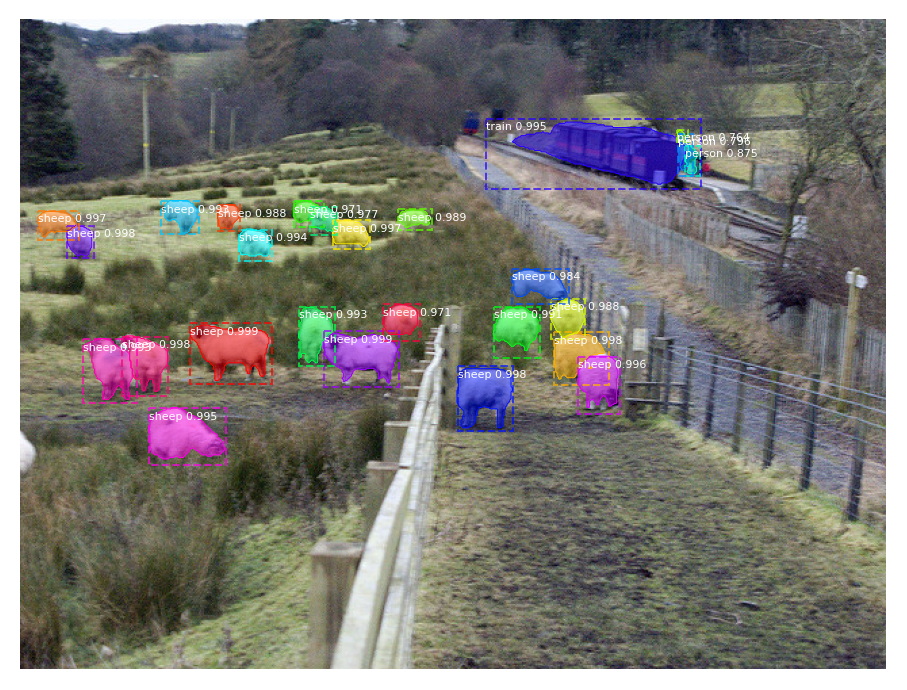
(1) 객체 검출 지정
# 이미지 폴더에서 랜덤으로 객체 검출을 진행한다.
file_names = next(os.walk(IMAGE_DIR))[2]
image = skimage.io.imread(os.path.join(IMAGE_DIR, random.choice(file_names)))

# 모형을 실행한 후 결과값을 저장한다.
results = model.detect([image], verbose=1)

# 결과를 시각화 한다.
r = results[0]
visualize.display_instances(image, r['rois'], r['masks'], r['class_ids'],
                            class_names, r['scores'])
WARNING:tensorflow:From /usr/local/lib/python3.6/dist-packages/keras/backend/tensorflow_backend.py:422: The name tf.global_variables is deprecated. Please use tf.compat.v1.global_variables instead.


Processing 1 images
image                    shape: (480, 640, 3)         min:    0.00000  max:  255.00000  uint8
molded_images            shape: (1, 1024, 1024, 3)    min: -123.70000  max:  151.10000  float64
image_metas              shape: (1, 93)               min:    0.00000  max: 1024.00000  float64
anchors                  shape: (1, 261888, 4)        min:   -0.35390  max:    1.29134  float32