Airflow

Airflow 활용한 DB Insert 예제 (M1, MacOS)

개요

  • MySQL과 PostgreSQL에 각각 테이블 생성 후 데이터 넣기
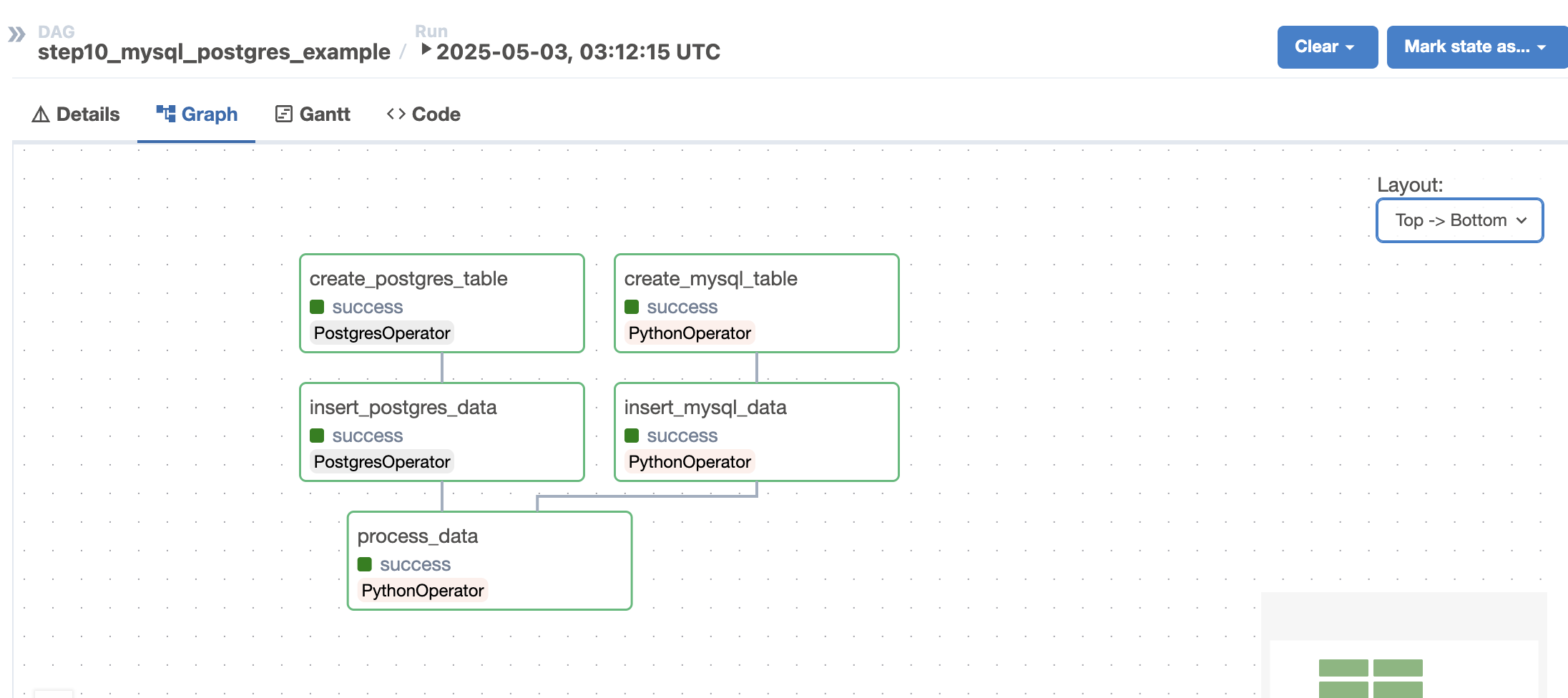
  • 아래와 같이 병렬적으로 실행하는 예제

Screenshot 2025-05-03 at 12.40.31 PM.png

시나리오

  • 테이블과 데이터를 추가하되 두 DB에 대한 접근 방식이 다름
    • MySQL은 직접적으로 넣기
    • PostgreSQL은 Airflow를 통해서 데이터 넣기

환경설정

  • 사전에 MySQL과 PostgreSQL이 설치가 이미 되어 있음을 가정한다.

파이썬 설치

프로젝트 초기화

  • 프로젝트 디렉터리에서 다음과 순차적으로 실행
$ uv venv -p 3.11
$ source .venv/bin/activate

Airflow 설치

  • 먼저 환경변수를 설정한다.
$ export AIRFLOW_HOME=$(pwd)/airflow

셸 스크립트 작성 및 실행

  • 다음과 같이 셸 스크립트 작성
    • 파일명 : install_airflow.sh
AIRFLOW_VERSION=2.8.0

# Python 버전을 3.11로 고정 설정
PYTHON_VERSION="3.11"

CONSTRAINT_URL="https://raw.githubusercontent.com/apache/airflow/constraints-${AIRFLOW_VERSION}/constraints-${PYTHON_VERSION}.txt"
# For example this would install 3.0.0 with python 3.11: https://raw.githubusercontent.com/apache/airflow/constraints-3.0.0/constraints-3.11.txt

uv pip install "apache-airflow==${AIRFLOW_VERSION}" --constraint "${CONSTRAINT_URL}"
uv pip install -r requirements.txt
  • 라이브러리 목록
    • 파일명 : requirements.txt
pandas
numpy
seaborn
matplotlib
requests
psycopg2-binary
streamlit
plotly
pytz
mysql-connector-python
apache-airflow-providers-postgres==5.7.1
  • 셸 스크립트를 실행한다.
chmod +x install_airflow.sh
./install_airflow.sh

MySQL, PostgreSQL 설정확인

MySQL 설정

  • 설정
    • host : localhost
    • user : root
    • password : evan1234
    • port : 3306
    • Schema : airflow_db

PostgreSQL 설정

  • 설정
    • host : localhost
    • user : postgres
    • password : 1234
    • port : 5432
    • Database : python_dataengineering

최종 결과 예시

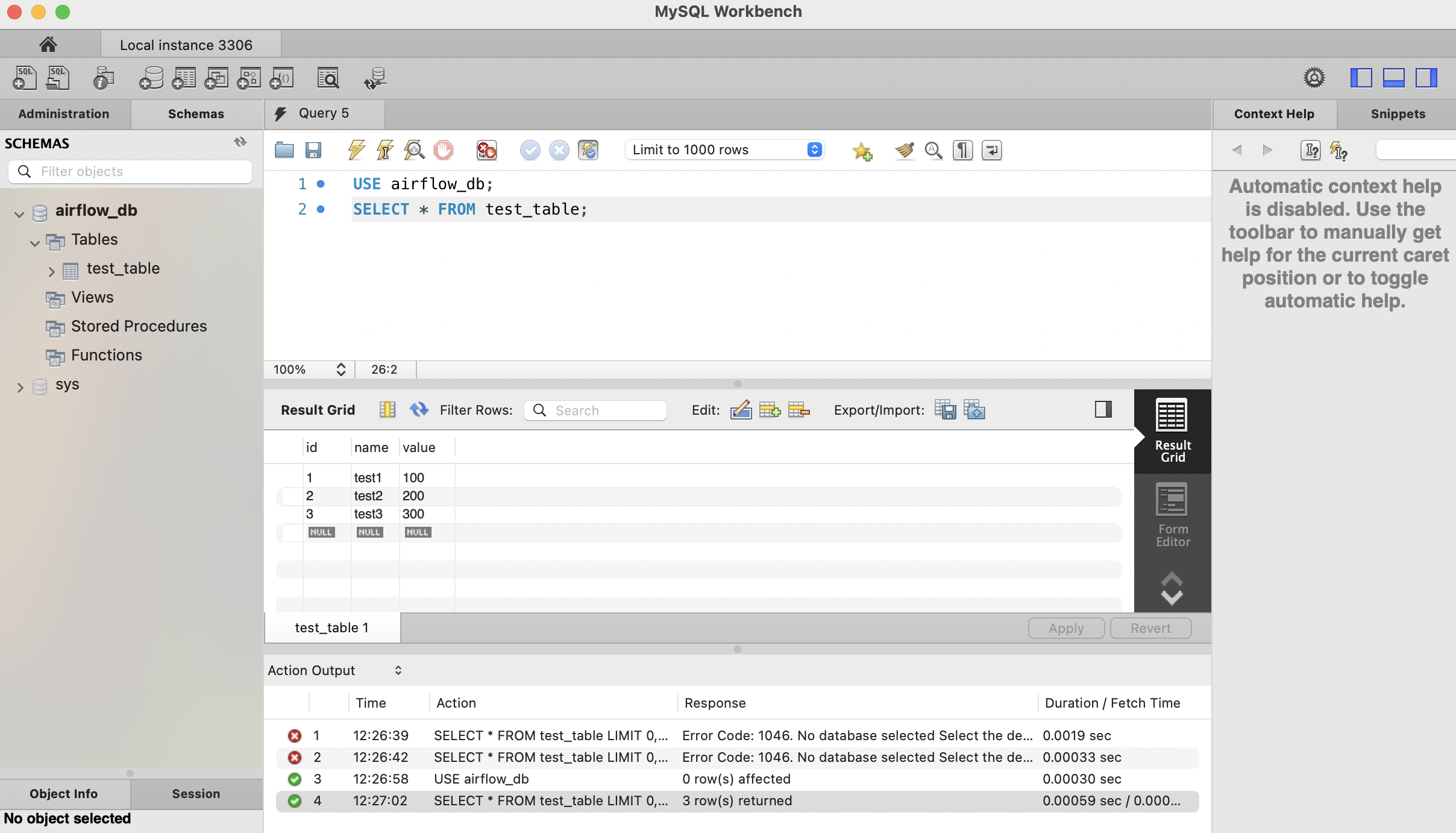
  • 정상적으로 입력이 되면 다음과 같이 출력이 될 것이다. (미리 확인용)
  • MySQL

Screenshot 2025-05-03 at 1.43.48 PM.png

Airflow 활용한 API 크롤링 및 이미지 다운로드 (M1, MacOS)

개요

  • Airflow 활용해서 이미지 다운로드 받기 예제

개발환경설정

  • MacOS, M1
  • Python uv 개발환경 설정

uv 설치

curl -LsSf https://astral.sh/uv/install.sh | sh

가상환경 설정

  • 다음과 같이 설정, 프로젝트 초기화 (Python 3.11 지정)
$ uv venv -p 3.11
$ source .venv/bin/activate
  • Python 버전 확인
$ python --version 

AIRFLOW_HOME 환경변수 지정

  • airflow는 환경변수에 예민하다.
  • 프로젝트 디렉터리 경로에서 다음과 같이 추가
$ export AIRFLOW_HOME=$(pwd)/airflow
$ echo $AIRFLOW_HOME
/Users/evan/Desktop/your/project/directory/airflow

설치 스크립트 작성

  • 파일명 : install_airflow.sh
AIRFLOW_VERSION=2.8.0

# Python 버전을 3.11로 고정 설정
PYTHON_VERSION="3.11"

CONSTRAINT_URL="https://raw.githubusercontent.com/apache/airflow/constraints-${AIRFLOW_VERSION}/constraints-${PYTHON_VERSION}.txt"
# For example this would install 3.0.0 with python 3.11: https://raw.githubusercontent.com/apache/airflow/constraints-3.0.0/constraints-3.11.txt

uv pip install "apache-airflow==${AIRFLOW_VERSION}" --constraint "${CONSTRAINT_URL}"
# PostgreSQL 제공자 패키지 버전 명시
uv pip install apache-airflow-providers-postgres==5.7.1
uv pip install -r requirements.txt
  • 파일명 : requirements.txt 파일 작성
pandas
numpy
seaborn
matplotlib
requests
  • sh 파일 실행 모드로 변경 후 실행
$ chmod +x install_airflow.sh
$ ./install_airflow.sh

API 확인 및 테스트

  • 다음 5개의 예정된 발사 정보 조회
$ curl "https://ll.thespacedevs.com/2.2.0/launch/upcoming/?limit=5"
{"count":338,"next":"https://ll.thespacedevs.com/2.2.0/launch/upcoming/?limit=5&offset=5","previous":null,"results":[{"id":"1a105ccb-e59f-48e8-b853-c424bd8cc699","url":"https://ll.thespacedevs.com/2.2.0/launch/1a105ccb-e59f-48e8-b853-c424bd8cc699/","slug":"falcon-9-block-5-starlink-group-6-75","name":"Falcon 9 Block 5 | Starlink Group 6-75","status":{"id":6,"name":"Launch in Flight","abbrev":"In Flight","description":"The launch vehicle has lifted off from the launchpad."},"last_updated":"2025-05-02T01:52:11Z","net":"2025-05-02T01:51:10Z","window_end":"2025-05-02T05:51:00Z","window_start":"2025-05-02T01:51:10Z","net_precision":{"id":0,"name":"Second","abbrev":"SEC","description":"The T-0 is accurate to the second."},"probability":99,"weather_concerns":null,"holdreason":"","failreason":"","hashtag":null,"launch_service_provider":{"id":121,"url":"https://ll.thespacedevs.com/2.2.0/agencies/121/","name":"SpaceX","type":"Commercial"},"rocket":{"id":8596,"configuration":{"id":164,"url":"https://ll.thespacedevs.com/2.2.0/config/launcher/164/","name":"Falcon 9","family":"Falcon","full_name":"Falcon 9 Block 5","variant":"Block 5"}},"mission":{"id":7188,"name":"Starlink Group 6-75","description":"A batch of 28 satellites for the Starlink mega-constellation - SpaceX's project for space-based Internet communication system.","launch_designator":null,"type":"Communications","orbit":{"id":8,"name":"Low Earth Orbit","abbrev":"LEO"},"agencies":[{"id":121,"url":"https://ll.thespacedevs.com/2.2.0/agencies/121/","name":"SpaceX","featured":true,"type":"Commercial","country_code":"USA","abbrev":"SpX","description":"Space Exploration Technologies Corp., known as SpaceX, is an American aerospace manufacturer and space transport services company headquartered in Hawthorne, California. It was founded in 2002 by entrepreneur Elon Musk with the goal of reducing space transportation costs and enabling the colonization of Mars. SpaceX operates from many pads, on the East Coast of the US they operate from SLC-40 at Cape Canaveral Space Force Station and historic LC-39A at Kennedy Space Center. They also operate from SLC-4E at Vandenberg Space Force Base, California, usually for polar launches. Another launch site is being developed at Boca Chica, Texas.","administrator":"CEO: Elon Musk","founding_year":"2002","launchers":"Falcon | Starship","spacecraft":"Dragon","launch_library_url":null,"total_launch_count":502,"consecutive_successful_launches":24,"successful_launches":487,"failed_launches":14,"pending_launches":118,"consecutive_successful_landings":71,"successful_landings":449,"failed_landings":26,"attempted_landings":474,"info_url":"http://www.spacex.com/","wiki_url":"http://en.wikipedia.org/wiki/SpaceX","logo_url":"https://thespacedevs-prod.nyc3.digitaloceanspaces.com/media/images/spacex_logo_20220826094919.png","image_url":"https://thespacedevs-prod.nyc3.digitaloceanspaces.com/media/images/spacex_image_20190207032501.jpeg","nation_url":"https://thespacedevs-prod.nyc3.digitaloceanspaces.com/media/images/spacex_nation_20230531064544.jpg"}],"info_urls":[],"vid_urls":[]},"pad":{"id":80,"url":"https://ll.thespacedevs.com/2.2.0/pad/80/","agency_id":121,"name":"Space Launch Complex 40","description":"","info_url":null,"wiki_url":"https://en.wikipedia.org/wiki/Cape_Canaveral_Air_Force_Station_Space_Launch_Complex_40","map_url":"https://www.google.com/maps?q=28.56194122,-80.57735736","latitude":"28.56194122","longitude":"-80.57735736","location":{"id":12,"url":"https://ll.thespacedevs.com/2.2.0/location/12/","name":"Cape Canaveral SFS, FL, USA","country_code":"USA","description":"Cape Canaveral Space Force Station (CCSFS) is an installation of the United States Space Force's Space Launch Delta 45, located on Cape Canaveral in Brevard County, Florida.","map_image":"https://thespacedevs-prod.nyc3.digitaloceanspaces.com/media/map_images/location_12_20200803142519.jpg","timezone_name":"America/New_York","total_launch_count":1020,"total_landing_count":64},"country_code":"USA","map_image":"https://thespacedevs-prod.nyc3.digitaloceanspaces.com/media/map_images/pad_80_20200803143323.jpg","total_launch_count":304,"orbital_launch_attempt_count":304},"webcast_live":true,"image":"https://thespacedevs-prod.nyc3.digitaloceanspaces.com/media/images/falcon2520925_image_20221009234147.png","infographic":null,"program":[{"id":25,"url":"https://ll.thespacedevs.com/2.2.0/program/25/","name":"Starlink","description":"Starlink is a satellite internet constellation operated by American aerospace company SpaceX","agencies":[{"id":121,"url":"https://ll.thespacedevs.com/2.2.0/agencies/121/","name":"SpaceX","type":"Commercial"}],"image_url":"https://thespacedevs-prod.nyc3.digitaloceanspaces.com/media/images/starlink_program_20231228154508.jpeg","start_date":"2018-02-22T14:17:00Z","end_date":null,"info_url":"https://starlink.com","wiki_url":"https://en.wikipedia.org/wiki/Starlink","mission_patches":[{"id":7,"name":"Space X Starlink Mission Patch","priority":10,"image_url":"https://thespacedevs-prod.nyc3.digitaloceanspaces.com/media/mission_patch_images/space2520x252_mission_patch_20221011205756.png","agency":{"id":121,"url":"https://ll.thespacedevs.com/2.2.0/agencies/121/","name":"SpaceX","type":"Commercial"}}],"type":{"id":3,"name":"Communication Constellation"}}],"orbital_launch_attempt_count":6943,"location_launch_attempt_count":1020,"pad_launch_attempt_count":304,"agency_launch_attempt_count":502,"orbital_launch_attempt_count_year":94,"location_launch_attempt_count_year":26,"pad_launch_attempt_count_year":24,"agency_launch_attempt_count_year":53,"type":"normal"},{"id":"7b685ef7-f610-413f-bd4a-cc58aed97be2","url":"https://ll.thespacedevs.com/2.2.0/launch/7b685ef7-f610-413f-bd4a-cc58aed97be2/","slug":"falcon-9-block-5-starlink-group-15-3","name":"Falcon 9 Block 5 | Starlink Group 15-3","status":{"id":8,"name":"To Be Confirmed","abbrev":"TBC","description":"Awaiting official confirmation - current date is known with some certainty."},"last_updated":"2025-04-30T19:54:30Z","net":"2025-05-03T18:13:00Z","window_end":"2025-05-03T22:13:00Z","window_start":"2025-05-03T18:13:00Z","net_precision":{"id":2,"name":"Hour","abbrev":"HR","description":"The T-0 is accurate to the hour."},"probability":null,"weather_concerns":null,"holdreason":"","failreason":"","hashtag":null,"launch_service_provider":{"id":121,"url":"https://ll.thespacedevs.com/2.2.0/agencies/121/","name":"SpaceX","type":"Commercial"},"rocket":{"id":8594,"configuration":{"id":164,"url":"https://ll.thespacedevs.com/2.2.0/config/launcher/164/","name":"Falcon 9","family":"Falcon","full_name":"Falcon 9 Block 5","variant":"Block 5"}},"mission":{"id":7186,"name":"Starlink Group 15-3","description":"A batch of 26 satellites for the Starlink mega-constellation - SpaceX's project for space-based Internet communication system.","launch_designator":null,"type":"Communications","orbit":{"id":8,"name":"Low Earth Orbit","abbrev":"LEO"},"agencies":[{"id":121,"url":"https://ll.thespacedevs.com/2.2.0/agencies/121/","name":"SpaceX","featured":true,"type":"Commercial","country_code":"USA","abbrev":"SpX","description":"Space Exploration Technologies Corp., known as SpaceX, is an American aerospace manufacturer and space transport services company headquartered in Hawthorne, California. It was founded in 2002 by entrepreneur Elon Musk with the goal of reducing space transportation costs and enabling the colonization of Mars. SpaceX operates from many pads, on the East Coast of the US they operate from SLC-40 at Cape Canaveral Space Force Station and historic LC-39A at Kennedy Space Center. They also operate from SLC-4E at Vandenberg Space Force Base, California, usually for polar launches. Another launch site is being developed at Boca Chica, Texas.","administrator":"CEO: Elon Musk","founding_year":"2002","launchers":"Falcon | Starship","spacecraft":"Dragon","launch_library_url":null,"total_launch_count":502,"consecutive_successful_launches":24,"successful_launches":487,"failed_launches":14,"pending_launches":118,"consecutive_successful_landings":71,"successful_landings":449,"failed_landings":26,"attempted_landings":474,"info_url":"http://www.spacex.com/","wiki_url":"http://en.wikipedia.org/wiki/SpaceX","logo_url":"https://thespacedevs-prod.nyc3.digitaloceanspaces.com/media/images/spacex_logo_20220826094919.png","image_url":"https://thespacedevs-prod.nyc3.digitaloceanspaces.com/media/images/spacex_image_20190207032501.jpeg","nation_url":"https://thespacedevs-prod.nyc3.digitaloceanspaces.com/media/images/spacex_nation_20230531064544.jpg"}],"info_urls":[],"vid_urls":[]},"pad":{"id":16,"url":"https://ll.thespacedevs.com/2.2.0/pad/16/","agency_id":null,"name":"Space Launch Complex 4E","description":"Space Launch Complex 4 East (SLC-4E) is a launch site at Vandenberg Space Force Base, California, U.S.\r\n\r\nThe pad was previously used by Atlas and Titan rockets between 1963 and 2005. The pad was built for use by Atlas-Agena rockets, but was later rebuilt to handle Titan rockets.","info_url":null,"wiki_url":"https://en.wikipedia.org/wiki/Vandenberg_Space_Launch_Complex_4#SLC-4E","map_url":"https://www.google.com/maps?q=34.632,-120.611","latitude":"34.632","longitude":"-120.611","location":{"id":11,"url":"https://ll.thespacedevs.com/2.2.0/location/11/","name":"Vandenberg SFB, CA, USA","country_code":"USA","description":"Vandenberg Space Force Base is a United States Space Force Base in Santa Barbara County, California. Established in 1941, Vandenberg Space Force Base is a space launch base, launching spacecraft from the Western Range, and also performs missile testing. The United States Space Force's Space Launch Delta 30 serves as the host delta for the base, equivalent to an Air Force air base wing. In addition to its military space launch mission, Vandenberg Space Force Base also hosts space launches for civil and commercial space entities, such as NASA and SpaceX.","map_image":"https://thespacedevs-prod.nyc3.digitaloceanspaces.com/media/map_images/location_11_20200803142416.jpg","timezone_name":"America/Los_Angeles","total_launch_count":804,"total_landing_count":26},"country_code":"USA","map_image":"https://thespacedevs-prod.nyc3.digitaloceanspaces.com/media/map_images/pad_16_20200803143532.jpg","total_launch_count":190,"orbital_launch_attempt_count":190},"webcast_live":false,"image":"https://thespacedevs-prod.nyc3.digitaloceanspaces.com/media/images/falcon2520925_image_20221009234147.png","infographic":null,"program":[{"id":25,"url":"https://ll.thespacedevs.com/2.2.0/program/25/","name":"Starlink","description":"Starlink is a satellite internet constellation operated by American aerospace company SpaceX","agencies":[{"id":121,"url":"https://ll.thespacedevs.com/2.2.0/agencies/121/","name":"SpaceX","type":"Commercial"}],"image_url":"https://thespacedevs-prod.nyc3.digitaloceanspaces.com/media/images/starlink_program_20231228154508.jpeg","start_date":"2018-02-22T14:17:00Z","end_date":null,"info_url":"https://starlink.com","wiki_url":"https://en.wikipedia.org/wiki/Starlink","mission_patches":[{"id":7,"name":"Space X Starlink Mission Patch","priority":10,"image_url":"https://thespacedevs-prod.nyc3.digitaloceanspaces.com/media/mission_patch_images/space2520x252_mission_patch_20221011205756.png","agency":{"id":121,"url":"https://ll.thespacedevs.com/2.2.0/agencies/121/","name":"SpaceX","type":"Commercial"}}],"type":{"id":3,"name":"Communication Constellation"}}],"orbital_launch_attempt_count":6944,"location_launch_attempt_count":805,"pad_launch_attempt_count":191,"agency_launch_attempt_count":503,"orbital_launch_attempt_count_year":95,"location_launch_attempt_count_year":19,"pad_launch_attempt_count_year":17,"agency_launch_attempt_count_year":54,"type":"normal"},{"id":"8ffb4866-43c9-46c1-aaac-05bd37891b0a","url":"https://ll.thespacedevs.com/2.2.0/launch/8ffb4866-43c9-46c1-aaac-05bd37891b0a/","slug":"falcon-9-block-5-starlink-group-6-84","name":"Falcon 9 Block 5 | Starlink Group 6-84","status":{"id":8,"name":"To Be Confirmed","abbrev":"TBC","description":"Awaiting official confirmation - current date is known with some certainty."},"last_updated":"2025-05-02T01:01:57Z","net":"2025-05-04T08:48:00Z","window_end":"2025-05-04T12:48:00Z","window_start":"2025-05-04T08:48:00Z","net_precision":{"id":2,"name":"Hour","abbrev":"HR","description":"The T-0 is accurate to the hour."},"probability":null,"weather_concerns":null,"holdreason":"","failreason":"","hashtag":null,"launch_service_provider":{"id":121,"url":"https://ll.thespacedevs.com/2.2.0/agencies/121/","name":"SpaceX","type":"Commercial"},"rocket":{"id":8598,"configuration":{"id":164,"url":"https://ll.thespacedevs.com/2.2.0/config/launcher/164/","name":"Falcon 9","family":"Falcon","full_name":"Falcon 9 Block 5","variant":"Block 5"}},"mission":{"id":7190,"name":"Starlink Group 6-84","description":"A batch of 29 satellites for the Starlink mega-constellation - SpaceX's project for space-based Internet communication system.","launch_designator":null,"type":"Communications","orbit":{"id":8,"name":"Low Earth Orbit","abbrev":"LEO"},"agencies":[{"id":121,"url":"https://ll.thespacedevs.com/2.2.0/agencies/121/","name":"SpaceX","featured":true,"type":"Commercial","country_code":"USA","abbrev":"SpX","description":"Space Exploration Technologies Corp., known as SpaceX, is an American aerospace manufacturer and space transport services company headquartered in Hawthorne, California. It was founded in 2002 by entrepreneur Elon Musk with the goal of reducing space transportation costs and enabling the colonization of Mars. SpaceX operates from many pads, on the East Coast of the US they operate from SLC-40 at Cape Canaveral Space Force Station and historic LC-39A at Kennedy Space Center. They also operate from SLC-4E at Vandenberg Space Force Base, California, usually for polar launches. Another launch site is being developed at Boca Chica, Texas.","administrator":"CEO: Elon Musk","founding_year":"2002","launchers":"Falcon | Starship","spacecraft":"Dragon","launch_library_url":null,"total_launch_count":502,"consecutive_successful_launches":24,"successful_launches":487,"failed_launches":14,"pending_launches":118,"consecutive_successful_landings":71,"successful_landings":449,"failed_landings":26,"attempted_landings":474,"info_url":"http://www.spacex.com/","wiki_url":"http://en.wikipedia.org/wiki/SpaceX","logo_url":"https://thespacedevs-prod.nyc3.digitaloceanspaces.com/media/images/spacex_logo_20220826094919.png","image_url":"https://thespacedevs-prod.nyc3.digitaloceanspaces.com/media/images/spacex_image_20190207032501.jpeg","nation_url":"https://thespacedevs-prod.nyc3.digitaloceanspaces.com/media/images/spacex_nation_20230531064544.jpg"}],"info_urls":[],"vid_urls":[]},"pad":{"id":87,"url":"https://ll.thespacedevs.com/2.2.0/pad/87/","agency_id":121,"name":"Launch Complex 39A","description":"","info_url":null,"wiki_url":"https://en.wikipedia.org/wiki/Kennedy_Space_Center_Launch_Complex_39#Launch_Pad_39A","map_url":"https://www.google.com/maps?q=28.60822681,-80.60428186","latitude":"28.60822681","longitude":"-80.60428186","location":{"id":27,"url":"https://ll.thespacedevs.com/2.2.0/location/27/","name":"Kennedy Space Center, FL, USA","country_code":"USA","description":"The John F. Kennedy Space Center, located on Merritt Island, Florida, is one of NASA's ten field centers. Since 1968, KSC has been NASA's primary launch center of American spaceflight, research, and technology. Launch operations for the Apollo, Skylab and Space Shuttle programs were carried out from Kennedy Space Center Launch Complex 39 and managed by KSC. Located on the east coast of Florida, KSC is adjacent to Cape Canaveral Space Force Station (CCSFS).","map_image":"https://thespacedevs-prod.nyc3.digitaloceanspaces.com/media/map_images/location_27_20200803142447.jpg","timezone_name":"America/New_York","total_launch_count":263,"total_landing_count":0},"country_code":"USA","map_image":"https://thespacedevs-prod.nyc3.digitaloceanspaces.com/media/map_images/pad_87_20200803143537.jpg","total_launch_count":205,"orbital_launch_attempt_count":204},"webcast_live":false,"image":"https://thespacedevs-prod.nyc3.digitaloceanspaces.com/media/images/falcon2520925_image_20221009234147.png","infographic":null,"program":[{"id":25,"url":"https://ll.thespacedevs.com/2.2.0/program/25/","name":"Starlink","description":"Starlink is a satellite internet constellation operated by American aerospace company SpaceX","agencies":[{"id":121,"url":"https://ll.thespacedevs.com/2.2.0/agencies/121/","name":"SpaceX","type":"Commercial"}],"image_url":"https://thespacedevs-prod.nyc3.digitaloceanspaces.com/media/images/starlink_program_20231228154508.jpeg","start_date":"2018-02-22T14:17:00Z","end_date":null,"info_url":"https://starlink.com","wiki_url":"https://en.wikipedia.org/wiki/Starlink","mission_patches":[{"id":7,"name":"Space X Starlink Mission Patch","priority":10,"image_url":"https://thespacedevs-prod.nyc3.digitaloceanspaces.com/media/mission_patch_images/space2520x252_mission_patch_20221011205756.png","agency":{"id":121,"url":"https://ll.thespacedevs.com/2.2.0/agencies/121/","name":"SpaceX","type":"Commercial"}}],"type":{"id":3,"name":"Communication Constellation"}}],"orbital_launch_attempt_count":6945,"location_launch_attempt_count":264,"pad_launch_attempt_count":206,"agency_launch_attempt_count":504,"orbital_launch_attempt_count_year":96,"location_launch_attempt_count_year":12,"pad_launch_attempt_count_year":12,"agency_launch_attempt_count_year":55,"type":"normal"},{"id":"82aef7fd-9664-4e94-970c-5e99eff1b331","url":"https://ll.thespacedevs.com/2.2.0/launch/82aef7fd-9664-4e94-970c-5e99eff1b331/","slug":"long-march-12-satnet-leo-group-tbd","name":"Long March 12 | SatNet LEO Group TBD?","status":{"id":1,"name":"Go for Launch","abbrev":"Go","description":"Current T-0 confirmed by official or reliable sources."},"last_updated":"2025-04-30T07:27:01Z","net":"2025-05-05T11:05:00Z","window_end":"2025-05-05T11:47:00Z","window_start":"2025-05-05T10:57:00Z","net_precision":{"id":2,"name":"Hour","abbrev":"HR","description":"The T-0 is accurate to the hour."},"probability":null,"weather_concerns":null,"holdreason":"","failreason":"","hashtag":null,"launch_service_provider":{"id":88,"url":"https://ll.thespacedevs.com/2.2.0/agencies/88/","name":"China Aerospace Science and Technology Corporation","type":"Government"},"rocket":{"id":8600,"configuration":{"id":517,"url":"https://ll.thespacedevs.com/2.2.0/config/launcher/517/","name":"Long March 12","family":"Long March","full_name":"Long March 12","variant":"12"}},"mission":{"id":7192,"name":"SatNet LEO Group TBD?","description":"A batch of Low Earth Orbit communication satellites for the Chinese state owned SatNet constellation operated by the China Satellite Network Group.\r\n\r\nThe constellation will eventually consists of 13000 satellites.","launch_designator":null,"type":"Communications","orbit":{"id":8,"name":"Low Earth Orbit","abbrev":"LEO"},"agencies":[],"info_urls":[],"vid_urls":[]},"pad":{"id":219,"url":"https://ll.thespacedevs.com/2.2.0/pad/219/","agency_id":null,"name":"Commercial LC-2","description":"","info_url":null,"wiki_url":"https://en.wikipedia.org/wiki/Wenchang_Commercial_Space_Launch_Site","map_url":"https://www.google.com/maps?q=19.59755,110.936481","latitude":"19.59755","longitude":"110.936481","location":{"id":8,"url":"https://ll.thespacedevs.com/2.2.0/location/8/","name":"Wenchang Space Launch Site, People's Republic of China","country_code":"CHN","description":"The Wenchang Space Launch Site is a rocket launch site located in Wenchang on the island of Hainan, in China.\r\n\r\nFormally a suborbital test center, it currently serves as China's southernmost spaceport. The site was selected for its low latitude, 19° north of the equator, allowing for larger payloads to be launched. It is capable of launching the Long March 5, the heaviest Chinese rocket. Unlike launch facilities on the mainland, Wenchang uses its seaport for deliveries.","map_image":"https://thespacedevs-prod.nyc3.digitaloceanspaces.com/media/map_images/location_8_20200803142445.jpg","timezone_name":"Asia/Shanghai","total_launch_count":38,"total_landing_count":0},"country_code":"CHN","map_image":"https://thespacedevs-prod.nyc3.digitaloceanspaces.com/media/map_images/pad_commercial_lc-2_20231225074048.jpg","total_launch_count":1,"orbital_launch_attempt_count":1},"webcast_live":false,"image":"https://thespacedevs-prod.nyc3.digitaloceanspaces.com/media/images/cz-12_on_its_la_image_20241128132937.jpg","infographic":null,"program":[],"orbital_launch_attempt_count":6946,"location_launch_attempt_count":39,"pad_launch_attempt_count":2,"agency_launch_attempt_count":521,"orbital_launch_attempt_count_year":97,"location_launch_attempt_count_year":5,"pad_launch_attempt_count_year":1,"agency_launch_attempt_count_year":20,"type":"normal"},{"id":"d5e8b971-0138-42d7-a6ba-7d43bf529d5e","url":"https://ll.thespacedevs.com/2.2.0/launch/d5e8b971-0138-42d7-a6ba-7d43bf529d5e/","slug":"falcon-9-block-5-starlink-group-6-93","name":"Falcon 9 Block 5 | Starlink Group 6-93","status":{"id":8,"name":"To Be Confirmed","abbrev":"TBC","description":"Awaiting official confirmation - current date is known with some certainty."},"last_updated":"2025-05-01T02:37:15Z","net":"2025-05-06T00:48:00Z","window_end":"2025-05-06T04:48:00Z","window_start":"2025-05-06T00:48:00Z","net_precision":{"id":2,"name":"Hour","abbrev":"HR","description":"The T-0 is accurate to the hour."},"probability":null,"weather_concerns":null,"holdreason":"","failreason":"","hashtag":null,"launch_service_provider":{"id":121,"url":"https://ll.thespacedevs.com/2.2.0/agencies/121/","name":"SpaceX","type":"Commercial"},"rocket":{"id":8599,"configuration":{"id":164,"url":"https://ll.thespacedevs.com/2.2.0/config/launcher/164/","name":"Falcon 9","family":"Falcon","full_name":"Falcon 9 Block 5","variant":"Block 5"}},"mission":{"id":7191,"name":"Starlink Group 6-93","description":"A batch of satellites for the Starlink mega-constellation - SpaceX's project for space-based Internet communication system.","launch_designator":null,"type":"Communications","orbit":{"id":8,"name":"Low Earth Orbit","abbrev":"LEO"},"agencies":[{"id":121,"url":"https://ll.thespacedevs.com/2.2.0/agencies/121/","name":"SpaceX","featured":true,"type":"Commercial","country_code":"USA","abbrev":"SpX","description":"Space Exploration Technologies Corp., known as SpaceX, is an American aerospace manufacturer and space transport services company headquartered in Hawthorne, California. It was founded in 2002 by entrepreneur Elon Musk with the goal of reducing space transportation costs and enabling the colonization of Mars. SpaceX operates from many pads, on the East Coast of the US they operate from SLC-40 at Cape Canaveral Space Force Station and historic LC-39A at Kennedy Space Center. They also operate from SLC-4E at Vandenberg Space Force Base, California, usually for polar launches. Another launch site is being developed at Boca Chica, Texas.","administrator":"CEO: Elon Musk","founding_year":"2002","launchers":"Falcon | Starship","spacecraft":"Dragon","launch_library_url":null,"total_launch_count":502,"consecutive_successful_launches":24,"successful_launches":487,"failed_launches":14,"pending_launches":118,"consecutive_successful_landings":71,"successful_landings":449,"failed_landings":26,"attempted_landings":474,"info_url":"http://www.spacex.com/","wiki_url":"http://en.wikipedia.org/wiki/SpaceX","logo_url":"https://thespacedevs-prod.nyc3.digitaloceanspaces.com/media/images/spacex_logo_20220826094919.png","image_url":"https://thespacedevs-prod.nyc3.digitaloceanspaces.com/media/images/spacex_image_20190207032501.jpeg","nation_url":"https://thespacedevs-prod.nyc3.digitaloceanspaces.com/media/images/spacex_nation_20230531064544.jpg"}],"info_urls":[],"vid_urls":[]},"pad":{"id":80,"url":"https://ll.thespacedevs.com/2.2.0/pad/80/","agency_id":121,"name":"Space Launch Complex 40","description":"","info_url":null,"wiki_url":"https://en.wikipedia.org/wiki/Cape_Canaveral_Air_Force_Station_Space_Launch_Complex_40","map_url":"https://www.google.com/maps?q=28.56194122,-80.57735736","latitude":"28.56194122","longitude":"-80.57735736","location":{"id":12,"url":"https://ll.thespacedevs.com/2.2.0/location/12/","name":"Cape Canaveral SFS, FL, USA","country_code":"USA","description":"Cape Canaveral Space Force Station (CCSFS) is an installation of the United States Space Force's Space Launch Delta 45, located on Cape Canaveral in Brevard County, Florida.","map_image":"https://thespacedevs-prod.nyc3.digitaloceanspaces.com/media/map_images/location_12_20200803142519.jpg","timezone_name":"America/New_York","total_launch_count":1020,"total_landing_count":64},"country_code":"USA","map_image":"https://thespacedevs-prod.nyc3.digitaloceanspaces.com/media/map_images/pad_80_20200803143323.jpg","total_launch_count":304,"orbital_launch_attempt_count":304},"webcast_live":false,"image":"https://thespacedevs-prod.nyc3.digitaloceanspaces.com/media/images/falcon2520925_image_20221009234147.png","infographic":null,"program":[{"id":25,"url":"https://ll.thespacedevs.com/2.2.0/program/25/","name":"Starlink","description":"Starlink is a satellite internet constellation operated by American aerospace company SpaceX","agencies":[{"id":121,"url":"https://ll.thespacedevs.com/2.2.0/agencies/121/","name":"SpaceX","type":"Commercial"}],"image_url":"https://thespacedevs-prod.nyc3.digitaloceanspaces.com/media/images/starlink_program_20231228154508.jpeg","start_date":"2018-02-22T14:17:00Z","end_date":null,"info_url":"https://starlink.com","wiki_url":"https://en.wikipedia.org/wiki/Starlink","mission_patches":[{"id":7,"name":"Space X Starlink Mission Patch","priority":10,"image_url":"https://thespacedevs-prod.nyc3.digitaloceanspaces.com/media/mission_patch_images/space2520x252_mission_patch_20221011205756.png","agency":{"id":121,"url":"https://ll.thespacedevs.com/2.2.0/agencies/121/","name":"SpaceX","type":"Commercial"}}],"type":{"id":3,"name":"Communication Constellation"}}],"orbital_launch_attempt_count":6947,"location_launch_attempt_count":1021,"pad_launch_attempt_count":305,"agency_launch_attempt_count":505,"orbital_launch_attempt_count_year":98,"location_launch_attempt_count_year":27,"pad_launch_attempt_count_year":25,"agency_launch_attempt_count_year":56,"type":"normal"}]}
현재까지 준비된 파일 구조

  • 파일 구조는 다음과 같다.
    • airflow 폴더 생성
    • dags 폴더 생성
    • dags 폴더 내에서 step06_rocket_image_download_filename.py 파일
tree
.
├── README.md
├── airflow
│   └── dags
│       ├── step06_rocket_image_download_filename.py
├── install_airflow.sh
└── requirements.txt

파이썬 파일 작업

  • 파일명 : step06_rocket_image_download_filename.py
  • 코드는 다음과 같다.
from datetime import datetime, timedelta
from airflow import DAG
from airflow.operators.python import PythonOperator
from airflow.operators.bash import BashOperator
import requests
import os
from urllib.parse import urlparse
import urllib.parse
import json

# macOS에서 Airflow 네트워크 요청 문제 해결
os.environ['NO_PROXY'] = '*'

# DAG의 기본 인자 설정
default_args = {
    'owner': 'airflow',
    'depends_on_past': False,
    'start_date': datetime(2024, 1, 1),
    'email_on_failure': False,
    'email_on_retry': False,
    'retries': 1,
    'retry_delay': timedelta(minutes=1),
}

def setup_airflow_home():
    """Airflow 홈 디렉토리 설정 및 환경 변수 설정"""
    try:
        # 현재 작업 디렉토리 확인
        current_dir = os.getcwd()
        # Airflow 홈 디렉토리 설정
        airflow_home = os.path.join(current_dir, 'airflow')
        # 환경 변수 설정
        os.environ['AIRFLOW_HOME'] = airflow_home
        print(f"AIRFLOW_HOME 설정됨: {airflow_home}")
        return "AIRFLOW_HOME 환경 변수 설정 완료"
    except Exception as e:
        print(f"AIRFLOW_HOME 설정 중 오류 발생: {str(e)}")
        raise

def get_launch_images():
    """Launch Library 2 API에서 로켓 발사 이미지 URL을 가져오는 함수"""
    api_url = "https://ll.thespacedevs.com/2.2.0/launch/upcoming/?limit=5"
    print(f"API 요청 시작: {api_url}")
    
    try:
        print(f"NO_PROXY 환경변수: {os.environ.get('NO_PROXY')}")
        response = requests.get(api_url, timeout=30)
        print(f"API 응답 받음: 상태 코드 {response.status_code}")
        
        if response.status_code == 200:
            data = response.json()
            launches = data['results']
            image_urls = [launch['image'] for launch in launches if launch.get('image')]
            print(f"총 {len(image_urls)}개의 이미지 URL 찾음")
            return image_urls
        else:
            raise Exception(f"API 요청 실패: {response.status_code}")
            
    except Exception as e:
        print(f"API 요청 중 오류 발생: {str(e)}")
        return [
            "https://spacelaunchnow-prod-east.nyc3.digitaloceanspaces.com/media/launch_images/falcon2520925_image_20230804070848.jpg",
            "https://spacelaunchnow-prod-east.nyc3.digitaloceanspaces.com/media/launcher_images/falcon_9_block__image_20210506060831.jpg"
        ]

def create_rocket_images_dir():
    """rocket_images 디렉토리 생성 - airflow 디렉토리 내에만 생성"""
    try:
        airflow_home = os.environ.get('AIRFLOW_HOME')
        if not airflow_home:
            raise Exception("AIRFLOW_HOME 환경변수가 설정되지 않았습니다.")
        
        # rocket_images 디렉토리 경로 설정 - airflow 디렉토리 내에 생성
        image_dir = os.path.join(airflow_home, 'rocket_images')
        os.makedirs(image_dir, exist_ok=True)
        print(f"rocket_images 디렉토리 생성됨: {image_dir}")
        return image_dir
    except Exception as e:
        print(f"디렉토리 생성 중 오류 발생: {str(e)}")
        raise

def create_output_dir():
    """output 디렉토리 생성 - airflow 디렉토리 내에만 생성"""
    try:
        airflow_home = os.environ.get('AIRFLOW_HOME')
        if not airflow_home:
            raise Exception("AIRFLOW_HOME 환경변수가 설정되지 않았습니다.")
        
        # output 디렉토리 경로 설정 - airflow 디렉토리 내에 생성
        output_dir = os.path.join(airflow_home, 'output')
        os.makedirs(output_dir, exist_ok=True)
        print(f"output 디렉토리 생성됨: {output_dir}")
        return output_dir
    except Exception as e:
        print(f"디렉토리 생성 중 오류 발생: {str(e)}")
        raise

def download_json_data():
    """Launch Library 2 API에서 JSON 데이터를 다운로드하는 함수"""
    try:
        print("JSON 데이터 다운로드 시작")
        api_url = "https://ll.thespacedevs.com/2.2.0/launch/upcoming/?limit=5"
        response = requests.get(api_url, timeout=30)
        
        if response.status_code == 200:
            data = response.json()
            
            # output 디렉토리에 JSON 파일 저장
            output_dir = create_output_dir()
            json_file_path = os.path.join(output_dir, 'launch_data.json')
            
            with open(json_file_path, 'w', encoding='utf-8') as f:
                json.dump(data, f, ensure_ascii=False, indent=4)
            
            print(f"JSON 데이터 저장 완료: {json_file_path}")
            return data
        else:
            raise Exception(f"API 요청 실패: {response.status_code}")
            
    except Exception as e:
        print(f"JSON 데이터 다운로드 중 오류 발생: {str(e)}")
        raise

def download_images():
    """로켓 발사 이미지를 다운로드하는 함수"""
    try:
        print("download_images 함수 시작")
        # JSON 데이터 가져오기
        data = download_json_data()
        launches = data['results']
        
        # AIRFLOW_HOME 환경변수 가져오기
        airflow_home = os.environ.get('AIRFLOW_HOME')
        if not airflow_home:
            raise Exception("AIRFLOW_HOME 환경변수가 설정되지 않았습니다.")
        
        # rocket_images 디렉토리 경로 설정 - airflow 디렉토리 내에 생성
        image_dir = os.path.join(airflow_home, 'rocket_images')
        os.makedirs(image_dir, exist_ok=True)
        print(f"저장 경로: {os.path.abspath(image_dir)}")
        
        downloaded_paths = []
        for idx, launch in enumerate(launches):
            try:
                if not launch.get('image'):
                    continue
                    
                url = launch['image']
                print(f"이미지 다운로드 시도 {idx+1}: {url}")
                response = requests.get(url, timeout=10)
                
                if response.status_code == 200:
                    # 파일 이름 생성 (로켓 이름과 날짜 사용)
                    rocket_name = launch.get('name', f'rocket_{idx + 1}')
                    launch_date = launch.get('net', '').split('T')[0]  # 날짜만 추출
                    safe_name = "".join(c for c in rocket_name if c.isalnum() or c in (' ', '-', '_')).rstrip()
                    file_extension = os.path.splitext(urlparse(url).path)[1] or '.jpg'
                    file_name = f'{safe_name}_{launch_date}{file_extension}'
                    file_path = os.path.join(image_dir, file_name)
                    
                    with open(file_path, 'wb') as f:
                        f.write(response.content)
                    downloaded_paths.append(file_path)
                    print(f"이미지 저장 성공: {file_path}")
                else:
                    print(f"이미지 다운로드 실패 - 상태 코드: {response.status_code}")
            
            except Exception as e:
                print(f"개별 이미지 다운로드 실패 (URL: {url}): {str(e)}")
        
        return f"총 {len(downloaded_paths)}개의 이미지 다운로드 완료"
        
    except Exception as e:
        print(f"전체 프로세스 실패: {str(e)}")
        return f"오류 발생: {str(e)}"

# DAG 정의
dag = DAG(
    'step06_rocket_image_download',
    default_args=default_args,
    description='로켓 발사 이미지 다운로드',
    schedule_interval=timedelta(days=1),
    catchup=False
)

# AIRFLOW_HOME 설정 태스크
setup_env_task = PythonOperator(
    task_id='setup_airflow_home',
    python_callable=setup_airflow_home,
    dag=dag
)

# Hello Airflow 태스크
hello_task = BashOperator(
    task_id='hello_task',
    bash_command='echo "Hello Airflow" && echo "AIRFLOW_HOME: $AIRFLOW_HOME"',
    dag=dag
)

# 디렉토리 생성 태스크
create_dir_task = PythonOperator(
    task_id='create_dir_task',
    python_callable=create_rocket_images_dir,
    dag=dag
)

# JSON 데이터 다운로드 태스크
download_json_task = PythonOperator(
    task_id='download_json_data',
    python_callable=download_json_data,
    dag=dag
)

# 이미지 다운로드 태스크
download_task = PythonOperator(
    task_id='download_rocket_images',
    python_callable=download_images,
    dag=dag
)

# Task 의존성 설정
setup_env_task >> hello_task >> create_dir_task >> download_json_task >> download_task

테스트

  • 파일 작성이 완료가 되면 Airflow 실행을 할 것이다.
$ airflow db reset -y
$ airflow db init
  • 사용자 생성
$ airflow users create \
    --username admin \
    --firstname admin \
    --lastname admin \
    --role Admin \
    --email admin@example.com \
    --password 1234
  • 웹서버 실행
$ airflow webserver -p 8080
  • 다른 bash 터미널 열고 진행
$ export AIRFLOW_HOME=$(pwd)/airflow
$ airflow scheduler

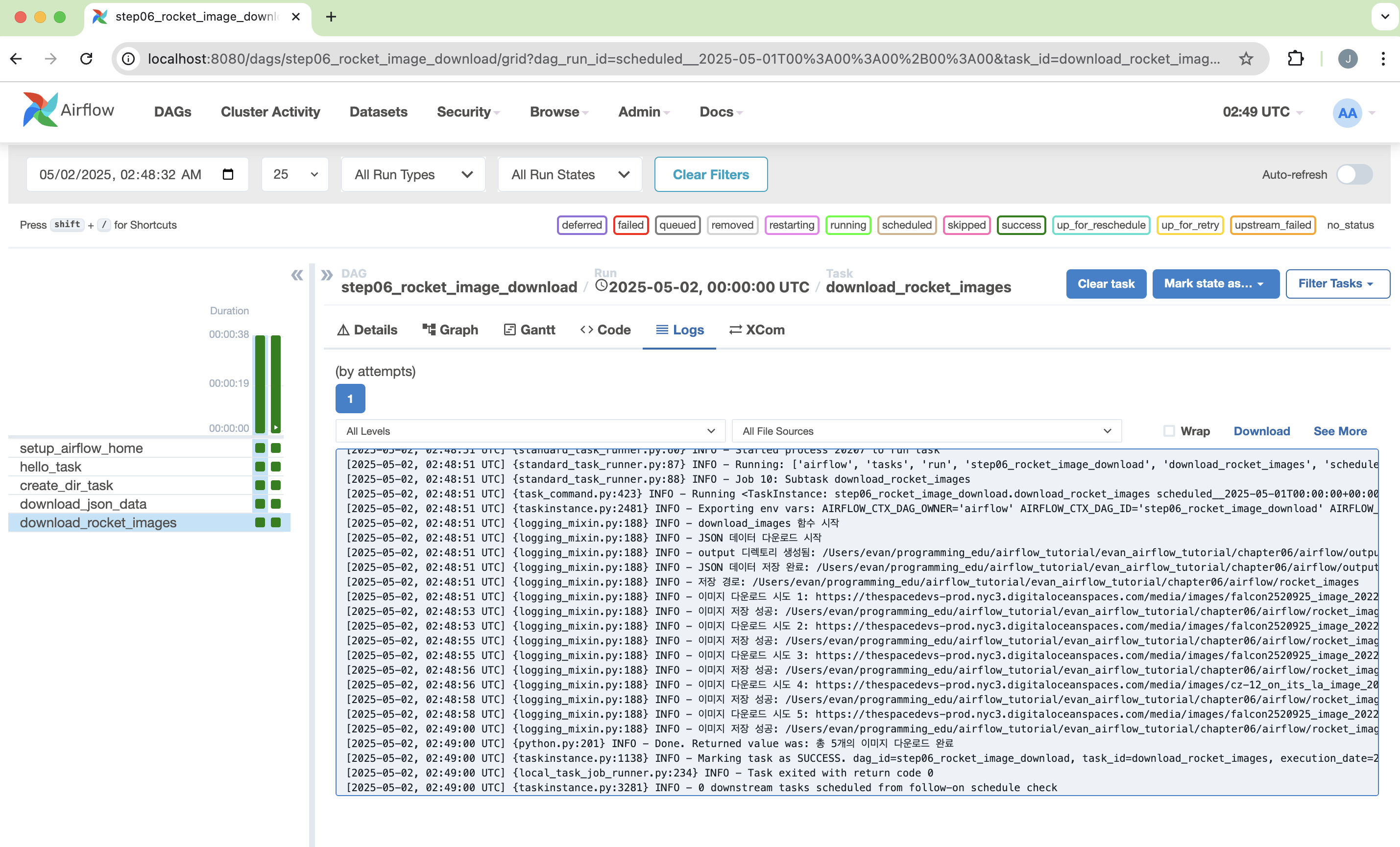
Screenshot 2025-05-02 at 11.49.42 AM.png

Docker Installation in Windows

사전 준비

도커 설치

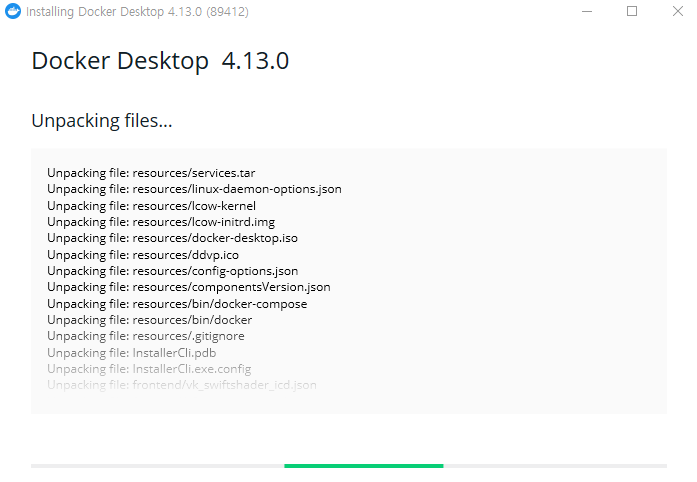
Untitled

  • 관리자 권한으로 실행

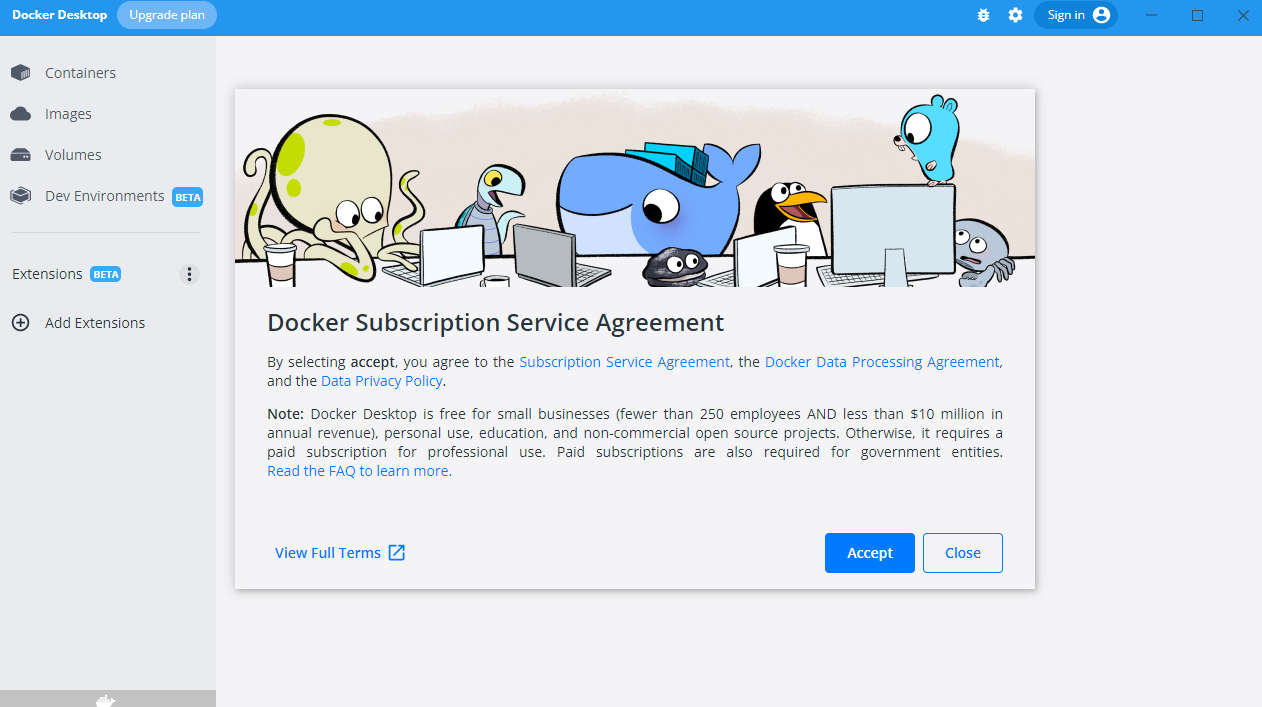
Untitled

  • 설치가 완료가 되면 Close and Log Out 버튼이 나오면 클릭하면 윈도우 로그아웃이 진행되기 때문에, 다시 재 로그인을 하도록 한다.
  • 아래 그림 메뉴 우측 상단에 Sign In 버튼을 클릭해 로그인을 한다.

Untitled

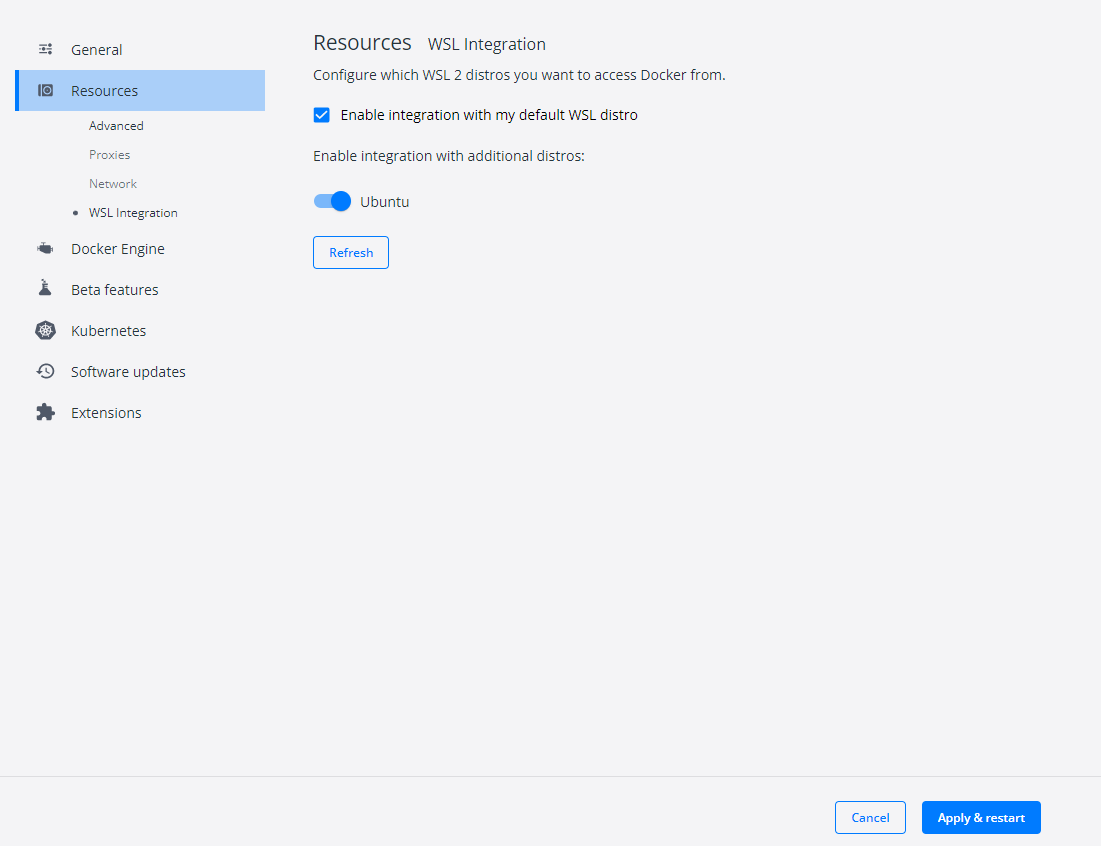
  • 도커 Settings 창에 들어가서 아래 그림처럼 변경후 Apply & Restart 버튼을 클릭한다.

Untitled

테스트

  • PowerShell에서 도커 명령어가 실행되는지 확인한다.
PS C:\Users\h> docker ps
CONTAINER ID   IMAGE     COMMAND   CREATED   STATUS    PORTS     NAMES
PS C:\Users\h> docker --version
Docker version 20.10.20, build 9fdeb9c
PS C:\Users\h> wsl -l -v
  NAME                   STATE           VERSION
* Ubuntu                 Running         2
  docker-desktop         Running         2
  docker-desktop-data    Running         2

Airflow 데이터 파이프라인 구축 예제

개요

  • 이번에는 CSV-JSON으로 데이터를 변환하는 파이프라인을 구축하도록 한다.

Step 01. Dags 폴더 생성

  • 프로젝트 Root 하단에 Dags 폴더를 만든다.
    • dags 폴더를 확인한다.
$ ls
airflow.cfg  airflow.db  dags  logs  venv  webserver_config.py

Step 02. 가상의 데이터 생성

  • 이번 테스트에서 사용할 라이브러리가 없다면 우선 설치한다.
$ pip3 install faker pandas
  • faker 라이브러리를 활용하여 가상의 데이터를 생성한다. (파일 경로 : data/step01_writecsv.py)
from faker import Faker
import csv
output=open('data.csv','w')
fake=Faker()
header=['name','age','street','city','state','zip','lng','lat']
mywriter=csv.writer(output)
mywriter.writerow(header)
for r in range(1000):
    mywriter.writerow([fake.name(),fake.random_int(min=18, max=80, step=1), fake.street_address(), fake.city(),fake.state(),fake.zipcode(),fake.longitude(),fake.latitude()])
output.close()
  • 생성된 후, 파일을 확인하도록 한다.
evan@evan:/mnt/c/airflow-test/data$ ls
data.csv  step01_writecsv.py

Step 03. csv2json 파일 구축

  • 이번에는 CSV와 JSON 변환 파일을 구축하는 코드를 작성한다. (파일 경로 : dags/csv2json.py)\
  • 주요 목적 함수 csvToJson()의 역할은 data/data.csv 파일을 불러와서 fromAirflow.json 파일로 변경하는 것이다.
  • DAG는 csvToJson 함수를 하나의 작업으로 등록하는 과정을 담는다. 작업의 소유자, 시작일시, 실패 시 재시도 횟수, 재시도 지연시 시간을 지정한다.
  • print_starting >> csvJson 에서 >> 는 하류 설정 연산자라고 부른다. (동의어 비트 자리이동 연산자)
import datetime as dt
from datetime import timedelta

from airflow import DAG
from airflow.operators.bash import BashOperator
from airflow.operators.python import PythonOperator

import pandas as pd

def csvToJson():
    df=pd.read_csv('data/data.csv')
    for i,r in df.iterrows():
        print(r['name'])
    df.to_json('fromAirflow.json',orient='records')

default_args = {
    'owner': 'evan',
    'start_date': dt.datetime(2020, 3, 18),
    'retries': 1,
    'retry_delay': dt.timedelta(minutes=5),
}

with DAG('MyCSVDAG',
         default_args=default_args,
         schedule_interval=timedelta(minutes=5),      # '0 * * * *',
         ) as dag:

    print_starting = BashOperator(task_id='starting',
                               bash_command='echo "I am reading the CSV now....."')
    
    csvJson = PythonOperator(task_id='convertCSVtoJson',
                                 python_callable=csvToJson)

print_starting >> csvJson

Step 04. Airflow Webserver 및 Scheduler 동시 실행

  • 이제 웹서버와 스케쥴러를 동시에 실행한다. (터미널을 2개 열어야 함에 주의한다.)
$ airflow webserver -p 8080
$ airflow scheduler
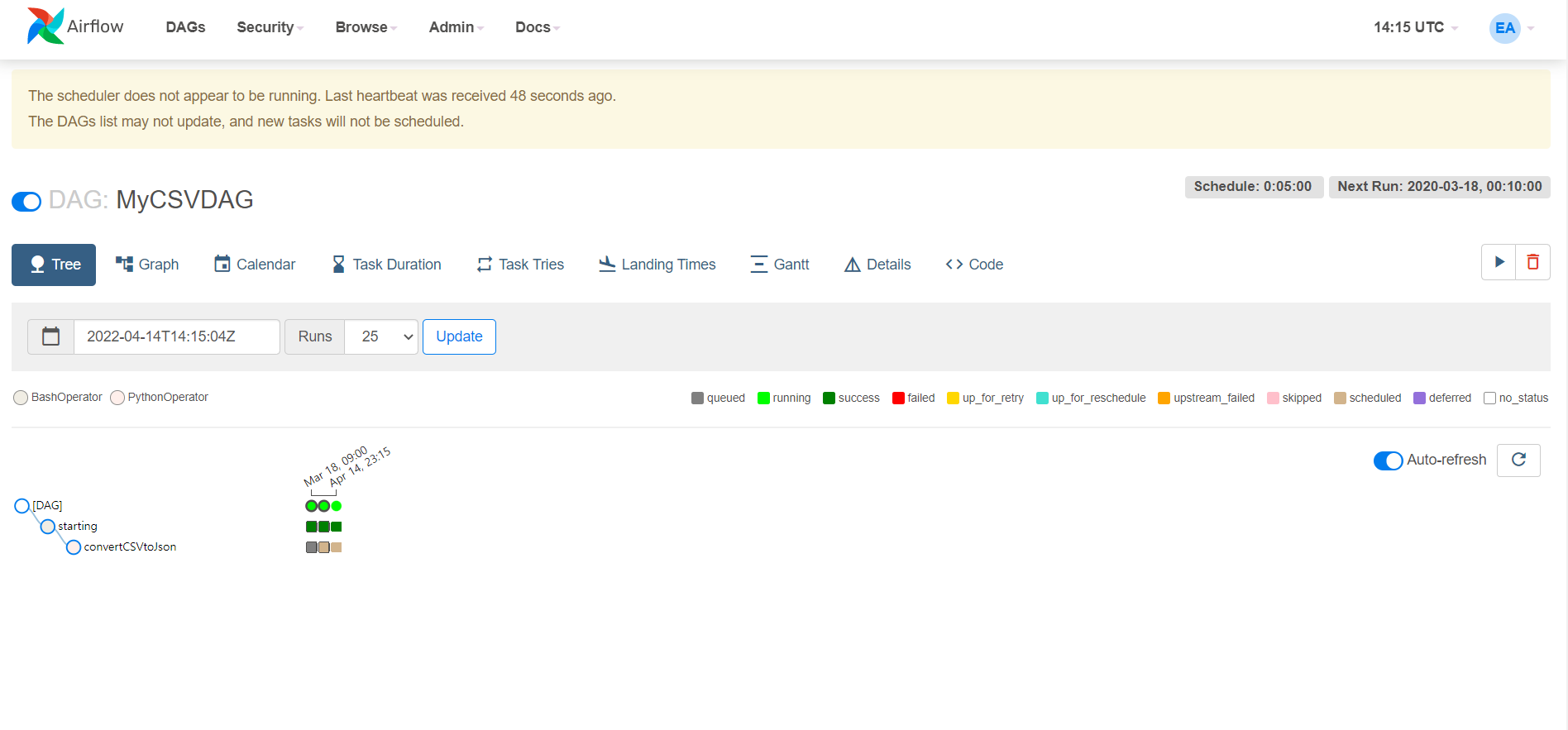
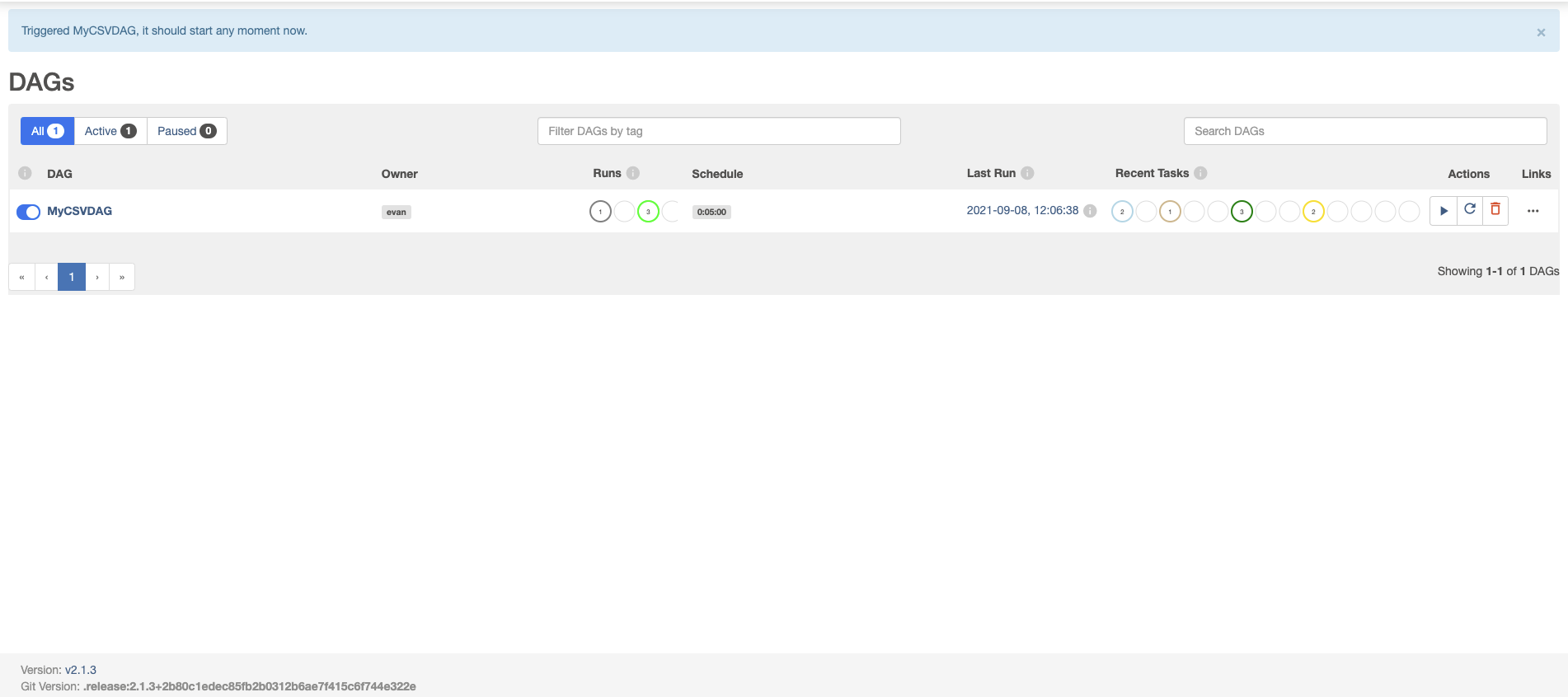
  • 이제 WebUI를 확인하면 정상적으로 작동하는 것을 확인할 수 있다.

Untitled

Setting up Apache-Airflow in Windows using WSL2

개요

  • Windows WSL2에서 airflow를 설치한다.

Step 1. Install pip on WSL

  • airflow를 설치하기 위해 pip를 설치한다.
$ sudo apt install python3-pip
[sudo] password for username:

Step 2. Install virtualenv package

  • virtualenv 라이브러리를 설치한다.
$ sudo pip3 install virtualenv

Step 3. Create a virtual environment

  • C드라이브에 airflow-test 폴더를 생성한다.
    • 해당 디렉터리로 이동한다.
  • 이제 가상환경을 생성한다.
$ virtualenv venv
  • 가상환경에 접속을 한다.
$ source venv/bin/activate
  • 이번에는 .bashrc 파일을 수정한다.
$ vi ~/.bashrc
  • 파일을 연 후, 다음과 같은 코드를 추가한다.
export AIRFLOW_HOME=/mnt/c/airflow-test
  • 파일을 닫을 때는 ESC → :wq 순서대로 작성한다.
  • 수정된 코드를 업데이트 하기 위해서는 아래와 같이 반영한다.
$ source ~/.bashrc
  • 실제로 코드가 반영되었는지 확인하기 위해서는 다음과 같이 확인해본다.
echo $AIRFLOW_HOME
/mnt/c/airflow-test

Step 4. Apache Airflow 설치

  • PostgreSQL, Slack, Celery 패키지를 동시에 설치하는 코드를 작성한다.
$ pip3 install 'apache-airflow[postgres, slack, celery]'
  • 에어플로 실행 위해 DB 초기화를 해줘야 한다.
$ airflow db init
  • 실제로 잘 구현이 되었는지 확인하기 위해 webserver를 실행한다.
$ airflow webserver -p 8081
  • 다음으로 일정 주기로 데이터 흐름이 실행되게 하려면 Scheduler가 필요하다.
$ airflow scheduler

Untitled

Airflow를 활용한 Data Cleansing 예제

강의 홍보

개요

Raw 데이터 확인

  • 간단하게 Raw 데이터를 확인해보도록 한다.
import pandas as pd

df = pd.read_csv("data/scooter.csv", index_col=0)
print(df)
(venv) $ python3 step00_raw_df.py 
       trip_id  region_id  vehicle_id  ...                                  end_location_name   user_id trip_ledger_id
month                                  ...                                                                            
May    1613335        202     9424537  ...       1899 Roma Ave NE, Albuquerque, NM 87106, USA   8417864        1488546
May    1613639        202     9424537  ...    1111 Stanford Dr NE, Albuquerque, NM 87106, USA   8417864        1488838
May    1613708        202     9424537  ...  1 Domenici Center en Domenici Center, Albuquer...   8417864        1488851
May    1613867        202     9424537  ...  725 University Blvd SE, Albuquerque, NM 87106,...   8417864        1489064
May    1636714        202     8926493  ...          401 2nd St NW, Albuquerque, NM 87102, USA  35436274        1511212
...        ...        ...         ...  ...                                                ...       ...            ...
July   2482235        202     2893981  ...         1418 4th St NW, Albuquerque, NM 87102, USA  42559731        2340035
July   2482254        202     8201542  ...   302 San Felipe St NW, Albuquerque, NM 87104, USA  42457674        2339885
July   2482257        202     5136810  ...    3339 Central Ave NE, Albuquerque, NM 87106, USA  42576631        2342126
July   2482275        202     3125962  ...         1413 4th St SW, Albuquerque, NM 87102, USA  42575656        2340036
July   2482335        202     9449822  ...    3339 Central Ave NE, Albuquerque, NM 87106, USA  42586810        2342161

[34226 rows x 10 columns]

정제 코드 테스트

  • Airflow에 테스트를 하기 전, 실제 잘 작동하는지 확인하는 코드를 작업해본다.
  • 먼저 함수, cleanScooter() 함수에 대해 살펴본다.
    • 먼저 데이터셋의 컬러명은 모두 소문자로 변경한다.
    • 그 이후, 날짜 데이터를 포맷에 맞춰 변경한다.
    • 그리고, cleanscooter.csv 데이터로 내보내기를 진행했다.
  • 두번째 함수, filterData() 함수에 대해 살펴본다.
    • 데이터를 불러온뒤, 각 날짜에 조건문을 적용한 뒤, 데이터를 내보내기 하였다.
  • 마지막 함수는 최종 결과물을 콘솔창에 보여주기 위한 것으로 작업했다.
import pandas as pd

def cleanScooter(DATA_PATH):
    df = pd.read_csv(DATA_PATH + "scooter.csv", index_col=0)
    df.drop(columns=['region_id'], inplace=True)
    df.columns=[x.lower() for x in df.columns]
    df['started_at'] = pd.to_datetime(df['started_at'], format='%m/%d/%Y %H:%M')
    df.to_csv(DATA_PATH + "cleanscooter.csv")

def filterData(DATA_PATH):
    df = pd.read_csv(DATA_PATH + "cleanscooter.csv", index_col=0)
    from_date = '2019-05-23'
    to_date = '2019-06-03'
    to_from = df[(df['started_at'] > from_date) & (df['started_at'] < to_date)]
    to_from.to_csv(DATA_PATH + "may23-june3.csv")

def check_df(DATA_PATH):
    df = pd.read_csv(DATA_PATH + "may23-june3.csv")
    print(df)

if __name__ == "__main__":
    DATA_PATH = "your_path/data/"
    cleanScooter(DATA_PATH)
    filterData(DATA_PATH)
    check_df(DATA_PATH)
  • 위 파일을 실행하면 다음과 같은 결괏값이 나올 것이다.
(venv) $ python3 step01_clean_df.py
     month  trip_id  vehicle_id  ...                                  end_location_name   user_id trip_ledger_id
0      May  1636714     8926493  ...          401 2nd St NW, Albuquerque, NM 87102, USA  35436274        1511212
1      May  1636780     3902020  ...   3217 Pershing Ave SE, Albuquerque, NM 87106, USA  34352757        1511371
2      May  1636856     5192526  ...      809 Copper Ave NW, Albuquerque, NM 87102, USA  35466666        1511483
3      May  1636912     3902020  ...    802 Wellesley Dr SE, Albuquerque, NM 87106, USA  34352757        1511390
4      May  1637035     5192526  ...      809 Copper Ave NW, Albuquerque, NM 87102, USA  35466666        1511516
...    ...      ...         ...  ...                                                ...       ...            ...
6187  June  1772189     7992415  ...          200 3rd St NW, Albuquerque, NM 87102, USA  35858913        1642397
6188  June  1772212     5216813  ...           6th @ Silver, Albuquerque, NM 87102, USA  35795570        1642192
6189  June  1772216     5637480  ...          413 2nd St SW, Albuquerque, NM 87102, USA  37255146        1642781
6190  June  1772229     2739536  ...   101 Broadway Blvd NE, Albuquerque, NM 87102, USA  38038151        1643073
6191  June  1772254     6016871  ...  1st St NW @, Central Ave NW, Albuquerque, NM 8...  37761291        1642284

[6192 rows x 10 columns]
  • 약 3만개의 레코드의 행 갯수가 6000개로 줄어든 것을 확인할 수 있다.

Airflow Code

  • 이제 airflow 에서 작업을 해보도록 한다.
  • 파일명은 step05_01_clean_df.py 로 명명했다.
import pandas as pd
import datetime as dt
from datetime import timedelta
from airflow import DAG
from airflow.operators.bash import BashOperator
from airflow.operators.python import PythonOperator

def cleanScooter():
    df = pd.read_csv("dags/data/scooter.csv", index_col=0)
    df.drop(columns=['region_id'], inplace=True)
    df.columns=[x.lower() for x in df.columns]
    df['started_at'] = pd.to_datetime(df['started_at'], format='%m/%d/%Y %H:%M')
    df.to_csv("dags/data/cleanscooter.csv")

def filterData():
    df = pd.read_csv("dags/data/cleanscooter.csv", index_col=0)
    from_date = '2019-05-23'
    to_date = '2019-06-03'
    to_from = df[(df['started_at'] > from_date) & (df['started_at'] < to_date)]
    to_from.to_csv("dags/data/may23-june3.csv")

default_args = {
    'owner': 'evan',
    'start_date': dt.datetime(2021, 9, 15),
    'retries': 1,
    'retry_delay': dt.timedelta(minutes=5),
}

with DAG('Cleaning_Data',
         default_args = default_args,
         schedule_interval=timedelta(minutes=5),
         ) as dag:

    print_starting = BashOperator(task_id='starting',
                                  bash_command='echo "I am reading the PostgreSQL now....."')

    cleanData = PythonOperator(task_id="cleaning_df",
                               python_callable=cleanScooter)

    selectData = PythonOperator(task_id="Filtering_df",
                                python_callable=filterData)

    copyFile = BashOperator(task_id="copy_df",
                            bash_command='cp $AIRFLOW_HOME/dags/data/may23-june3.csv /your_path/Desktop/')

print_starting >> cleanData >> selectData >> copyFile
  • 기존에 작업한 코드와 크게 달라진 것은 없기 때문에, 전체 코드는 생략한다.
  • dags 안에 data 폴더를 만들어서 scooter.csv 만 넣었다. 실행 후 어떻게 새로운 데이터가 추가가 되었는지 확인해본다.
  • 마지막 코드는 최종 결과물을 복사하여 바탕화면에 붙여넣기 하는 코드를 말한다.
(venv) $ ls
scooter.csv
  • DAG가 완성되었으면, 해당 코드를 $AIRFLOW_HOME/dags 폴더에 복사하고, 다음 명령들로 웹서버와 스케줄러를 실행한다.
(venv) airflow:evan $ airflow webserver
(venv) airflow:evan $ airflow scheduler

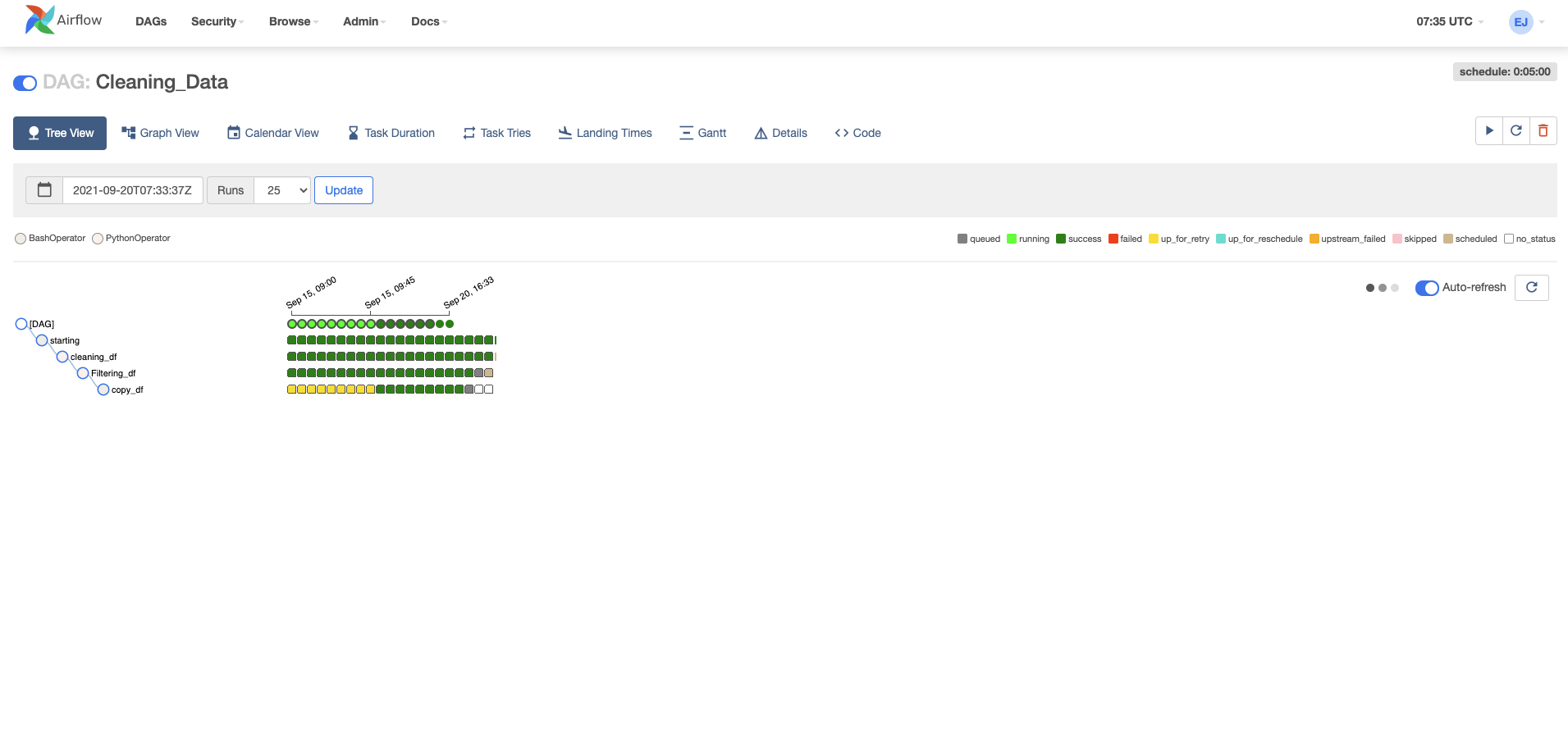
실행결과 확인

  • 우선 웹 브라우저로 [http://localhost:8080](http://localhost:8080) 에 접속 후, 정상적으로 작업이 되는지 확인한다.

clean_df.png

Airflow를 활용한 PostgreSQL에서 Elasticsearch로 데이터 마이그레이션 예제

강의 홍보

개요

  • Airflow를 활용하여 PostgreSQL에 저장된 데이터를 디스크로 다운로드 받고, 그리고 그 파일을 다시 읽어서 Elasticsearch에 저장하도록 한다.
  • 전체적인 흐름은 getData from PostgreSQL >> insertData to Elasticsearch 로 저장할 수 있다.

전체 코드 실행

  • 우선 전체 코드를 실행하도록 한다.
import datetime as dt
from datetime import timedelta
from airflow import DAG
from airflow.operators.bash import BashOperator
from airflow.operators.python import PythonOperator
import pandas as pd
import psycopg2 as db
from elasticsearch import Elasticsearch

def queryPostgresql():
    conn_string="dbname='python_dataengineering' host='localhost' user='postgres' password='evan'"
    conn = db.connect(conn_string)
    df = pd.read_sql("select name, city from users", conn)
    df.to_csv("dags/postgresqldata.csv")
    print("----------Data Saved------------")

def insertElasticsearch():
    es=Elasticsearch()
    df = pd.read_csv("dags/postgresqldata.csv")
    print(df.head())
    for i, r in df.iterrows():
        doc = r.to_json()
        res = es.index(index="frompostgresql", doc_type="doc", body=doc)
        print(res)

default_args = {
    'owner': 'evan',
    'start_date': dt.datetime(2021, 9, 15),
    'retries': 1,
    'retry_delay': dt.timedelta(minutes=5),
}

with DAG('MyDBdag',
         default_args = default_args,
         schedule_interval=timedelta(minutes=5),
         ) as dag:

    print_starting = BashOperator(task_id='starting',
                                  bash_command='echo "I am reading the PostgreSQL now....."')

    getData = PythonOperator(task_id='QueryPostgreSQL',
                             python_callable=queryPostgresql)

    insertData = PythonOperator(task_id="InsertDataElasticsearch",
                                python_callable=insertElasticsearch)

print_starting >> getData >> insertData
(venv) $ airflow webserver
(venv) $ airflow scheduler

결과 확인

  • 브라우저로 [http://localhost:8080](http://localhost:8080) 에 접속한다.
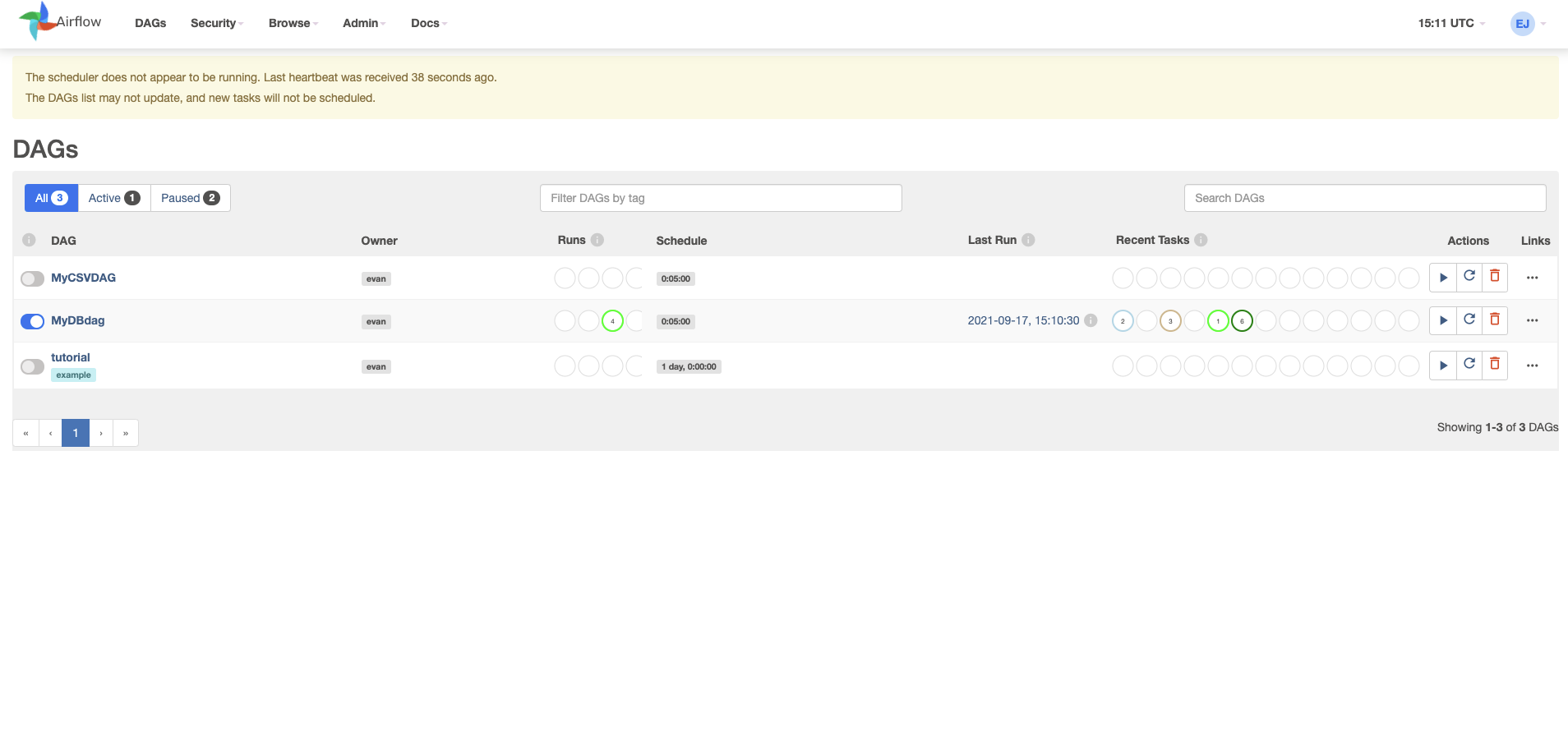
  • MyDBdag 를 실행 후, 클릭한다.

airflow_01.png

Apache Airflow를 활용한 CSV에서 JSON으로 변환하기

강의 홍보

개요

  • Apache Airflow에서 가장 중요한 개념은 DAG(Directed Acyclic Graph)이다.
  • DAG를 만들 시, Bash 스크립트 및 연산자(Operator)로 작업을 정의할 수 있다.
  • 이 때, 파이썬 함수로 조직화 한다.
  • Airflow 설치방법을 모른다면 다음 페이지에서 확인한다.

Step 01. Building a CSV to a JSON data pipeline

  • 우선 전체적인 코드를 확인한다.
  • 필자의 airflow 버전은 2.13이다.
  • 이 때, 몇몇 코드는 아래와 같이 발견될 수도 있다.
from airflow.operators.~~python_operator~~ import PythonOperator
## This module is deprecated. Please use `airflow.operators.python`.
  • 그럴 경우, 해당 명령어대로 수정하기를 바란다.
  • 위 부분이 교재와 코드 일부가 조금 다르며, 그 때마다 수정한다. 따라서, 교재를 보더라도 실제로는 아래 코드를 적용하거나, 아니면 airflow 1.x 버전으로 맞춰서 진행하기를 바란다.
import datetime as dt
from datetime import timedelta

from airflow import DAG
from airflow.operators.bash import BashOperator
from airflow.operators.python import PythonOperator

import pandas as pd

def csvToJson():
    df = pd.read_csv('dags/data.csv')
    for i, r in df.iterrows():
        print(r['name'])
    df.to_json('dags/fromAirflow.json', orient='records')

default_args = {
    'owner': 'evan',
    'start_date': dt.datetime(2020, 3, 18),
    'retries': 1,
    'retry_delay': dt.timedelta(minutes=5),
}

with DAG('MyCSVDAG',
         default_args=default_args,
         schedule_interval=timedelta(minutes=5),  # '0 * * * *',
         ) as dag:
    print_starting = BashOperator(task_id='starting',
                                  bash_command='echo "I am reading the CSV now....."')

    csvJson = PythonOperator(task_id='convertCSVtoJson',
                             python_callable=csvToJson)

print_starting >> csvJson
  • 위 코드에서 바꿔야 하는 것은 owner : evan 여기 부분만 변경하시면 된다.

Step 02. 소스코드 실행방법

  • 소스코드를 실행하려면 특정 폴더에 소스 파일과 그리고 csv 파일을 별도 폴더로 지정해줘야 한다.
  • 필자의 경우 파이썬 파일명은 ch02_airflow.py 이다.
  • 우선 Airflow 경로를 확인한다. (여기서 헤매면 계속 헤매이게 된다!)
(venv) $ echo $AIRFLOW_HOME
/Users/evan/Desktop/data_engineering_python/install_files/airflow
  • 이 때, airflow.cfg 파일에서 dags_folder 속성을 확인해본다.
  • 필자는 아래와 같이 지정이 되어 있다.
.
.
dags_folder = /Users/evan/Desktop/data_engineering_python/install_files/airflow/dags
.
.
  • 이 경로의 의미는 ch02_airflow.pydata.csv 파일이 해당 폴더 dags 안에 있어야 한다는 것이다.
  • 만약 dags 폴더가 없다면 새로 만들고, 두개의 파일을 추가하도록 한다.
  • 다시 말하지만, 대부분의 경우가 소스 파일 및 데이터 파일의 경로 문제가 대다수 에러의 원인임을 기억한다.
  • 이제 이 상태에서 아래 코드를 순차적으로 실행한다. 이 때, 터미널을 두개를 열어서 독립적으로 실행한다.
(venv) $ airflow webserver
(venv) $ airflow scheduler
  • 만약 접속이 안되거나, 그 외 대부분의 문제는 AIRFLOW 경로가 제대로 설정이 안된 경우이기 때문에, 그럴 경우에는 무조건 $AIRFLOW_HOME 설정을 다시 하도록 한다.
  • 설정 방법은 아래 코드를 참조한다.
(venv) $ export AIRFLOW_HOME="$(pwd)"
(venv) $ echo $AIRFLOW_HOME

Step 03. GUI에서 확인

  • http://0.0.0.0:8080/ 에 접속한 후, 로그인을 진행한다.
  • 그러면 아래와 같은 화면이 나타나면 정상적으로 실행이 된 것이다.

airflow_01.png

Apache Airflow Installation

강의 홍보

개요

  • NiFi와 같은 용도의 소프트웨어이며, 현재 가장 인기 있는 오픈소스 데이터 파이프라인 도구라고 할 수 있다.
  • 보통은 시스템에 경로를 설정한다. 그런데, 본 장에서는 가상환경 설정 후 진행하는 것으로 했다.
  • 가상 환경은 virtualenv 를 통해서 진행한다.
  • 그 후에 가상 환경에 접속한다.
$ source venv/bin/activate
(venv) $

Step 01. 환경변수 설정

  • 우선 pip 으로 설치 하기에 앞서서 환경 변수를 임시로 설정한다.
  • 해당 환경 변수가 설정된 곳으로 airflow 설치 관련 폴더 및 파일들이 다운로드 될 것이다.
(venv) $ export AIRFLOW_HOME="$(pwd)"
(venv) $ echo $AIRFLOW_HOME
/Users/evan/Desktop/data_engineering_python/install_files/airflow

Step 02. 라이브러리 설치

  • 이제 airflow 설치를 진행한다.
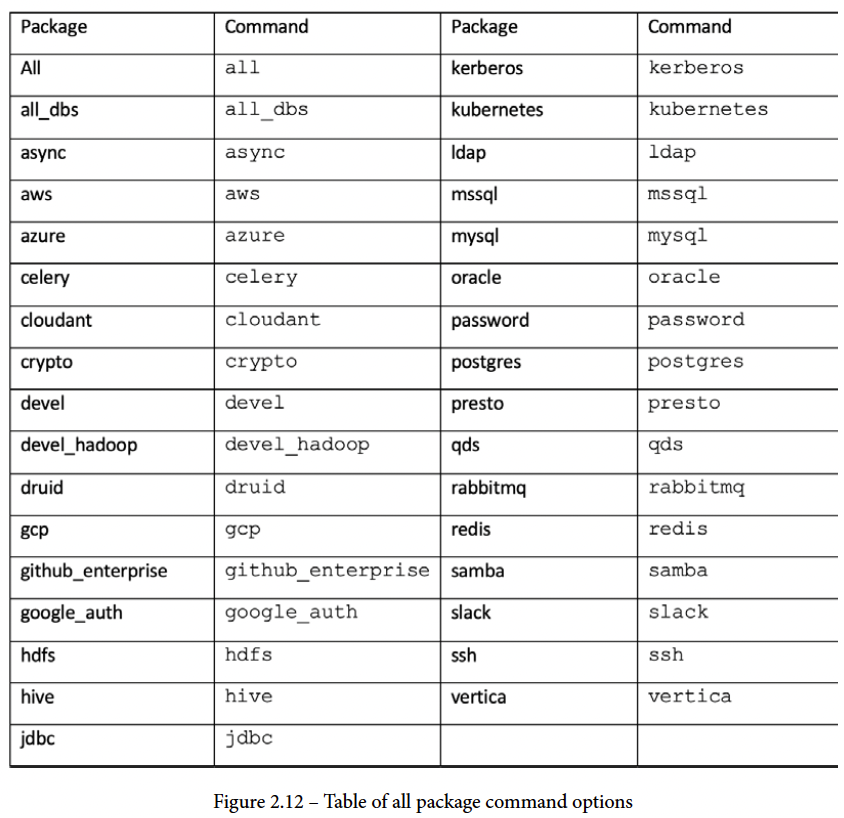
  • 이때, 설치 명령어에 따른 옵션은 아래 그림에서 살펴보기를 바란다.

airflow_01.png

AirFlow ch01. 개요

인프런 강의

공지

  • Airflow 2.0 원서 나온 것을 공부용으로 활용합니다.

Airflow Project

Airflow%20Project%20ad0ddb927b43444a9837279ad7ea27fe/book_cover.png

  • 이 책에 나온 내용을 Chapter별로 요약하여 정리하려고 한다.
  • 원서 구매 페이지는 아래와 같다.
  • 구매 페이지: Data Pipelines with Apache Airflow

Chapter 1. Apache Airflow Introduction

Airflow%20Project%20ad0ddb927b43444a9837279ad7ea27fe/figure_1-1.png